

ClickUp vs Monday.com for Project Management (2026)
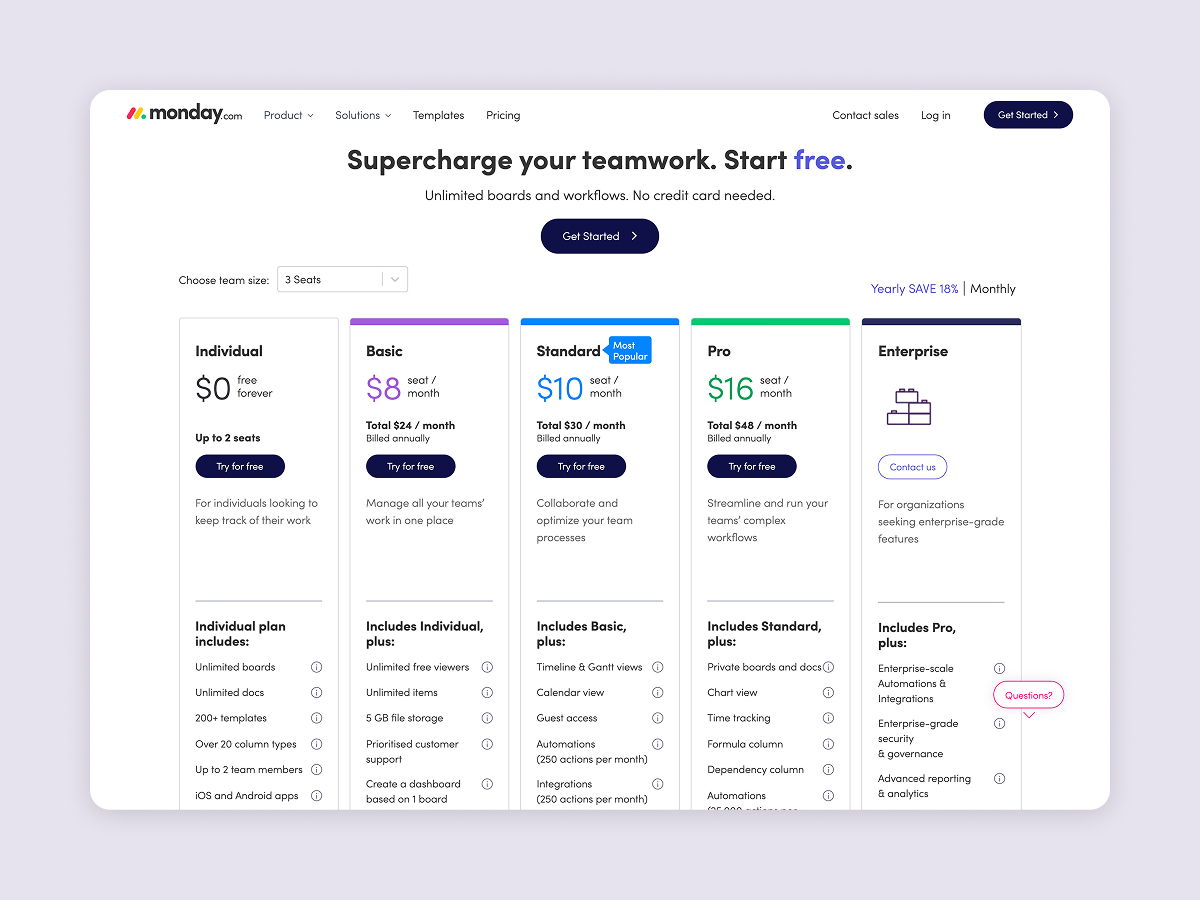
One pricing point that should weigh on this decision. Monday charges per seat and starts at a three-seat minimum, so a two-person team pays for three. ClickUp is per member too. That is fine if your team is stable, but it adds friction the moment you bring in a freelancer or a client for one project. Worth asking how often your real team size actually changes before you commit.
ClickUp vs Monday.com: Power vs Simplicity
ClickUp and Monday.com are the two most compared project management tools in 2026. Both have millions of users, strong review ratings on G2 and Capterra, and overlapping feature sets. But they solve the same problem in very different ways.
ClickUp gives you everything and lets you configure it. Monday.com gives you less but makes it immediately usable. For a different PM axis, see the Asana vs Trello head-to-head. For a different PM axis, see the Asana vs Trello, ClickUp vs Asana, or ClickUp vs Trello head-to-heads. For a different PM axis, see the Asana vs Trello, ClickUp vs Asana, ClickUp vs Trello, or Asana vs Monday head-to-heads. For a different PM axis, see the Asana vs Trello, ClickUp vs Asana, ClickUp vs Trello, Asana vs Monday, or Trello vs Monday head-to-heads. For an agency choosing between them, that trade-off shapes every part of the experience, from onboarding to daily use to what you pay.
This ClickUp vs Monday comparison covers the differences that actually matter: pricing at real team sizes, features that are locked behind higher tiers, and which tool fits which type of team.
Short on time? Take the 30-second quiz to get a personalized recommendation.
Which PM tool fits your team?
Answer 4 questions. Takes 30 seconds.
1. What matters most to you?
Select all that apply
2. How many people will use it?
3. How important is fast onboarding?
4. What's your budget?
Start over

Want PM without the per-seat scaling?
Rock combines tasks, notes, and chat at one flat price for unlimited users.
Task Views and Flexibility
Both tools offer list, board (kanban), and calendar views. The differences show up in what is available on which plan.

ClickUp includes Gantt charts, timeline views, and workload management starting from the Unlimited plan at $7/user/month. You get 15+ ways to view your work without upgrading. For agencies that need to see client projects on a timeline and balance team capacity, this flexibility is available at the entry-level paid tier.
Monday.com locks timeline and Gantt views behind the Standard plan ($12/seat/month). Workload views require Pro ($19/seat). The board-based approach is visually intuitive, with color-coded status columns that make it easy to scan progress at a glance. But if you need anything beyond basic boards and lists, you are paying more per person.
ClickUp also supports a deeper project hierarchy: Workspaces contain Spaces, which contain Folders, which contain Lists, which contain Tasks with subtasks. Monday.com uses a flatter structure: Workspaces, Boards, Groups, and Items. The deeper hierarchy helps agencies organize by department, client, and project type. The flatter structure is easier to learn but harder to scale past 20-30 active projects.
Automations and Workflows
Both tools let you automate repetitive work, things like moving a task to "Review" when its status changes, or notifying a team lead when a deadline is missed. Switching between apps all day is a real cost for teams, so built-in automations matter more than they appear.
ClickUp includes 1,000 automation actions per month on the Unlimited plan ($7/user). Monday.com gives you 250 actions on Standard ($12/seat) and 25,000 on Pro ($19/seat). For a team that runs 5-10 automations daily, ClickUp's allowance at a lower price point is significantly more generous.
ClickUp supports more trigger-action combinations natively. Monday.com's builder is simpler but covers the common cases well.
One limitation worth noting: ClickUp's automation builder does not support "OR" conditions, which can frustrate teams trying to build complex branching logic.
Time Tracking and Billing
This is one of the biggest practical differences between the two tools, especially for agencies that bill by the hour.

ClickUp includes native time tracking on all paid plans, starting at $7/user/month. You can start a timer on any task, view timesheets, and build dashboard reports on time spent per client or project. No third-party integration needed.
Monday.com only includes time tracking on the Pro plan at $19/seat/month. On Standard ($12/seat), you need to connect an external tool like Toggl or Harvest, which adds cost and complexity.
For a 15-person agency, the difference is concrete: ClickUp Unlimited with time tracking costs $105/month. Monday.com Pro with time tracking costs $285/month. That is $2,160/year in savings for the same core capability.
The real choice is whether you want a tool that adapts to your process or one your team can pick up in a day. Both are valid. You just have to commit to one and stop fighting it.
Or skip the seat math
Rock is flat $89/month for unlimited users, with chat and notes in the same workspace.
Pricing Breakdown (2026)
Both tools use per-seat pricing, which means costs scale directly with team size. Monday.com also enforces a 3-seat minimum on all paid plans.
ClickUp plans:
Free: Unlimited tasks and members, but only 60 MB storage and limited use of advanced features.
Unlimited ($7/user/month annual): Unlimited storage, custom fields, Gantt charts, native time tracking, goals, 1,000 automations/month.
Business ($12/user/month annual): Sprint reporting, advanced automations, private docs, all dashboard views.
AI add-on (ClickUp Brain): $9/user/month extra on any plan.
Monday.com plans:
Free: 2 seats, 3 boards. Essentially a trial.
Basic ($9/seat/month annual): Unlimited boards and docs, but no automations, no integrations, no timeline view.
Standard ($12/seat/month annual): 250 automations/month, timeline view, guest access, basic AI included.
Pro ($19/seat/month annual): Time tracking, 25,000 automations/month, private boards, chart views.
Cost comparison for a 15-person agency:
ClickUp Unlimited (with time tracking): $105/month ($1,260/year)
Monday.com Pro (with time tracking): $285/month ($3,420/year)
Difference: $2,160/year. For agencies in developing markets, that gap covers months of other software costs.
"If you need your team productive this week, Monday.com has the edge. But if you can invest time upfront for long-term flexibility, ClickUp pays off." - Aron Kantor, Reviewer at TheBusinessDive
Learning Curve and Onboarding
Monday.com is genuinely easier to learn. A new team member can start creating and moving tasks within minutes. The board-based interface is visual and self-explanatory. Most teams are productive within days.
ClickUp takes longer. Expect 2-3 weeks for basic proficiency and 4-6 weeks before your team uses it confidently. The number of features, views, and configuration options is overwhelming at first. In the ClickUp vs Monday learning curve debate, this is where Monday.com has a genuine advantage. This is the most common complaint in user reviews, and it is legitimate.
For agencies that need to onboard freelancers or temporary team members regularly, Monday.com's simplicity reduces friction. For agencies building a long-term operating system they will use for years, ClickUp's learning investment pays off in flexibility.
One specific difference for agencies running repeatable projects: ClickUp templates include date remapping, which automatically adjusts all due dates when you deploy a template for a new project. Monday.com does not have this. If you launch 10 similar client projects per month, manually adjusting every date in Monday.com adds up.
AI Features (2026)
Both tools are investing heavily in AI, but the pricing models differ.
ClickUp Brain (AI writing, task creation, project summaries, meeting transcription) costs $9/user/month on top of your plan. For a 15-person team on Unlimited, that adds $135/month. ClickUp also launched "Super Agents" in late 2025, autonomous AI that can execute multi-step workflows.
Monday.com includes basic AI (Sidekick Lite) on Standard plans and above at no extra cost. The formula builder and docs assistant are free. More advanced AI (Sidekick Plus, Monday Agents) uses a credit system with additional fees.
If AI features matter to your workflow, Monday.com's bundled approach is more predictable. ClickUp's AI is more powerful but the separate pricing can add up quickly.
Guest and Client Access
For agencies that bring clients into their project management tool, access controls matter. ClickUp offers three guest types with granular permissions: view-only, comment, and full edit. You can share specific Lists or Folders without exposing the entire workspace. Guest access is available on all paid plans starting at $7/user.
Monday.com includes guest access from the Standard plan ($12/seat), but the number of guest seats is capped relative to your paid seats. For agencies managing many clients simultaneously, this cap can be limiting. Shareable boards offer a workaround, but with less granular control.
Neither tool offers a true client portal out of the box. Most agencies supplement with external dashboards or shared views. This is one area where the ClickUp vs Monday decision depends on how many external stakeholders need access and what level of visibility they require.
Best For: When to Pick Which
Pick ClickUp if:
You need native time tracking without paying for the highest tier. You run repeatable projects that benefit from template date remapping. Your team is comfortable with a steeper learning curve in exchange for deep customization. You want sprints and advanced reporting at a lower price point.
Pick Monday.com if:
Fast onboarding matters more than deep customization. Your team is non-technical and visual workflows are easier to adopt. You want basic AI features included without an add-on fee. You value a clean, simple interface over having every possible feature.
Skip ClickUp if: Your team resists complex tools and you do not have someone to own the setup. The learning curve is real and without a champion driving adoption, it will not stick.
Skip Monday.com if: You need time tracking on a budget. Paying $19/seat just to unlock time tracking when ClickUp offers it at $7/user is hard to justify. Also consider Monday.com alternatives if per-seat pricing at scale is a concern.
"Organizations waste $1 million every 20 seconds due to poor project management. That adds up to $2 trillion annually." - Project Management Institute
| Feature | ClickUp | Monday.com |
|---|---|---|
| Free plan | Unlimited tasks, 60 MB storage | 2 seats, 3 boards |
| Paid plan from | $7/user/month | $9/seat/month (3-seat min) |
| Time tracking | All paid plans ($7+) | Pro only ($19/seat) |
| Gantt / timeline | Unlimited plan ($7) | Standard plan ($12) |
| Automations (entry tier) | 1,000/month ($7) | 250/month ($12) |
| Custom fields | Unlimited ($7+) | Standard+ ($12) |
| Task views | 15+ views | 8+ views |
| Project hierarchy | 5 levels deep | 3 levels |
| Template date remapping | Yes | No |
| Native docs | All plans | All paid plans |
| Goals / OKRs | Unlimited+ ($7) | Board-based workaround |
| Guest access | Paid plans | Standard+ (2 per user) |
| AI included in plan | No ($9/user extra) | Basic AI on Standard+ |
| Learning curve | 2-3 weeks | Days |
| G2 rating | 4.7/5 (11K reviews) | 4.7/5 (18K reviews) |
What If You Need Chat and Project Management Together?
One thing both ClickUp and Monday.com assume is that your team already has a messaging tool. For doc-side angles on the same decision, see our Notion vs ClickUp and Monday vs Notion head-to-heads. Slack, Teams, or WhatsApp. You manage projects in one app and communicate in another, then connect them with integrations.

If your team's real friction is switching between chat and tasks, Rock puts messaging, tasks, and notes in one workspace. See how it compares to Monday.com directly. Flat pricing at $89/month for unlimited users (no per-seat fees). Clients and freelancers join your spaces directly. It is simpler than ClickUp and more structured than WhatsApp, designed for agencies that want one tool instead of three.
What we do at Rock: every client project runs in its own space with chat and tasks in the same view. When a client pings us about a bug, we turn the message into a task with one click. No context-switching, no searching across two tools for where the conversation happened.
Not the right fit if you need Gantt charts, advanced automations, or deep reporting. But for teams where project management means "know who is doing what and talk about it in the same place," it is worth trying.
Exploring more options? Check out ClickUp alternatives or Monday.com alternatives for a wider comparison.
The right project management tool keeps your agency running without adding complexity. Rock combines chat, tasks, and notes in one workspace. One flat price, unlimited users. Get started for free.





