

10 Best Jira Alternatives for Agencies and Teams (2026)
We are the team behind Rock, a simple chat and tasks app for agencies and non-engineering teams, so we compare these tools constantly. Rock is on this list, but for real engineering work some of the options below are the better call, and we say so. We set each one up and used it to see who it actually fits.
Jira built a whole category. It also became the reason many teams dread opening their project management tool on Monday morning. Nested epics, custom workflow states, permission schemes, and a UI that rewards long-time admins over new hires. For agencies and non-engineering teams, Jira is often the wrong shape.
Two things changed in 2026 that push more teams to look for alternatives. Atlassian stops selling new Data Center subscriptions on March 30, 2026, with full read-only mode arriving March 28, 2029. And Cloud pricing keeps climbing for teams that did not migrate. If your agency is on a legacy contract or a small engineering team stuck on a tool built for 500 people, the math is getting worse.
These 10 Jira alternatives cover three buckets: agency-friendly tools where clients and non-technical team members can actually use the software, modern engineering trackers that feel fast and opinionated, and all-in-one platforms that replace Jira plus two or three other apps.
Jira Alternatives: Quick Comparison
Here is a side-by-side overview of all 10 tools before the details.
| Tool | Best For | Free Plan | Paid From |
|---|---|---|---|
| Rock | Agency chat + tasks, flat pricing | 3 spaces, 5 members | $89/mo flat |
| Basecamp | Simple PM, flat pricing at scale | 30-day trial | $15/user/mo or $349/mo flat |
| Asana | Marketing and ops timelines | Up to 10 users | $10.99/user/mo |
| Linear | Modern engineering tracking | 2 teams, 250 issues | $8/user/mo |
| Shortcut | Dev teams wanting simpler Jira | Up to 10 users | $8.50/user/mo |
| GitHub Projects | GitHub-native task tracking | Free with GitHub | $4/user/mo (Team) |
| YouTrack | Affordable Jira-style features | Up to 10 users | $3.67/user/mo |
| ClickUp | Consolidating multiple tools | Unlimited tasks, 60 MB | $7/user/mo |
| Monday.com | Visual boards and automation | 2 seats, 3 boards | $9/seat/mo (3-seat min) |
| Notion | Docs + tasks in one structure | Personal use | $10/user/mo |
Short on time? Take the 30-second quiz to get a personalized recommendation.
Which Jira alternative fits your team?
Answer 4 questions. Takes 30 seconds.
1. What matters most to you?
Select all that apply
2. What is your team shape?
3. How many people will use it?
4. What is your budget?
Start over

Not an engineering team?
Rock is built for agencies and cross-functional teams who landed on a dev tool by accident. Chat plus simple tasks.
Best Jira Alternatives for Agencies
1. Rock - Chat + Tasks for Agency Teams
Rock combines team messaging with task management, notes, and file sharing in one workspace. Every project space has a chat and a task board, so conversations stay next to the work instead of living in Slack while Jira tracks tickets somewhere else.
Rock also connects to AI assistants like Claude and Cursor through a native MCP integration, plus an open API, so you can drive Rock from your AI tools and automate routine work. It is available on the free plan, not gated behind an upgrade.
For agencies, the standout feature is cross-organization collaboration. Clients, freelancers, and partners join spaces directly at no extra cost. There is no guest limit and no per-seat pricing. The flat $89/month covers unlimited users, which makes budgeting predictable as the team grows.
Rock is not trying to replace Jira for a 50-person engineering org. No epics hierarchy, no velocity charts, no GitHub PR linking. For agency work and small cross-functional teams, that simpler shape is the point.
What we do at Rock: every client project runs in its own space with chat, a task board, and notes in one view. When a client sends a question, we use Tap to Organize to turn the message into a task with one click. Set Aside flags anything that needs a later response without losing it.
Unlimited: $89/month flat or $74.92/month annual

2. Basecamp - Flat-Rate Simple PM
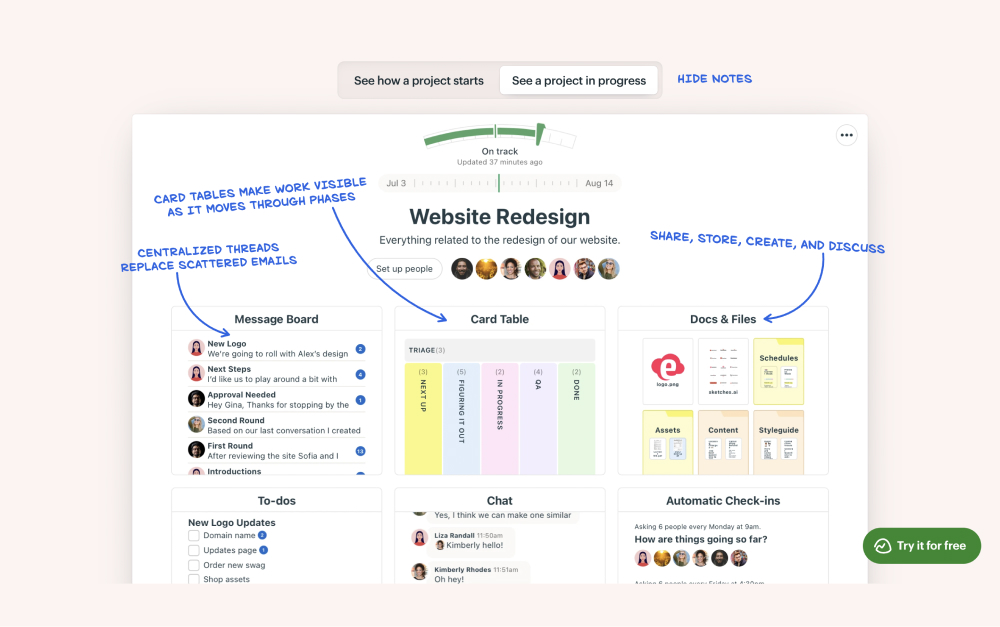
Basecamp takes the opposite approach to Jira. Message boards, to-do lists, a schedule, and docs. That is the whole product. No sprints, no burn-downs, no workflow states to configure. Jason Fried and 37signals have built the product around the idea that most project management complexity is self-inflicted.
The pricing model is unusual. Basecamp Pro Unlimited is a flat $349/month for your whole company, which at 20 people works out to $17.45 per person and scales down as you grow. For an agency of 30 people, Basecamp costs less than half of what Jira Premium charges.
Basecamp: $15/user/month
Pro Unlimited: $349/month flat (unlimited users)
3. Asana - Visual PM for Marketing Teams
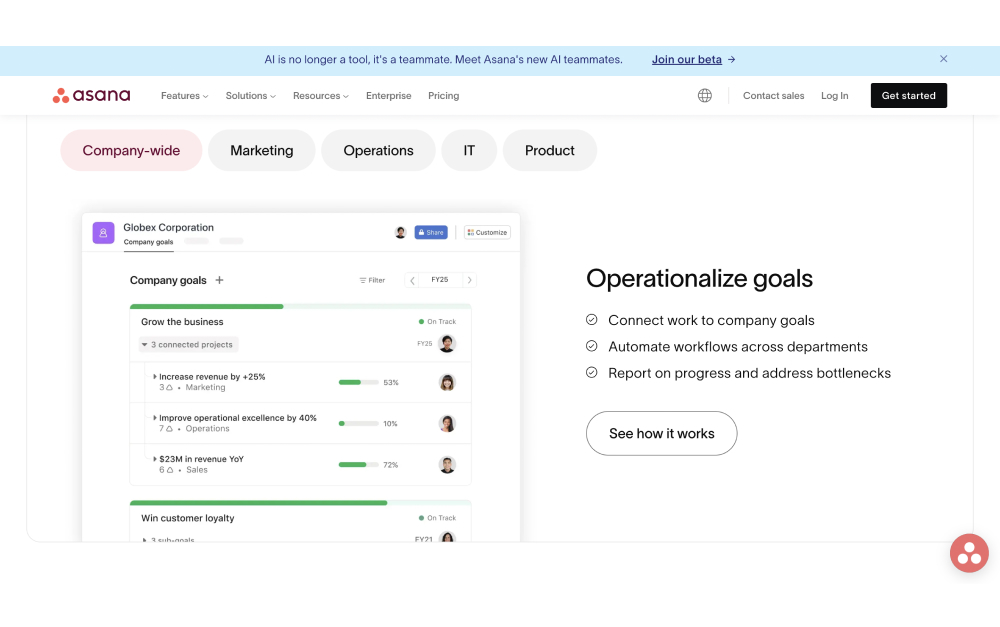
Asana is the default pick for marketing and operations teams that want structured project management without Jira's weight. Timeline view, portfolio dashboards, and goal tracking map well to quarterly planning cycles.
Asana does have dev-adjacent features like custom fields, automations, and a solid API. But the product is designed around project and task, not issue and epic, so engineering teams sometimes feel the gap.
Starter: $10.99/user/month
Advanced: $24.99/user/month
Best Jira Alternatives for Engineering Teams
4. Linear - Fast, Modern Issue Tracking
Linear is what many engineering teams replace Jira with when they are tired of the weight. Keyboard-driven UI, cycles instead of sprints, and opinionated defaults that mean less configuration.
Linear has pushed hard into AI in 2026. Coding agents are now native in the workflow, and CEO Karri Saarinen has publicly argued that traditional issue tracking is dead. For teams already working with AI tools, the product fits the moment.
Basic: $8/user/month
Business: $14/user/month
5. Shortcut - Dev-Focused, Simpler Scope
Shortcut (formerly Clubhouse) sits between Jira and Linear. It keeps the epic-story-task hierarchy developers expect but strips the configuration overhead. Docs, iterations, and workflows are all built in.
The free tier covers up to 10 users, which is generous for small startups. GitHub, GitLab, and Slack integrations are solid, and the API lets you automate most of what Jira's plugin marketplace offers.
Team: $8.50/user/month
Business: $12-$16/user/month
6. GitHub Projects - Code-First Tasks
GitHub Projects has grown into a real alternative for teams that already live in GitHub. Boards, tables, timelines, custom fields, and iterations are all included in the Projects v2 experience. Issues link natively to pull requests, so code and task stay in sync.
The ceiling is visible. No burndown charts, no formal workflow enforcement, and limited cross-repo rollups. For a 5 to 30-person engineering team that already pays for GitHub, it is often enough.
Included in Team ($4/user/month) and Enterprise plans
7. YouTrack - Affordable Jira-Style
YouTrack is JetBrains' issue tracker. If your team already uses IntelliJ, PyCharm, or GoLand, YouTrack fits the ecosystem naturally. The feature set is the closest direct match to Jira: agile boards, workflow automation, custom fields, and a serious query language.
Pricing is the big delta. Cloud starts at $3.67/user/month (annual), roughly half of Jira Standard. JetBrains also offers free tiers for open-source projects and educational use. Jira migration is supported out of the box.
Cloud: $3.67-$5.50/user/month (annual)
"Issue tracking is dead." - Karri Saarinen, Co-founder and CEO, Linear
All-in-One Jira Alternatives
8. ClickUp - Everything in One Place
ClickUp is the deepest feature set in the alternatives market. Tasks, docs, goals, whiteboards, chat, and time tracking all in one product. For teams that want to consolidate five tools into one, ClickUp is the common answer.
The trade-off is complexity. ClickUp has almost as many configuration options as Jira. For a small team, that can feel like trading one problem for another. For teams willing to invest in setup, it pays off.
Unlimited: $7/user/month (annual)
Business: $12/user/month
For focused side-by-sides, see our ClickUp vs Jira, Asana vs Jira, or Trello vs Jira head-to-heads.

9. Monday.com - Visual Boards + Automation
Monday.com turns project management into a visual, color-coded board. Status columns, timeline views, and a flexible automation builder make it popular with marketing and ops teams that need to see work at a glance.
For engineering, Monday.com is thinner. No built-in epic hierarchy, no Git integration at Jira's depth. Pricing is per seat with a 3-seat minimum, so small teams pay more than the per-user number suggests.
Basic: $9/seat/month
Standard: $12/seat/month
Pro: $19/seat/month

10. Notion - Docs and Tasks Together
Notion is the go-to for teams that live in documentation. Wikis, databases, meeting notes, and project boards all work inside the same linked structure. For an agency where requirements, specs, and task lists naturally overlap, that shape fits.
Notion's dedicated Projects feature has matured. Timeline views, custom properties, and sub-tasks are all solid. For pure engineering sprints it is lighter than Jira or Linear, but for cross-functional teams it often replaces both a wiki and a PM tool.
Plus: $10/user/month
Business: $18/user/month

"We're not into waterfall or agile or scrum. No backlogs, no Kanban, no velocity tracking, none of that." - Jason Fried, Co-founder and CEO, 37signals
Tools We Did Not Include (and Why)
Trello. Atlassian owns Trello, so it sits inside the same company as Jira. For teams actively leaving Atlassian, switching to another Atlassian product rarely solves the root cause.
Redmine. Open source and self-hosted, which appeals to a small audience. The UI feels dated next to Linear or Shortcut and most agencies will not enjoy running their own server.
Wrike and Hive. Both are solid project management tools that overlap heavily with Asana and ClickUp without a clear reason to pick them over those two.
Airtable. Great database tool, thin as a dedicated project management replacement. Teams end up building their own system instead of getting one that works out of the box.
Need tasks without the overhead?
Rock pairs simple task boards with team chat. Built for marketing, ops, and agency work, not sprints.
How to Choose a Jira Alternative
If your team is non-engineering. Rock, Basecamp, or Asana are the natural starting points. All three skip the sprint ceremony and focus on getting work done.
If you need engineering-shaped features. Linear is the modern default. Shortcut if you want epics and stories without Jira's weight. GitHub Projects if you already pay for GitHub and want zero context-switching.
If budget is the top pressure. YouTrack at $3.67/user is roughly half of Jira Standard. Rock at $89/month flat wins for teams over 12 people. Basecamp at $349/month flat is the cap for larger agencies.
If you want to consolidate tools. ClickUp and Notion each replace several products. Pick ClickUp if your bottleneck is task tracking, Notion if it is documentation.
If clients need access to the work. Rock includes external collaborators for free on any plan. That matters for agencies that share project spaces with clients.
The way I see it, Jira earns its complexity when you are an engineering team doing genuinely technical work at scale. That is what it was built for, and it is still great at it. But for leaner teams the math changes. AI assistants now absorb a lot of the coordination Jira was built to manage, and that same overhead turns from a time gain into a time drag. The right alternative is built for the team you actually have.
Want to see how other project management tools compare? Or browse ClickUp alternatives, Monday.com alternatives, and Asana alternatives for more options.
The right project management tool should match the shape of the team, not reshape the team to match the tool. Rock combines chat, tasks, and notes in one workspace. One flat price, unlimited users. Get started for free.

Which Jira alternative fits you
| If your team is... | Best pick | Why |
|---|---|---|
| Agency chat + tasks, flat pricing | Rock | chat and tasks in one, flat pricing, no sprint overhead |
| Simple PM, flat pricing at scale | Basecamp | simple projects at a flat price, no per-user creep |
| Marketing and ops timelines | Asana | polished task and workflow management for ops teams |
| Modern engineering tracking | Linear | fast, keyboard-first issue tracking for engineers |
| Dev teams wanting simpler Jira | Shortcut | issue tracking built for software teams |
| GitHub-native task tracking | GitHub Projects | GitHub-native task tracking |
| Affordable Jira-style features | YouTrack | Affordable Jira-style features |
| Consolidating multiple tools | ClickUp | docs, tasks, and goals in one dense workspace |
| Visual boards and automation | Monday.com | Visual boards and automation |
| Docs + tasks in one structure | Notion | flexible docs plus light project tracking |





