

10 Best Monday.com Alternatives for Teams and Agencies (2026)
Monday.com is one of the most popular project management tools on the market. Colorful boards, strong automations, and a polished interface make it easy to see why teams sign up. But staying on Monday.com is getting harder to justify.
We are the team behind Rock, a chat and tasks app for agencies and client teams, so we test these tools constantly. Rock is on this list, but if you need Monday-style visual boards and dashboards, some of the options below fit better, and we say so. We set each one up and used it for real work to see who it suits.
In February 2026, Monday.com announced an 18% price increase across all plans. Seats are sold in bundles of five, so a team of 11 pays for 15. Products like monday CRM and monday dev are billed separately. And essential features like time tracking, guest access, and automations beyond basic limits are locked behind Pro and Enterprise tiers.
Then there is the missing piece: Monday.com has no built-in chat. Your team still needs Slack or Teams on the side. According to Harvard Business Review, knowledge workers toggle between apps over 1,200 times per day. Every extra tool adds to that cost.
If you are rethinking your Monday.com subscription, here are 10 monday.com alternatives worth considering in 2026. We tested each one with agencies, remote teams, and small businesses in mind.
Quick Comparison
| Tool | Best For | Free Plan | Paid From |
|---|---|---|---|
| Rock | Agencies + client teams | Yes (3 spaces) | $89/mo flat |
| Basecamp | Async-first teams | 1 project | $15/user/mo |
| Asana | Cross-project reporting | Yes (basic) | $10.99/user/mo |
| ClickUp | Maximum customization | Yes | $7/user/mo |
| Trello | Simple Kanban boards | Yes | $5/user/mo |
| Todoist | Lightweight tasks | Yes | $4/user/mo |
| Notion | Docs + tasks combined | Yes | $10/user/mo |
| Hive | Creative proofing | Yes (limited) | $5/user/mo |
| Wrike | Enterprise workflows | Yes (basic) | $10/user/mo |
| SmartSuite | Data-driven teams | Yes | $10/user/mo |
Not sure what Monday Alternative Suits You Best? Take the Quiz!
Questions regarding your team size, budget and needs that help you find the best match among these 10 Monday.com alternatives.
Which Monday.com alternative fits your team?
Answer 4 questions. Takes 30 seconds.
1. What features matter most?
Select all that apply
2. How many people will use it?
3. Do external people (clients, freelancers) need access?
4. What's your budget?
Start over

Want chat built in?
Rock pairs task boards with team messaging and notes. One flat price, no per-seat scaling.
Best Monday.com Alternatives for Agencies and Client Teams

1. Rock - Best for agencies that need chat and tasks in one place
Monday.com handles tasks well, but your team still needs a separate app for messaging. Rock removes that gap. Every project space includes chat, a task board, notes, and file storage. No Slack subscription on the side.
Rock also connects to AI assistants like Claude and Cursor through a native MCP integration, plus an open API, so you can drive Rock from your AI tools and automate routine work. It is available on the free plan, not gated behind an upgrade.
For agencies, the client collaboration model is the key differentiator. External clients and freelancers join your spaces at no extra cost. They see the same updates your team sees. There are no guest seat fees or limited viewer tiers.
AI isn't replacing project managers. It's revealing what great project leaders have always done best: connecting purpose with progress.
The pricing is flat: $89 per month for unlimited users, spaces, and tasks. For a team of 20, that works out to $4.45 per user. Monday.com Standard for 20 users costs $240 per month. The gap widens as your team grows.
Unlimited: $89/mo flat
Try it: move tasks across the board
Move cards between columns to update status.
Review SEO keywords
Update pricing page
Send client proposal
Drag cards between columns or add your own
Tap a card, then tap a column
2. Basecamp - Best for async-first teams with client access
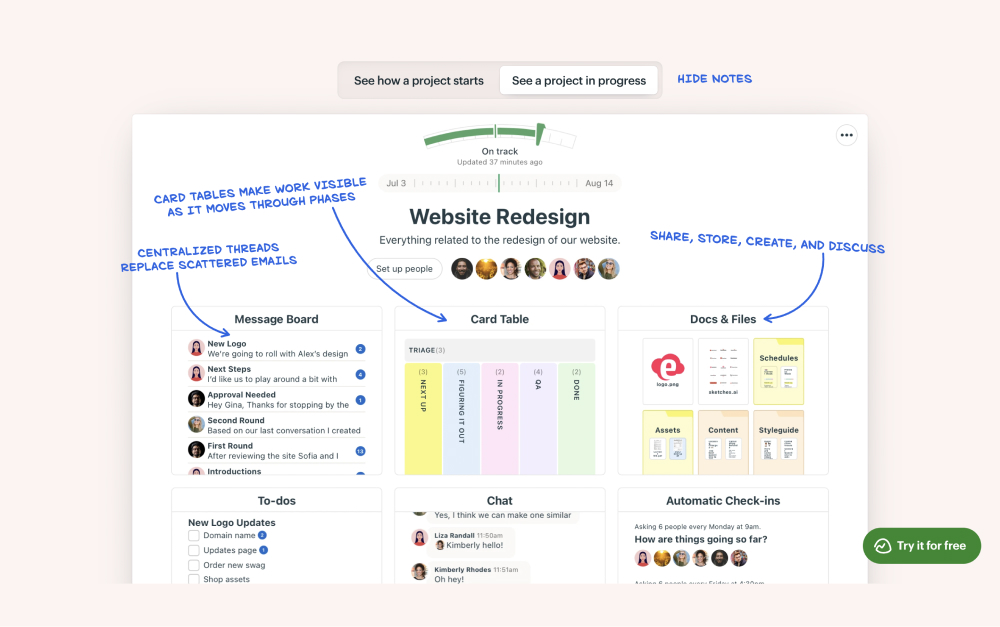
Basecamp is built around a specific idea: fewer features, less noise, more focus. Each project gets a message board, to-do lists, a schedule, a chat room (Campfire), and file storage. There is no Kanban board, no Gantt chart, and no automations. That is intentional.
The message board format works well for async teams. Long-form updates replace constant pings. Clients can be added with limited visibility. Hill Charts give a visual sense of project momentum without requiring daily status updates.
Basecamp's flat pricing ($299/mo for unlimited users on the Pro tier) makes it predictable. But the limited feature set means teams that need visual boards or reporting will hit walls fast.
Paid: $15/user/mo or $299/mo flat (Pro Unlimited)
Best Monday.com Alternatives for Feature-Rich PM
3. Asana - Best for cross-project reporting and portfolios
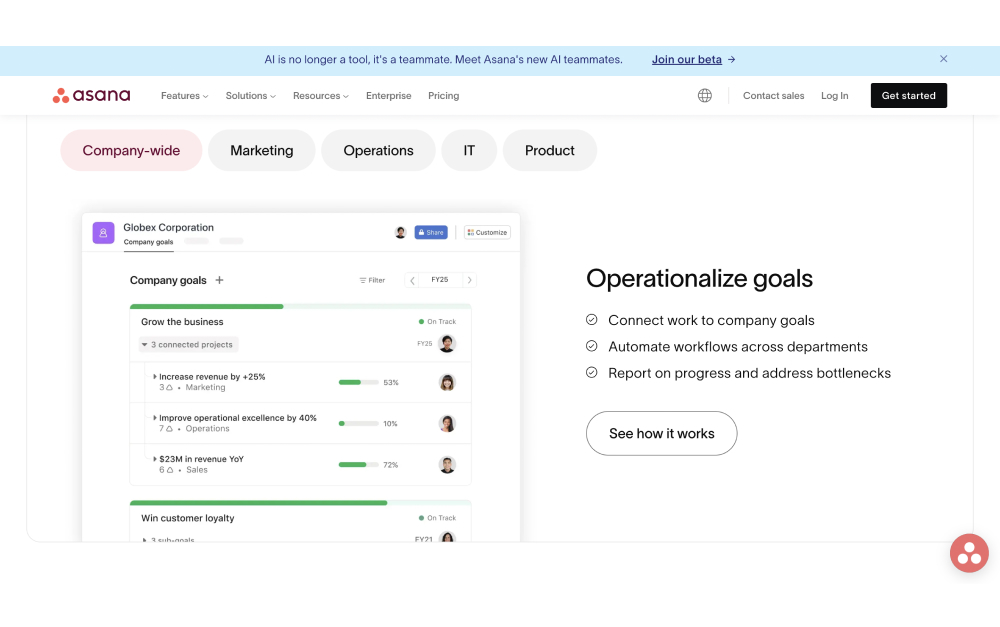
Asana is the closest match to Monday.com in terms of feature depth. Timeline views, board views, custom fields, and automations all come standard. Where Asana pulls ahead is portfolio management: a single dashboard that tracks the status, owner, and progress of every active project.
For agencies running ten or more client projects at once, that portfolio view is genuinely useful. You see which projects are on track and which are slipping without opening each one individually.
The pricing is steep. Asana Starter costs $10.99 per user per month (annual billing). Advanced, which unlocks portfolios and proofing, costs more. A 20-person agency pays roughly $220 to $500 per month depending on the tier.
Starter: $10.99/user/mo
Advanced: $24.99/user/mo
4. ClickUp - Best for teams that want maximum customization

ClickUp is the Swiss Army knife of project management. Tasks, docs, whiteboards, goals, time tracking, chat, dashboards, and forms are all built in. If Monday.com felt like it was missing something, ClickUp probably has it.
The Unlimited plan at $7 per user per month is one of the best values in the market for feature depth. Custom fields, views, automations, and statuses can be configured at every level.
The trade-off is complexity. ClickUp's interface is dense, and the setup process takes time. New team members often need training to navigate it effectively. If Monday.com's learning curve was already a challenge, ClickUp's will be steeper.
Unlimited: $7/user/mo
Business: $12/user/mo
Best Monday.com Alternatives for Simplicity
5. Trello - Best for simple Kanban boards
Trello is the opposite of Monday.com's complexity. Cards, lists, and boards. That is the core experience. Drag a card from "To Do" to "In Progress" to "Done." New team members understand the system within minutes.
Your mind is for having ideas, not holding them.
That principle is what makes Trello effective for small teams. The tool stays out of your way. Power-Ups add calendar views, voting, custom fields, and integrations, but the free plan limits you to one Power-Up per board.
Trello falls short when projects get complex. There is no built-in time tracking, no native Gantt view, and no cross-board reporting. For anything beyond basic task management, you will need to add integrations or switch to a fuller platform.
Standard: $5/user/mo
Premium: $10/user/mo
6. Todoist - Best lightweight personal task manager
Todoist does one thing well: it keeps track of what you need to do. Tasks, due dates, priorities, labels, and projects. No boards, no Gantt charts, no team dashboards. The interface is fast and clean.
Natural language input lets you type "Call client Tuesday at 3pm #marketing" and Todoist creates a task with the right date, time, and label. Recurring tasks are simple to set up. The daily view keeps your focus on what matters today.
Todoist is a personal productivity tool first. The team features exist, but they are basic compared to Monday.com. If you need client access, visual boards, or cross-project reporting, Todoist will feel too limited.
Pro: $4/user/mo
Business: $6/user/mo
Best Monday.com Alternatives for Docs and Tasks
7. Notion - Best for document-heavy workflows

Notion is part wiki, part database, part project tracker. For the direct comparison, see our Monday vs Notion head-to-head, or our broader Notion alternatives guide. The block-based editor lets you build anything: meeting notes, project boards, product roadmaps, company wikis, and client portals. The flexibility is unmatched.
For teams that spend as much time writing and organizing information as managing tasks, Notion is a strong pick. Linked databases let you connect tasks to documents, create relational views, and build dashboards from your data.
The downside: Notion is not a traditional PM tool. There are no native Gantt charts, no resource management, and no proofing features. Building a project management system in Notion requires time and ongoing maintenance. It is flexible, but it is not turnkey.
Plus: $10/user/mo
Business: $18/user/mo
8. Hive - Best for creative teams with design proofing
Hive includes built-in proofing that lets designers, clients, and managers mark up images and documents directly in the platform. Combined with six project views (Gantt, Kanban, calendar, table, portfolio, and summary), it covers a wide range of creative workflows.
The native time tracker, resourcing views, and forms for client intake requests make it practical for agencies that handle incoming work from multiple clients. At $5 per user per month, it is one of the more affordable options with proofing included.
The free plan is limited, and some analytics features are locked behind enterprise pricing. The integration ecosystem is smaller than Monday.com's.
Teams: $5/user/mo
Enterprise: custom
Best Monday.com Alternatives for Enterprise
9. Wrike - Best for enterprise workflows and proofing
Wrike is built for structured, repeatable processes at scale. Request forms, multi-level approval workflows, proofing, Gantt charts, resource management, and time tracking are all native. For organizations with compliance requirements or formal review processes, Wrike offers the depth that Monday.com lacks on lower tiers.
Rather than obsess over idea generation, we would be better served by developing the capacity to make ideas happen.
Wrike supports both agile and waterfall methodologies with dedicated views. Cross-tagging lets tasks exist in multiple projects simultaneously, which simplifies reporting across teams.
The trade-off is complexity. Wrike's interface is dense, and onboarding takes longer than most tools on this list. Smaller teams often find it overpowered for their needs.
Team: $10/user/mo
Business: $25/user/mo
10. SmartSuite - Best for data-driven teams
SmartSuite sits between Monday.com and Airtable. You get visual project views (grid, Kanban, timeline, calendar, card, map, chart) combined with database-level flexibility: formulas, rollups, linked records, and pivot tables.
The automation builder is capable and easier to configure than Monday.com's for most use cases. The template library covers over 200 solutions, from sales pipelines to product roadmaps to HR onboarding.
The trade-off: SmartSuite has a smaller user base and integration ecosystem compared to Monday.com. Support resources and community forums are less extensive. The free plan limits you to two users.
Team: $10/user/mo
Professional: $25/user/mo
Tools We Didn't Include (and Why)
- Jira: Purpose-built for software development. If your team is not running sprints and tracking code issues, Jira is overkill.
- Airtable: A powerful database tool with PM add-ons, but not a direct Monday.com replacement. Best used alongside a dedicated PM platform.
- Microsoft Project: Enterprise scheduling software tied to the Microsoft 365 ecosystem. Not practical for small or mid-size teams.
- Zoho Projects: Works well inside the Zoho suite (CRM, Books, Desk). Standalone, it lacks the polish and integrations of dedicated PM tools.
- GoodDay: Budget-friendly ($4/user), but limited market presence, fewer integrations, and a smaller support community than established alternatives.
We also considered tools like Teamwork and Productive, which target agencies specifically. Both are solid but priced at $13 or more per user per month, which puts them in the same cost bracket as Monday.com without enough differentiation to justify the switch.
Skip the per-seat pricing
Rock is flat $89/mo for unlimited users. Chat, tasks, and notes in one workspace.
Which Monday.com alternative fits you
| If you want... | Best pick | Why |
|---|---|---|
| Agencies + client teams | Rock | chat and tasks in one, simple, flat pricing |
| Async-first teams | Basecamp | calm, async-first project management |
| Cross-project reporting | Asana | cross-project task management and reporting |
| Maximum customization | ClickUp | maximum customization and many views |
| Simple Kanban boards | Trello | simple Kanban boards |
| Lightweight tasks | Todoist | lightweight personal and team task lists |
| Docs + tasks combined | Notion | docs and tasks combined in one flexible space |
| Creative proofing | Hive | creative proofing and collaboration |
| Enterprise workflows | Wrike | enterprise workflows and resource management |
| Data-driven teams | SmartSuite | data-driven, database-style work management |
How to Choose the Right Monday.com Alternative
The right tool depends on three things: how your team communicates, how many external people need access, and how much you want to pay.
If your team relies on chat alongside tasks, look at Rock or Basecamp. Both include messaging so you are not paying for a separate tool like Slack. If external clients need regular access, Rock's flat pricing model removes the per-seat cost that makes guest access expensive on Monday.com.
A UCI study found that it takes over 23 minutes to refocus after switching between tools. Choosing a platform that covers more of your workflow in one place can reduce that switching cost significantly.
For feature-rich PM, Asana and ClickUp are the strongest options. Asana is better for reporting across projects. ClickUp is better for teams that want to customize everything. Both charge per user, so calculate the cost at your actual team size.
For simplicity, Trello and Todoist stand out. Both have generous free plans and minimal learning curves. They work best for small teams or individuals who do not need heavy collaboration features. But be honest about your growth plans: a tool that works at five people may not work at fifteen.
For document-heavy work, Notion is hard to beat. For creative teams that need proofing, Hive brings that into the PM workflow. For enterprise, Wrike offers the depth and compliance features that larger organizations require. For deeper dives, see our Basecamp alternatives guide, the ClickUp vs Monday head-to-head, or our honest reviews of ClickUp and Asana. For deeper dives, see our Basecamp alternatives guide, the ClickUp vs Monday or Asana vs Monday head-to-heads, or our honest reviews of ClickUp and Asana. For deeper dives, see our Basecamp alternatives guide, the ClickUp vs Monday, Asana vs Monday, or Trello vs Monday head-to-heads, or our honest reviews of ClickUp and Asana.
Start with what your team actually needs today, not what you might need in a year. Most tools on this list offer free plans or trials. Pick two or three that match your priorities, run a real project in each for a week, and let your team vote. The best monday.com alternative is the one your team will actually use. For the direct Rock comparison, see Rock vs Monday. For the head-to-head against the calmer alternative, see Basecamp vs Monday.

Looking for a Monday.com alternative that combines chat and tasks without per-user pricing? Try Rock for free.





