
Rock MCP lets the AI tools you already use act in Rock on your behalf. You point your AI client at the Rock endpoint, authenticate with a Personal Access Token, and the assistant can read and write across your spaces as you. It uses the Model Context Protocol, a standard for connecting AI clients to outside tools. It is hosted by Rock, so there is nothing to install.
A Personal Access Token (PAT) is the key that authenticates the connection. Think of it as a password built for tools rather than people: any action the token takes is recorded as you, and you can revoke it at any time. The same token works for Rock MCP and for any script or integration that calls the Rock API directly.
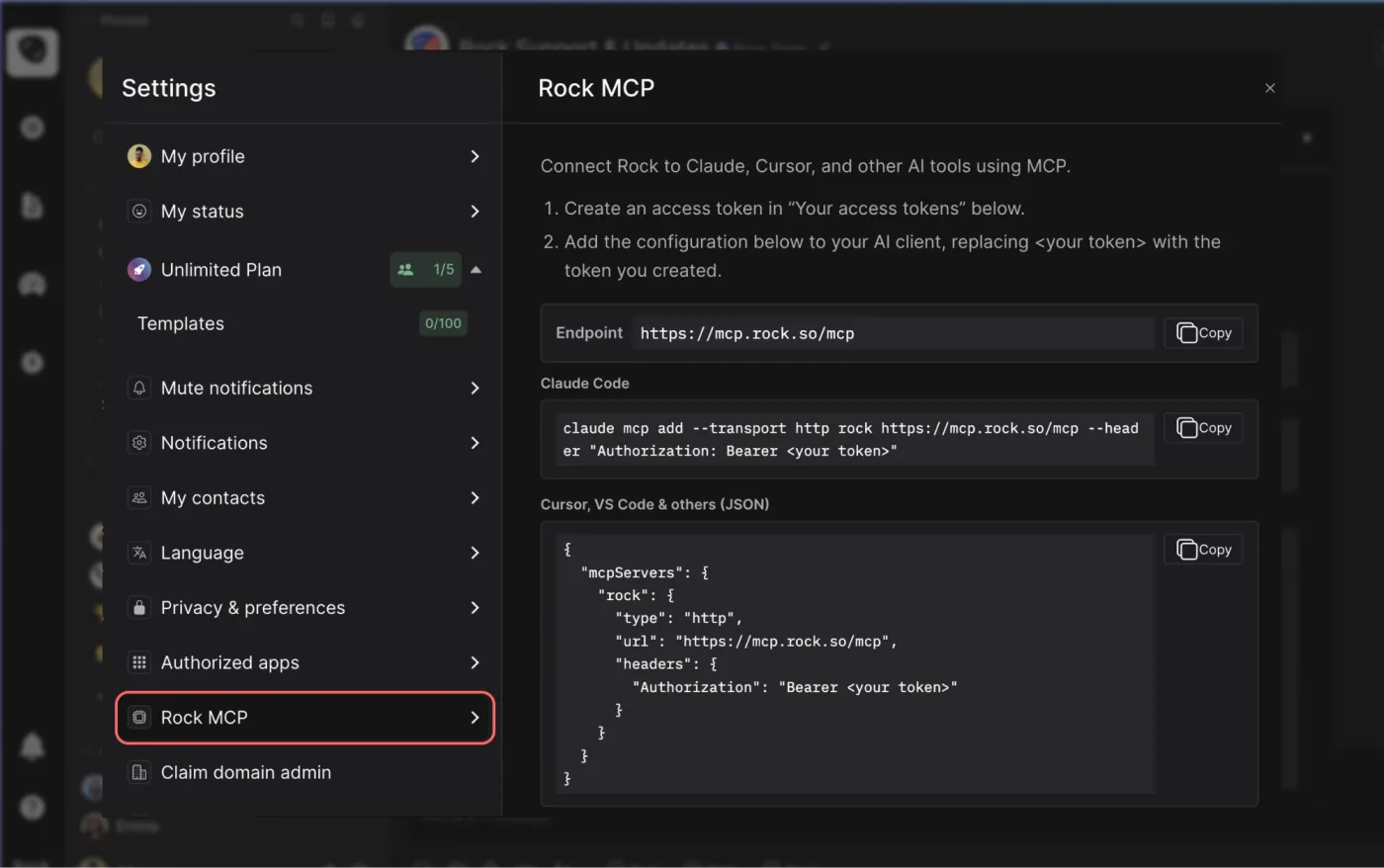
- Endpoint:
https://mcp.rock.so/mcp - Transport: Streamable HTTP
- Auth:
Authorization: Bearer <your token>
Rock MCP works the same on every plan. Both free and paid users can create a token and connect, at no extra cost.

Using Claude Cowork?
You do not need to follow the technical steps below. Paste this page into Cowork and ask it to connect Rock for you, and it can set up the configuration.
Keep your token safe: do not paste it into the chat. Create your token in Rock (step 1), then add it to the local config file on your machine, which Cowork will point you to, so the token never leaves your computer.
1. Create a token
In Rock, open Settings → Rock MCP → Your access tokens → Create new token. Copy the token when it is shown, you will not be able to see it again. Treat it like a password.
2. Add the server to your client
Replace <your token> with the token you copied.
Claude Code
claude mcp add --transport http rock https://mcp.rock.so/mcp \
  --header "Authorization: Bearer <your token>"
Claude Desktop, Cursor, and other clients
Add this to your client's MCP servers configuration (for example Claude Desktop's claude_desktop_config.json, or Cursor's ~/.cursor/mcp.json):
{
  "mcpServers": {
    "rock": {
      "type": "http",
      "url": "https://mcp.rock.so/mcp",
      "headers": { "Authorization": "Bearer <your token>" }
    }
  }
}
Claude Cowork reads this same Claude Desktop configuration. Turn on developer mode in Claude Desktop, add the server above with your token, and Cowork connects through it.
VS Code
VS Code uses a different shape, a top-level servers object in a .vscode/mcp.json (workspace) or your user mcp.json:
{
  "servers": {
    "rock": {
      "type": "http",
      "url": "https://mcp.rock.so/mcp",
      "headers": { "Authorization": "Bearer <your token>" }
    }
  }
}
If your client does not support remote HTTP MCP servers directly, use the mcp-remote bridge:
{
  "mcpServers": {
    "rock": {
      "command": "npx",
      "args": ["mcp-remote", "https://mcp.rock.so/mcp",
               "--header", "Authorization: Bearer <your token>"]
    }
  }
}
What you can do with it
Once connected, your assistant can use Rock the way you would. You can always ask your client to list the available Rock tools to see the current set. Today they cover six areas:
- Search: Find a conversation, note, or decision across your whole account ('where did we discuss the Q3 budget'), not one space at a time.
- Messages: Read recent messages, search a space, send a message, or react, all as you.
- Tasks: See what is assigned to you, list a space's tasks, and create, update, or complete a task.
- Notes: Create a note in the right space, or search your existing notes.
- Spaces: List your spaces, find one by name, and see who is in it.
- Files: List the files in a space.
A few things people set up:
- 'What is due this week across my spaces?' to start the day in one place.
- Turn a thread in your AI client into a Rock note or task in the right space.
- A script that posts a daily standup or reminder to a space.
Using the token directly (advanced)
If you are not using an MCP client, the same token authenticates direct calls to the Rock API, for a script, a cron job, or a custom integration.
- Endpoint:
https://api.rock.so/api - Auth: pass the token in the request body as
patToken(not a header). Use it exactly as Rock shows it, no conversion needed. - Format: JSON (Protocol Buffers is also supported). The query string names the request; the body carries an
id, yourpatToken, and the request itself. - Responses: timestamps come back as integers, the UNIX epoch in seconds. The Rock app may display them as formatted dates instead.
- Operations: the same actions as the Rock MCP tools above, across spaces, messages, tasks, notes, files, and search.
For example, a POST to https://api.rock.so/api?userPref with the body below returns your own profile, a quick way to confirm a token works:
{
  "id": 1,
  "patToken": "<your token>",
  "userPref": { "getMyself": true }
}
Troubleshooting
- 401 Unauthorized: The token is invalid, expired, revoked, or mistyped. Create a new token in Settings → Rock MCP and update the config.
- INVALID_ACCESS_TOKEN (direct API): The token belongs in the
patTokenbody field, not anAuthorizationheader. The Bearer header is only for the MCP endpoint. - Client cannot connect: Wrong transport or endpoint. Confirm streamable HTTP and the exact URL
https://mcp.rock.so/mcp. - Tools do not appear: The server was added but not reloaded. Restart the client or reload its MCP servers.
Security and access
- A token grants nearly full access to your account. It acts as you, with the same permissions you have, read and write, across every space. There is no read-only or single-space option yet.
- Keep it secret. Do not push it to public repositories, log it, embed it in a web or mobile app, put it in an issue tracker, or share it over chat.
- When an assistant helps you set up, add the token to the config file yourself. Do not paste it into the chat.
- You can see when a token was last used, and revoke it any time in Settings → Rock MCP → Your access tokens.
- A token cannot create another token, and cannot run sign-in or sign-up.
Questions and answers
Is Rock MCP free?
Yes. It works on every plan, and both free and paid users can create a token and connect, at no extra cost.
Which AI tools can I connect today?
Any client you set up locally with a token works now, including Claude Desktop, Claude Code, Cursor, VS Code, and Claude Cowork (which reads Claude Desktop's config in developer mode). You paste the endpoint and your token into the client's own MCP settings.
Can I connect Claude on the web or mobile?
Not yet. Those run from Anthropic's cloud and connect through Claude's cloud connectors, which need a one-click sign-in (OAuth) that is coming soon. For now, use a token-based client like Claude Desktop, Claude Cowork, Cursor, or VS Code.
How many tokens can I create?
Up to 20 active tokens at a time. Use a separate token per tool so you can revoke one without affecting the others.
Can I make a token read-only or limit it to one space?
Not yet, those scopes are on the roadmap. For a bot limited to a single space, use a Custom Webhook bot token instead.
What happens when I revoke a token?
Any tool using it loses access immediately. Create a new token and update that tool's configuration to reconnect.





