
Most content teams track their articles in a spreadsheet. One tab for keywords, another for deadlines, a shared Google Doc for the brief, Slack for feedback, and email for client approvals. By the time a post is published, the process has touched five different tools and nobody is sure which version of the draft was final.
This template replaces all of that with a single board. Every article is a task card that moves through six stages: keyword research, outline, draft, edit, ready to publish, and published. Your whole team sees what stage each piece is in without asking.
What is in this template
The board mirrors a real content production workflow with six columns, each representing a stage in the publishing pipeline.
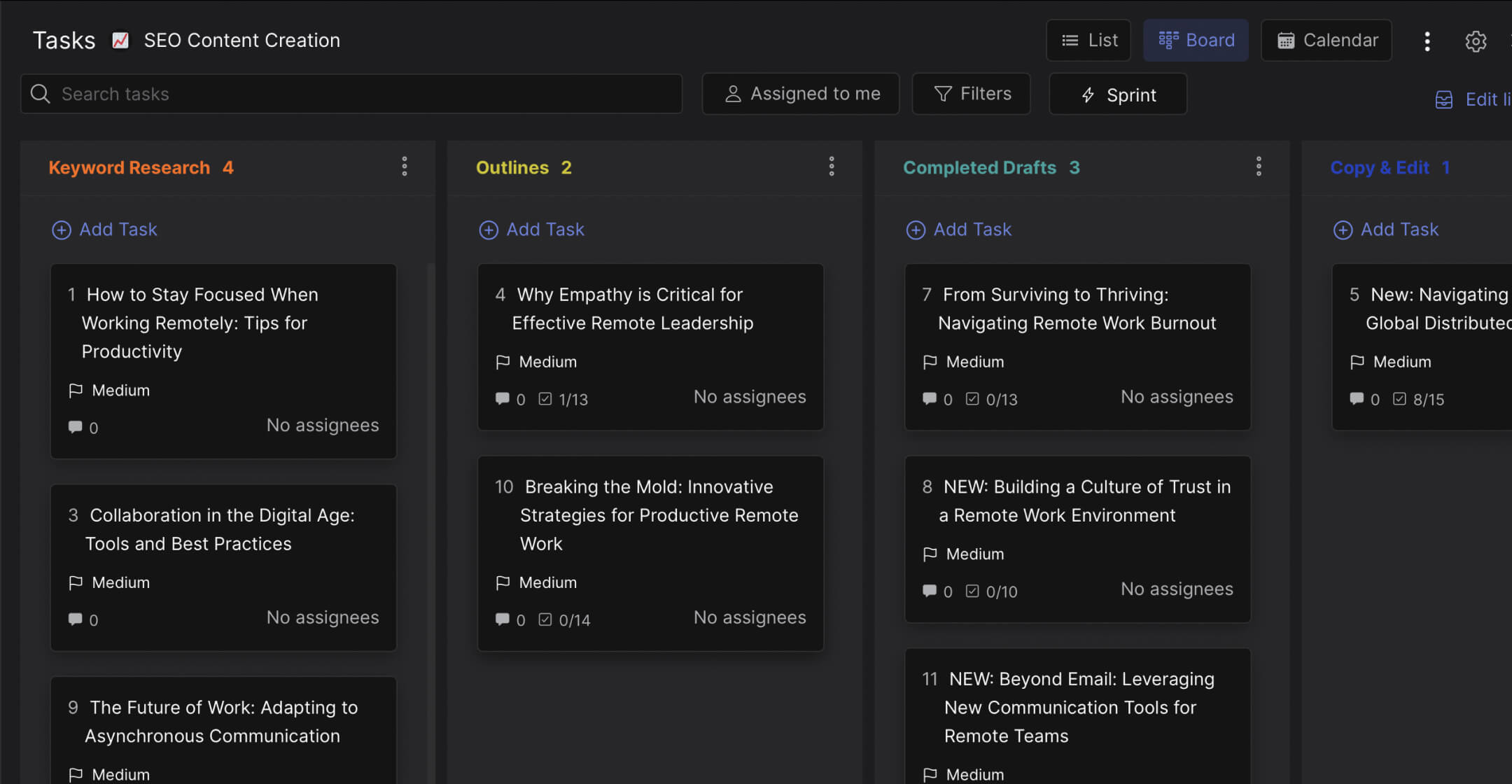
Preview: SEO Content Creation Board
This is what the template looks like in Rock. Drag cards between columns to try it.
Drag cards between columns or add your own
Tap a card, then tap a column header
Keyword Research. New article ideas start here. Each card includes the target keyword, monthly search volume, difficulty score, and expected publish date. This is where your team decides what to write next based on data, not gut feeling.
Outlines. Once a keyword is approved, the card moves here. The writer creates a structured outline with H2s, key points, and internal link targets. A checklist tracks whether the outline has been drafted and sent to the writer.
Completed Drafts. First drafts land here. Each card has a checklist covering Copyscape checks, initial copyedit, and second draft revisions if needed. Nothing moves forward until the checklist is done.
Copy & Edit. The editing stage. Final copyedits, formatting for the CMS, and adding inbound links happen here. This is where quality control lives.
Ready to Publish. The article is formatted, optimized, and waiting for a publish date. Final QC check, meta information, and featured image are confirmed.
Scheduled/Published. The article is live or scheduled. Cards here include a completion checklist: social media distribution, Pinterest submission, and recurring promotion tasks.
"The biggest challenge with content marketing is not creating the content. It is getting it from draft to published without losing quality or momentum." - Joe Pulizzi, Founder, Content Marketing Institute
Why spreadsheets fail for content pipelines
A spreadsheet can track what you plan to write. It cannot track where a draft is stuck, who is waiting on feedback, or whether the copyedit was done. That information ends up in chat threads and email chains that nobody can search six months later.
What we do at Rock: the content pipeline lives in a space where your team also communicates. When a writer finishes a draft, they move the card to "Copy & Edit" and the editor sees it immediately in the same workspace. Comments, files, and feedback stay attached to the card, not scattered across tools.
According to a Content Marketing Institute study, teams with a documented content workflow are 60% more likely to report their strategy as effective compared to those without one.
Who this template is for
Best for: Marketing agencies managing content for multiple clients, in-house teams publishing 4+ articles per month, and freelance writers who want to organize work visually instead of in a spreadsheet.
Skip this if: You publish less than once a month or you are a solo writer who does not need stage-based tracking.
Tips for getting started
Add your keyword research fields to the task description. Each card in the "Keyword Research" column should include: target keyword, monthly volume, difficulty score, and content type (blog post, guide, listicle). This turns the card into a mini brief.
Use checklists inside each card. The template comes with a built-in checklist for each stage: outline drafted, copyedit done, inbound links added, final QC check. This is what prevents articles from skipping steps.
"Content without a workflow is just words. A workflow without accountability is just a wish list." - Ann Handley, Chief Content Officer, MarketingProfs
Set a project timeline for each article. In the task description, add an expected publish date and content cadence (weekly, bi-weekly, monthly). When your team can see deadlines on the board, nothing sits in "Completed Drafts" for three weeks because nobody noticed.
Invite your client to the space. If you are producing content for a client, give them view access to the board. They can see progress without you sending weekly status emails. This builds trust and cuts down on "where is my article?" messages.
"The best editorial calendars are not calendars at all. They are workflows that show you where everything is and what needs to happen next." - Jimmy Daly, Co-founder, Superpath
Keep the board lean. Not every article idea deserves a card. Only add topics that have passed your keyword research filter. If you dump 50 ideas into "Keyword Research," the board becomes a backlog nobody looks at. Aim for 10-15 active cards across all columns.


