

Slack vs WhatsApp for Team Messaging (2026)
Slack vs WhatsApp looks like a simple choice on the surface. You open an app, you type, someone types back. That surface similarity is exactly why so many teams agonize over it, and why the debate so often goes in circles.
The clearer way to decide is to look at what each tool was actually built for. WhatsApp is a personal messaging app that got pulled into work. Slack was built as a team workspace from day one. Almost every difference that matters, search, structure, pricing, compliance, falls out of that one fact.
Slack vs WhatsApp: the quick answer
It depends on what your team actually does. Slack fits structured, growing, or multi-client teams that need searchable history, integrations, and a defensible record of decisions. WhatsApp fits a small or casual team, or any team whose clients already live on WhatsApp, which is the regional default across Latin America, Southeast Asia, and Africa. The deeper reason is that the two were built for opposite jobs. WhatsApp is personal messaging stretched to cover work. Slack is a work tool from the ground up. Match the tool to the job and the choice gets easy.
| Feature | Slack | |
|---|---|---|
| Built for | Team workspace | Personal messaging |
| Identity | Workspace account | Phone number |
| Message history (free) | 90 days | On device only |
| Message history (paid) | Unlimited, searchable | No central archive |
| Organization | Channels and threads | Flat groups up to 1,024 |
| Search | Filters (from:, in:, before:) | Basic keyword search |
| Integrations | 2,600+ apps | None built in |
| Free video calls | 1:1 huddles only | Up to 8 people |
| Free voice calls | 1:1 huddles only | Up to 32 people |
| File sharing | 5 GB free, 10 GB/user paid | 2 GB media, 16 MB docs |
| Scheduled messages | Yes | No |
| Admin and compliance | Audit logs, SSO, DLP (paid) | Basic (Business app) |
| End-to-end encryption | No (TLS in transit) | Yes, by default |
| Paid plan from | $7.25/user/month | API only (per-message) |
Which messaging tool fits your team?
Answer 4 questions. Takes 30 seconds.
1. What matters most to you?
Select all that apply
2. How many people will use it?
3. Do clients or freelancers need access?
4. What's your budget?
Start over

Comparing two chat apps, but the work lives elsewhere?
Rock keeps messaging, tasks, and notes in one workspace. One flat price, unlimited users, clients join free.
The core difference: two opposite jobs
Start with identity. On WhatsApp, you are your phone number. That is perfect for reaching a friend, and awkward for work, because adding a teammate means swapping personal numbers, and removing one when they leave is messy. On Slack, you are an account inside a workspace. An admin adds you, assigns you to channels, and deactivates you on your last day.
Then look at how conversations are shaped. WhatsApp gives you flat group chats. Everything scrolls in one stream, and side topics bury the main one. Slack gives you channels and threads, so a client project, a design review, and the office banter each live in their own space with their own history.
"Searchable Log of All Conversation and Knowledge." That is what Slack stands for, according to co-founder Stewart Butterfield, and it captures the whole point of the team-channel model. - Stewart Butterfield, Co-founder, Slack
Everything downstream follows from this split. Searchable history, admin controls, integrations, and compliance are native to a tool built for teams. They are bolted on, or missing, in a tool built for personal chat. Keep that lens and the rest of this comparison reads as consequences, not a random feature checklist.
Which WhatsApp are we comparing?
This trips up most comparisons, so it is worth being precise. There are three different WhatsApps, and only some of them belong in a Slack comparison.
Consumer WhatsApp. The free app on everyone's phone. Plenty of small teams run their whole operation here, informally.
WhatsApp Business app. Also free, aimed at small businesses. It adds a business profile, a product catalog, and quick replies, but the chat itself is still the same flat, mobile-first experience.
WhatsApp Business Platform (the API). Priced per conversation, used through a provider like Twilio. It is built for customer messaging at scale, things like order updates and support, not for your internal team chat.
For an honest comparison against Slack, the right match is the consumer or Business app. The API solves a different problem, so we leave it out of the team-chat decision below.
Channels and threads vs flat groups
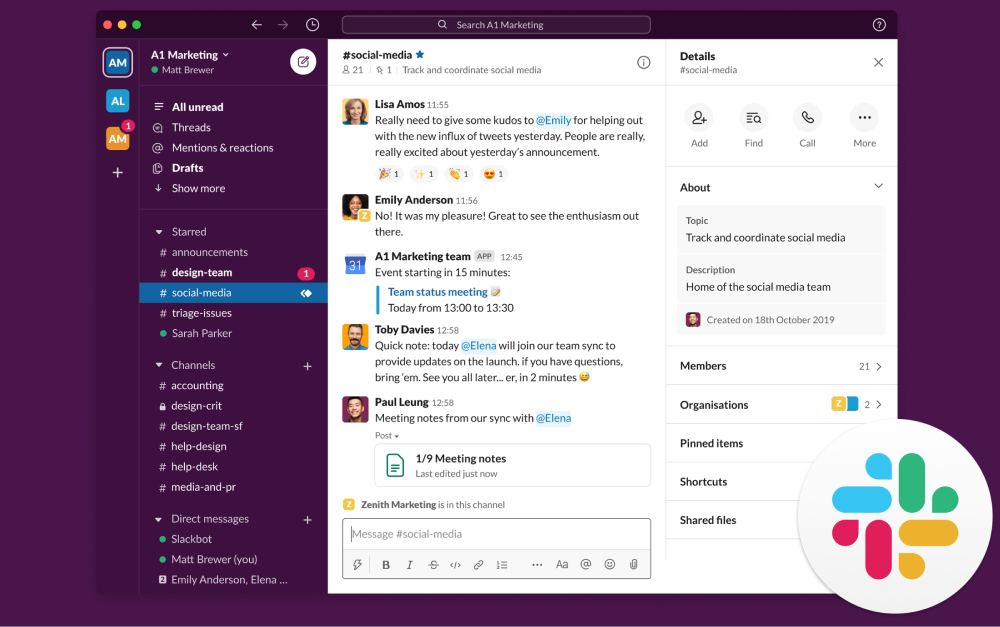
Slack organizes work into channels. You can keep #client-acme, #design, and #random separate, each with its own members, pinned files, and history. Threads hang follow-up replies off a single message, so a side discussion does not derail the main channel.
WhatsApp groups, and the newer Communities feature, stay flat. There are no per-topic channels and no real threads, so messages pile into one stream. Once a conversation scrolls away, you are searching for the exact words you remember, or scrolling for a while.
For a team of five on one or two projects, flat groups are genuinely fine, and the simplicity is a feature. The cost shows up later, when you juggle several clients at once and the single stream stops being enough.

Search, history, and file access
Search is where the two models separate most sharply. Slack indexes messages so you can filter by person, channel, date, or file type. On paid plans, every message ever sent stays searchable. Since August 2024, the free plan keeps only 90 days of history, which is a real limit for budget-conscious teams.
WhatsApp stores messages and files on your device, not in a central archive. There is no shared repository, and search is basic keyword matching inside a single chat. A PDF someone shared last month lives in their phone's downloads, not in a place the team can reach.
That gap has a familiar shape. A client asks what you agreed on last month. The answer is buried in a group chat between voice notes and lunch plans, and suddenly the missing record is very concrete. This is also why communicating with clients over a personal app gets risky as the relationship grows.
Integrations and automation
Slack connects to over 2,600 apps, covering project management, cloud storage, developer tools, and CRMs. Its no-code Workflow Builder lets you automate routine steps without writing anything. That breadth exists because a work hub has to talk to the other tools work runs on.
WhatsApp has no built-in integrations for internal teams. The Business API can connect to outside systems, but that needs a provider, developer time, and per-message fees, and it is aimed at customer messaging rather than team workflows.
Be honest about whether you need this. A team that mostly just talks to each other and to clients does not need 2,600 connectors. If your work already lives in other apps and you want chat tied into them, Slack is the clearer fit.
Calls, video, and meetings
This is WhatsApp's clearest free-tier win. You get group voice calls with up to 32 people and video calls with up to 8, no time limit, nothing to install beyond the app. For a quick sync or a client check-in, it just works.
Slack's free plan limits you to one-to-one huddles. Group huddles, with up to 50 participants and screen sharing, need the Pro plan. If informal calls inside your chat tool are a daily habit and budget is tight, that is a genuine gap.
One caveat in both directions. Most teams already run scheduled meetings in Zoom or Google Meet, so the real question is whether you want casual calls living inside the messaging app itself. If you do, WhatsApp wins here on the free tier.
Security: encryption is not a record
People often conflate two different things here, so it helps to separate them. WhatsApp has end-to-end encryption on by default, which is a real privacy strength. What it does not have is an audit trail, central record-keeping, or admin-controlled retention.
Slack is not end-to-end encrypted by default. It uses enterprise-grade encryption in transit, and on paid tiers it adds audit logs, retention policies, single sign-on (SSO), and clean account removal when someone leaves.
The headline here is recent and instructive. Regulators have fined major banks more than 2 billion dollars over staff using WhatsApp for business, with JPMorgan alone paying 200 million. The problem was not weak encryption. It was that those messages were never preserved as records. So the short answer to "is WhatsApp safe for business records" is this: it is private, but it is not a record. If you need a defensible archive, Slack gives you one and WhatsApp does not.
Pricing in 2026
WhatsApp is free for team messaging. The consumer app and the Business app both cost nothing. Only the Business API charges, per conversation, and that is for customer messaging rather than internal chat.
Slack scales per user, which is the number that matters most as you grow.
Free. 90-day history, 5 GB storage, 10 app integrations, one-to-one huddles only.
Pro. $7.25 per user per month on annual billing. Unlimited history, more storage, unlimited integrations, group huddles.
Business+. $15 per user per month on annual billing. Adds single sign-on, audit logs, and data loss prevention.
The math gets real at scale. A 15-person team on Slack Pro runs about $109 a month, which is meaningful money in markets where software budgets are tighter. And the free plan's 90-day limit means older decisions and context quietly disappear. Re-check current pricing before you commit, since these numbers move.
When to pick WhatsApp
WhatsApp is the right call more often than feature checklists admit. It genuinely wins when your situation looks like this.
Your team is small and casual. Under ten people on one or two projects, where flat groups are plenty and structure would just be overhead.
Your clients already live there. If clients message you on WhatsApp by default, meeting them there beats forcing them onto a tool they will not open.
WhatsApp is the regional default. Across Latin America, Southeast Asia, and Africa, adoption is effectively free because everyone is already on it.
You want free group calls and zero setup. No accounts, no admin, no training, just a phone number.
"India is leading the world in terms of how people and businesses have embraced messaging as the better way to get things done." - Mark Zuckerberg, CEO, Meta
None of that is a weakness. For a lot of teams, especially in emerging markets, a client already on WhatsApp is a reason to stay, not a problem to fix.
When to pick Slack
Slack pulls ahead as the work gets more structured. Lean toward it when these are true.
You run several clients or projects at once. Channels keep each one separate instead of collapsing into a single stream.
Searchable history is load-bearing. You routinely need to find what was decided, by whom, and when.
You need integrations. Your work lives in PM, storage, or CRM tools and should surface in chat.
You work async across time zones. Threads, scheduled messages, and notification controls matter more than instant replies.
You need a record or admin control. Audit logs, retention, and clean offboarding are requirements, not nice-to-haves.
Or skip the per-seat math.
Rock combines chat, tasks, and notes for one flat price. Unlimited users, no per-user scaling.
The catch: neither tracks the work
Here is the thing both tools quietly share. Slack and WhatsApp are both chat. Neither is where tasks, owners, and due dates actually live. Slack bolts task management on through paid integrations. WhatsApp has nothing at all. So the real decision is often two tools that still need a third for the work itself.
What we see at Rock is that for many small teams, the pain is not really "which chat app." It is that chat and the work live in different places. Decisions made in a thread never become tasks anyone tracks. A workspace that keeps messaging, tasks, and notes together closes that gap, at one flat price instead of per-seat math.
"Workers toggled between applications and websites roughly 1,200 times each day, adding up to just under four hours a week reorienting themselves." - Rohan Narayana Murty and co-authors, Harvard Business Review
That toggling tax is the real cost of splitting chat from the work it produces. Fewer places to switch between means less time spent just finding where things live.
That is the honest pitch, and it is not for everyone. If you only need to talk, pick Slack or WhatsApp on the criteria above. If you keep losing the work between the messages, it is worth a look. For the full three-way picture, our instant messaging apps roundup compares more options, and switching from WhatsApp walks through the migration if you have already decided to move.
Frequently asked questions
Is WhatsApp or Slack better for business? Neither wins outright. Slack is better for structured, growing, or multi-client teams that need search, integrations, and a record. WhatsApp is better for small, casual teams or when your clients already use it.
Can I use WhatsApp instead of Slack for my team? Yes, and many small teams do. It works well up to about ten people on a couple of projects. The strain appears when you add clients, projects, and the need to find old decisions.
Is WhatsApp safe and legal for business records? It is encrypted and private, but it does not keep a central, retrievable record by default. In regulated settings that is a real problem, which is why banks have been fined billions for relying on it.
Why do companies use Slack instead of WhatsApp? Mainly for searchable history, channels, integrations, and admin controls. As a team grows, those become the difference between finding information fast and digging for it.
Does Slack have free video calls like WhatsApp? Not at the same level. Slack's free huddles are one-to-one. Group huddles need a paid plan, while WhatsApp offers free group voice up to 32 and video up to 8.
What is the best alternative to both for a team that also tracks work? A workspace that combines chat with tasks, like Rock, removes the need for a separate project tool. Compare options in our instant messaging apps guide.
The short version
Slack vs WhatsApp feels like a feature fight, but it is really a fit decision, because the two were built for opposite jobs. Pick Slack for structured, growing, or multi-client teams, and for anyone who needs a searchable record. Pick WhatsApp for small or casual teams, and when your clients already live there. And if the real problem is that the work keeps slipping between the messages, that is the moment to look at a workspace that holds chat and tasks together.
The right messaging tool keeps your team aligned without adding complexity. Rock combines chat, tasks, and notes in one workspace. One flat price, unlimited users. Get started for free.





