

15 Best Instant Messaging Apps for Businesses in 2026
The messaging app your business uses shapes everything: how fast decisions get made, how clients experience your team, and how much you pay per month. Pick the wrong one and your team spends half the day switching between chat, email, and task tools. For the wider category view, see our best collaboration software guide. Pick the right one and work just flows.
This guide covers 15 instant messaging apps for businesses in 2026. We organized them by category so you can jump to what matters for your team. Each app includes real pricing, who it is best for, and when to skip it.
Quick disclosure: we are the team behind Rock, one of the apps on this list. We build in this space and run these tools next to Rock, so we know where each is strong and where it is not. What follows is the honest landscape, not a pitch.
We will be successful to the extent that we create better teams.
Quick Comparison
| App | Best For | Pricing |
|---|---|---|
| Rock | Agencies and client teams | Free / $89/mo flat |
| Microsoft Teams | Microsoft 365 users | Free / $4/user/mo |
| Google Chat | Google Workspace users | $7/user/mo (no free standalone) |
| Pumble | Best free plan overall | Free / $2.49/user/mo |
| Chanty | Small teams on a budget | Free (5 users) / $3/user/mo |
| WhatsApp Business | Teams already on WhatsApp | Free |
| Telegram | Broadcast channels and bots | Free / Premium $4.99/mo |
| Slack | Tech teams and integrations | Free / $8.75/user/mo |
| Discord | Creative and community teams | Free / Nitro $9.99/mo |
| Rocket.Chat | Self-hosted customization | Free / $4/user/mo cloud |
| Mattermost | Regulated environments | Free / $10/user/mo |
| Element | Decentralized, government use | Free / Contact sales |
| Zulip | Topic-based threading for dev teams | Free / $6.67/user/mo |
| Wire | End-to-end encryption | Free (5 users) / ~$8/user/mo |
| Lark | All-in-one workspace | Free (50 users) / $12/user/mo |
Which Messaging App Is Right for You?
Not sure where to start? Answer four quick questions and we will recommend the best fit based on your team, budget, and how you work with clients.
Which messaging app fits your team?
Answer 4 questions. Takes 30 seconds.
1. What matters most to you?
Select all that apply
2. How many people will use it?
3. Do external people (clients, freelancers) need access?
4. What's your budget?
Start over
Best for Agencies and Client Teams
1. Rock - Best for Agencies Managing Client Projects
Unlimited: $89/mo flat, unlimited users and spaces
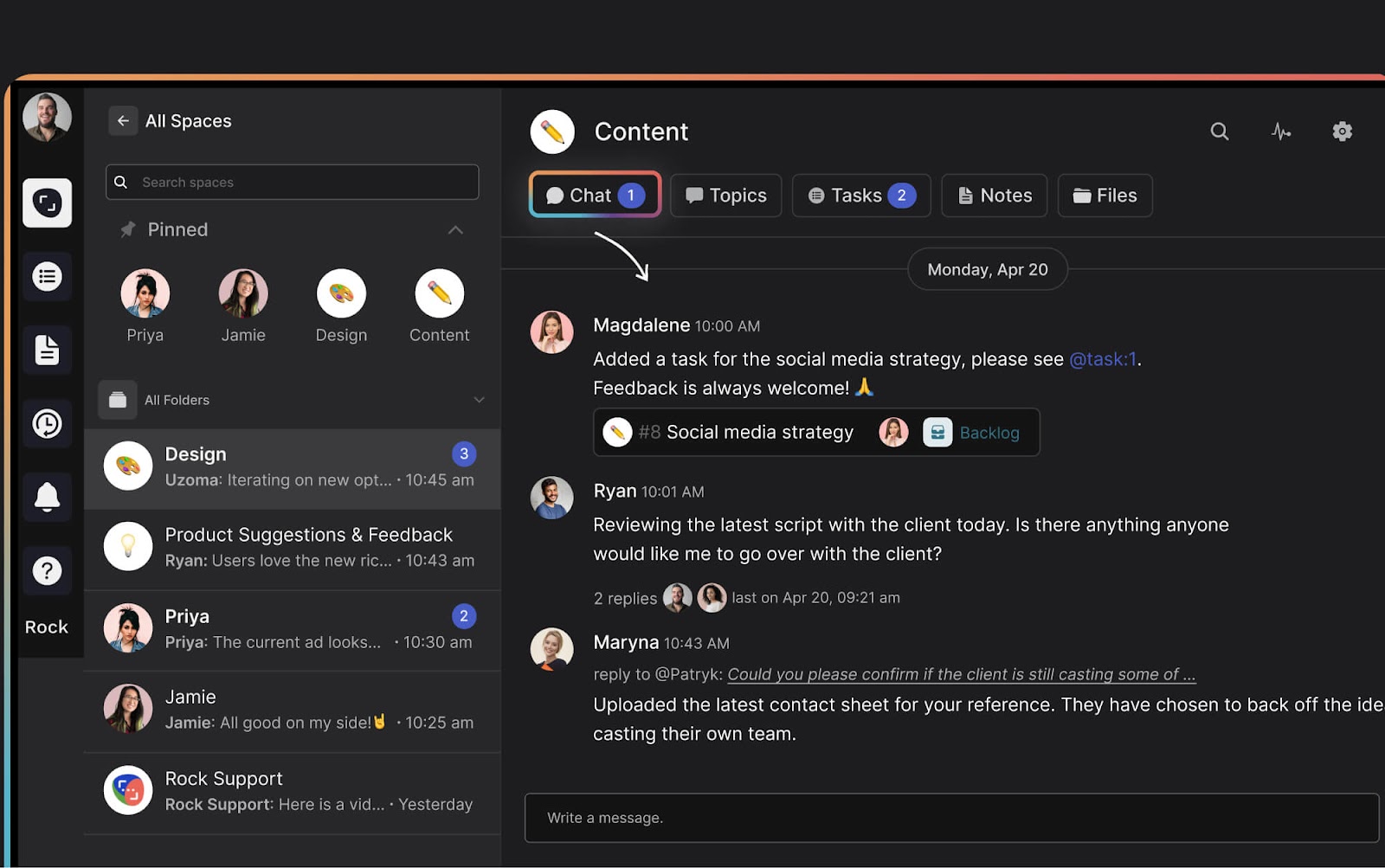
Rock combines instant messaging with tasks, notes, files, and meetings in one workspace. Every project gets its own space. Clients and freelancers join directly without a separate guest portal or extra per-user fees.
What sets Rock apart: there is no AI tax. While other platforms charge $10-30/user/month for AI features, Rock has an open API that lets you connect any AI (ChatGPT, Claude, Gemini) as a bot. Bring your own key, pay your own rates. Your bot can send messages, create tasks, and read everything in a space.
Rock now also ships a native MCP server, so AI assistants like Claude, Cursor, and ChatGPT can operate your workspace directly: read messages, create tasks, and search across spaces. It is available on the free plan, not gated behind an enterprise tier.
Best for Enterprise
2. Microsoft Teams - Best for Microsoft 365 Users
Essentials: $4/user/mo

If your company already pays for Microsoft 365, Teams is included. It integrates directly with Word, Excel, SharePoint, and OneDrive. Video conferencing supports 300 participants on paid plans with Copilot AI for transcription.
3. Google Chat - Best for Google Workspace Users
Workspace Business Starter: $7/user/mo
Same logic, different ecosystem. Google Chat lives inside Gmail alongside Drive, Meet, and Calendar. Gemini AI is built into chats for summaries and suggestions.
Best Free Instant Messaging Apps
Per-user pricing adds up fast. A 20-person team on Slack Pro pays $175/month. These apps give you real business messaging without the bill.
4. Pumble - Best Free Plan Overall
Pro: $2.49/user/mo
Pumble offers unlimited users, unlimited message history, and 10 GB storage for free. The interface feels familiar to Slack users. Channels, threads, direct messages, voice and video calls with screen sharing. All free.
5. Chanty - Best Budget Option for Small Teams
Business: $3/user/mo
Chanty keeps messaging simple and affordable. The paid plan at $3/user/month includes HIPAA compliance, which is rare at this price.
Best Consumer-to-Business Messaging Apps
If your team currently uses WhatsApp, Telegram, or Facebook Messenger for work, you are not alone. In many regions, especially Southeast Asia, Africa, and Latin America, these are the default. Here is when to stay and when to upgrade.
6. WhatsApp Business - Best for Teams Already on WhatsApp
API pricing for larger operations

WhatsApp Business is free and already on everyone's phone. For quick client conversations, appointment confirmations, and simple updates, it works. Quick replies, labels, and automated greetings cover basic business needs.
The limit: WhatsApp has no task management, no file organization, no project structure. As your team grows past 5-10 people or you manage multiple client projects, conversations blur together and nothing is trackable. If you are ready to upgrade, check our guide on switching from WhatsApp or weigh the trade-offs in Slack vs WhatsApp.
7. Telegram - Best for Broadcast Channels and Bots
Telegram Premium: $4.99/mo
Telegram is fast, free, and great for one-to-many communication. Channels support unlimited subscribers. Supergroups hold up to 200,000 members. Bot integrations let you automate updates, customer support, and scheduled messages. Secret chats offer end-to-end encryption.
For internal team messaging though, Telegram lacks structure. No task management, no project spaces, no threaded conversations by default. It works for broadcasting updates, not for managing work.
Best for Tech Teams and Communities
8. Slack - Best for Integrations and Developer Workflows
Pro: $8.75/user/mo
Business+: $12.50/user/mo

Slack is the messaging app most tech teams know. Channel-based conversations, a massive app directory (2,600+ integrations), and workflow automations make it powerful for developer teams. The free plan now includes 90 days of message history.
The downside: per-user pricing adds up fast, and Slack does not include task management. Most Slack teams also pay for a separate project management tool. For a deeper comparison, see our list of 20 Slack alternatives, the Slack vs ClickUp, or the Slack vs Discord head-to-heads.
9. Discord - Best for Creative and Community Teams
Nitro: $9.99/mo
Discord (Rock vs Discord) is not a business tool. There is no SSO, no compliance, no admin dashboard worth mentioning. But for creative teams, developer communities, and startups that do not need those things, it is hard to beat. Voice channels let people drop in and out of conversations without scheduling anything.
Best Open-Source Instant Messaging Apps
Open-source apps give you full control over your data and the ability to self-host. They are excellent for dev teams, IT organizations, and regulated industries. Self-hosting requires technical resources to set up and maintain, so be honest about whether your team can handle that.
10. Rocket.Chat - Best for Self-Hosted Customization
Cloud: ~$4/user/mo
Rocket.Chat is the most customizable option in this category. Host it on your own servers, own all your data, and tailor it through an extensive API. The community edition is free with no user limit. It supports federation with Matrix and XMPP protocols.
11. Mattermost - Best for Regulated Environments
Professional: $10/user/mo (annual)
Mattermost is built for organizations that handle classified or sensitive information. Defense, government, healthcare. It supports air-gapped networks and on-premise deployment. Integrations lean developer-heavy: GitLab, Jira, CI/CD pipelines.
12. Element - Best for Decentralized Communication
Enterprise: contact sales (min 100 users)
Element runs on the open Matrix protocol. No vendor lock-in. End-to-end encryption is on by default. Governments in France, Germany, and the UK use Element for secure inter-departmental communication.
13. Zulip - Best for Topic-Based Threading
Standard: $6.67/user/mo (annual)
Self-hosted: free
Zulip takes a different approach to chat. Instead of channels with a single timeline, Zulip organizes conversations by topic within each stream. This means multiple discussions can happen in the same channel without stepping on each other. It is the closest thing to email-style threading inside a chat app.
Layers of tools have accumulated organically, each introduced in response to a pressing need, but rarely revisited or retired.
Best for Security
14. Wire - Best for End-to-End Encryption
SMB: ~$8/user/mo (annual)
Wire encrypts everything by default. Messages, calls, files. There is no way to turn it off. The platform is based in Switzerland under Swiss privacy law. Wire meets compliance standards for finance and healthcare.
Best All-in-One
15. Lark - Best Feature-Rich Free Plan
Pro: $12/user/mo
Lark (by ByteDance) packs messaging, documents, video meetings, calendars, and AI translation into one app. The free plan supports 50 users with 100 GB of cloud storage.
The catch: there have been reports of free accounts being deleted with limited notice. And since ByteDance is a Chinese company, some organizations have data sovereignty concerns.
How to Choose the Right Messaging App

Start with three questions:
Do you work with external clients? If yes, look for tools that let clients join your workspace easily. Rock handles this with cross-org spaces at no extra cost. Most other tools charge per guest or make external access clunky.
What is your budget? If free is the priority, Pumble gives you the most. If you want messaging plus task management at a flat price, Rock removes the per-user math. If you already pay for Microsoft 365 or Google Workspace, you already have Teams or Chat included.
Do you need self-hosting? Rocket.Chat, Mattermost, Element, and Zulip all offer self-hosted options. But they require IT resources to manage. For most agencies and small businesses, cloud-hosted is simpler.
For more on setting up your team's communication strategy, check our full guide. If you are evaluating remote work tools beyond messaging, we cover that too. And if you are thinking about asynchronous work, many of these tools support it, but only a few are designed for it.
Final Thoughts
Business messaging apps are not all the same. Some are built for chat. Some bundle chat with tasks. Some are designed for 200,000-person communities and some for 5-person agencies.
The best instant messaging app is the one that matches how your team actually works. If you manage client projects, you need more than chat. If you need security, you need more than Slack. If your budget is zero, Pumble or the free tiers listed above get you started.
Better team communication is not about sending more messages. It is about making the right information visible at the right moment, so nobody has to chase it down.
Pick one, try the free plan, and test it with a real project. You will know within a week if it fits.
__________________________________________________
Looking for the doc-side companion to messaging? See our Notion alternatives guide for workspaces that lead with documentation.
Want messaging, tasks, and client collaboration in one workspace? Rock brings it all together. One flat price, unlimited users. Get started for free.





