

What is Jitsi? An Honest Guide to the Open-Source Video Tool
Jitsi is an open-source video conferencing platform. You may have used it without knowing. If you have ever joined a meeting through Nextcloud Talk, Rocket.Chat, or a public sector video call in France or Spain, the video you were on was Jitsi underneath.
Most people find Jitsi in one of three ways. They are tired of paying per-seat fees to Zoom or Google for every new person on the team. Their client's IT department blocks US-based SaaS and asks for a European or self-hosted alternative. Or they care about privacy enough to want end-to-end encryption without trusting a single vendor. All three are real reasons to look at Jitsi in 2026.
This guide is the honest version. What Jitsi actually is, what it does well, where it falls short, and who is using it successfully today. Run the widget below first to see whether Jitsi fits your situation. The rest of the article will make more sense once you know the answer.
Is Jitsi right for you?
Three questions. Clear recommendation based on your answers, not on what we are selling.
Is Jitsi right for you?
Three questions. Clear verdict, not a sales pitch.

Jitsi in 30 seconds
Jitsi started as a research project at the University of Strasbourg in 2003, led by Emil Ivov. Atlassian acquired it in 2015. In 2018, Atlassian sold it to 8x8, the communications platform company. 8x8 still owns and develops Jitsi today. Emil Ivov is VP of Product for Video Platform and Services there.
The code is licensed under Apache 2.0. That means you can self-host it, modify it, build commercial products on top of it, and redistribute it, all without paying royalties. You only need to keep the attribution notice. This is the same license that covers Kubernetes, Apache Kafka, and much of the internet's plumbing.
The main Jitsi Meet repository has over 29,000 stars and 7,800 forks on GitHub. Releases ship roughly monthly, with the current stable version as of April 2026 being 2.0.10888. The project is actively maintained, not a zombie.
"The most important thing about Jitsi is that it is open source. That means freedom for the user and transparency about how communication is handled." - Emil Ivov, VP Product Video Platform and Services, 8x8
The three ways you can use Jitsi
This is where most guides oversimplify. Jitsi is not one thing. It is three delivery modes with different trade-offs. Pick the wrong one and the experience will feel broken. Pick the right one and it fits your needs well.
| Mode | Price | Participants | Recording + AI | Best for |
|---|---|---|---|---|
| meet.jit.si (public) | Free | ~35 recommended, 75 soft cap | Neither built in | Quick external calls where no signup is the point |
| JaaS (8x8 managed) | $0.35 per monthly active user, $0.01 per recording minute | Scales via 8x8 infrastructure | Recording add-on; bring your own AI notes | Teams that want managed Jitsi without running servers, or embedding video in their own product |
| Self-hosted | Software free forever; infrastructure roughly $40-200/month for small to mid deployments | Scale by adding Jitsi Videobridges | Jibri for recording; Skynet for AI transcription (early, open-source) | Teams that need full data sovereignty or run video at higher volume |
The short read on each mode:
meet.jit.si is the free public instance. No account, no app install, no time limit. You just go to the URL, type a room name, and share the link. Quality starts to strain past roughly 35 concurrent participants. It is perfect for quick external calls where a signup requirement would kill the conversation. It is not right as your team's primary tool.
Jitsi as a Service (JaaS) is 8x8's managed Jitsi. You pay per monthly active user ($0.35 on the entry tier, less at volume). You get a managed infrastructure, custom branding, SDKs to embed video in your own product, and the ability to add recording at a per-minute fee. This is where teams land when they want Jitsi quality without running servers themselves.
Self-hosted is full control. You run your own servers, own your data, and pay nothing in licensing. Infrastructure cost is usually $40 to $200 per month for a small to mid-sized deployment on a single Jitsi Videobridge handling 50 to 100 concurrent users. You scale by adding more bridges. The trade-off is operational: somebody has to run it.
What Jitsi genuinely does well
Four things make Jitsi legitimately good, not just cheap.
End-to-end encryption with WebRTC Insertable Streams. Modern browsers (Chromium 83+, Edge, Brave) support E2EE for audio, video, and screen share. The video never passes through Jitsi's servers in a readable form. This is a real privacy feature, not marketing. The important caveat is that E2EE covers the media streams. It does not cover chat messages, polls, recording, transcription, or livestream. If you need E2EE on those too, you need to look elsewhere.
Guest join with no account. A participant clicks a link and they are in. No signup, no app install, no password reset flow. For external calls with clients, contractors, or anyone outside your workspace, this is the cleanest UX in the category. Zoom and Google Meet both require some form of identity in 2026. Jitsi does not.

Self-hosting for data sovereignty. If your client's compliance team rejects US-based SaaS, or if you operate under GDPR, or if you simply do not want video metadata sitting in a third-party cloud, self-hosting Jitsi is a legitimate answer. France's public digital services group DINUM uses it. Several German nonprofits including fairmeeting and fairkom run it. Spanish government briefings have used it. Universities across Europe deploy it. The compliance and sovereignty arguments are not theoretical.
White-label embedding through JaaS. The JaaS SDK lets you embed video calls directly inside your own product under your own domain. This is how Nextcloud Talk, Rocket.Chat, and Rock integrate Jitsi. The end user sees your brand. Jitsi is the engine.
Where Jitsi falls short in 2026
Any honest guide has to cover the weaknesses. If these matter to you, Zoom or Google Meet is the better answer.
Quality degrades past 35 participants. On the default public instance, calls start to get uneven at that size. You can scale by adding more Jitsi Videobridges if you self-host, but that is an operational project. For webinars, large all-hands, or 100-person workshops, Jitsi is the wrong tool.
Recording is clunky. To record a Jitsi call, you need Jibri, a separate component you either self-host or pay JaaS for. Recordings land in storage you own or configure (S3, usually). Compare this to Zoom or Meet, where recording is one click and the file shows up in your cloud Drive. If your workflow relies on recorded meetings as a deliverable, Jitsi adds friction.
No polished AI notes out of the box. Zoom has AI Companion. Meet has Gemini. Jitsi has Skynet, an open-source Whisper and vLLM API project maintained by 8x8. Skynet is real, but it is early, and running it is your problem. Third-party tools like Fireflies, Leexi, and Granola can fill the gap, but they are separate subscriptions you have to orchestrate. If AI notes are table stakes for your meetings, Jitsi is behind.
SOC 2 and enterprise compliance are ambiguous. JaaS claims HIPAA-ready configurations. A clear public SOC 2 Type II attestation is harder to find. If you are selling to enterprise procurement or healthcare clients who demand a specific certification, expect to spend time in conversation with 8x8 sales before you get a clean answer.
meet.jit.si reliability has wobbled. The public instance has had rougher periods in 2023 through 2025, mostly driven by abuse and capacity. 8x8 has added authentication requirements on and off. If your team relies on meet.jit.si as a primary tool, expect occasional friction.
"End-to-end encryption protects the media. Chat, polls, and recordings are a separate conversation and users should understand the boundaries." - Saúl Ibarra Corretgé, Jitsi core maintainer
Who actually uses Jitsi
The adoption picture is skewed. Jitsi does not show up in Zoom-vs-Teams market share reports because most deployments are self-hosted or embedded in other products. The real footprint is wider than the numbers suggest.
On the public sector side, France's DINUM and several Spanish government departments run Jitsi for secure communications. The German nonprofit fairmeeting.net provides Jitsi rooms for activists, civic groups, and NGOs. UK NHS trusts have piloted it. Universities across Europe run their own instances for lectures and student meetings. Privacy-focused media organizations like EngageMedia use it in Asia-Pacific.
On the embedded side, Jitsi is the video engine inside Nextcloud Talk, Rocket.Chat, Mattermost, and Rock. If you use any of those products and hit the "start a call" button, Jitsi is what you are using.
On the commercial side, the pattern is quieter but real. Agencies, product companies, and small businesses that care about per-seat cost run Jitsi for internal and client calls, often pairing it with a workspace tool for the surrounding context. This is the group most guides ignore and the group we think the honest story serves best.
Pick Jitsi when...
Based on the pattern of who gets genuine value from Jitsi in 2026:
You are escaping per-seat pricing. Budget pressure is a valid and unromantic reason to pick open-source video. If your Zoom or Workspace bill grows linearly with your team and that math is not working, Jitsi is a real answer, either through meet.jit.si for quick calls or JaaS for managed infrastructure.
Your client or industry requires data sovereignty. GDPR-anchored deals, EU public sector work, and some LATAM government contracts reject US-based SaaS. Self-hosted Jitsi is one of the few video tools that passes those requirements out of the box.
You embed video in your own product. JaaS and the Jitsi SDK are the standard choice if you are building a product that needs to include video calls inside your own UX. Paying vendor rates while showing their brand is not a viable business model.
External calls are signup-averse. Quick calls with prospects, clients, or anyone who hates installing apps benefit from meet.jit.si's zero-friction guest join.
Skip Jitsi when...
Just as honestly, here is when to pay for a different tool.
You run webinars or 100-person meetings regularly. Zoom webinar and Meet's high-participant tiers are built for this. Jitsi can be pushed to those sizes, but only through non-trivial self-host effort.
Recorded meetings are a deliverable. If your workflow ships recordings to clients, the Zoom or Meet one-click flow wins. Jibri plus S3 plus a script is not a good use of your time.
Enterprise procurement demands a specific certification. SOC 2 Type II, FedRAMP, ISO 27001 at specific scopes. Zoom and Google have the paperwork filed. Jitsi will require a conversation.
AI notes are non-negotiable. The Zoom AI Companion and Gemini-in-Meet flows are more mature than anything native to Jitsi right now.
What We Do at Rock
Rock integrates Jitsi as one of the free meeting options alongside Zoom and Google Meet. Inside any space, the team can start a Jitsi call in one click, no account needed, no additional cost. For agencies and teams that do not want to pay per-seat fees for video on top of per-seat fees for everything else, this is how Rock makes Jitsi feel like an enterprise product.
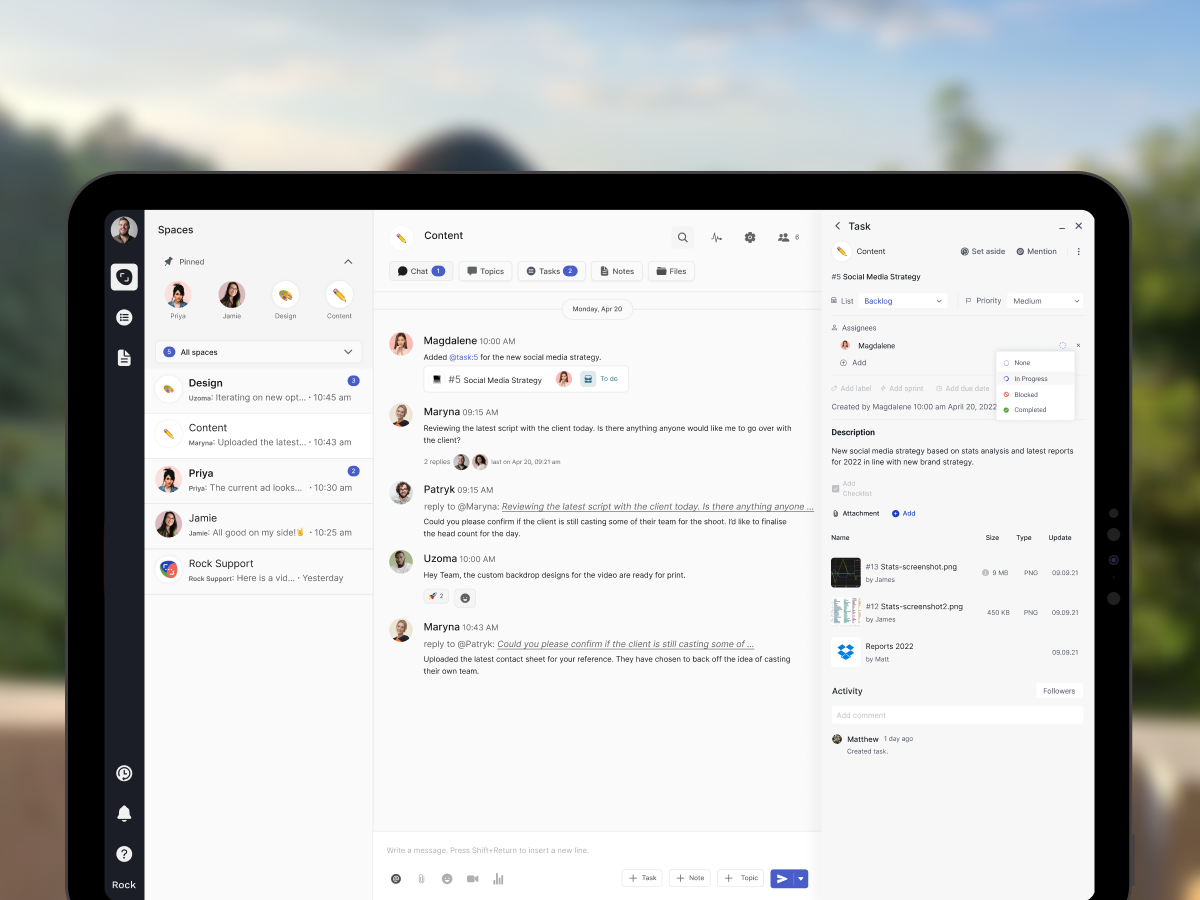
What Rock adds around the call is what Jitsi does not need to do. The agenda lives in a shared note. Action items become tasks with owners and deadlines. Chat before and after the call sits in the same space. Recording is optional, because the decisions that used to need a replay now live as written notes and tracked tasks. The rough edges that make standalone Jitsi feel unfinished are invisible because the wrapper handles them.
Our meetings mini-app treats Zoom, Meet, and Jitsi as interchangeable endpoints. Pick whichever the call requires. Rock fills in the rest.
The smartest open-source setups pair Jitsi with a workspace that handles the agenda, the notes, and the follow-up. On its own, Jitsi is a video window. Inside a workspace, it becomes a meeting system.
The short version
Jitsi is a legitimate open-source video platform with three delivery modes: a free public instance at meet.jit.si for quick external calls, JaaS for managed infrastructure at $0.35 per monthly active user, and self-hosted for full control and zero licensing. It is owned by 8x8, licensed under Apache 2.0, and actively maintained. Adoption is strongest in public sector, privacy-focused teams, and embedded use cases inside other products.
It earns the seat when you are escaping per-seat pricing, need data sovereignty, embed video in your own product, or want signup-free guest joins. It is the wrong tool when you run webinars, ship recorded meetings as deliverables, need SOC 2 Type II with a clean signature page, or rely on polished AI notes. For small and mid-sized teams who fit the first profile, pairing Jitsi with a workspace tool that handles agendas, notes, and tasks is how you get enterprise-feeling video without the enterprise bill.
Our Zoom vs Google Meet comparison covers the paid-vendor side of the same decision. Zoom fatigue explains why the wrapper around the call matters more than the pixel quality. The meeting cost calculator turns per-seat fatigue into a dollar number. Meeting agenda examples has templates for the calls you do keep. And async work covers the meetings you probably do not need to hold at all.
Rock integrates Jitsi at no extra cost inside every space, alongside Zoom and Google Meet. Rock combines chat, tasks, notes, and meetings in one workspace. One flat price, unlimited users. Get started for free.





