

Best Client Management Software for Freelancers in 2026
Most freelance client management tools look similar on the landing page. The real differences show up in how they fit your billing model, your tech comfort, and how much you want to be reachable by clients. Picking the right one saves hours a week. Picking the wrong one adds a subscription you stop using in three months.
This guide covers eight tools that actually work for freelancers in 2026, with honest "Best for" and "Skip this if" framing per tool. Run the recommender widget below to get a pick that fits your setup, then read the detail on the one or two that match.

Pick the Tool in 30 Seconds
Before the tool breakdowns, get a shortlist for your specific setup. Four questions, one recommendation.
Which tool fits your freelance setup?
Four questions. Get a tool pick that fits your billing model, workflow, and budget.
Quick answer. Client management software for freelancers is any tool that holds the client relationship, the work, and the money side in one place. Good tools cover at least two of the three. Great tools cover all three without becoming a second job to maintain. The right pick depends on your billing model, tech comfort, and how reachable you want to be. Rock fits chat plus tasks with clients in one shared space. HoneyBook, Dubsado, and Bonsai lead on contracts and invoicing. Notion suits DIY builders, HubSpot suits a real sales pipeline. Match the tool to the shape of your work, not the feature list.
What to Look For
Every freelance client tool pitches itself as "all-in-one." They are not. Before picking, decide which two or three of these matter most for your practice. Rank them. Use the ranking as your shortlist filter.
Client communication. Can you talk to the client inside the tool (chat, comments, shared threads), or do conversations still live in your email and WhatsApp? If the tool has no client-facing side, you will still need a second channel. Our guide on communicating with clients covers the messaging side in more depth.
Contracts and billing. Does the tool handle proposals, contracts, invoices, and payments? If yes, is it baked in or a bolt-on? Freelancers who do project-based work lose the most time here. If contracts are the main need, pair any of these tools with a solid scope of work template.
Project delivery. Tasks, files, deliverable tracking. Some tools are CRM-first and weak on delivery. Some are delivery-first and weak on client communication.
Price and scale. Per-client or per-user pricing punishes growth. Flat pricing or free-tier-with-guests favors freelancers scaling past three clients.
A freelancer with three retainer clients needs different software than one with fifteen one-off projects a year. Match the tool to the shape of your work, not the feature list.
Side-by-Side Comparison
All eight tools at a glance, with honest pricing and positioning.
| Tool | Price | Best for | Free tier? |
|---|---|---|---|
| Rock | Free tier; $89/mo flat (unlimited users and guests) | Chat plus tasks plus client spaces in one workspace | Yes, useful |
| Notion | Free; up to $10/mo for one user | DIY-inclined freelancers who want to design their own system | Yes, generous |
| HoneyBook | $16 to $19/mo | Creative freelancers wanting proposals to invoicing in one flow | No, 7-day trial |
| Dubsado | $20/mo | Freelancers with repeatable processes who want heavy automation | No, free trial on 3 clients |
| Bonsai | $17 to $21/mo | Solo freelancers wanting tax, contracts, and invoicing built in | No, 7-day trial |
| Plutio | $19/mo and up | Freelancers wanting a branded client portal | No, 14-day trial |
| Moxie | $20 to $25/mo | Freelance-native PM plus CRM plus invoicing in one tool | No, 14-day trial |
| HubSpot CRM | Free; paid tiers scale up quickly | Freelancers with a real sales pipeline (leads and deals) | Yes, the free tier is the point |
The 8 Tools
1. Rock
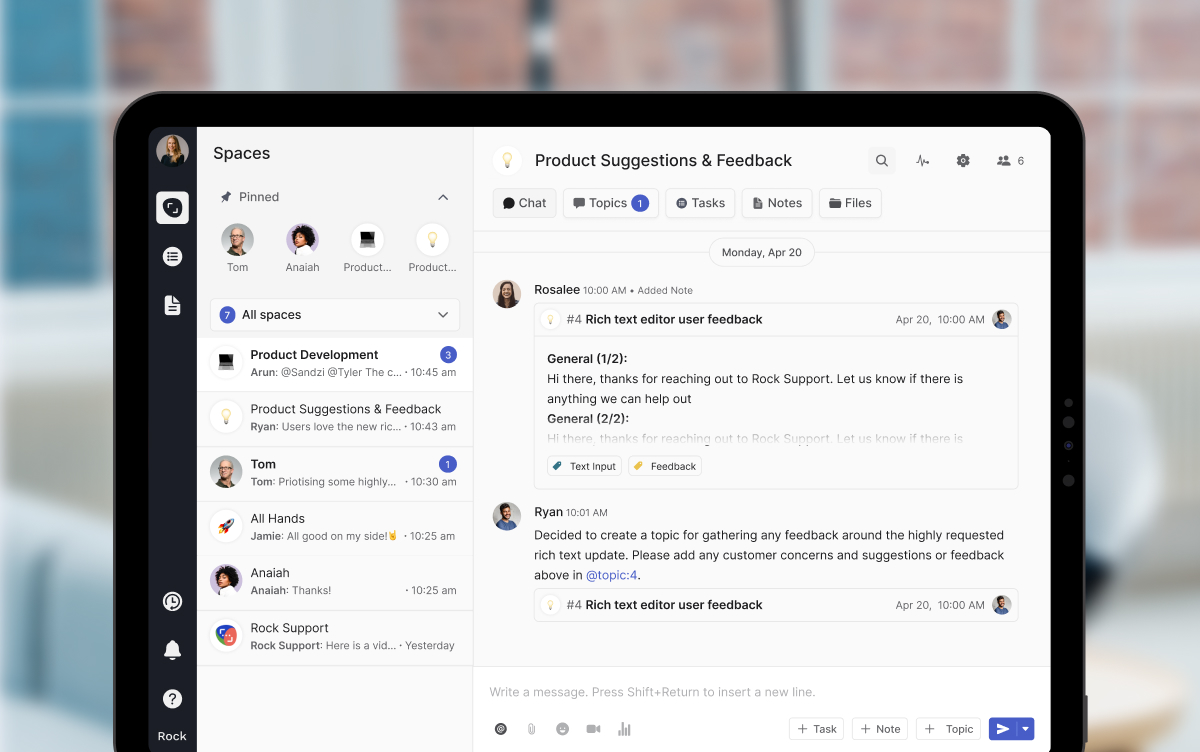
Rock is a chat-first workspace that combines messaging, tasks, notes, and files per space. For freelancers, the unlock is that every client gets their own shared space. The client joins as a guest at no extra cost. That means conversations, tasks, and files stay in one place instead of scattered across email, WhatsApp, and a separate PM tool.
Best for: freelancers with ongoing or retainer-style work who want chat plus tasks plus file sharing in one space per client. Also strong for freelance teams collaborating with clients who are not tool-savvy, because the interface is chat-led and the setup is minimal.
Skip this if: you mainly need proposals, contracts, and invoicing in one flow. Rock does not currently bundle billing. Pair it with a separate invoicing tool, or pick one of the all-in-one platforms below.
Price: Free tier with limited spaces, or $89 per month flat for unlimited users and guests. Uniquely freelancer-friendly: adding clients to a space never costs more. The flat pricing starts to pay back around five clients or two helpers.
2. Notion
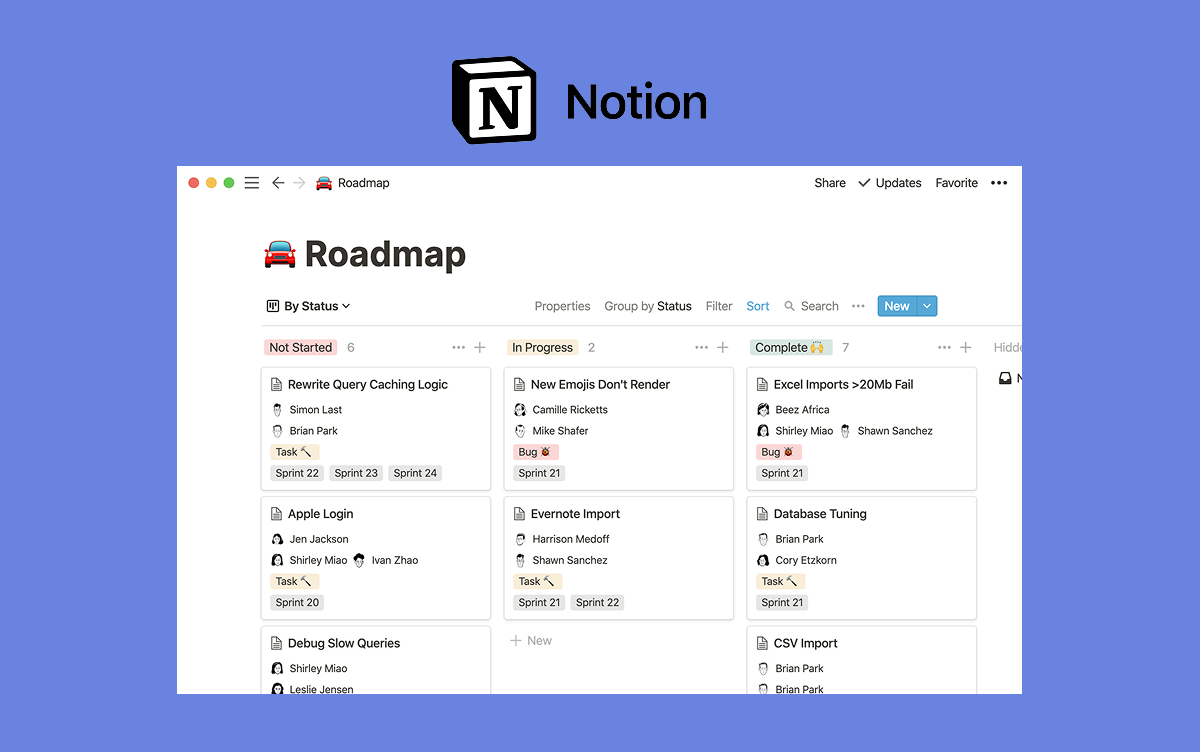
Notion is the tool freelancers use when they want to design their own client system from scratch. Databases, pages, and templates let you build anything from a simple client list to a full CRM with project tracking and deliverables. The flexibility is both the strength and the tax.
Best for: DIY-inclined freelancers who enjoy building their own system and want flexibility over convention. Also strong as a document layer paired with a separate chat and task tool. Rock integrates directly with Notion, so you can pin Notion docs inside a client space while keeping chat and tasks in Rock.
Skip this if: you want something that works out of the box. Notion rewards setup effort. Freelancers who want to start Monday and have something running by Tuesday should pick a more structured tool from the list below.
Price: Free for one person with generous limits, or up to $10 per month for a paid solo tier. Check current Notion pricing.
3. HoneyBook
HoneyBook is a long-time favorite for creative freelancers. It bundles proposals, contracts, invoicing, scheduling, and a light CRM into one polished platform. For photographers, designers, wedding planners, and other project-based creatives, the "proposal to paid" flow is the strongest in the category.
Best for: creative freelancers (photographers, designers, planners) whose work is project-based and who want the money side (proposal → contract → invoice → payment) in one tool. The templates for creatives are a clear edge.
Skip this if: you mainly do retainer-style work rather than projects. HoneyBook's flow is built around one-and-done engagements. Also skip if your main need is chat and tasks with the client: HoneyBook is CRM-first, communication-second.
Price: roughly $16 to $19 per month on annual plans. Check current HoneyBook pricing.
4. Dubsado
Dubsado is the automation-heavy option. It does what HoneyBook does, but with deeper workflow automation, custom forms, and a steeper learning curve. Freelancers who run the same process over and over (intake form → contract → onboarding email → kickoff → delivery → invoice) get the most value here.
Best for: freelancers with repeatable client processes who want to automate as much as possible. Also strong for service-business owners who have already worked out their flow and want the tool to run it.
Skip this if: you want something simple or you are still figuring out your workflow. Dubsado's setup takes days, sometimes weeks, if you use the automation properly. It rewards established freelancers more than brand-new ones.
Price: around $20 per month on annual plans. Check current Dubsado pricing.
5. Bonsai
Bonsai leans into the legal and financial side of freelancing. Contracts (lawyer-vetted templates), invoicing, tax tracking, proposals, and basic project management in one tool. The strength is that it covers the admin work freelancers usually dread.
Best for: solo freelancers who want contracts, tax, and invoicing built in. Particularly useful for freelancers in the US tracking 1099 income, self-employment tax, and mileage. The contract library alone saves weeks of legal research.
Skip this if: you already have an accountant, a contract template, and an invoicing system you like. Bonsai's value is bundling these together; if they are already solved, the bundle is not worth the cost.
Price: around $17 to $21 per month depending on tier. Check current Bonsai pricing.
6. Plutio
Plutio is the branded-client-portal tool. Each client gets a white-labeled space with your branding where they see proposals, contracts, invoices, messages, and file shares. For freelancers who want to present a polished, agency-like experience, the portal is the selling point.
Best for: freelancers who care about presentation and want every client touchpoint on a branded surface. Also strong for solopreneurs positioning themselves as a small agency.
Skip this if: you do not care about branding or your clients will never log into a portal. Plutio is a lot of tool if the portal sits empty. Freelancers with technical clients who prefer email or Slack tend to underuse it.
Price: starts around $19 per month. Check current Plutio pricing.
7. Moxie
Moxie is the freelance-native all-in-one. Project management, CRM, invoicing, and contracts all in one tool, built specifically for freelancers (not adapted from agency or enterprise software). The fit for the freelance use case is tight, which is the biggest thing it has over Dubsado and HoneyBook.
Best for: solo freelancers who want one tool covering everything and who prefer a freelance-native feel over an agency or creative-industry lean. Also strong for freelancers who outgrew a CRM-only or PM-only tool.
Skip this if: you want a shared space where the client participates in chat and tasks. Moxie is freelancer-side-of-the-desk; the client-facing side is lighter than Rock or Plutio.
Price: around $20 to $25 per month. Check current Moxie pricing.
8. HubSpot CRM (free tier)
HubSpot's free CRM is the right pick when your real problem is sales pipeline, not active client management. Leads, deals, contact history, and email tracking are all in the free tier, at a scale that most freelancers never outgrow.
Best for: freelancers with a real sales pipeline: business development, outbound, or a steady flow of prospects. If your bottleneck is landing clients more than managing them, HubSpot free solves the harder half.
Skip this if: you do not really have a pipeline. Most freelancers with one or two referral sources do not need a CRM. HubSpot also scales up fast in price once you hit paid tiers, which is why freelancers should stay on the free tier or switch before that point.
Price: free tier is useful; paid tiers start at $20 per month and scale to enterprise pricing. Check current HubSpot plans.

Tools We Did Not Include (and Why)
A few notable tools did not make the list. Naming them and the reason is more useful than pretending they do not exist.
Salesforce and Pipedrive. Both are excellent CRMs but priced and built for sales teams. A freelancer who genuinely needs either one is running a small agency, not freelancing.
Zoho CRM. Capable and affordable, but the learning curve is high and the interface is dated. HubSpot's free tier is a better starting point for most freelancers who need a CRM.
Flowlu, Taskip, Bloom.io. Solid all-in-one platforms, but they overlap heavily with Moxie and Plutio in positioning. Picking one freelance-native all-in-one is usually enough; choosing between three becomes a tool-shopping project, not a client-management upgrade.
Airtable. Excellent for structured data, but as a client management tool it has the same issue as Notion: you are building, not using. If you want DIY, Notion is easier to start with.
Which Tool Wins for Which Freelancer
A quick decision map for the common cases.
Long retainer work, mostly communication. Rock. Clients join free, chat plus tasks plus files in one place, and flat pricing scales as you add retainers.
Creative project-based work. HoneyBook if you want the "creative business platform" feel. Dubsado if you want more automation depth.
Contracts and tax matter most. Bonsai. The legal and financial tooling is the strongest reason to pick it.
Branded client portal matters. Plutio. Nobody in this list does the portal better.
DIY system-builder. Notion, ideally paired with Rock for the chat and tasks side. Rock integrates with Notion directly, so docs stay where they work and conversations stay where they belong.
Sales pipeline is the real problem. HubSpot CRM free.
Everything in one freelance-native tool. Moxie.
"Freelance client tools only pay off when they match the shape of your work, not the size of your ambition. The best software is the one you will actually use on week three of every client." - Nicolaas Spijker, Marketing Expert
What We Do at Rock
We built Rock with freelancer-client collaboration in mind. Our own team uses one shared space per client: chat, tasks, files, and meetings all in one place. The client joins as a guest and never pays. For a real example, see Fosca's case study on running freelance client work inside Rock.
The practical pattern we see from freelancers who get the most out of Rock: a pinned note in the space with the response-time rule and the weekly update cadence, one task list per active deliverable, and Topics for anything that needs a private thread (invoice questions, sensitive feedback). For docs, many of them keep proposals and longer writing in Notion and pin those into the Rock space through the Notion integration. Best of both tools.
Retention is the main reason to pick any client tool carefully. Harvard Business Review research on client retention still holds: a 5 percent increase in retention can lift profits by 25 to 95 percent. For a freelancer, retention is the whole game. Client acquisition is the most expensive work you do all year. Every tool choice either supports retention or makes it harder.
For the freelance-client process itself, including the seven rules, channel map, and when to fire a client, our client management for freelancers guide is the companion piece to this list. For the onboarding side, the client onboarding checklist covers the first week in detail. And if you are deciding between full PM tools for the delivery side, our best task management apps guide has broader picks beyond client-specific software.
The best freelance client management tool is the one you will still be using in month six. Rock combines chat, tasks, notes, and client collaboration in one workspace, with guests included at no extra cost. Get started for free.





