

Inbox Zero: What It Actually Means (Hint: Not Empty)
Inbox Zero gets misread the moment people hear the name. Most articles, including the ones at the top of Google, treat it as a discipline of emptying the inbox each day. The originator was clear that this is not the point.
This guide covers what Inbox Zero actually means in Mann's original framing, the five actions that make up the method, and how to run it in Gmail or Outlook. It also covers where the method holds up in 2026, and where it breaks. The widget below lets you run a quick triage simulator first; most of the value is in the doing, not the reading.
Quick answer: what Inbox Zero means
Inbox Zero is a method created by Merlin Mann in 2006 and 2007 for processing email without letting it consume your attention. The "zero" refers to zero time your brain spends in the inbox between processing windows, not zero messages waiting in it. The method works by triaging each email through five distinct actions: Delete, Delegate, Respond, Defer, or Do.
Mann himself was direct about the misread. The point is to stop email from running your day, not to perform a clean inbox at 5pm. Most of the productivity gain comes from running the method in batched windows with notifications off, rather than from any specific organizing system.
The simulator above teaches the rhythm faster than reading does. The 5 D's table further down shows when each action applies and the typical mistake to avoid.
What Inbox Zero actually means (in Mann's words)
Mann coined the term in a 43folders.com blog series in 2006 and gave the canonical talk at Google in July 2007. The framing is consistent across both: email processing should not require continuous attention, and the productivity cost of an inbox is not measured in unread count but in cognitive time.
"It is not how many messages are in your inbox. It is how much of your own brain is in that inbox." - Merlin Mann, Inbox Zero Google Tech Talk, July 2007
Mann was equally direct that "as a knowledge worker, the two most precious things you have are your time and your attention." Email vendors and most productivity blogs have spent the years since rewriting the method as five steps to an empty inbox. That is the literal misread; the spirit is that email should occupy as little of your attention as possible, processed deliberately in dedicated windows, not continuously.
This matters because the literal interpretation produces the wrong behaviors. Constant inbox checking to keep the count near zero is the opposite of what Mann recommended. Reaching empty inbox by half-reading 80 messages in 20 minutes is not Inbox Zero either. It is performance triage that costs more attention than letting the inbox sit until the next batched window.
The 5 D's: Delete, Delegate, Respond, Defer, Do
The method is five actions, applied to every email in turn during a processing window. There is no sixth action. There is no "leave it for later" that does not map to one of these. Most of the discipline is choosing the right D quickly, then moving to the next email.
| Action | Use it when | The mistake to avoid |
|---|---|---|
| Delete | The email has no value to you, your team, or your records. Newsletters you stopped reading, app digests, phishing, FYI threads with no action. | Hesitating. Most low-signal email gets archived "just in case" and accumulates as background noise. |
| Delegate | The email needs an action, but you are not the right owner. Forward to the right person and archive. | Forwarding without context. A two-line note explaining what is needed saves the receiver from re-reading the whole thread. |
| Respond | A reply is the action, and it takes under two minutes. Allen's two-minute rule applies cleanly here. | Letting two-minute replies pile up. Each one carries its own context-switching cost; batching 30 of them is its own focus killer. |
| Defer | The email needs a real action longer than two minutes. Capture the action in your task system, schedule a focus block, and archive the email. | Leaving it in the inbox to drift. Deferred emails that stay in the inbox become a second to-do list with no priority logic. |
| Do | The action is small, owned by you, and can be done now without disrupting deeper work. Approving an invoice, confirming a meeting time, sending a quick file. | Confusing Do with Respond. Do means take an action outside the inbox; Respond means the reply itself is the action. |
Some popular accounts collapse the framework to four D's by merging Respond into Do or Defer. Mann's original method has five, and the distinction between Respond and Do is doing real work. Respond means the reply itself is the action. Do means the action lives outside the inbox: approving, paying, scheduling, sending a file. Lumping them together hides the question that should drive the choice.
"If the next action can be done in two minutes or less, do it when you first pick the item up. Even if that item is not a high priority, do it now if you are ever going to do it at all." - David Allen, Getting Things Done
Allen's two-minute rule is the principle behind Respond. Anything longer becomes a Defer with the action captured in your task system, not a longer Respond that bleeds into focus time.
How to do Inbox Zero (Gmail and Outlook)
The method does not need a specific email client; it needs a specific cadence. The steps below assume Gmail or Outlook, the two clients covering most knowledge workers, but the moves translate to any inbox.
- Set two daily processing windows Block 20 to 30 minutes in the morning and 15 minutes at the end of the day on the calendar. Outside those windows, the email tab stays closed. The discipline is not about willpower; it is about creating windows that produce decisions, instead of letting the inbox produce decisions for you.
- Turn off email notifications system-wide Desktop, mobile, browser. Each ping is an unforced context switch. The triage windows are the only access points. Most teams find that nothing breaks; the few cases that genuinely need real-time attention should not have been email in the first place.
- Apply the 5 D's, top to bottom Open the oldest unread first. For each: Delete, Delegate, Respond (under two minutes), Defer (capture in tasks, archive the email), or Do (the action lives outside the inbox). One pass, no second-guessing. The first time it takes longer; by the third or fourth window the rhythm sets.
- Build filters for low-decision email Newsletters, app digests, recurring vendor notifications: filter to a folder labeled "Read later" or "Receipts." This is not deferral; it is removing repetitive triage decisions altogether. Review the folder once a week, not daily.
- Move conversations off email when possible If the same colleague emails you 10 times a day, the fix is not better triage; it is moving that conversation to chat. Inbox Zero only works if the inbox is for the kind of work that actually belongs there: external messages, formal records, and one-to-one threads with people you do not chat with daily.
- Audit weekly, adjust the rhythm After two weeks, look at the pattern. Are the windows enough? Did anything important slip? The right cadence is the smallest one that does not break communication. For some roles that is twice a day; for client-facing roles it might be four windows; for deep-work roles it might be once a day.
One detail surprises most people. The time investment of Inbox Zero, run properly, is roughly 30 to 45 minutes per day, not the multiple hours a continuously checked inbox consumes. The savings come from removing the dozens of micro-context-switches a constant inbox creates, not from doing email faster.
Solo, team, executive: different versions
Inbox Zero works differently depending on the role. The most common reason people abandon the method is applying the solo version to a role that needs the executive version, or vice versa.
| Use case | Realistic target | Sustainable rhythm |
|---|---|---|
| Solo / individual contributor | Empty inbox once a day. Most days, briefly. Some days, not at all. | Two batched processing windows: morning kickoff and end-of-day. Notifications off in between. |
| Team contributor on a small team | Triage to single digits twice daily. Empty is a bonus, not the goal. | Three windows: morning, post-lunch, end-of-day. Slack or chat handles same-day coordination instead of email. |
| Manager / project lead | Triage to under 20 unread daily. Many threads stay open as ongoing context. | Process 3-4 times during the day in 10-minute windows; longer batched reply sessions for substantive responses. |
| Executive / client-facing role | Empty is unrealistic; the right metric is response-time on what matters, not unread count. | Continuous triage with strict Delegate-first habit; an executive assistant or shared inbox for delegation reduces the load further. |
| Agency owner with multiple clients | Per-client folder triage; empty inbox per client matters less than per-client response SLA. | Filters route by client; reply windows align with client time zones; non-client email batched once daily. |
The agency-owner row in particular tends to surprise people. Running Inbox Zero across multiple client retainers is rarely about reaching empty; it is about per-client triage discipline so the right client never waits longer than the SLA promised. That is the realistic version of the method for the role.
What Inbox Zero is not (the 2026 reality)
Modern email volume is genuinely higher than when Mann coined the term. Microsoft's 2024 Work Trend Index found knowledge workers receive 117 emails per day on average, are interrupted every two minutes, and that 48% feel work is fragmented and chaotic. McKinsey's earlier Social Economy research found knowledge workers spend roughly 28% of their workweek on email, the equivalent of 13 hours.
The volume is real, and pretending the original method scales unchanged to those numbers is dishonest. What still works at 2026 volume:
The principle. Zero attention between processing windows. Notifications off. Batched triage. This is more important now, not less.
The 5 D's. The action set covers everything regardless of volume. Higher volume means more decisions per window, not different decisions.
Filters and aggressive deletion. Most of the volume increase is automated email: app digests, vendor updates, marketing. Rules and filters route this without triage; the human inbox stays at human-scale volume.
What does not survive 2026 unchanged is the mental model of email as the primary work channel. Much of the email volume that makes Inbox Zero feel impossible should not have been email in the first place.
"Knowledge workers increasingly replace deep work with the shallow alternative, constantly sending and receiving emails like human network routers, with frequent breaks for quick hits of distraction." - Cal Newport, Deep Work (Grand Central Publishing, 2016)
What we recommend (the better question)
Most of what makes Inbox Zero feel impossible in 2026 is not better email triage; it is conversations sitting in email that should be in chat, in a shared task tool, or in a workspace where context lives next to the work. Better triage at higher volume only buys back so much.
The bridge is to two pieces Rock has covered separately. The Pomodoro Technique covers individual focus discipline. The cost of context switching covers the structural case against constant inbox attention. Inbox Zero is the email-specific version of the same idea.
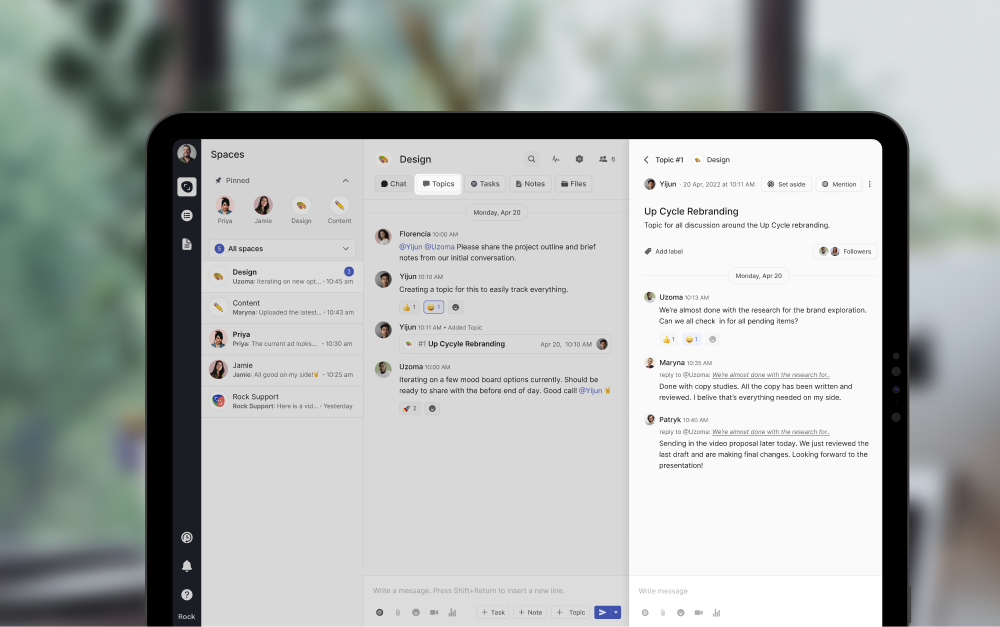
What we do at Rock: chat, tasks, and notes live in the same workspace, so most same-team conversations never become email at all. Topics let threads branch from a main chat without spawning new channels for each. Set Aside lets a teammate flag your message for later instead of forcing a real-time answer.
The result is fewer emails to triage, not faster triage. The same Inbox Zero principle (zero attention between windows) applied upstream of the inbox itself.
Common pitfalls
The most predictable failure modes when teams or individuals try to adopt Inbox Zero.
- Treating empty inbox as the goal Mann's whole point was that "zero" refers to the time your brain spends in the inbox, not the message count. Reaching empty inbox at 5pm by half-reading 80 messages is not Inbox Zero; it is performative triage that costs more attention than it saves.
- Confusing Defer with leaving it in the inbox Defer means the action is captured somewhere you actually look at, like a task system or a calendar block. An email "deferred" by sitting in the inbox is just an email. The discipline is moving the commitment out, then archiving the source message.
- Skipping the Delegate D Many people default to Respond or Do for emails that should have been Delegated. Two-minute self-replies feel productive but accumulate. If a teammate or assistant is the right owner, forwarding with two lines of context is the whole job.
- Treating chat the same as email Inbox Zero on email plus 200 unread Slack pings is not focus; it is the same problem in a different tool. The principle (your brain in the inbox is the cost) applies to every constant-attention channel, with the same fix: batched windows, fewer notifications, clearer ownership.
- Maintaining 14 folders that nobody uses Elaborate folder hierarchies are inbox theater. Modern email search is good enough that two or three folders (Receipts, Read Later, Archive) cover the cases. Anything more complex creates a fresh decision problem at every triage window.
Frequently asked questions
What does Inbox Zero actually mean?
In Merlin Mann's original 2007 framing, "zero" refers to zero time spent thinking about email when you are not processing it, not zero messages in the inbox. Mann himself was clear: "It is not how many messages are in your inbox; it is how much of your own brain is in that inbox." The literal empty-inbox interpretation is the misread that has dominated since.
What are the 5 D's of Inbox Zero?
Delete, Delegate, Respond, Defer, Do. Some sources collapse to four by merging Respond into Do, but Mann's original method is five distinct actions, each with a different default outcome. The 5 D's table above shows when each applies and the typical mistake to avoid.
Is Inbox Zero realistic in 2026?
For most knowledge workers, the literal empty inbox at end-of-day is unrealistic and usually counterproductive. The original method (zero attention spent on email between processing windows) is realistic, with adaptations: batched windows instead of constant attention, filters for low-decision email, and moving same-team conversations off email entirely.
How long should it take to reach Inbox Zero?
Two batched windows totaling 30 to 45 minutes per day is enough for most roles. Client-facing and management roles often need three or four shorter windows. The first week takes longer because the back-catalog is cleared; after roughly two weeks the steady-state cadence settles in.
How do you do Inbox Zero in Gmail?
Gmail's Multiple Inboxes layout works well: one section for unread, one for Snoozed (Defer), and Archive as the default action. Turn off all desktop and mobile notifications; rely on the two-window cadence instead. Filters route newsletters and app digests to a Read Later label that you check once a week.
How do you do Inbox Zero in Outlook?
Use Focused Inbox to surface what matters; route the rest to Other and triage less frequently. Snooze for Defer. Quick Steps for one-click delegate-and-archive on common patterns. The principles are the same as Gmail; only the buttons move.
Should small teams use Inbox Zero?
Yes, but with one extra move: examine which conversations should not be in email at all. Same-team coordination, project status, and quick questions usually belong in chat or a shared workspace, not in seven separate inboxes. The biggest Inbox Zero gain for teams is upstream: less email volume, not better email triage.
How to start this week
Pick two windows tomorrow. Block them on the calendar; treat them as appointments. Outside those windows, the email tab stays closed and notifications stay off. The first day will feel uncomfortable; by the third day the rhythm is doing the work.
If the triage simulator above showed a clear drift in your decisions, run it again at the end of the week. The categories sharpen with about 50 deliberate decisions, not with reading more about the method.
The fastest path to Inbox Zero is not better triage; it is fewer conversations in email. Rock combines chat, tasks, and notes in one workspace. One flat price, unlimited users. Get started for free.





