

How to Write a Scope of Work That Actually Protects Your Agency
The document that saves (or costs) you thousands
Here is a number that should make every agency owner uncomfortable: 78% of agencies rarely or never charge for out-of-scope work. The same report found that 57% lose between $1,000 and $5,000 every single month to scope creep. If you want the board-level fix that makes scope creep visible week over week, pair the SOW with our revision and change request tracker. For freelancers running client work solo, our freelance client management guide covers the boundary-setting habits that prevent this. If you want the board-level fix that makes scope creep visible week over week, pair the SOW with our revision and change request tracker. For freelancers running client work solo, our freelance client management guide covers the boundary-setting habits that prevent this. If you want the board-level fix that makes scope creep visible week over week, pair the SOW with our revision and change request tracker. For freelancers running client work solo, our freelance client management guide covers the boundary-setting habits that prevent this. If you want the board-level fix that makes scope creep visible week over week, pair the SOW with our revision and change request tracker. For freelancers running client work solo, our freelance client management guide covers the boundary-setting habits that prevent this. If you want the board-level fix that makes scope creep visible week over week, pair the SOW with our revision and change request tracker. For freelancers running client work solo, our freelance client management guide covers the boundary-setting habits that prevent this. That is real revenue walking out the door.
The difference between agencies that absorb those losses and agencies that don't? A clear scope of work. Not a proposal. Not a creative brief. A document that spells out what you are delivering, when you are delivering it, and how much it costs. The "when" lives in the project roadmap, the visual artifact paired with the SOW. Both sides sign it before any work begins.
If you have ever finished a project wondering how you ended up doing twice the work for the original price, this guide is for you. We will walk through every section your SOW needs, the exclusions most agencies forget to write, and the change order process that turns "one small thing" into a paid add-on.

Build your scope of work
Fill in the basics and generate a client-ready SOW document.
What a scope of work actually is (and isn't)
Agencies mix up four documents all the time, and it causes real problems. A client signs a proposal thinking it is a binding SOW. A project manager treats a creative brief as the deliverable list. Here is how each one is different.
A creative brief is the client's document. It describes what they want, who their audience is, and what success looks like from their side. You don't write this. They do (or you help them fill it in).
A proposal is your sales document. It explains why your agency is the right fit, outlines your approach, and gives a ballpark price. It is designed to win the deal, not govern the project.
A scope of work (SOW) is the execution agreement. It lists exactly what you will deliver, in what quantities, by when, and for how much. Both parties sign it. It is the reference point for every conversation about what is "in" or "out" during the project.
A contract or MSA (Master Service Agreement) is the legal framework. It covers liability, IP ownership, termination clauses, and confidentiality. The SOW sits inside this framework as an attachment or exhibit.
If you need help defining the boundaries of your project before writing the SOW, our guide on how to define your project scope covers that process in detail.

The 10 sections every agency SOW needs
A solid SOW does not need to be long. It needs to be specific. Here are the 10 sections that protect both you and your client, with example language you can adapt.
1. Project overview
One to two sentences that describe the project at the highest level. This is not the place for strategy or background. Keep it tight.
Example: "[Agency] will design and develop a 7-page responsive website for [Client], replacing the existing WordPress site with a custom build on Webflow."
2. Objectives
What does success look like? Use measurable outcomes, not vague goals. "Increase organic traffic" is not an objective. "Increase organic traffic by 30% within 6 months of launch" is.
Example: "Launch the new site by June 15. Achieve a Core Web Vitals pass on all pages. Reduce bounce rate from 68% to under 50%."
3. Deliverables with quantities
This is where most SOWs fail. "A website" is not a deliverable. "5 responsive pages (Home, About, Services, Portfolio, Contact), 1 custom contact form, and 1 blog template" is a deliverable.
Every item on this list should be countable. If you can't put a number next to it, it is too vague.
4. Exclusions (the most important section)
We will cover this in its own section below because it deserves the attention. For now, know this: every deliverable implies ten things the client might assume are included. Write them down.
5. Timeline and milestones
Break the project into phases with dates. Tie payment to milestones when possible. This gives both sides checkpoints and reduces the risk of a project dragging on for months.
Example: "Phase 1: Wireframes delivered by April 20. Phase 2: Design mockups by May 5. Phase 3: Development complete by June 1. Phase 4: QA and launch by June 15."
6. Revision rounds
Set a limit. Two rounds per deliverable is standard for most agency work. Define what counts as a "round" (one consolidated set of feedback, not five separate emails over two weeks). For a deeper look at managing revisions mid-project, see our guide on handling client revisions.
Example: "Each deliverable includes 2 rounds of revisions. A revision round consists of one consolidated feedback document submitted within 3 business days."

7. Client responsibilities
Projects stall when clients don't deliver their part on time. Your SOW should list what you need from them: brand assets, copy, login credentials, feedback within a set number of days. Add a clause that delays on their side push the timeline.
Example: "Client will provide all brand assets and copy by April 10. Feedback on each deliverable is due within 5 business days. Delays in client deliverables will extend the project timeline by an equal number of days."
8. Payment terms
Spell out the deposit, milestone payments, and final payment. Include late payment terms. A common structure: 50% upfront, 25% at the midpoint, 25% on delivery.
Example: "50% deposit due before work begins. 25% due upon design approval. 25% due on project delivery. Invoices are payable within 14 days. Late payments incur a 2% monthly fee."
9. Change order process
This is the section that turns scope creep from an agency problem into a business opportunity. For the full operational playbook alongside the SOW, see our client working agreement template. Agency consultant Karl Sakas calls the response to out-of-scope requests the "7 magic words."
"Would you like an estimate for that?" Karl Sakas shares the story of an agency owner who started using this single question for every out-of-scope request. Within a year, the agency recovered over $100,000 in work they previously would have done for free. Not because clients were angry. Because clients didn't know the request was outside the scope until someone told them. - Karl Sakas, President, Sakas & Company
Your SOW should include a simple change order clause: "Work outside this scope will be quoted separately and requires written approval before it begins." That is it. One sentence that protects thousands of dollars.
10. Acceptance criteria
How does the client officially sign off that a deliverable is done? Without this section, projects linger in a gray zone where the client keeps requesting tweaks and nobody can say "this is finished."
Example: "Each deliverable is considered accepted if the client does not submit feedback within 5 business days of delivery. Final project sign-off requires a written approval email from [Decision Maker Name]."
The exclusions nobody writes (but should)
The exclusions section is where experienced agencies separate themselves from everyone else. It is easy to list what you will deliver. It is harder, and more important, to list what you won't.
Here are common exclusions by project type that most agencies forget to include.
Website projects
- Content writing
- Photography or stock images
- SEO optimization
- Ongoing maintenance after launch
- Hosting migration
- Third-party plugin licensing
Branding projects
- Website design
- Social media templates
- Print collateral beyond business cards
- Packaging design
- Brand photography
Marketing campaigns
- Ad spend budget
- Influencer sourcing and fees
- PR placements
- Ongoing community management
- Video production
Content and SEO
- Stock images or custom photography
- Video production
- Paid content distribution
- CMS setup or migration
- Ongoing SEO monitoring after project end

The pattern is simple. For every deliverable in your SOW, ask: "What will the client assume is included that actually isn't?" Write those down. Your future self will thank you.
"Draft specific contracts listing deliverables with explicit additional fees for extra work." - Kirsten Rabe Smolensky, Owner, Minerva Appraisals LLC
3 mistakes that cost agencies money
Even agencies with a solid SOW template can lose money if they make one of these three common mistakes.
Mistake 1: Getting sign-off from the wrong person
You spend three weeks working with a marketing manager. The designs are approved. Development starts. Then the CEO sees the project for the first time and wants to change the direction completely.
The fix: name the decision-maker in the SOW. Not the day-to-day contact, but the person with final approval authority. Add a clause: "Design direction changes requested after sign-off by [Decision Maker] will be treated as a new scope and quoted separately."
Mistake 2: Using ambiguous language
Words like "reasonable," "approximately," "as needed," and "ongoing support" have no place in a SOW. Every vague term is a future argument waiting to happen.
The fix: replace every soft word with a number. "Approximately 5 pages" becomes "5 pages." "Reasonable revisions" becomes "2 revision rounds." "Ongoing support" becomes "4 hours of post-launch support within 30 days of delivery."

Mistake 3: No change order process
The client adds "one small thing." Then another. Then another. Fifteen small things later, you have done an extra two weeks of work and never sent an invoice for any of it. Research from PMI found that 52% of projects experience scope creep, and only 31% finish on time, on budget, and within scope.
The fix: include a change order clause in the SOW and actually use it. When a request comes in that falls outside the signed scope, respond with the 7 magic words: "Would you like an estimate for that?" Most clients will say yes, no, or "let's skip it." All three answers are better than doing the work for free.
"Scope creep refers to the uncontrolled growth of features that the team attempts to stuff into an already-full project box. Change is never free." - Karl Wiegers, PhD, Author of Software Requirements
A McKinsey-Oxford study found that 66% of large-scale projects run over budget. For agencies, this often starts not with poor planning, but with poor scope documentation.
SOW vs. proposal vs. contract: a quick comparison
Agencies get into trouble when they treat these documents as interchangeable. They are not. Here is a side-by-side comparison.
The proposal gets you hired. The SOW keeps the project on track. The contract covers you legally. You need all three, and none of them replaces the others.
After the SOW is signed
A signed SOW only works if your team actually uses it during the project. Too many agencies celebrate the signature and then file the document away. For an engineering agency that keeps scope visible day to day, see our Metio case study. Here is a quick workflow that keeps it relevant from day one to final delivery.
Convert deliverables into tasks. Every line item from section 3 of your SOW should become a task with an owner, a deadline, and a clear "done" definition. This connects your task management directly to what the client is paying for.
Pin the SOW where your team can see it. If the scope document lives in an email thread from three weeks ago, nobody will check it. Put it somewhere visible: a pinned message, a shared note, or a documentation folder in your workspace.
Check every new request against the scope. Before saying yes to anything, open the SOW and ask: "Is this in the deliverables list?" If yes, do it. If no, quote it. This sounds rigid, but it actually improves client communication because expectations are always clear.
Use the change order clause. The first time you use it feels awkward. The second time feels normal. By the third time, the client expects it and respects the process. That is how healthy projects work. Clients don't push back on boundaries that are clearly communicated. They push back on surprises.

What we recommend at Rock
At Rock, we see agencies handle SOW documents in a few different ways. The setup that works best is surprisingly simple.
Write the SOW as a pinned note. Create a note in your client's space with all 10 sections. Pin it so it stays at the top. Anyone on the team (or the client) can open it in two clicks. No digging through email.
Turn deliverables into tasks. Each deliverable from the SOW becomes a task on the project board. Assign owners, set deadlines, track progress. The client can see what is in progress and what is waiting on them.
Invite the client into the space. When the client has visibility into the project, they understand what is happening and what comes next. This reduces "just checking in" messages and builds trust. A client onboarding checklist can help you set this up consistently. For the full framework including the sales-to-delivery handoff, see our client onboarding guide.
Handle change requests in chat. When a client asks for something new, discuss it in the project chat. Reference the pinned SOW. If it is outside scope, quote it right there. No separate email chain. No confusion about what was agreed. For teams working across departments, this kind of cross-functional collaboration keeps everyone aligned.
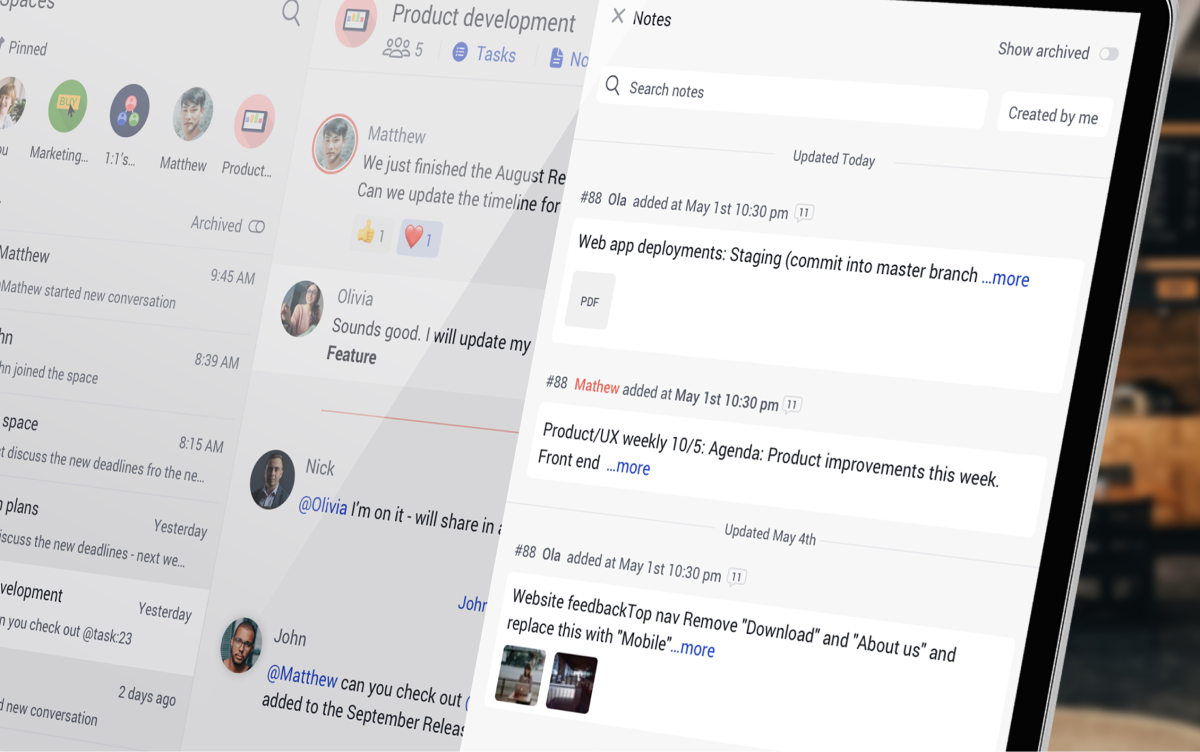
The whole idea is to keep the SOW visible and actionable. A document that lives in a filing cabinet (digital or physical) does not protect you. One that lives in your daily workspace does. Whether you choose agile or waterfall as your project approach, the SOW stays the same: it defines what was agreed before work started.
If you want a head start on the project setup, our simple project template gives you a ready-made structure for tasks, notes, and files.
Start with the next project
You probably can't go back and add a scope of work to a project that is already halfway done. That is fine. Start with the next one. Use the 10 sections above as a checklist. Write the exclusions first, because that is the section that saves you the most money. Add the change order clause. Get the right person to sign.
The agencies that charge for out-of-scope work are not more aggressive or less client-friendly. They just have a document that makes expectations clear before the first task starts. That document is the SOW.
Manage your next client project in Rock
Chat, tasks, notes, and files in one workspace. Free to start.





