

What is Slack? Pros, Cons & Honest Review (2026)
Slack is a business messaging platform built around channels, threads, and direct messages instead of email. Launched in 2014, it was acquired by Salesforce for $27.7 billion in 2021. It now serves more than 200,000 paying organizations, including 77% of the Fortune 100.
If you are researching what Slack is in 2026, you probably already know the brand. This guide covers what it actually does, what it costs, what the trade-offs are, and when a different tool makes more sense. No marketing spin.
The short version: Slack is excellent at team chat, channels, and integrations. It is expensive per user, it pushes toward always-on culture, and it does not include task management. The rest is context.
One cost worth flagging before you commit. Slack now sells its AI as a paid add-on on top of the per-user price. If your team already pays for ChatGPT or Claude, it is fair to ask what you are paying twice for. The AI inside these tools usually pulls from the same models you already have access to. The real value is whether it is wired into your work, not the model itself.
Slack vs Popular Alternatives (2026)
Before the deep dive, here is how Slack stacks up against the tools people most often compare it to, usually Microsoft Teams and Google Chat. The full comparison is in our guide to Slack alternatives.
| Tool | Best For | Free Plan | Paid From |
|---|---|---|---|
| Slack | Integrations, cross-company | 90-day history | $7.25/user/mo |
| Rock | Chat + tasks, flat pricing | 3 spaces, 5 members | $89/mo flat |
| Microsoft Teams | Office 365 organizations | Unlimited chat | $4/user/mo |
| Discord | Communities and voice | Unlimited members | Free (Nitro $9.99/mo) |
| Pumble | Free Slack-style alternative | Unlimited history | $2.49/user/mo |
What Slack Actually Does
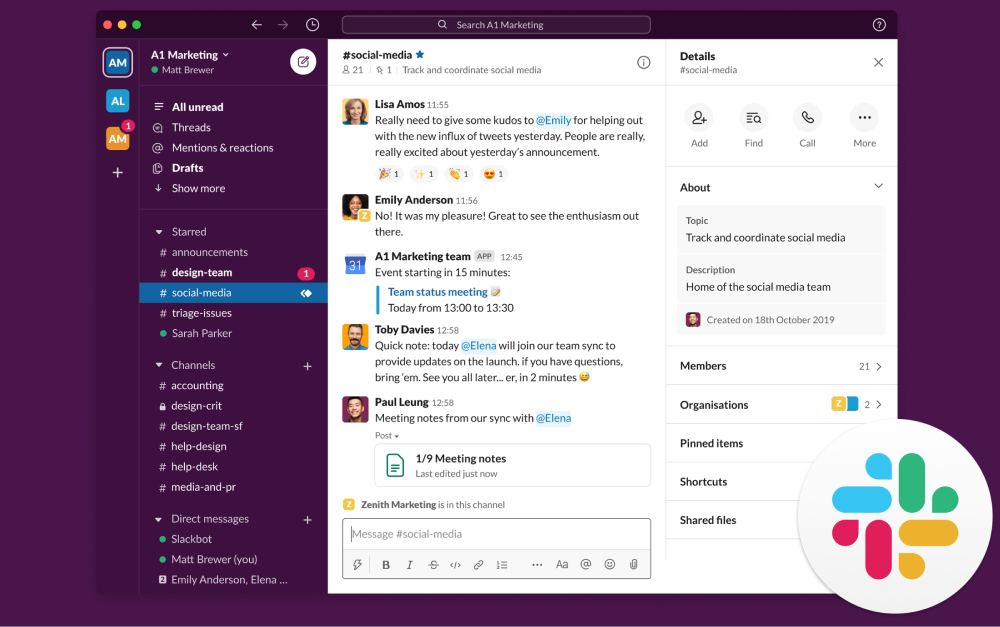
At its core, Slack replaces email for internal team communication. Channels organize conversations by project, client, or topic. Threads keep replies from clogging the main feed. Direct messages cover one-on-ones, and group DMs handle ad hoc huddles.
On top of that base, Slack has added more over the last few years. Huddles are lightweight voice or video calls that start with one click in any channel. Canvas is a document surface that lives inside a channel, similar to a lightweight Notion page. Workflow Builder automates routine actions (like onboarding checklists or weekly updates) without code.
Slack AI, now bundled into the Business+ plan, summarizes long threads, drafts replies, and generates huddle notes. The integration ecosystem is the other big draw. The Slack App Directory lists more than 2,600 apps, including native connectors for Salesforce, Jira, GitHub, and Google Workspace.
Slack Pricing in 2026
Slack's pricing changed in June 2025. Business+ went from $12.50 to $15 per user per month on monthly billing, and the previously separate Slack AI add-on was bundled in.
Free: No cost. Message history limited to 90 days, one-on-one huddles only. Data older than a year is permanently deleted per Slack's usage limits policy.
Pro: $7.25 per user per month on annual billing, $8.75 monthly. Unlimited message history, group huddles, basic Slack AI features (thread summaries, huddle notes).
Business+: $12.50 per user per month annually, $15 monthly. Adds SSO/SAML, compliance exports, and the full Slack AI suite.
Enterprise+: Custom pricing, typically starting around $15 per user per month. Includes multi-workspace Grid, data loss prevention, HIPAA compliance, and advanced admin controls.
Slack Business+
What it costs as your team grows
Monthly cost
$2,250 per year
Annual billing. Pro tier is $7.25/user/month; Enterprise+ starts around $15/user/month.

Want chat with your task management?
Rock combines messaging with tasks and notes in one workspace. One flat price.
Where Slack Excels
Integrations ecosystem. More than 2,600 apps plug into Slack natively. If your team runs on Salesforce, Jira, GitHub, or Notion, Slack often becomes the nerve center where those tools communicate.
Polished async UX. Threads, channels, Canvas, and Huddles are as good as they get for team chat. Slack has spent a decade refining this experience, and it shows.
Cross-company collaboration. Slack Connect lets you share channels with clients, partners, and vendors without inviting them into your workspace. Onboarding friction is near-zero if they already use Slack.
Search and history. Years of conversations become searchable context. For teams that move between projects or onboard new people often, that institutional memory is genuine value.
"The experience of being able to search back over all your team's communications in all the different channels, is super-valuable." - Stewart Butterfield, Slack co-founder, Thought Economics
The Honest Trade-offs
The 90-day limit on free plans. Slack cut free-plan message history to 90 days in September 2024. Data older than a year is permanently deleted, not hidden. For small teams relying on the free tier, this is a real liability. Context you expected to search for later is simply gone.
Per-user pricing scales painfully. At Business+ annual billing, a 100-person company pays $15,000 per year. A 500-person company pays $75,000. Flat-priced alternatives like Basecamp or Rock often land well below that once team size passes roughly 15 people.
Notification fatigue and always-on culture. Microsoft's 2025 Work Trend Index found that knowledge workers get interrupted every two minutes during core work hours. Slack is designed to amplify that pattern, not reduce it.
Chat alone does not cover the work. Slack is messaging. Tasks, deadlines, project plans, and documents live in other tools. That tool sprawl is why some teams look for an all-in-one alternative. Rock, for example, combines chat with task boards, notes, and files in the same workspace at a flat $89 per month.
Security and trust. In July 2024, Disney had 1.1 TB of Slack data and 44 million messages leaked after one employee account was compromised. Disney subsequently moved off Slack. The lesson is not that Slack is uniquely insecure. It is that concentrating years of sensitive internal conversations in one tool is a real risk surface.
"Slack is the right tool for the wrong way to work. It optimized the haphazard approach to work that e-mail had initiated." - Cal Newport, Professor of Computer Science, Georgetown University
What we do at Rock: we use chat, task boards, notes, and client spaces in one workspace. When a client message becomes a task, we turn it into one with a click. There is no searching across Slack and a separate PM tool for where a decision lived.
Or pick the all-in-one option.
Rock combines chat, tasks, and notes. Free for small teams.
Who Slack Is Really For
Best for: mid-size to enterprise teams (50 to 5,000+ people) that already run on Salesforce, Jira, or GitHub. Cross-company collaboration via Slack Connect is the other strong use case, especially for partners, vendors, and clients who already live in Slack.
Skip Slack if: you are a small team on a budget. The 90-day history limit and per-seat pricing hurt. Skip it too if you need chat and tasks in one tool, or if your culture struggles with always-on expectations. Slack amplifies the habits your team already has, for better or worse.
For privacy-sensitive work, Slack is not end-to-end encrypted. Teams handling confidential client data or regulated information usually need to layer in Enterprise Grid controls or look at encrypted alternatives.
Related Reading
If Slack sounds close but not quite right, a few cluster reads cover the adjacent questions:
Explore alternatives. Our 20 best Slack alternatives compares tools across budget, privacy, and all-in-one categories.
Consumer apps at work. Slack vs WhatsApp for team messaging covers the upgrade path from consumer messaging apps.
Slack vs ClickUp. Our Slack vs ClickUp head-to-head covers the chat-first vs work-first decision.
Slack vs Discord. Our Slack vs Discord head-to-head covers voice, compliance, and when each fits.
Comparing work-first tools? See our honest reviews of ClickUp, Asana, and Monday.com.
All instant messaging options. The guide to instant messaging apps for business covers the full category.
Rock vs Slack head-to-head. If you want the direct comparison, see Rock vs Slack.
If you are weighing Slack against a tool that combines chat, tasks, and notes, Rock bundles them in one workspace. One flat price, unlimited users. Get started for free.





