

ClickUp vs Basecamp: Power vs Calm, Compared Honestly
ClickUp and Basecamp solve project work in opposite directions. ClickUp is the everything app. List, board, Gantt, calendar, workload, mind map, automations, time tracking, dashboards, AI, all in one product, all configurable. Basecamp is the opposite. To-dos, schedules, message boards, Hill Charts, and Campfire chat live inside one calm, opinionated workspace, and you adjust your team to the tool.
That single difference shapes everything else. This ClickUp vs Basecamp guide compares them honestly across philosophy, features, AI, and pricing, and runs the real annual cost at 5, 15, 30, and 50 seats. Some teams should pick ClickUp. Some should pick Basecamp. Some should pick neither because the chat-first workspace closer to how your team actually communicates lives somewhere else. Run the recommender below for a starting point.
ClickUp or Basecamp? Or neither?
Answer 4 questions for an honest pick.
1. What matters most for your team?
2. How fast do you need the team productive?
3. How many people will use it?
4. Do clients or freelancers need access?
Start over
Quick answer. ClickUp is a customizable PM platform with deep features and a steep learning curve. Basecamp is opinionated PM with built-in messaging and a one-day onboarding. Pick ClickUp if your team will invest two to four weeks of setup for long-term flexibility. Pick Basecamp if you want a calm tool that works on day one. Pick neither if you want chat-first agency work with clients in the same space.

Need chat in the same workspace?
Rock pairs messaging with tasks and notes. One flat price, unlimited users.
What ClickUp is built for
ClickUp launched in 2017 with a simple pitch. One app to replace them all. Tasks, docs, goals, chats, whiteboards, mind maps, time tracking, and dashboards all live inside one workspace, and the company ships new features almost weekly. The free plan is one of the most generous in the category. Unlimited tasks, unlimited members, and access to most core features at $0.
The trade-off is depth. ClickUp gives you 15 plus task views and a deep workspace hierarchy (Workspaces, Spaces, Folders, Lists, Tasks, Subtasks). The Unlimited plan adds 1,000 monthly automations, and ClickUp Brain is a separate AI add-on at $9 per user per month. Most teams report two to four weeks before everyone is fully comfortable. Power users love it. New hires often need a champion to walk them through setup.
"ClickUp is extremely easy to use and adaptable to different needs… we can customize pretty much anything." - Erica C., VP of Creative, Marketing & Advertising agency (Capterra reviewer)
Erica makes the point well. ClickUp consolidates a lot of tools into one place, which is exactly its appeal for teams ready to invest setup time. For a wider field of options, see our ClickUp alternatives roundup. For a more direct PM head-to-head, our ClickUp vs Monday comparison covers the per-seat versus per-seat split.

What Basecamp is built for
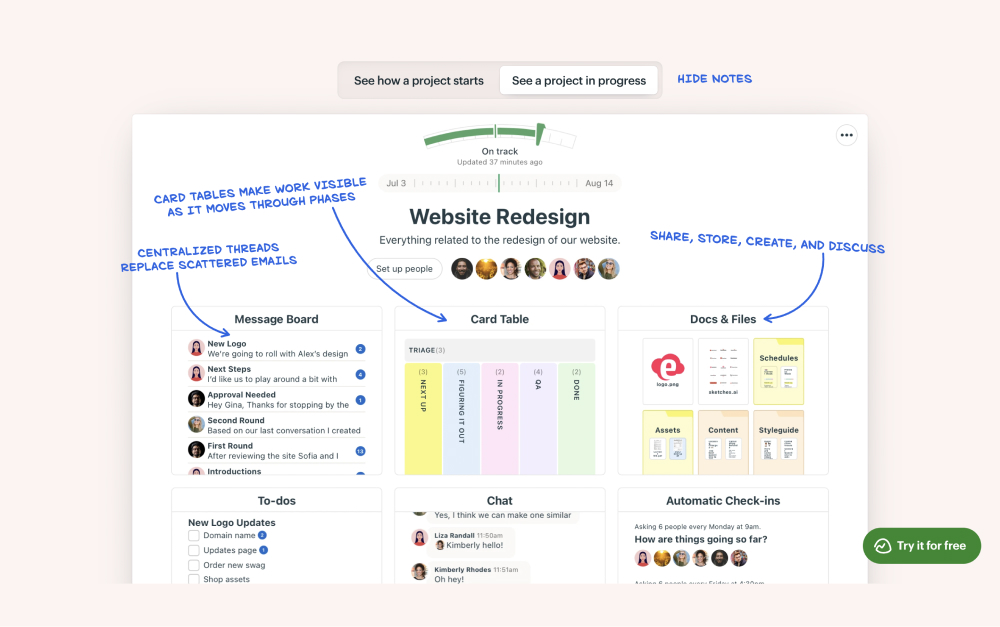
Basecamp has been around since 2004 and has stayed close to one idea. Project management should be calm. Each project gets a message board, to-do lists, a schedule, a chat room called Campfire, real-time pings, file storage, and Hill Charts that visualize uphill and downhill phases of work. The features are deliberately limited. There is no native Gantt chart with cross-task dependencies, no built-in time tracking on the standard tier, and no AI features.
That last point is intentional. 37signals, the company behind Basecamp, has been openly skeptical of bolting AI features onto every product. Founder David Heinemeier Hansson wrote about Basecamp becoming agent-accessible in late 2025. Instead of baking AI features in, 37signals revamped the API and added a CLI so external agents can drive Basecamp from the outside. The bet is that users will pick their own AI rather than accept the one baked in.
"Clean interface and straightforward structure made it easy for everyone on the team." - Radha S., Legal Assistant, Legal Services (Capterra reviewer)
Radha captures the appeal. Basecamp arrives with a finished product and the layout is fixed. New teammates open it and know where to write a status update, where to add a to-do, where to start a chat. Onboarding takes hours, not weeks. For agency owners onboarding freelancers and clients across time zones, the finished-product feel reduces friction. Teams that want a deep wiki or formal Gantt-based PM will find Basecamp limiting. For the wider field, see our Basecamp alternatives guide.
ClickUp vs Basecamp side-by-side
Five axes matter when picking between these tools. Philosophy, tasks and project management, communication and chat, AI in 2026, and pricing model. Here is how each one stacks up.
| Feature | ClickUp | Basecamp |
|---|---|---|
| Philosophy | Customizable everything app | Opinionated, finished product |
| Best for | Teams that want depth and will invest setup time | Async PM with calm, simple interface |
| Task views | 15+ (List, Board, Gantt, Calendar, Workload, Timeline, Mind Map) | To-dos, Schedule, Card Tables (Kanban), Hill Charts |
| Built-in chat | ClickUp Chat (added 2024) | Campfire and Pings |
| Time tracking | Native, Unlimited plan onward | Add-on ($50/mo Timesheet) |
| Automations | 1,000/mo on Unlimited, 5,000 on Business | None native |
| AI in 2026 | ClickUp Brain ($9/user/mo add-on) | None native (deliberate). API and CLI for external agents |
| Free plan | Unlimited tasks and members, 60 MB storage | 1 project, 20 users, 1 GB |
| Paid from | Unlimited $7/user/mo, Business $12/user/mo | Plus $15/user/mo, Pro Unlimited $299/mo flat |
| Client access | Guests on paid plans | Built-in client view (hides internal threads) |
| Onboarding time | 2 to 4 weeks for full team adoption | 1 to 2 days |
| Mobile | Functional, occasional lag reports | Strong |
Philosophy: customization vs calm
This is the spine of the ClickUp vs Basecamp comparison. ClickUp arrives with components. Views, custom fields, automations, dashboards, and templates all wait to be configured. The team architect decides what every list looks like, what fields every task carries, how dashboards aggregate. The flexibility is real.
Basecamp arrives with opinions. Each project gets the same set of tools. Message board, to-dos, schedule, chat, docs and files, Hill Charts. The trade-off is real on both sides. ClickUp pays off after weeks of investment. Basecamp pays off on day one but hits a ceiling once teams need formal project management with dependencies and resource workload views.
Tasks and project management
ClickUp wins on raw depth. List, Board, Gantt, Calendar, Workload, Timeline, Mind Map, Activity, and more. Custom statuses, custom fields, recurring tasks, dependencies, sprint reporting, and template date remapping are all part of the product. For agencies running 10 similar client engagements per month, template date remapping alone saves hours of manual scheduling work.
Basecamp ships To-dos, Schedules, Card Tables (lightweight Kanban added in 2024), and Hill Charts. The set is small and focused. There is no Gantt chart with cross-task dependencies, no resource workload view, and no formal sprint reporting. Teams that need dependencies and capacity planning will outgrow Basecamp. Teams that want a clean message board and a to-do list per project will find Basecamp easier to live in. See our sprint duration guide for context on which teams actually need formal sprints.
Communication and chat
Both tools ship with chat. ClickUp added native Chat in 2024 and it sits next to tasks and docs in the same workspace. Basecamp has Campfire (group chat per project) and Pings (one-to-one direct messages) baked in since the early days. Both work. Neither is the equal of a chat-first product like Slack or Rock for daily back-and-forth.
The practical difference is around the message board. Basecamp encourages thoughtful written updates instead of rapid-fire chat. The format is closer to email than to Slack, and async-first agencies tend to like it. ClickUp Chat behaves more like a standard team chat product with channels and direct messages. If your team already lives in Slack or WhatsApp, neither tool replaces that. For more on the trade-off, see our asynchronous work guide.
AI in 2026
This is the cleanest wedge between the two products. ClickUp ships ClickUp Brain, an AI add-on at $9 per user per month on top of any paid plan. Brain handles writing assistance, task summaries, project rollups, and meeting transcription. ClickUp also released Super Agents in late 2025, autonomous AI that can execute multi-step workflows.
Basecamp went the opposite direction. 37signals deliberately ships no native AI features. The company experimented internally and chose not to ship most of what they built because it was not actually useful. Their public bet is on agent-accessibility instead. The revamped API and new CLI let external agents like Claude, ChatGPT, or Cursor drive Basecamp from the outside. Users bring their own AI rather than have one chosen for them. If AI is part of how your team works, ClickUp Brain is the more out-of-the-box experience. If you want a tool that does not push you toward AI features, Basecamp is rare in the modern PM market.
Pricing model
ClickUp uses straight per-user pricing on annual billing. Unlimited is $7 per user per month. Business is $12 per user per month. ClickUp Brain (AI) is a separate $9 per user per month add-on. Pricing details on clickup.com/pricing.
Basecamp uses two pricing models in parallel. Plus is $15 per user per month, which favors small teams. Pro Unlimited is a flat $299 per month on annual billing or $349 per month on monthly billing for unlimited users. The flat-rate option becomes the cheaper Basecamp once a team passes 20 people. Pricing details on basecamp.com/pricing. The headline math depends on team size, which is what we model next.
Real cost at 5, 15, 30, and 50 seats
Most ClickUp vs Basecamp articles model 10 seats and stop. Below is the verified annual cost at 5, 15, 30, and 50 seats using 2026 list prices on annual billing. Rock is included as a flat-rate reference because the math gets interesting at the larger sizes.
| Team size | ClickUp Unlimited | ClickUp Business | Basecamp Plus | Basecamp Pro Unlimited | Rock Unlimited |
|---|---|---|---|---|---|
| 5 people | $420 | $720 | $900 | $3,588 | $899 |
| 15 people | $1,260 | $2,160 | $2,700 | $3,588 | $899 |
| 30 people | $2,520 | $4,320 | $5,400 | $3,588 | $899 |
| 50 people | $4,200 | $7,200 | $9,000 | $3,588 | $899 |
Three things stand out. First, ClickUp Unlimited is the cheapest paid option below 12 people. Second, Basecamp Pro Unlimited at $3,588 per year stays flat regardless of team size. That makes it cheaper than ClickUp Business once you pass roughly 25 people, and cheaper than Basecamp Plus once you pass 20. Third, Rock at $899 per year on annual billing is cheaper than both Basecamp options at every team size, and cheaper than ClickUp Business from about 8 people up.
The breakeven math is worth knowing. At 5 people, ClickUp Unlimited at $420 per year wins on price. Past 12 people on ClickUp Unlimited, Rock costs less. Past 20 people, Basecamp Pro Unlimited becomes the better Basecamp option but is still 4 times the cost of Rock. Add ClickUp Brain and the per-user math changes again. AI bundling is a real choice, not a footnote.
None of this matters if the wrong tool is wrong for the work. Pricing alone is a bad reason to switch. But the ClickUp vs Basecamp pricing question, combined with which philosophy fits your team, shapes the decision. For broader cost modeling across PM software, see our best task management apps guide.
When to pick ClickUp
ClickUp is the right pick for teams that want depth and will invest setup time. Some specific cases.
Teams that need Gantt charts, dependencies, and workload views. Basecamp does not ship these. ClickUp does, on the Unlimited plan at $7 per user per month. For agencies running parallel client projects with shifting deadlines, this matters.
Repeatable project work. ClickUp templates include date remapping, which automatically adjusts every due date when you spin up a template for a new project. If your agency launches 10 similar projects per month, this saves hours of manual scheduling. See our ClickUp vs Asana for a deeper PM-side comparison.
Teams that want native AI bundled into the daily flow. ClickUp Brain is the smoother experience for teams that will actually use AI for task summaries, doc drafts, and project rollups.
Teams large enough to assign a champion. The learning curve is real. Without one person owning the setup, ClickUp adoption tends to stall.
Skip ClickUp if. Your team resists complex tools and you cannot dedicate 2 to 4 weeks to setup. You want a tool that works on day one. Or your real friction is chat plus tasks together, not deeper PM features.
When to pick Basecamp
Basecamp is the right pick for teams that want calm, opinionated project management with chat included. Some specific cases.
Async-first agencies and consultancies. The message board format encourages thoughtful written updates instead of rapid-fire chat. Hill Charts give a sense of progress without daily status meetings. The whole product is shaped around how async teams actually work.
Teams that bring clients into projects. Basecamp's client-access mode hides internal threads and gives clients a curated view of project progress. The flow is built in, not bolted on. Agencies that ran into ClickUp's guest-seat complexity tend to find Basecamp a relief.
Teams that prefer no AI baked in. If you want a tool that does not push you to use AI features, Basecamp is rare in the modern PM market. The 37signals stance is a genuine product choice, not marketing.
Teams larger than 20 with a flat-rate preference. Pro Unlimited at $3,588 per year covers any number of users. For a 30-person team, that beats both ClickUp Business ($4,320) and Basecamp Plus ($5,400). Predictable cost matters when budgets are tight.
Skip Basecamp if. You need formal project management with Gantt charts, dependencies, or resource workload views. You want native AI as part of the daily flow. Or your team will outgrow the simple feature set within a year.
Or pick the third option.
Rock combines chat, tasks, and notes in one workspace. Free for small teams.
What we recommend
The honest answer is that neither tool fits every agency. ClickUp wins on depth but adds complexity that takes weeks to land. Basecamp wins on calm but caps out the moment you need real PM. The pattern we see most often at Rock is teams that bought one of these tools and ran into the trade-off. They end up running a chat tool plus a PM tool plus a docs tool side by side.
That is the friction we built Rock to remove. Chat, tasks, and notes in one workspace, with clients and freelancers joining your spaces directly. Flat $89 per month for unlimited users (or $899 per year on annual billing), so a 30-person team pays less than $30 per person per year. Not the right fit if you need Gantt charts and dependencies. Right fit if your real problem is switching between three apps every day.
Picking the right tool is one piece of solving project friction. Picking the right communication setup is another. For more on the broader category, see our Basecamp vs Notion, Asana vs Basecamp, ClickUp vs Jira, or Basecamp vs Monday head-to-heads, or browse better than ClickUp for the chat-first angle.

FAQ
Is ClickUp or Basecamp easier to use?
Basecamp is easier to use on day one. The interface is opinionated and most teams are productive in a day or two. ClickUp has more features but takes 2 to 4 weeks for the team to feel comfortable. If onboarding speed matters more than feature depth, Basecamp wins this round.
Which is cheaper at scale?
Basecamp Pro Unlimited becomes the cheaper Basecamp option once a team passes 20 people, at a flat $3,588 per year. ClickUp Unlimited stays cheaper than Basecamp Plus at any team size and stays cheaper than Basecamp Pro Unlimited up to about 42 people. ClickUp Business at $12 per user per month catches up to Basecamp Pro Unlimited around 25 people.
Does Basecamp have AI features?
No. 37signals deliberately ships no native AI in Basecamp. They revamped the API and built a CLI in 2025 so external agents can drive Basecamp from the outside. Inside the product itself, there is no AI assistant, no AI summaries, and no AI writing tool.
Does ClickUp have built-in chat?
Yes. ClickUp added native Chat in 2024 and it sits next to tasks and docs. It is functional but not a chat-first product. Most teams that need rich daily chat run a separate messaging tool alongside ClickUp. Basecamp's Campfire chat is older and lighter, and message boards carry most async communication.
Should an agency pick ClickUp or Basecamp?
It depends on the work. Agencies running complex client projects with dependencies, time tracking for billing, and repeatable templates lean ClickUp. Agencies prioritizing client communication, async updates, and minimal training time lean Basecamp. For agencies whose real friction is chat plus tasks together, neither tool is the right answer. See our task management apps guide for the broader category.
The right tool keeps your team focused without adding overhead. Rock combines chat, tasks, and notes in one workspace. One flat price, unlimited users. Get started for free.





