Latest news from Rock

Discover our insights on the Future of work, learn how to build better teams & work environments .
Showing 0 results

You can have the best possible team, the best product or service, and the best management tools in the market. But if you don’t have an idea of what a communication plan is (and you don’t put it into practice) you can gloriously crash down an entire business project. Or, at the very least, generate chaos and confusion among those involved.

But it works both ways. Communication planning provides a straightforward way to simplify interactions as well as minimize frustrations. And, ultimately, getting a project across the finish line.

It is a critical tool for professionals to stay fully engaged with a project and create a strong framework to build relationships with internal and external parties.

It might sound complex, but it really is all about keeping things tidy and staying organized at work. To ‘spark joy’ among your team, as Marie Kondo would say. Joking aside, a clear communication plan can really help you simplify tasks and processes.

A critical tool for asynchronous communication

As remote work is taking over workplaces around the world, a communication plan becomes even more critical to keep distributed teams in the loop.

Employees more often work from different cities, continents, and time zones these days. Walking around the workplace and getting an update from a colleague sitting next to you is no longer an option. You also can't set up a spontaneous meeting with a team member you just saw at your office.

As a result, every stakeholder needs to understand clearly where to find all the ongoing information, how the different details will be shared and whom to contact in each case (and through which channel).

Moreover, when asynchronous work takes place – with fewer meetings and more time zones across the work environment – having all the communication processes well-defined and organized becomes even more relevant.

Plus it provides an additional level of documentation that allows people to find updates easily, optimizing their time and energy to focus on the work that matters.

So, how to make communication plans effective, you might be wondering. Just keep reading. In this article, we will guide you through the process and we will give you a project charter example, so you can create your own and start rocking your comms!

But let’s start with the basics.

What is a communication plan?

Communication is a critical part of any successful project. But what is a communication plan? Well, to put it in a simple way, a communication plan is the line of action to make communication happen in a clear and organized way.

A communication plan gives you the structure to target your messages effectively across teams and clients. Also, it defines collaboration tools, communication strategies, and insights on where and how to share information.

There are two types of communication plans: if you address your teams, then your plan is internal. If you focus on your clients, then you need to develop an external communication plan.

In both cases, if, for example, there has been a weekly update on a certain project, a communication plan sets up the guidelines to update and access that information. It also defines the processes on how to contact the right person through the right channel.

Think of a communication plan as a road map to get the project team involved and keep everybody on the same page.

What to include in a communication plan?

Think about who is the communicator and the audience. Also, about what needs to be shared, as well as specific details that you can explain briefly. For instance, does it involve the team (internal) or it also involves communicating with clients (external)?

In your communication plan project management, you need to break down all the documentation, timelines, and communication channels. You also have to set expectations on how updates and critical information will be shared throughout the project.

Broadly speaking, a high-level communication plan should include:

  • Goals and approach. Think about the purpose of your communication plan, how it fits your organizational strategy, and the goals that you are planning to accomplish. What are the main expectations?
  • Stakeholder communications. Create a stakeholder communication plan to define who is involved in the project. Also, the audience: who is the message for? Define how often information will be shared. Will there be daily, weekly and/or monthly updates? Think about who is in charge of sending the information.
  • Tools and channels. Describe the methods and channels to share briefings, communicate updates, make a presentation, and meeting agendas, among other information. Which medium or remote work tool will be used in each case?

Five key elements that a successful communication plan must have

On a more specific note, any ‘successful communication plan’ requires five specific elements, according to Forbes:

  • The purpose. Think about your goals and ask yourself how you are going to reach them. How will you deliver your message to get the most impact?
  • The audience. In the case of an external communication plan, define your target audience, including clients, professionals, and media. It could be useful to create an audience map to identify key audiences.
  • The medium. You need to define clearly which communication channels you will use to deliver your information. We will tell you more about this very shortly and provide an example of a project charter that you might find useful.
  • The timing. Timing is key. When and how often are you going to communicate your information? Set up a timing plan. Prioritize the most important tasks in your comms strategy.
  • The owner. If the communications are addressed to external audiences, the media professionals, marketing, and public relations teams will be the ones in charge. If it is an internal communication plan, you must involve project managers and human resources departments. Decide who is in charge of sending the update/communication.

If you define each element properly, the communication plan will allow you to ‘put together a solid strategy that could bring more success for your business’, says product marketing expert Haseeb Tariq.

If you have read this far, you may know how to answer the question of what is a communication plan. It’s time to put theory into practice.

And now… let’s rock your comms plan!

A thing to keep in mind when you design a communication plan – either for internal or external parties – is to keep it as clear and accurate as possible.

Especially in the case of asynchronous work, it is essential to use a platform that simplifies communication and the way people interact with each other. Rock will allow you to keep your communications on point and bring all project stakeholders in one area to work effectively as a team.

On Rock, you can clearly define which spaces and mini-apps you are going to use for your communications. Ask yourself what you are going to use each feature for:

  • Spaces. Do you need a specific space for your communications plan? If so, create a dedicated space and invite everyone who needs to be aware of it.
  • Mini-apps. Will the communications plan go into a topic, note, or task? Think about which mini-apps are the most suitable to store and manage your plan. How about creating a specific topic for communication updates? Decide how and where you will communicate updates and changes, too.
  • Integrations. Which other apps – Google Docs, Sheets, Loom, etc – will be integrated? Rock offers many integrations of external apps, so you can have it all in one place.
  • Meetings. Will you need to set up meetings? If yes, integrate video conferencing apps such as Zoom or Google Meet.
  • File sharing. Will you need to upload and send files? You can integrate various cloud storage providers. Everybody in a space can access your files through the Files mini-app.

Rock is very multifunctional. You can facilitate specific mini-apps such as task management, notes, chat, files or topics to share different communication updates for different teams, project management frameworks, and clients.

rock your communications plan

Example of project charter for a communications plan

Break everything down into a sample project charter and create a list. it will give you a clever vision of your communication goals and processes.

Think of activities such as weekly updates on a project. For instance, communications that your company sends every Thursday to the same client. You can create a topic on Rock to follow and store all the information up to date. You can use the project charter sample below for inspiration and adapt it to your plan.

Communications plan template

Why do you need a communication plan?

There are many reasons that explain why a communication plan is vital for a successful project or business. The most important one is that it helps you organize the communication flows and the information you share with your team or audience.

It can also nurture cross-departmental communication between team members. And it allows you to be more strategic and effective with your conversations.

Rock can help you have all your communications in one space. You don’t have to waste time switching between apps. Also, it allows you to make sure that everyone has access to the same information. No more confusion between hundreds of spreadsheets and multiple chats.

Start a communication plan with Rock and keep everyone in tune with your comms!

Sep 20, 2022
November 22, 2022

What is Communication Plan? Explained

Nicolaas Spijker
Editorial @ Rock
5 min read

Product manager, project manager, and project lead. Do you know the difference between each of these roles? For people that aren’t in the industry, they could look like a variation of the same job. This is far from true.

The product manager role is fairly new. Despite that, the sector is growing hugely. Glassdoor recently released a study that suggests that product management is the 10th best career path in the US.This article will go into more detail about a product manager job description.

However, as a brief overview, a product manager focuses on the development, strategy, and improvements of a product. The job is increasingly more important in workflow spaces, product teams, and digital industries.

What Does A Product Manager Do?

A digital product manager will take the overall business goals and align them to the customer base’s needs. With this, they steer a product through creation, across multiple teams. The aim is to deliver a final product that satisfies both the user base and achieving business objectives.

Product managers will prioritize the new releases and structure the product life cycle. This as well as delivering the product onto the market.Some key elements of a product manager job description are:

  • Working closely with internal and external stakeholders on improvements, issues and priorities.
  • Following customer needs, collecting information, and analyzing it.
  • Prioritizing product features to be released in the upcoming releases.
  • Assisting in creating a long-term vision and roadmap of the product.
  • Translating the organizational strategy into product requirements and required improvements.

A product manager often works across multiple departments. Because of this, a product manager fills any empty space between teams. This creates a cohesive working unit, ensuring that a product release is successful.

It’s unfortunate that sometimes teams such as key account management, customer support, engineering and design, work in isolation. A successful product manager nurtures cross-departmental communication for product improvements, changes and updates.

Putting this into practice, a product manager will define a vision and a strategy. From there, the features get outlined, and a development plan is created. All of these steps create a product’s lifecycle.

what does a product manager do

Day-to-day activities of a product manager

Over the last 20 years, product manager roles have gotten more and more popular. Even so, compared to other disciplines, there is still much to define about what a product manager does. A product manager balances a variety of responsibilities and tasks, but what that means varies from company to company.

This lack of clear boundaries is one of the things that makes product management such an exciting position. However, there are some core elements outlined about how to be a product manager.

Product management in a large business

A product manager's role and responsibility in a big company could place them within a team of qualified colleagues. There is more support and resources for a product manager. Nevertheless, there is also more time spent on managing stakeholders to keep them in line with the product vision.

As large businesses need to balance more teams and external stakeholders, gathering and managing information becomes a bigger part of day-to-day responsibilities.

Product management in a small business

Compared to a large business, a product manager in a small company spends less time gathering information from different teams and stakeholders. The product role in a smaller business is more focused on direct work, rather than the big picture plans.

They focus on more straightforward tasks that are essential to moving a product towards completion. As the teams are smaller, they can also handle multiple stakeholders easily, as there likely won’t be too many departments or stakeholders to manage.

Product manager responsibilities

No matter the size of the business, there are a few activities that a product manager in any kind of company will focus on.

1. Create a product vision

The product vision must balance the business objectives alongside the needs of the user base. This means reaching out to stakeholders and customers. With this information, a product manager forms a roadmap and strategy to deliver the product into its vision.

2. Fight for the user

A product manager must understand what the users and customers want. To do this, they conduct a large amount of consumer research. A product manager will find the client base, reach out to them and collect key information. This often means working closely with the customer support team to determine issues that aren’t currently addressed. This information is then used to improve the strategy and development.

3. Market and competitor analysis

To fulfill a product vision, a product manager must understand the needs of the user. As well as their competitors’ offerings. A product manager must understand why customers behave as they do, or why competitors have chosen certain paths. Without this, they could not know where their own product is leading.

Skills needed to become a product manager

A product manager has to combine a range of skills. Some of their skills are very technical, others are interpersonal and theoretical. Below you can read more about the 4 most important skills that should be highlighted in the product manager job description.

Communication and negotiation

Despite how hard businesses try, inter-department rivalries can develop. However, a product manager must navigate the needs of multiple departments. Clear communication and good negotiation skills are crucial to bringing stakeholders together around a product vision.

Customer service, design, engineering, operations, and management must all unite. For a business to meet its objectives and create a happy customer base, all departments must work as a team.A good product manager should set up clear communication strategies to make sure everyone is on the same page.

There are multiple ways to ensure clear communication. These include regular briefings, detailed meeting agendas, clear and accessible documentation, and defined opportunities for teams to give and get feedback.

Here's a list of essential skills everyone in product management should possess for communicating effectively:

  • Stakeholder management
  • Information & documentation management
  • Project management
  • Effective communication
  • Negotiation
  • cross-functional communication
  • Feedback management

Prioritization skills

Setting clear and thought-through priorities is another important aspect. The needs of different stakeholders should get addressed. However, this cannot happen all at once. Most teams, in some capacity, will ask for extra resources. But some teams need resources more than others.

It is the job of the product manager to define the teams that need resources the most. It’s also important to estimate the amount of work that goes into an activity. Product managers should be able to separate a project vs task so teams spend realistic amounts of time and resources on different activities.

Prioritization can get tricky. It doesn’t just cover priorities within a company, but clients as well. For example, is it better to release a feature that satisfies the needs of one big client, but might disadvantage a number of smaller ones? Or does the product diverge from its current path, to better align with new business goals?

The right answer depends on very specific business situations. Any product manager must clearly understand the impact that their decisions have.Here's a list of essential skills you can add in the product manager job description for prioritizing work effectively:

  • Information pooling and data analytics
  • Task management
  • Priority management
  • Time tracking and skill assessment

Leading the team to work independently

A product manager must have strong leadership skills. This can come in many shapes and sizes, but one thing is for sure. To get a product released, there are too many decisions for a single person to make. It is clear that a product manager couldn’t make all decisions alone.

A product manager has to lead a team of specialists and departments. Ideally, these employees should be capable of deciding the best course of action for their field of expertise. If a decision becomes problematic, a product manager should use their problem-solving and leadership skills wisely.

It’s important to create a space for teams to work independently as well. Especially in remote environments, leveraging asynchronous work as much as possible can be advantageous. Here's a list of essential skills everyone in product management should possess for leading effectively:

  • Interpersonal skills
  • Empathy
  • Recognize and effectively respond to different types of communication styles
  • Leadership
  • Coaching & mentoring
  • Personal development management

Understand how to test and innovate

As a product moves through each stage and gets closer to completion, it enters a testing phase at some point. For example, a software product manager will be in charge of the beta stage and pilot programs of a new product.

They must have a clear understanding of the testing process and how to overcome issues that arise. Learning more about project management frameworks can be very beneficial to people in this role.

Knowledge of the agile framework is extremely useful here. An agile product manager can adjust a project around quick feedback.

Peter Bendor-Samuel, CEO of Everest Group, writes on Forbes:  “Product management is a companion component of the Agile methodology and DevOps operations. Product management creates a Product manager – an individual responsible for the software product – who sits outside the development team.”

Why product managers should be fluent in task management

Effective task management is one of the most crucial skills that any IT product manager should master. With many businesses moving to remote and hybrid working patterns, task management is an important bullet to add in your product manager job description.

A product manager must be on top of monitoring multiple coworkers' tasks. This is important to keep all teams on schedule and guarantee that everyone is staying organized at work.

To move a product successfully from conception through to completion, a product manager should have the right remote work tools to help streamline processes and organize workflow.

Manage your products with Rock

This is where Rock comes into the picture. Product managers can bring customers, the development team, and management together in one place. Communicate and collaborate with anyone within seconds.

Task management on Rock makes managing a product way more straightforward. A product manager can create, assign and follow tasks that are necessary to develop and improve a product. This gives the whole team a clear overview of where everyone stands in the process.

The Files mini-app lets all the people involved with a project access files easily. This means all files get organized in one place. Add files directly from your device or connect to Google Drive, Dropbox, OneDrive, Figma, Miro, and many others.

product management with files

Also, you can store any vital project information for everyone to access in one place. In this case, the Notes mini-app or the Pinboard come in handy. Using these features you can make sure that everyone on the team is on the same page and up to date.

To find out more about how Rock can improve your product management, sign up for free today.

Sep 14, 2022
November 22, 2022

Product Manager Job Description - Everything You Should Know

Nicolaas Spijker
Editorial @ Rock
5 min read

It’s no secret that hiring the right people can be challenging. Particularly for small businesses and startups, hiring the wrong person in a role can have devastating effects. Recruitment management systems are used to increase the chances of finding the best match for your open role.

A lot of financial investment and time goes into hiring, and there is opportunity costs that comes with every new position. Remote work tools can make hiring more straightforward and easier to manage by reducing admin tasks, grouping information, and creating workflows.

However, recruitment management systems aren’t always designed with startups, small businesses or smaller sized teams in mind. Businesses don’t always need to invest their resources into a large recruitment management system.

Sometimes, making use of available resources can be the best organizational strategy when hiring.

What is a recruitment management system?

Let’s explain briefly what a recruitment management system is. A recruiting management system helps automate and manage the process of finding new employees.

With a hiring management system, a company has an overview of the people who apply, are interviewing, have been offered a job with documented candidate information, and internal feedback.

Basically, it brings together all the different pieces of information that businesses need when hiring. Recruitment management systems help organize the data while also staying organized at work.

Step by step, the number of candidates pass through different stages in the recruitment process until one or multiple people fill the job opening. After that, you can onboard them with a 90-day plan or other frameworks.

Why use a recruitment management system?

It is part of the natural lifecycle of a company to hire new employees. Sometimes people get promoted, someone leaves, retires or is fired. Achieving company goals and objectives or overall company growth can also be a reason for new positions opening up.

To keep up with the hiring needs, every company must create a process to find and employ new team members in an effective and productive way. Without a good process, companies risk creating a toxic work culture, loss in productivity and a waste of resources and time.

Particularly on a smaller scale, this recruiting process is relatively straightforward. However, as more people are hired or openings receive a lot of applicants, needs become more complex. The hiring process must then adapt to ensure you find the right fit for your open role.

Depending on the system, there is a range of ways a management system makes the hiring process more efficient. With technology advancing so quickly there are now even tons of recruiting tools that use artificial intelligence to automate recruiter tasks.

Here are two main reasons businesses use a recruitment management system as a small business or startup.

  1. Reduce administration costs by documenting all information in one place.
  2. Pick out the most qualified candidate and hire them faster

Let’s dive a bit deeper into each reason.

Decrease administration costs

The admin side of hiring can become overwhelming. Contracts must get prepared, jobs posted, candidates reviewed, interviewed, and assessed. Alongside this, schedules must align for interviews and meetings. It takes a lot of time to bring relevant information together and organize it.

Organizing and scheduling becomes even more difficult if your business operates on an asynchronous work schedule. A recruitment management system reduces endless back and forth while keeping everyone informed on the current hiring funnel.

Filtering for qualified candidates and faster hiring

An established hiring process will allow teams to more easily pick out the most suitable candidate. A recruitment management system helps businesses screen candidates and assess their capabilities in more efficient ways. This means less time wasted on people that aren’t suitable or the best match.

Writing for Forbes, Deborah Lovich, makes an interesting point about how important streamlining the hiring process is. She writes, ‘In today’s hyper-competitive job market, as the saying goes, those who hesitate are lost.’ If you want to move quickly and not lose talent to competitors, hiring them quickly is extremely important.

With a better-organized hiring process, you can cut down on the back and forth and move qualified applicants to the ‘hired’ stage faster. This means you can improve the chances of the best profile match joining your team.

For smaller teams there are better alternatives to manage hiring

For a lot of startups and small businesses, finding a suitable recruitment management tool can be a challenging task. Advanced tools have a lot of functionality that a small business or startup might not need.

This is because a lot of recruitment management systems were created with scaleups, larger businesses and big multinationals in mind. These large companies are continually hiring, or have a lot of applications to process.

Typically, they also have hiring managers or human resources departments that spend most of their day using the system.Comparatively, a smaller business or startup might have just one person or team member who goes through applications. It might even be a shared responsibility among team members across business functions.

Enterprise recruitment management tools have a lot of functionality that a startup will probably not need to make use of when hiring.

Think of advanced dashboards and complex automation systems.There are a few reasons why enterprise software is not the best match for startups and small businesses. But the main one is that they simply don’t get as many applications on a day-to-day basis.

Also, they might not go as deep into the recruitment process, with their hiring funnel consisting of 1 or 2 stages instead of 5+. Let's dive a bit deeper into why an enterprise tool is often not effective.

Consider the price

Dedicated recruiting tools are expensive. This is especially an issue if a business is not continually hiring and works with a small team.

If a startup wants to hire a new person for a role, buying access to a recruitment management system for one hire is not effective. The subscription could run for months, which is a waste of resources.

For smaller teams, money is often tight, and there are probably better investments the team can make instead of purchasing a recruitment management solution.

Training employees

Specialized tools require getting used to. Users must learn how different parts of the platform work. This can be an ineffective use of time, particularly if there are only a few roles to fill.

A small business might just need a fraction of the functionality that the tool provides. However, because there is so much functionality, an inexperienced user can become overwhelmed.

A new user can get lost among all the options. The more training your team needs to navigate a tool, the harder it gets to involve a wider team as not everyone will be able to navigate the platform.

What startups and small businesses need for a recruitment management system

Despite the benefits of using a hire management system, sometimes startups and small businesses need a more tailored solution. Below are some of the key features a startup should look for in a recruitment management system.

1. Simple functionality

Complex or hard-to-manage functionality makes hiring harder. Usually, it takes a lot longer to get started with the recruitment process.

If you want to hire someone, you want to start right away. You don’t need to go through a whole setup and learning process before processing applications. Or have the hassle of signing up to get a free trial with a bigger tool.

Your recruitment management system must be accessible enough so anyone can jump in without too much of a learning curve. The focus should be on getting new team members rather than learning new software. Simple functionality promotes  cross-functional communication as everyone can chip in.

2. Integrated work environment

Don’t overcomplicate work with hundreds of different processes and tools. Incorporate the management recruiting system into current work streams. This allows people to easily access new information and updates.

For example, some companies have candidate information stored in an email, the job role in a shared folder, notes on the candidate’s interview on paper, and internal discussions on a communication tool. Browsing each of these tools to find and add information to your workflow is inefficient.

Spreading your recruitment information across multiple platforms is a waste of time. In this circumstance, you’re continually searching different information stores. Instead, securing information in one place will save a lot of time, everything is together, and organized for access.

Collaboration tools like Rock bring all of those knowledge bits into one place. Everyone is involved without switching platforms. You can do everything from one place, with centralized documentation.

3. Lower the cost

An RMS (recruitment management system) only makes sense for smaller startups or businesses if it’s free or low in cost. Startups must be mindful with how they spend their money. They should spend resources on other critical areas of the business if an effective, low-cost alternative is available.

With Rock, you can create unlimited spaces and manage the whole recruitment system at no cost for your team. You can access all main functionality you might need, such as messaging, tasks and notes just like large recruitment management systems.

It can also be neatly combined with other day-to-day work, as you can create unlimited spaces and adapt the functionality for marketing workflows, general team communications and even engineering, sales or customer support tasks.

How To Set Up a Hiring Funnel With Rock

Setting up a hiring funnel in Rock is simple and quick. To do this, follow the steps below:

1. Create a dedicated space and add colleagues involved in the recruiting process.

You can create unlimited group spaces for managing work. A group space allows you to invite anyone in or outsite of your team. This means that you can encourage cross-departmental communication or even invite external recruiters or people you are interviewing to a Rock space.

Group spaces offer loads of functionality, here’s a brief overview:

  • Full-fledged messaging: reactions, gifs, polls, threads, and everything else you need to message team members.
  • Task management: Switch between list, board, and calendar view with feature-rich tasks for any kind of workflow.
  • Note-taking functionality: set up meeting agendas, interview guidelines or other important information in dedicated notes.
  • Meetings: start a Zoom, Google Meet, or Jitsi meeting for free, you can also share asynchronous video with Loom.

2. Connect relevant storage providers, add relevant files about the open positions and keep everyone updated within that space

If you’re storing important hiring information on Google Drive, Dropbox or OneDrive you can directly add the folder to your space.

This allows you to quickie access CV’s, cover letters, interview questions and other important information in your space. You can even attach your cloud files to tasks, notes or topics so you don’t have to search around for information.

3. Leverage the tasks Mini-app as a Recruitment Management Tool

It is also possible to create a hiring flow by leveraging task management on Rock. The Tasks mini-app allows you to add new applicants and manage their progress from start to finish in one place. Essentially, every applicant becomes a ‘Task’, which is then moved between the different stages of the funnel.

To use the Tasks mini-app as a recruitment management tool, format the lists in your recruitment space in a way that mirrors a recruitment pipeline.

For example, you can structure your process like this:

  • CV review - the applicant has registered interest in the role
  • First interview - candidates to interview
  • Case - Complete a case assessment before moving to the last interview stage.
  • Accepted for the final interview - a shortlist of applicants to interview again
  • Job offer - the candidates that offers were sent to
  • Hired - the candidates that accepted the job offer
  • Rejected - candidates that turned down the offer or did not pass an application.

In this recruitment pipeline, you can assign and process applicants by creating tasks. For example, a job applicant for a key account manager job applies and a task is created with their relevant information. A colleague involved with their application can be assigned to manage the task.

Any thoughts, remarks or complementing information gets added to the task description. For example, their cover letter. The team can then discuss the applicant in a dedicated comment section under the task.

With a task created, you can move the applicant across each section of the funnel. Following this method, you replicate the functions of a dedicated recruitment system, without paying for the tool.

recruitment management system tasks

Use Zapier to Automate the Recruitment Management Process

You can even automate the recruitment process with a Zapier integration in the PRO plan. With this setup, you can automate emails from applicants to go straight to a recruitment space as dedicated tasks with titles, assignees, descriptions, and more.

Instead of copying the data from emails into the relevant tasks, Zapier automatically moves the information into a task and formats it. This is useful because it removes a layer of administration and speeds up processes.

Centralize Your Activities

For startups and smaller businesses, it is important to work efficiently and not waste resources. The more you centralize activities, the better. With Rock you can centralize messaging and task management in one place.

Collaborate and communicate the whole hiring process while also managing other workflows in the same place. Conveniently, you can also manage any other project related to, for instance, marketing campaigns, product development, sales, or customer success.

Find the Right Recruitment Management System For Your Business

A recruitment management system can dramatically improve the hiring process. But it is important to consider the size of your business and whether a dedicated tool is actually necessary.

Use Rock to manage the hiring process and seamlessly incorporate recruiting into your everyday team communication, collaboration, and project management. Set up your first recruitment space and start with a hiring funnel within minutes of signing up.

Sep 12, 2022
January 13, 2023

What is a Recruitment Management System (RMS)?

Nicolaas Spijker
Editorial @ Rock
5 min read

Metio Software is a Czech software development company that primarily focuses on creating web presentations, information systems and software prototypes. Markéta Mazlová, the CEO of Metio Software, shares her team’s experience with Rock and asynchronous work.

Within their team, everyone is free to change their location and work from anywhere. The team leverages Rock to make this possible while staying productive and completing projects.

Metio Software is a team of 12 people who also work with freelancers on various projects. The company operates fully remotely.

Why Metio Software chose an all-in-one, asynchronous first approach for their remote collaboration

Markéta shares that before discovering Rock, the company was mainly using Slack for communication and Asana for task management. The combination brought some complications in terms of team communication and collaboration.

Switching between different tools for tasks and chatting quickly became tiring, confusing, and simply too much. That was the moment when their team decided to look for one tool which would offer both at once - tasks and chat in one place.

Metio Software discovered Rock in 2021 and quickly adopted the all-in-one approach. Messaging, tasks, and other mini-apps helped their team save time and reduce daily context switching.

The all-in-one approach, especially the combination of tasks and chat, was the primary but not the only reason why Metio Software switched to Rock. The second reason was the combination of asynchronous with synchronous communication channels.

Markéta says that she read quite a few articles about asynchronous work and became interested in the idea. She mentions: ‘I got the feeling that there are a bunch of people who are trying to solve similar work challenges as us. I like that you share your ideas and information about alternative ways of working and improving processes in a remote setting.’

Working across different locations and timezones with a more flexible way of working

Implementing a more asynchronous and remote work model became way easier once the company switched to Rock. The team can focus on the goals rather than being physically together or immediately responding to messages. This gives the team more flexibility and freedom to work from anywhere.

For instance, the CTO of Metio Software travels the world and works from Cambodia at the moment. While the team is mostly based in Czech Republic, they are allowed to take workations from time to time. The team can switch work locations and enjoy new cities or natural parks while still getting work done.

Mention anything, topics, and integrations have been extensively incorporated into Metio Software’s day-to-day work

The Mention anything function allows Metio Software to interconnect different subjects on Rock. It quickly became an important part of daily communication

‘It’s so cool that we can mention different tasks, topics, notes or people when communicating. It makes the connection between things so much smoother. There is no need to spend too much time searching for relevant information anymore.’ - shares Markéta.
Mention functionality within the Rock platform example. Chat preview with tasks, notes and files mentioned in the discussion

The Topics mini-app is also a big part of the company’s work routine. ‘It’s so much easier to structure conversations when you use Topics. You can really make sure that important discussions don’t get lost.’ - says Markéta.

Whenever developers want to discuss some new ideas, they create a topic that everyone who is involved can elaborate on. As a result of discussions, tasks might come up. You can easily create them by switching to the Tasks mini-app.

Rock topics mini-app feature preview. Example workspace with a highlight on a conversation within a topic Multiple messages and reactions between different team members.

Metio Software team is also glad that Rock offers the Jitsi integration:

Markéta shares: ‘We use Jitsi for our meetings due to security reasons. We find it super cool that you integrate it. We can set up quick meetings without leaving Rock.’

Rock also offers other video conferencing tool integrations, such as Google Meet or Zoom. It comes in handy when you need to discuss things in real time.

Rock zoom integration preview. Example workspace with an open panel enabling the user to start a Zoom meeting from within their project space.

Another tool that Metio Software (as well as many other software developers) frequently use is Github. Rock offers Github integration which allows everyone to stay up to date on the latest developments.

How can software developers organize their workflow on Rock?

There might be many different ways to organize your workflow on Rock. There is no one-size-fits-all approach but there certainly are things we might learn from each other. Markéta is sharing the workflow that Metio Software has discovered and which works well for their developers.

‘Any software development company sooner or later needs a place to coordinate projects and communicate. Our way is to create two Rock spaces per project and it works really well.’ - shares Marketa.

When their team starts a project, they usually create two internal spaces for it. One space is used for more general updates and is run by a project coordinator. They use it for announcing information, updates, deadlines, meeting notes, agendas, and other important things.

The team uses the Notes mini-app to store information. Also, they create more general tasks in the Tasks mini-app in that particular space, too.

The second space the Metio Software team dedicates for daily communication and organizing work in detail. In this space, they create topics and more specific tasks and update things frequently in the process.

Sometimes their team creates a third space for a project where they invite clients. It’s a convenient way to inform them about a project and share summaries and other relevant information.

Markéta also shares that sometimes it’s challenging to break old habits of clients writing emails. However, once they try using Rock all the communication around projects becomes way more centralized. On Rock, you can bring in as many people from outside your organization as you like and collaborate together.

Rock your collaboration as a software development team

Metio Software’s use case shows that any software development company can benefit from the all-in-one approach and the variety of integrations as well as features on Rock. It’s essential for software developers to have a dedicated place to manage projects.

We found that there are many useful features which you discover in the process of using Rock. I encourage you to explore these and create the workflow that works best for you. You will definitely benefit from having everything set in one place.’ - Markéta Mazlová
Sep 6, 2022
September 1, 2023

Software Development and Asynchronous Work: How Metio Software Combines Both

Software Development
Greta Pagojute
Product Specialist @ Rock
5 min read

Communicating with people has changed a lot in the last couple of years and in addition to working from the office, many teams now enjoy fully remote or hybrid working environments.

Unfortunately, most of the collaboration tools used today were not made for those work environments which leads to less productive time, too many meetings, and anxiety & stress.

Collaboration is also no longer limited to just your company and your immediate co-workers. Your team is now a more fluid group of people including agencies, freelancers, clients, or even a decentralized DAO or open source community collaborating outside of a typical company setting.

With Rock, we are on a mission to:

  1. Make remote or hybrid work “work” – When people are able to communicate both asynchronously and synchronously you don't need to be online or in meetings all the time. We believe that being able to pick and choose how you want to communicate allows teams to reduce noise while maximizing productivity and work life balance.
  2. Make it easier to work with anyone - Some tools make it too difficult to work with clients, partners, freelancers, and others outside your organization. As a result, many teams end up relying on email or other outdated communication channels. We believe that by removing barriers, working together with others becomes more seamless, more productive and more organized.
  3. Make next-gen communication tools accessible to everyone - Tools like Slack, Asana, Trello, and ClickUp charge per user which quickly becomes expensive and puts these tools out of reach for a large number of people. Controlling costs is even more important given the current economy where every dollar matters. We believe productivity tools should be fairly priced and instead of paying per user you should be able to pay per space irrespective of how many users have access to that space.

The first platform built for the way we work today

In the last 12 months, we’ve talked to hundreds of users and have shipped hundreds of new features and improvements that combined add up to something we're very proud of. Internally we’ve started calling this Rock 2.0 but you can also think about this really being a next-gen collaboration platform:

  • Messaging + tasks: Rock combines messages and tasks in a way that nobody else does it. Instead of choosing one or the other, you get full-fledged functionality for both making it easier to get work done in one place.
  • The fastest way to start working with anyone: With Rock you can start collaborating with anyone within seconds. Gone are the days of having to figure out  over email how to get everybody set up on bunch of different tools before you can work together. Quick Connect with your own personalized space.new link, and workspaces do away with all that friction.
  • The collaboration front-end for every team: Rock deeply integrates with cloud storage providers, document editors, and videoconferencing services allowing you to continue using your favorite tools in your Rock workflows.
  • No limits on the free plan & radically different pricing: You can do all of this on Rock for free and we won't limit the number of spaces you can create or the number of people you can have in each space. We have paid plans starting at $5.99 per month per space which still allow you to add as many users as you want without paying more.

1. Messaging + tasks together at last

Gone are the days of having to jump between different apps or hacking together bots and third-party services just to message or manage projects. Rock has a full-fledged task manager alongside a feature-rich chat in every space.

Chat and Topics mini-app

Topics are one of the most notable improvements to the messaging experience on Rock. Chat messages are great for ad-hoc and urgent conversations, but messages can quickly become distracting and chaotic if you’re not following along in real-time.

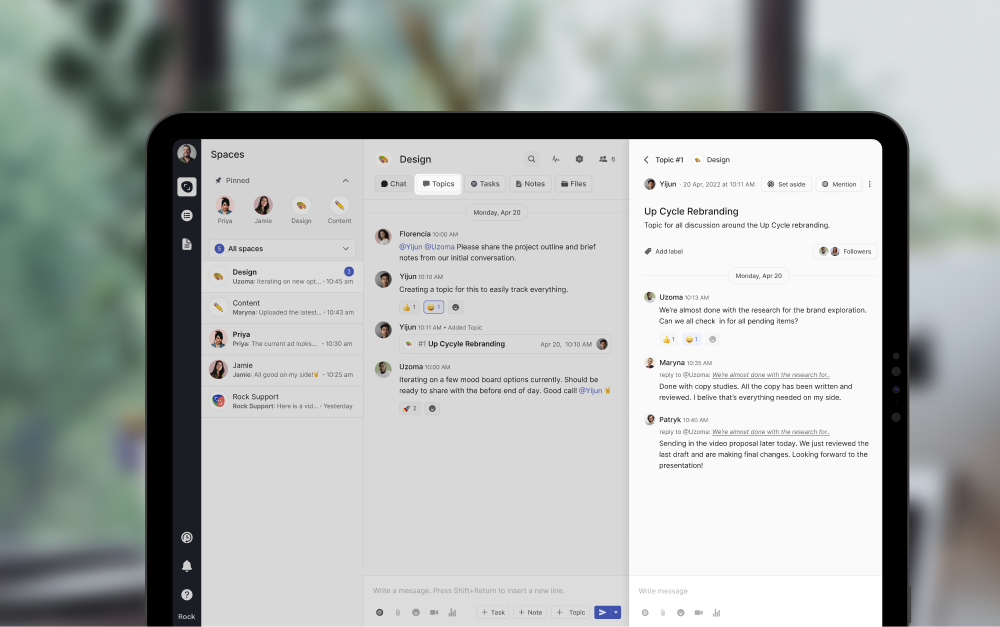
The Topics mini-app was introduced to solve this issue by enabling teams to discuss in more structured ways. Topics allow you to document information, keep conversations organized, and limit notifications only to those involved in the conversation.

Tasks mini-app

You should be able to manage any kind of project or workflow with the Tasks mini-app. The calendar view is the main highlight of changes in the Tasks mini-app experience. Teams can now view deadlines for projects and schedule new tasks with a time-based view.

We have also added a calendar integration for most major calendar services in the PRO plan. This allows teams to visualize work deadlines alongside other important weekly information.

Tap to Organize

By combining tasks and messaging, Rock provides a solution for a bunch of problems teams run into when work happens across different apps.

Two improvements that showcase this are Tap to Organize and the ability to @mention anything.

You can move conversations over to topics, notes, or tasks with a few clicks through Tap to Organize. Create tasks out of messages or document information by moving information to a relevant note or topic leaving the chat stream more organized and less chaotic.

Mention Anything

With information organized across different mini-apps, it’s easy to create links directly to information within Rock allowing you to share more context. We have made multiple improvements to the @mention anything feature so teams can more effectively link to information across mini-apps.

Besides a smart object snippet in the chat, teams can @mention tasks, notes, topics, and attachments in the description and comments section of every object. This allows you to jump to the object in question and we even introduced cross-space @mentions so you can interlink between spaces within seconds.

2. The fastest way to start working with anyone

Getting started on a new platform or tool can often be a tedious process. This is especially true if you have to leave behind both your task management and messaging platform. We’ve added some improvements focused on making it easier to invite new people as well as migrate your stuff from other platforms.

Quick Connect with space.new links

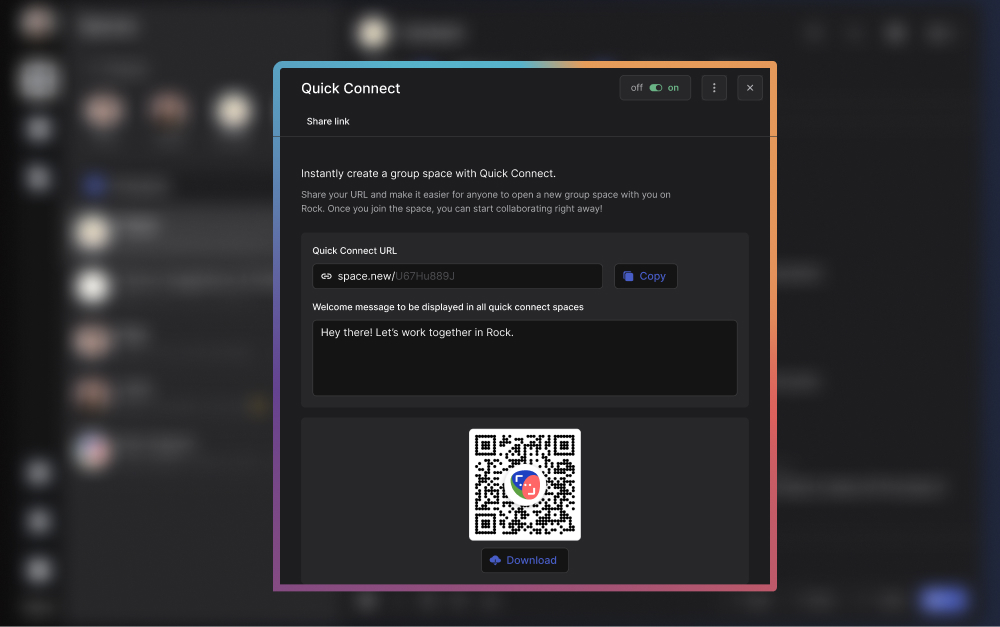
Quick Connect is the fastest way to collaborate with anyone. You can set up your space.new link and share it across your social channels, website, or email. When someone visits your link or scans the dedicated QR code, they are directly added to a group space with you.

Instead of first having to exchange emails and then go into different tools to give everyone access you can now just share your space.new link and get a brand-new space set up so you can work together within seconds.

Import messages and tasks from multiple platforms

We understand how important it is for users to access past conversations. In order to make switching easier, we introduced import from Slack or WhatsApp. The import feature allows users to take all their data with them, assign messages to people, and directly migrate new users to Rock.

If your team cannot stop slacking, we also introduced a dedicated Rock bot for Slack that allows you to receive Rock notifications in your different Slack channels. Users can keep up with new tasks, notes, and topics across Rock spaces without leaving Slack.

For tasks, you can import all your project management information from Trello, Asana, Jira, and ClickUp. In addition to that, we have also added an import from CSV option. This makes it easier to convert large databases into individual tasks on Rock.

Bring it all together with workspaces

We introduced a big change to team and space management with workspaces. This feature was added to make it easier to manage multiple users and spaces from a single workspace similar to how you can do this with a Slack workspace or a Discord server.

Users can set up a workspace for different teams, clients, communities, or other use cases. A dedicated settings panel in every workspace allows you to invite people to the workspace and manage their overall permissions.

3. The collaboration front-end for any team

Unlike other apps out there, we don’t think you want to replace all your apps. Different teams still need access to documents, design files, meetings, or other important information in apps like Figma, Notion, Dropbox, Adobe, Miro, and Zoom.

Rock brings all of these together in one simple front-end with messaging and tasks enabling people to discuss, collaborate, and get work done with these external services.

Editors & Cloud storage

From design files to spreadsheets and other documentation is key for any team so we worked hard to expand the number of services you can add to Rock.

Users can now set up integrations with Google Drive, Onedrive, Dropbox, and Smartsheet and quickly access important folders and files from within a space. It is also possible to add a Notion knowledge base or Miro whiteboard to the Files mini-app.

For design teams, we added an Adobe Creative Cloud and Figma integration. This allows anyone to quickly access creative files and attach them to tasks, notes, or topics when relevant.

Video conferencing

Meetings and asynchronous video sharing can provide a lot of value when used correctly. Rock offers messaging, tasks, notes, and files for people to discuss in more asynchronous ways, but when really needed, we also provide more synchronous real-time channels.

Start meetings in any space with Zoom, Google Meet, and Jitsi integrations. While you should be mindful of your meeting frequency, it is sometimes better to just talk to someone face-to-face.

We also added a Loom integration to the Meetings mini-app to encourage more asynchronous video sharing. Do you really have to talk to someone live, or is a quick video walkthrough enough?

Automations

Automate the creation of tasks, notes, or messages with a Zapier integration in the PRO plan. With this integration, you can build automations for emails, social media posts, web forms, or other information that create messages and tasks in Rock when triggered.

For engineering teams, we have also introduced a public API for custom integrations,  Github, Rollbar, and Sentry integrations. This means that you can more easily integrate Rock with technical, product, or development workflows.

A sneak peek into what’s next

Based on feedback from users, we’re building some of the most requested features which are shipping very soon. From a management dashboard to a time tracker we have a ton of stuff on the pipeline that will make Rock even better for everyone.

Are there any features you would like to see that are not available on Rock?

Let us know in the Rock Support space or create a new space with us through this Quick Connect link.

Celebrate Rock 2.0 with us in September ?

Thousands of hours and lots of hard work went into building all of these features so to celebrate all of this we are doing a special launch on Product Hunt. Our goal with this release is to share Rock with new users, teams, and communities worldwide and hopefully introduce them to a better way of working.

It would mean the world to our team if you can support us by signing up for the dedicated landing page. We’ll make sure to send updates when the date nears and we will provide you with special discounts and promotions on the official launch day!

You can also support us by sharing the landing page link across social media and tagging us on Facebook, Linkedin or Twitter.

Aug 31, 2022
November 22, 2022

Rock is built for how we work today

Announcements
Kenzo Fong
CEO & founder
5 min read

One of the things that companies should prioritize in this day and age is innovation. Having an innovative mindset paves the way to new ideas and solutions – ones that can help you breathe life into an original product idea.

Creating a product, however, is no easy task. There are many factors you need to consider – from the steps in making it a reality to the different members of your team. That’s where product development comes in. But what is product development in the first place?

Keep reading this article to learn more about the foundations of product development.

Product development and its meaning

A simple way to define product development is to understand it as the entire journey involved in creating a new product. This covers the ideation of the product up until its market launch. It’s the process that you and your team must go through to make your concept of a product a reality.

When we look solely at product development’s definition, the process may seem easy. However, every product launch is different. Things don’t always go according to plan, and there’s really no foolproof blueprint to success.

Note that there are several crucial steps that can increase your chances of success. Some of them are more extensive than others, but all of them are equally important. But before we get into that, it’s important to know why you should follow a framework or a strategy in the first place.

The importance of a product development strategy

Maybe you’re asking yourself – if there’s no surefire way to create a well-performing product, why create a product development plan at all? That’s because having a plan takes into consideration market research and analysis.

This is crucial because you can’t successfully launch a product if you don’t understand what problem you’re trying to solve, or who it’s for.

And because your product will be backed by research, you have more opportunities to learn about similar products that failed, similar products that succeeded, and how you can leverage current market gaps for similar products.

Planning out each product development stage can also save time once you go through the different steps. That’s because you already laid out what you need to do and what each team member has to be doing. It also gives you a better understanding of the project as a whole.

product development board

Another thing about having a product development plan is that it helps with staying organized at work. By having something to guide you throughout the process, cross-functional collaboration is more seamless. This is especially true when you apply effective communication strategies.

Task management also becomes less complicated, and everyone will find it easier to stay on the same page.Ultimately, having a product development plan doesn’t ensure your success, but it definitely helps a lot.

Having a good framework can determine whether or not you achieve company goals and objectives, so it’s an important step you shouldn’t overlook!

The stages of product development

Now that you’ve answered the question, ‘What is product development?’, it's time to look at the specific stages that your team will go through when developing a new product. Although different industries may have iterations of product development stages and examples, the process generally has the same flow or steps.

1. Identify a need in the market

Every product development process starts with ideation. This means having brainstorming sessions with your team. You can begin by identifying today’s problems in the market. Once your team zeroes in on one, your next step would be to try and solve it.

You might get stuck on this first step because some teams search endlessly for the “perfect” idea. This is something you should avoid. Instead, keep an open mind. Bounce off ideas, no matter how out-of-the-box, and see which ones stick. This will help ideas flow, and maybe even connect with one another.

If you need help with ideation, you can try using the SCAMPER technique. It’s a model that helps you explore different perspectives to encourage fresh ideas.

S - Substitute (what can you replace?) C - Combine (what can you combine?) A - Adapt (what can you add?) M - Modify (what can you change?) P - Put to another use (what other uses does the product have?) E - Eliminate (what can you remove or simplify?) R - Reverse (what can be rearranged or done in reverse?)

The next time you have a brainstorm, try asking these questions about existing products. You can also gather insights by talking to your target market and studying data on the problem you’ve focused on. All of these will help you have high-level ideas on your product’s look and functionality.

product development scamper framework

2. Quantify the opportunity

Now that you have a problem you want to solve, figure out if it calls for a product-based solution. You need data that shows there is demand for the product you want to make. Research on the number of people the problem impacts, and whether or not people would be willing to pay for a solution.

3. Create a concept for a product

Once you’ve confirmed the need for your product, it’s time to start conceptualizing it. This means taking your initial idea and refining it further. Deep dive into the design of the product by answering specific questions.

What is the product’s value proposition? Have you finalized a product roadmap? What does the product look like? Are your product’s key features well-defined? Is everyone aligned on your key performance indicators (KPIs)? How does it align with your organizational strategy?

These are some of the questions you must answer during this stage. This is also the stage of product development where marketing might start getting included in the conversation.

Granted you don’t have your finished product yet, but it’s good to have a general idea on how to go about marketing on this product development stage.

4. Create a Minimum Viable Product (MVP)

Once you’re done with fine tuning the fundamental concept for your product, you can move onto creating a minimum viable product (MVP). This is a version of your product that has just its basic features. Doing this will help you see how the product works at this point.

After creating your MVP, you can have a small group of early customers test it out. This will help you gather feedback that you can use to further improve your product. It will also help you gauge how the market reacts to it, and if it’s something that resonates with your target audience.

5. Validate and test

Since creating an MVP should have helped you finalize your product’s design, it’s now time to validate and test it. First, it’s important to see if your product addressed the problem that you were trying to solve. Second, you should test the different aspects and functionalities of your product.

Check that everything works as it should, and that you’ve addressed potential problems that may arise. You can even use this stage of product development in testing your marketing efforts. Make sure your campaigns are all set and will be ready for the launch.

Naturally, you would want everything to go off without a hitch. However, if you encounter a big problem, there’s nothing wrong with going back to the conceptualization stage. This doesn’t mean you’ve hit a dead end – it just means you have more information to go with for your next attempt.

6. Commercialize and scale

Once your different testing phases are complete, you’re now ready to launch your product to the market. Make sure you find your perfect market fit or the audience that has the highest need for your product. Once you nail this down, you can look into scaling the distribution of your product.

Easily do this by using different channels to spread the word about your product. You can also run various marketing campaigns online and offline, and even get the help of sales agents or distributors based on your product.

What is product development all about?

One thing you should understand is that the product development process isn’t set in stone. There are times when you may need to redo certain steps depending on the results you gather. Research and feedback are also a big part of the process, which means the concept for your product can change along the way.

Also, note that the product development plan and examples of stages that we shared are just a guide. You can customize it depending on the needs of your project.

Ultimately, product development is about continuously learning how to solve the pain point you’ve chosen. Don’t get discouraged if you encounter challenges along the way. You should always remember your goal!

Who are the members of a product development team?

Your project is more likely to succeed if you have the right people on the team. If you’re a startup, it’s possible that each team member may take on more than one role. This is okay, as long as the workload is manageable.

This is important to take into account if you’re looking to avoid a toxic work culture. Here’s a list of people that you need on your product development team:

1. Product manager

The product manager oversees everything in relation to the product’s life cycle. They create the product vision and strategy, spearhead market research initiatives, and take the lead in brainstorming sessions. He or she also ensures that the team is working towards a unified vision.

2. Project manager

The project manager’s main role is to make sure that the project is moving according to plan. Project managers usually keep track of everyone’s progress, as well as the project’s goals and budget. He or she also delegates tasks, makes sure the team plans retrospectives if applicable, and helps prevent any gaps in communication from happening.

3. Designer

The designer works mostly during the prototyping phase of product development.  Also, when design improvements are made throughout the project. He or she has a crucial role in designing the product to follow the company’s branding as well as UX & UI best practices. This means putting emphasis on the customers’ needs.

4. Developers

Developers deal with using research and concepts to bring the product to life. They help provide insights on the technical aspect of the product, such as what’s feasible to do and what’s not. You can have one or more developers in your team – it all depends on what the project calls for.

5. Testers

Testers are a big part of a product’s quality assurance (QA). They analyze the product and note down changes that can be done to improve one’s overall user experience. They also make sure that each aspect of the product is working the way it’s supposed to.

6. Marketers

Once you have your final product, it’s important to give it as much market exposure as possible. That’s where marketers come in. They help define your target audience and do research on the current landscape as well as your competitors.

They do this so that they can form a marketing campaign strategy for your product – one that can increase brand awareness and patronage. These are just some of the key personnel that you need on your product development team.

Depending on what the project calls for, the number of team members you have will vary. But one thing is certain, product development involves cross-departmental collaboration with different business functions coming together to build a new solution.

product development team

Effective project development tools

Now that you know what product development is, you’re ready to start creating your new product. Don’t forget to use the best tools for the project! If you want an easy way to manage the process, try out Rock - a holistic task management and communication tool.

Rock is the preferred tool of choice because it has everything you need. You get to send messages, create tasks, and monitor the progress of the project in one platform.

It also connects to different apps and third-party software providers that are useful in product development. This includes Google Drive, Dropbox, Miro and more. It streamlines the process of accessing files, lessens movement from one app to another, and makes collaboration easier.

Switching between synchronous and asynchronous work isn’t a problem on Rock either. Each Space has full-fledged task management functionality, which you work on with list, a board, or a calendar view.

The Tasks mini-app is packed with functionality – labels, descriptions, assignees, sprints, and start and due dates, to name a few. If you’re a Project Manager who wants to oversee movements on the project, there’s an option to follow tasks.

This gives you a great overview even if you may not be directly working on the task at hand. You can apply any kind of project management framework with flexible functionality across the board.

Rock also provides unlimited space for your files and conversations, so you don’t have to worry about losing important correspondence. You can even invite collaborators from outside your organization, absolutely for free!

You’re all set for your product development project!

Now that you know what product development is, why it’s important to have a product development plan, the different stages it involves, and who you’ll be needing on your team, you can certainly start creating your product.

By having a good product development plan, you can better grasp your team’s overall vision, as well as the steps you need to take to achieve your goals. Remember to stay focused on these goals as you work on your product.

Hopefully, your journey will solve the pain point you’ve pinpointed while also bringing something unique to today’s market.

Aug 30, 2022
November 22, 2022

What is Product Development and What's The Process For it?

Nicolaas Spijker
Editorial @ Rock
5 min read

Do you spend too much time working with emails? How about trawling through old threads to find important information?

It’s easy to forget that when sorting out emails, often, you aren’t getting any actual work done. Yes, you are working, but most tasks aren’t ticked off by categorizing email threads.

Emails can improve your work by streamlining communication. But once an email becomes time-consuming and cluttered, it's less effective.

That’s when implementing email organization strategies becomes important. By doing this, you get more work done, in a quicker, more effective way.

What is email organization?

Before beginning, let’s explain exactly what is meant by email organization.

Email organization is the digital equivalent of tidying your room or desk. There can be important pieces of information and items scattered everywhere. Amongst them, there is also a lot of rubbish that isn’t needed. When you go to find the important information, you have to sift through the irrelevant junk as well. This can quickly become a waste of your time.

Email organization is about keeping your inbox clean, structured, and usable. This allows you to stay organized and productive, setting you up for success in order to achieve company goals and objectives.

what is email organization

Why are email organization strategies so important?

There are a couple of levels to this. The first is about staying organized at work. The second is psychological.

To concentrate on the first point, a cluttered inbox is not productive. It takes time to process emails. When messy, information gets lost, is not responded to, and documentation goes missing. The whole process is less efficient.

Have you ever looked at your inbox and felt a bit of despair? Perhaps after a couple of days off, you’ve opened your email account and it seems that there is a mountain of tasks to complete. This is why email organization is psychologically important.

Many people use their inbox as an unofficial to-do list. If it’s always full, it can feel like nothing is progressing. This can impact mental health.

One study by researchers from the University of California found that ‘[t]he longer one spends on email in [a given] hour the higher is one’s stress for that hour.’

Organizing your inbox properly will reduce the time you spend on emails. Caroline Castrillon, writing for Forbes,  argues that workers, ‘are suffering from email overload’. The goal of these tactics is to get work done faster and reduce the chance of burnout.

Top 13 best email organization strategies to manage your inbox

With just a few well-implemented strategies, organizing an email inbox is straightforward and time effective. Below, we’ve set up a list of all email management best practices at work.

1. Folders and Categories

Creating a filing system is incredibly important when defining email management strategies. The terminology will vary slightly depending on the email client you use. But folders, categories, and labels help to group and file different types of emails.

To get started, identify the different types of emails you want to keep. For instance, sales leads, design, marketing, and industry information could all enter your inbox. Create a folder for each of them. Now, when one of these management emails enters your inbox, you can file it away into a relevant folder to quickly find information back.

Most email providers let you create subfolders as well. So for instance, in the ‘sales leads’ section, you could have, ‘follow-up’, ‘cold’, and ‘priority’, for the different stages of acquisition.

email organization strategies folders

2. Filters

Filters can be a great email organization strategy.

If following best practices for managing email, automate as much as possible. Instead of manually wading through emails, filters can instantly categorize them. You can set up a filter with two basic inputs. The first is the term to monitor emails for. The second is the action applied to the email when a term is matched.

As an example, an administration team updates a website’s CMS extremely frequently. As part of their job, they respond to all change requests via email with ‘updated’. You could set up a filter to automatically move emails from the admin team with ‘updated’ into a dedicated folder.

3. Ditch email communication with clients or partners for Rock spaces

There are great alternatives to reduce emails and communicate in more efficient ways. Rock allows you to collaborate and communicate in one place with anyone. You can keep important conversations on Rock, easily access project information, and involve anyone at any point.

Create a space and invite colleagues from your team. You can also nurture cross-departmental communication and invite people outside your organization in every space. When working with another company on a project, Rock reduces the noise from your inbox as communications are done elsewhere.

Instead of several email threads, you can use full-fledged messaging and task management.

No matter the level of collaboration needed, Rock has you covered. If you have tasks that need to be completed, organize them in a Tasks mini-app. If messaging is the main requirement, Rock offers a dedicated chat in every space. Of course, you can easily combine both.

Work is then also integrated into your day-to-day work activity, which is a massive plus. Also, if you’re primarily looking for remote work tools, Rock is the perfect solution.

Use Rock topics for more versatility

You can create topics when you need to discuss a certain topic in more detail without overloading the main chat. Topics allow teams to have sub-conversations in a space while not overloading people who shouldn’t be involved with notifications. You can also move existing messages from the chat into topics, with Tap to Organize.

For example, if there are 20 people in a space, but a discussion only involves 5 people, you can move the conversation to a Topic. This way, the 15 other people that don’t need to be included in the discussion don’t get irrelevant notifications.

email organization strategies with topics

4. Move conversations with Quick Connect

Every Rock account has a Quick Connect link. It can be a link or a QR code that allows you to connect on Rock simply by scanning it.

Move email conversations to Rock with Quick Connect links in your responses to clients or in your email signature. If someone presses the unique link or scans the QR code, it creates an account on Rock, alongside a space with whoever sent the link.

By moving to Rock, you reduce emails. The conversation can continue within a dedicated space. This stops your email from filling with a 35 email thread with a colleague after colleague cc’d. With a Quick-connect link, you can get people started on Rock and use messaging and tasks to organize the discussion.

5. Unsubscribe from lists you don’t read

As much as we try to avoid needless subscription lists, sometimes it’s inevitable. Maybe you need an email address for a useful tool, you have to keep up with industry-related information, or you decided to put your work email instead of your personal one into an online shop.

One of the top email organization tips is to keep an eye out for the subscription emails that you repeatedly delete without reading. You should unsubscribe from the list rather than deleting the emails on a regular basis.

6. Properly check your emails once a day

As an exercise, over the course of a day, monitor all the time you spend doing emails. Understand how long you take to read, process emails, reply, and sort. Then with this information, ask yourself, was that time well spent? Often, the answer is no.

Set aside one time slot in the day to properly go through your emails and reply. Keep to this schedule, including a set time limit. If you go past your time limit, return to your emails the next day.

For this approach, you need to prioritize which emails are more important and which ones can wait.Depending on your job, monitoring emails is often unavoidable. For example, a lot of direct input positions require employees to react to time-sensitive emails.

Even if you are in this type of work, the ethos of this strategy is still actionable. Instead of constantly checking back on your inbox, set clear times, and concentrate on asynchronous work outside of those designated slots.

From time to time, an exceptionally long email enters your inbox. Don’t fall into the trap of thinking an exceptionally long email is exceptionally important. Scan the email quickly and assess if it requires your input. If not, file and archive it.

7. Reduce writing time

Just because an email is long, you don’t have to respond in kind. If you get into a back and forth with extremely lengthy emails, you should consider if another type of communication strategy is more effective.

Just like with reading your emails, set a time limit to write them. Distill the key information, don’t waffle, get your points across, and move on to the next email. If a reply is not very urgent, once your time is up, save the draft and come back to it at the next allocated slot.

8. Templates

With a bit of analysis, you can most likely find patterns in your management mail. These could be people, or inboxes, that you reply to or reach out to regularly.

For example, internal direct action emails for a website update, monthly reports, and answers to client requests, could all be emails you regularly compose. You might have a format for sending these emails, for instance, highlighting a couple of key figures in a monthly report.

Consider saving a template, write the words once and insert the figures monthly. Or think about this situation: a client emails you during a really busy day. You want to respond and acknowledge you’ve seen it, but will address the request at a later date.

With a template in place, you can write the email in seconds and get back to conquering your to-do list.

There are many situations where a basic template can outline information. This email organization strategy allows you to fill in the blanks and adapt it to the exact situation.

Write down answer templates on notes

If you have recurring answers to emails you can quickly write them down in a dedicated note on Rock. This means you can quickly access them and spend less time searching or writing repeated responses.

On Rock, the Notes mini-app lets you write down any information that you want to access easily.  If needed, your colleagues can also access these templates and make comments.

email organization strategies templates with rock

9. Prioritize

In an ideal world, we would respond to all emails instantly. But just like all day-to-day tasks, some emails are more important than others. Some emails can wait, and you shouldn’t spend time on some at all.

For some people, this is difficult to learn, but not every email needs a reply. Again, this is very dependent on your industry and position.

Do you need to respond to an automated email from the tech team about a detail irrelevant to your work? Absolutely not. What about an email from a client about terminating their contract? That’s a high priority.

As a generalization, communicating with clients and customers should be prioritized with quick and thought-out responses. On the other side, a back-end developer should put website downtime and essential maintenance at the top of their priority list.

10. Delete where possible

Before implementing these inbox management strategies, check what your company’s policy is here. Some businesses prefer to never delete emails. In this circumstance, use the archive function.

Dedicate time to clear out your inbox. Either bi-weekly, monthly, or quarterly, put this time aside for a deep clean. This means moving old emails that aren’t relevant anymore into the trash bin. Make sure the information in an email isn’t needed for future projects.

email organization strategies delete where possible

11. Schedule in organization

The purpose of email organization strategies is to stop emails from creeping in and taking over your work time. Set clear times and stick to them. This point means scheduling time to review your inbox every week. Not necessarily to reply to people, but to file away loose ends, and not miss anything important.

With this dedicated time in the diary, you know you’ve planned to catch anything that falls through the cracks. You don’t need to keep checking your inbox out of fear and can concentrate on your tasks.

12. Keep team conversations on rock

Instead of searching in long email threads for messages with your team, you can discuss everything important in chat, topics, tasks, and notes on Rock.

This way, all collaboration and information exchange is in one place. This means you won’t lose any important details. Rather than trawling through email threads, it’s easier to find structured conversations on Rock.

Consider migrating key information from email threads into notes (if you want to document it) or tasks (if it’s actionable). This keeps work together in one place, it is more organized and accessible for everyone. You can also nurture more cross-functional collaboration by inviting different stakeholders to a space.

13. Process emails with task lists

There are two elements to this email organization strategy. The first is to create tasks to help remind you to manage your inbox.

For example, clean and organize your inbox either weekly, monthly, or quarterly. You can use Rock to remind you to do that.The second point is that in Rock, you can create tasks directly from emails with automation through Zapier.

This lets you streamline your workflow and spend less time switching between different tools.

Automate emails into tasks or messages With zapier

With Zapier, Tasks and Messages are automatically created into a Rock space. They can be created from an email account that you connected to Rock via the Zapier integration. When an email comes in, Rock notifies you and you know if you need to check it.

It’s very beneficial as you don’t have to monitor your inbox constantly. Another example is if emails are actionable tasks. For instance, organize support tickets better by automating them into a space. The colleague who deals with the tickets is then assigned to do the tasks.

With Zapier integration on Rock, include all the details of the email and automatically create a task out of it.

Automated creation of Tasks via Zapier integration on Rock can be useful if you often receive actionable emails in a certain inbox that require action. Automated messages alert you of important emails without constantly hovering over your inbox.

Organize your inbox with these email organization strategies and keep your work tidy

The old saying goes, ‘tidy room, tidy mind’. Perhaps the 21st-century version should be, ‘tidy inbox, tidy mind’.

In this article, we have listed some email management best practices to keep your inbox organized. The impact of email organization strategies isn’t just improving your work, but it can help with mental health and stress.

Rock is a great support when managing your day-to-day inbox. To find out more about how Rock can improve your email organization, sign up for free today.

Aug 24, 2022
November 22, 2022

13 Email Organization Strategies to Keep Your Inbox Well Managed

Nicolaas Spijker
Editorial @ Rock
5 min read

Invite people and get PRO and TEAMS features for free! The referral & credit program allows you to access paid functionality including automations, larger workspaces, advanced task management functionality and so much more!

This release also includes import from WhatsApp to quickly migrate chats and team members. Additionally, the Files mini-app now also supports a Miro integration: add your retrospectives, diagrams and brainstorming boards to any task, note or topic.

Check out this product release webinar where Nico and Greta from the Rock team go over all of the latest features.

Referral & Credit Program

Invite people to Rock and upgrade to PRO starter or TEAMS starter for free! Earn new credits for every successful invite and quickly upgrade to access premium functionality. Check out this announcement for more information on the referral program.

You can extend your rewards if you have enough credits. This means that you can continue using the PRO starter or TEAMS starter plan for free if you have enough credits saved up on your profile.

Referral & credit program details

We’ve made it easy to quickly earn points with the credit program. Here are three quick ways to earn credits:

  1. Invite new users and domains: Send your quick connect or invite link anywhere for people to join you on Rock. You can quickly earn a lot of credits with +1 credit for every new signup and +10 credits for every new corporate domain.
  2. Import chats from other tools: The chat import feature rewards you with +10 credits and allows you to directly invite your whole team. Receive +1 credits for every invited user during your import and +10 credits for every new domain that signs up to Rock.
  3. Master Rock and Integrate your tool stack: Integrate videoconferencing, file management, or import tasks to earn credits. You can also increase your credit count by starting to use tasks, notes, Tap to Organize, and other features.

Learn more about each activity in this help guide!

Referral program rewards

There are three available rewards in the referral program. Here’s what’s included in each plan:

  • PRO starter plan: 5 free PRO spaces and two workspaces with up to 20 spaces each for 1 month.
  • TEAMS starter plan: 10 PRO spaces, 3 workspaces with up to 50 spaces. Team management functionality, 2 managers (user + someone else in your team) for 1 month.
  • Extend the PRO plan If you are currently under the PRO plan, you can extend your plan for free by 1 month.

Reward availability for the Rock credit and referral program depends on your current plan:

  • PRO starter plan/extension [20 credits] -> This reward is available to free users and those who want to continue using PRO starter
  • TEAMS starter plan/extension [150 credits] -> This reward is available to free users, those on PRO & TEAMS starter and PRO purchasers.
  • Extend full PRO plan for an additional month [120 credits] -> Available to paid PRO purchasers.

There are currently no rewards for TEAMS purchasers, but we will be adding those very soon! You can learn more about the overall credit program in this dedicated product guide.

Import from WhatsApp

Keep discussions going without friction by importing your different 1:1 and group chats from WhatsApp to Rock. Import from WhatsApp is a handy feature to migrate a complete chat while directly inviting and assigning users to messages.

When importing information, Rock allows you to map WhatsApp user names with existing or new Rock users. This way everyone can keep ownership over their own messages.

Check out the import from WhatsApp product guide to seamlessly move over your WhatsApp chats to Rock.

Miro integration

Integrate Miro for free in the Files mini-app of every 1:1 or group space! Access collaborative whiteboards right from within Rock and attach them to any note, task, or topic.

This makes it easier to access your team retrospective, brainstorming docs, diagramming or meeting discussions.

You can also start new drawings right from within Rock. No more link sharing or endless folder searching!You can learn more about the Miro integration in the dedicated product guide.

Mobile updates ?

We have added a bunch of improvements to the mobile experience. This product release includes the following changes and fixes to mobile apps:

  • Referral program: Invite people and upgrade for free in return! You now receive credits for every new user you invite (+1 credit) with additional credits for new domains (+10 credits). There are also some rewards unique to mobile: download the app (+5 credits) and import contact book (+10 credits)
  • Import from WhatsApp: Import chats from WhatsApp and directly invite users while importing their messages. Continue the conversation without losing any of your documentation.
  • Miro integration: Add your collaborative whiteboards to the Files mini-app of any Rock space! Access your brainstorming docs, meeting discussions or creative whiteboards right from within your Rock space.
  • Bug fixes and smaller improvements: Specifically, we have been working on improvements for notifications on web and mobile throughout this and the upcoming release.

Download the mobile app

Questions about this release? Feel free to send us a message in the Rock Support & Updates space or open a space with us.

Aug 19, 2022
November 22, 2022

Product Update: Referral Program, Miro Integration & Import from WhatsApp

Announcements
Kenzo Fong
CEO & founder
5 min read

Invite people and upgrade to PRO starter or TEAMS starter for free! The referral program rewards you with credits every time you invite new users and corporate domains. You can also earn credits by checking out different features on Rock, making it even easier to upgrade.

Top 3 ways to quickly earn a lot of credits

It is possible to quickly earn enough credits to upgrade to PRO or TEAMS. Here are three simple hacks to boost your credits.

  1. Invite new users and domains
  2. Import chats from other tools
  3. Integrate your tool stack

1. Invite new users and domains

Send your Quick Connect link anywhere for people to join you on Rock. You can quickly earn a lot of credits with 1 new credit for every signup and 10 credits for every new corporate domain.Step by step:

  1. Invite people to join you on Rock: Quick Connect, invite link, email or phone number.
  2. Success! Receive 1 credit for every accepted invitation and 10 credits for every new domain.
  3. Upgrade to PRO starter when you collect 20 credits or TEAMS starter with 150 credits.
  4. Receive credits when the users you invited upgrade to a paid plan. Continue extending your PRO starter or TEAMS starter with enough credits.
referral program step by step

2. Import from Slack or WhatsApp

The import feature rewards you with 10 credits and allows you to directly invite your whole team. Receive 1 additional credit for every user and 10 credits for every new domain you add during the import.Step by step:

  1. Export your chats from either Slack or WhatsApp
  2. Import them to Rock
  3. Map users from your chats, this directly invites your imported spaces. Receive 1 credit per new signup and 10 credits for every new corporate domain.
  4. Receive 10 credits for a successful signup.
import messages to rock referral program announcement

3. Integrate your tool stack

The last few releases have added a lot of new videoconferencing and cloud storage integrations. Make sure to add your complete toolstack to quickly connect workstreams and gather some credits. Available integrations include:

Rock referral and credit all integrations

What can I earn from the Rock referral program?

Rewards from the Rock referral program depend on your current plan.

  • PRO starter plan/extension [20 credits] -> Available to free users and those already on PRO starter that want to continue using it.
  • TEAMS starter plan/extension [150 credits] -> Available to free users, those on PRO & TEAMS starter and PRO purchasers.
  • Extend full PRO plan for an additional month [120 credits] -> Available to paid PRO purchasers.

There are currently no rewards for TEAMS plan purchasers. We will be adding custom options very soon! You can still collect credits, and use them when new rewards become available.

rock referral announcement rewards

PRO starter plan

Redeem 20 credits to earn 5 free PRO spaces and two workspaces with up to 20 spaces each for 1 month. You can continue extending the plan as long as you have enough credits.

PRO spaces accommodate a whole range of added functionality that you can use to supercharge your communication and collaboration. To get more out of your task management, PRO spaces unlock:

In addition to that, PRO spaces also include:

referral rock pro spaces

TEAMS starter plan

The TEAMS starter plan allows you to manage your team on Rock for 1 month in exchange for 150 credits. The plan includes the following:

  • 10 PRO spaces: includes PRO functionality described in the previous section.
  • 3 workspaces with up to 50 spaces.
  • Team management functionality, 2 managers (user + someone else in your team), and claim domain.

If you have enough credits to renew, you can extend your TEAMS starter plan for another month. There are currently no limits on the number of redemptions.

PRO users: Extend the PRO plan

If you are currently under the PRO plan, you can extend your plan for free by 1 month in return for 120 credits.

How to earn credits

Receive credit rewards by directly inviting clients, team members, friends, or corporate partners to Rock. You can use credits to upgrade to the PRO starter or TEAMS starter plans.The Rock referral program compensates you with credits are the following:

  • 1 credit: Inviting a new user
  • 10 credits: Inviting a new domain
  • 50 credits: Invited user upgrades to PRO
  • 300 credits: Invited user upgrades to TEAMS

Invite a new user -  1 credit per user

Invite anyone, either in or outside of your organization to Rock. We reward you with a credit once the invitee successfully created an account and entered the platform. Here are a few ways to invite new users:

  • Email invite: Create a space or add new users through space settings by inviting them by email.
  • Invite by link: Enter space settings and look for invite links, this allows new people to directly join your space as a member or guest.
  • Quick Connect: Use your Quick Connect link or QR code for people to open a new group space with you! When someone clicks on your dedicated link they can join you on Rock through a shared group space.
  • Phone number: Create a new 1:1 space with a user that is not yet on Rock by entering their phone number in the 1:1 invite panel.
rock referral invitation credits

Invite a new corporate domain - 10 credits per new domain

Invite a user from a new corporate domain (e.g. acmecorp.com). Check the ‘invite a new user’ section for different ways through which you can add someone that is not yet on Rock.

A user will be considered a new corporate domain user under the rock referral program when:

  • They are not signing up with a non-corporate domain (e.g. @gmail.com, @yahoo.com)
  • The corporate domain does not have any matching accounts that already exist on Rock.

You will receive 10 credits once a new corporate domain has fully registered an account in addition to the single credit received for the invite. The reward for a new domain might be slightly delayed if the new corporate domain is not directly recognized in our system.

Additional signups from that domain that you directly invite will reward you 1 credit. 10 credits will be awarded for each new corporate domain you bring in, and can be earned unlimited times as long as the domain is not registered.

Invited user upgrades to a paid PRO plan - 50 credits per upgrade

You receive 50 credits under the Rock referral program if one of the users you invited to Rock through email, invite links, quick connect or phone number upgrades to PRO. Learn more about the PRO plan here.

You receive the credit reward only the first time a user upgrades to PRO, and it applies both to the monthly and yearly memberships. If a user renews the following year you will not receive additional credits.

  • You receive 50 credits for any invited user that upgrades to PRO, even if they’re within the same domain.
  • Switching from monthly to yearly memberships will not award additional credits.
  • If a user upgrades from PRO to TEAMS, you will receive the reward credits for a TEAMS upgrade (if the user has not had the plan yet).
  • If a user downgrades from TEAMS to PRO and has not been on PRO before, you will still receive the 50 credits.

You receive 50 credits for every individual user that you invited who upgrades to the PRO plan. PRO plan upgrade rewards are given out once per invited user.

rock referral announcement upgrade to PRO

Invited user upgrades to a paid TEAMS plan - 300 credits per upgrade

You receive 300 credits under the rock referral program if a user you invited through email, invite links, quick connect or phone number upgrades to a monthly or yearly TEAMS subscription. Learn more about the TEAMS plan here.

You only receive the reward if it’s the first time they upgrade to TEAMS. No recurring credits are received for plan renewals or monthly payments.

  • You receive 300 credits for any directly invited user that upgrades to TEAMS, even if they’re within the same domain.
  • Switching from monthly to yearly memberships will not award additional credits.
  • Plan renewals will not award you with additional credits.
  • If a user downgrades from TEAMS to PRO, you will receive the reward credits for a PRO upgrade (if the user has not had the plan yet).

You receive 300 credits for every individual user that you invited who upgrades to the TEAMS plan. TEAMS plan upgrade rewards are only given once per invited user.

rock referral announcement teams rewards

6 Rock team tips for inviting people and new domains

Looking to get more team members, clients, partners or friends to join you on Rock? Here are a few suggestions on how to get them to join you and receive credits with the Rock referral program!

1. Share your Quick Connect link across channels

You can conveniently move communications from channels such as social media, email, or other platforms to Rock with your Quick Connect link. Remember that under the Rock referral program you get +1 credit for every new signup and +10 credits for every new corporate domain.

Here are some channels where you can embed your link:

  • Email signature: Add your Quick Connect link to your email signature so people can quickly switch to communicate with you on Rock.
  • LinkedIn profile: You can add your Quick Connect link to your LinkedIn profile so anyone who wants to connect can create a group space with you on Rock.
  • Freelance platform profile (i.e. Upwork or Fiverr): Connect and communicate with clients on Rock by adding your Quick Connect link to your profile on Upwork or Fiverr.
  • Contact link on your website: Have a contact form or link on your website? You can replace it with a Quick Connect link, pick a template and adjust your welcome message to anything!
  • Social media messages: instead of inviting people to DM you, send a dedicated quick connect link for them to chat with you on Rock!
rock referral program quick connect

2. Import Tasks from other tools to continue work without friction

You can import tasks from Trello, Asana, ClickUp, Jira and CSV. This way you can continue your task management without losing past workflows and documentation.Continue work with all your tasks on Rock.

The import migrates titles, descriptions, labels, checklists and so much more! You receive 10 credits for each platform you import tasks from.

referral announcement import from tasks

3. Import messages from Slack or WhatsApp and directly invite users

Rock allows you to import messages from Slack and WhatsApp so you don’t lose any past conversations while migrating your team. You can also configure the import feature to automatically invite the corresponding people to different spaces on Rock.

This means that you can instantly invite users across platforms while keeping past conversations available in every space. You receive +1 credit for every new user that joins and +10 credits for every new domain under the rock referral program!

import messages and users from WhatsApp and slack

4. Import your contact book on mobile

You can import your complete mobile contact book to Rock within a few seconds. This makes it easy to send invites to team members, clients, friends and even family members!

Here’s how you can import your contact book on mobile: user settings -> view my contacts -> import -> press ok.

You can invite new users by contact email or phone number by searching for their name when creating a new space. With your whole contact book on Rock, you won’t have to search for the correct phone number or email address.Importing your contact book also directly rewards you with +10 credits.

5. Explain the benefits of Rock

When inviting users to Rock, make sure to explain what makes Rock different from the rest. Here are a few unique features and benefits when switching to Rock:

  • Messaging + tasks: Rock provides different ways of communicating and collaborating so you don’t have to switch between platforms to collaborate with each other.
  • Unlimited spaces and invites: Instead of paying by team size or projects, you can create unlimited spaces and send as many invites to people in and outside of your organization for free.
  • Loads of free integrations: Integrate with Google Drive, OneDrive, Dropbox, Zoom, Google Meet, Notion, Miro, Figma, Loom and so many others for free!

Here is a sample text you can use when inviting people while earning credits for the rock referral program:

‘’Hi there! Join me on Rock to collaborate with messages, tasks and so much more in one place. Signing up only takes a few seconds and is completely free. Click on this link [insert Quick Connect link] to start communicating and collaborating for free!See you there!’’

6. Add your Quick Connect QR to posters, business cards, your website, or ads

Your quick connect link also comes with a custom QR code. Spark the interest of website visitors, clients or partners with a QR across your visual communications.

Here are some suggestions for locations where you can add your Quick Connect QR:

  • Business cards
  • Banners
  • Social media background/post visuals
  • Social ads
  • Youtube video thumbnails or end screens
  • Website pages: about us, contact, etc.

Allow people to join you on Rock by scanning your QR and earn credits from the Rock referral program!

Aug 19, 2022
November 22, 2022

New! Rock Referral and Credit Program

Announcements
Kacper Neuman
Partnerships & Communities @Rock
5 min read

Meetings consume a large portion of an employee's day and are often the primary mechanism for workplace communication. Sometimes, the outcome of a meeting is not truly reflective of the number of resources pooled to conduct the meeting.

A Forbes article suggested that more than 34% of professionals waste between two and five hours per week on unproductive calls or meetings. Additionally, 67% of the professionals surveyed claimed that spending too much time in meetings distracted them from making an impact at work.

This meeting productivity problem costs US companies $37 billion annually.Many organizations do not see the benefits of investing in their meeting culture. Some reasons why you should invest into more productive meetings include:

  1. Increased workplace productivity: employees are motivated after a productive meeting to work more efficiently, and their work quality and turnaround time increase.
  2. Increased company-wide organization: by removing inefficient meetings, the improved communication between employees will foster more vital and healthier meeting habits. These habits can include action item tracking or always preparing a meeting agenda.
  3. Increase employee engagement: meetings do not need to be a draining activity that the entire company dreads. When done correctly, they can be an engaging and pleasant experience that employees look forward to.

This blog post will explain how to overcome inefficient meetings and turn your organization's meeting culture from draining to engaging. This post was written by Carolina Lopez from Fellow.app who frequently writes about meeting management.

How to Overcome Inefficient Meetings

An efficient meeting starts on time, is well managed, includes only relevant attendees, and is well documented to stay on track with goals, objectives, and action items. Attendees should be thoughtfully selected for a specific purpose.

For example, the entire marketing team is meeting to brainstorm a new campaign after writing down their thoughts on a doc beforehand.

When done correctly, meetings can provide an open discussion, and deliver actionable results. Attendees should leave the meeting clear-headed and empowered to take the following steps.

1. Calculate the Cost of Your Meetings

Quantifying the cost of a meeting is the first step in overcoming inefficient meetings. But before explaining how to calculate the cost of your meeting, it is essential to understand why this is an important metric to qualify. As mentioned above, many organizations are not aware of their meeting problem.

However, when the cost of a meeting is quantified, it is easier to visualize the depth and urgency of the inefficient use of time. Ultimately, calculating the cost of your meetings will allow:

  • Increase meeting productivity: teams might reach conclusions faster and send important information in advance if they want to reduce meeting time, increasing productivity.
  • Visualize the value of your team's time: knowing the cost of time might create a more straightforward assessment of whether you should hold the meeting.
  • Find alternate meeting strategies, such as asynchronous meetings: Maybe not everyone needs to be present, record the overall meeting or share an asynchronous video for everyone to watch in their own time.

There are different ways to calculate the cost of a meeting, the fastest being to use a meeting cost calculator. This tool will consider the number of participants and their salary, the duration of the meeting, and its cadence to provide the total cost of a meeting.

2. Use the Right Tech Stack

Different software can solve certain aspects of inefficient meetings. For example, if your meetings rarely have prepared notes, a meeting agenda software that notifies attendees to add talking points to the agenda before the meeting could be a good idea.

The core is to leverage tools and workflows for your meetings to run smoothly. Managing effective communication, especially cross-departmental communication, can become increasingly challenging with remote and hybrid work.

Tools to include in your tech stack include a video conferencing app, note-taking software, and a calendar management app to schedule the meeting. These three types of tools are the baseline: after successfully integrating those, you can choose to add additional software to your workflow.

Think of scheduling apps, 1:1 meeting tools, meeting transcription tools, anonymous feedback tools, or even task management tools like Rock.

For meetings in particular, tools like Fellow.app help managers and their teams build effective meeting habits.

Teams can create collaborative agendas, action item tracking, and leverage a library of expert-approved meeting templates.

3. Prepare an agenda

Before attending any meeting, it is imperative to prepare a meeting agenda.. You can lose valuable time or easily go off-track if you don’t have a pre-made agenda outlining different talking points alongside relevant support documents.

Coming prepared for meetings should be instilled in your company culture. Different meetings require different agendas. For example, an agile meeting check-in meeting will not include the same talking points as a sales stand-up meeting or an onboarding training meeting.

As there are so many kinds of meetings, a best practice is to review different meeting agenda examples. This can help all attendees identify which topics are relevant to cover. Note that sending the agenda out as early as possible is best, try to always release one at least 24 to 48 hours before the meeting.

4. Set Rules

Establishing guidelines and meeting rules to create a safe and productive meeting environment is essential. These guidelines can be set in the meeting agenda or as part of your onboarding if they apply to all meetings in your company.Participants should feel respected and comfortable speaking and sharing ideas.

Rules also include a mechanism to manage the conversation in case it gets too off-topic. A round table approach is an excellent strategy to balance the conversation.  Examples of meeting rules can include:

  • Turn your phone to silent to minimize distractions
  • Do not speak while others are speaking
  • Arrive on time to be respectful of everyone’s time
  • Add your talking points to the agenda before the meeting
  • Discuss topics that concern the entire team
  • Keep your video on during the meeting
  • Attendees that are not present must follow up by reading the meeting minutes

5. Only Invite Essential Participants

Attendees should not feel shy to decline an invitation to a meeting if the issue does not concern them. Part of efficient meetings includes keeping the list of attendees lean: only those connected to the topic or looking to contribute should attend the meeting.

Many organizers tend to invite everyone in their contact list to meetings as they believe it is a best practice. In reality, this reduces engagement. To find out if someone should attend a meeting, ask yourself:

  • To achieve the ideal outcome of this meeting, who needs to be present?
  • Whose perspective is required to have a productive conversation in the meeting?
  • Who can just listen to a meeting recording or simply review the post-meeting notes instead of attending?

The answers to these questions should reflect your invite list.

Finally, as habits, routines, and workflows change, it is crucial to continuously gather feedback through a feedback app. The insights from either positive feedback or negative feedback will help managers understand how their team is adapting and if they appreciate the change.

This will help inform if the desired impact is happening and its benefits.

Aug 18, 2022
November 22, 2022

5 Tips Overcome Inefficient Meetings

Carolina Lopez
5 min read

Highly successful people are known for having intricate productive morning routines. From Naomi Osaka to Jeff Bezos, the most successful people on earth maintain good morning habits.A productive morning routine can help you optimize your day for success.

How you start your morning impacts your productivity throughout the day. But developing healthy morning habits are easier said than done. Are you exhausted from the quality of sleep or feeling overloaded with work?

Maybe your current morning routine is scrolling through social media and then hurrying to your laptop in your pajamas. If this is your case, don't despair.

Let's look at ten tips to help you figure out how to improve work performance with a morning routine that boosts productivity.

1. Strive for a good night's sleep

A productive morning routine starts the night before. A study by the American Academy of Sleep Medicine found that sleep massively impacts productivity. Compared to those who get 7 to 8 hours of sleep, those getting 5 to 6 experience a 19% productivity loss.

People sleeping less than 5 hours report a 29% productivity loss compared to those getting enough sleep. If you're a night owl, don’t worry. You do not need to be an early bird to increase your productivity. You need to respect your sleep pattern.

If you are not productive at 8 am and need to sleep in later, you can still have a productive morning. Try moving your work schedule by starting work at 10 or 11 am to just make sure you are getting 7 hours of sleep.

Alternatively, you could put less creative or challenging work in your morning task list and move to more challenging tasks as the day progresses. However, you might find that becoming an early bird could improve your overall quality of life and productivity.

Productive Morning Routine List: How to Wake Up Earlier

The 5AM Club's bestselling author Robin Sharma told Forbes about the five ways business leaders wake up early. If waking up early is one of your goals, let's look at some tips directly from the horse's mouth.

  • Make it a habit. Sharma argues that you must make waking up early a habit and then "allow neuroplasticity to work its magic".
  • Community. Taking on this challenge with others is helpful, particularly someone living with you. Think of it as having an accountability partner.
  • Log victories. Keep a visual log where you check off your daily goal of waking up early. One day it will become natural to check it off as it becomes part of your routine.
  • Failure is natural. Do not beat yourself up for failing on a particular day. Instead, pick up where you finished the next day.
  • Old-school clock. Carry an old-school analog clock and set it ahead to trick your brain into thinking it's a different time. By putting it an hour forward, you will be pleasantly surprised to learn it's earlier in the day.

2. Take your time in the morning

Have you heard of the miracle morning? Developed by Hal Elrod, this method has helped many successful business owners maximize productivity.

The method includes six steps called S.A.V.E.R.S: silence, affirmation, visualization, exercise, reading, and scribing (writing).

But waking up at 5 am and taking on these six challenges might not fit your lifestyle. Maybe you are a single parent working from home and don't have the time. Still, the main takeaway of the miracle morning is taking time to yourself before the work day starts.

Go for a walk or read a book, but do not start your day immediately with work. Whether you conquer a challenge or meditate to find some peace, it will make productivity and staying organized at work a much easier task.

3. Implement mindfulness in your morning routines

Forbes reports that just 10 minutes of daily mindfulness practice can improve one's productivity.

Mindfulness entails focusing on the present. Being mindful is having acceptance, curiosity, and openness toward thoughts and feelings rather than judgment. You can implement this in practice through meditation, yoga, breathing exercises or positive affirmations.

Implementing mindfulness is key to a productive morning routine as it fights what psychologists call negativity bias.

Negativity bias refers to how as humans, people focus on things of a more negative nature rather than positives. Even if there are two possible outcomes of equal intensity: a positive and a negative, we focus on the negative.

Mindfulness is helpful in a work environment where possible outcomes could entail the success or failure of a project or task. Recondition negative default thinking into a more positive one with breathing, meditation and positive affirmation practices.

With a positive attitude, you are likely to be more productive. It is true that mindfulness has become a buzzword in recent years. If you have ventured out into the world of meditation, you will find that it can be challenging at first. While traditional meditation increases productivity, it's not the only way to practice mindfulness.

Morning Mindfulness Practices

Here are some mindfulness practices to add to your morning routine list:

  • Mindful shower: While taking a shower, focus on the smell of your body wash or the warmth of the water. Take deep breaths and imagine the water washing away your stress.
  • Mindful walk: Take a 10-minute walk where you focus on your feet touching the ground as you take each step. Pay attention to the noises around you.
  • Mindful affirmations: Stand in front of the mirror and say positive affirmations, such as "I am productive" and "I am calm." You can write these down on paper and place them on your mirror. Read them every morning while you brush your teeth.
  • Any activity: You can make any activity a part of mindful practice. From coloring to washing the dishes and making breakfast, focus your full attention on these activities. Whenever your mind starts to wander, bring your attention back to the present moment.

4. Fuel is key in a productive morning routine

An essential part of a healthy morning routine is a balanced breakfast. A study with 20,000 American employees found that those with an unhealthy diet were more likely to experience a loss in productivity. What breakfast should you be eating to increase productivity?

Certified health coach Isadora Baum told Bustle that a breakfast "filled with protein, vitamins, and minerals can boost productivity."

Here are some ingredients to include in your breakfast to sharpen the brain:

  • Cottage cheese
  • Berries
  • Green leafy vegetables
  • Beans
  • Dark chocolate
  • Salmon
  • Avocados
  • Nuts and seeds

Also, never forget to drink water in the morning. Even mild dehydration can cause tiredness due to insufficient electrolytes and fluid, leading to unproductiveness.

Productive morning routine breakfast

5. Set yourself up for a productive morning by preparing the day before

Preparation is vital if you're wondering how to have a productive morning. Create a task list the day before; your future self will thank you. It's known that people perform better when they have written down what they need to do.

Maybe pick tasks from a weekly to do list template, or check your backlog for urgent work that still needs to be completed or upcoming deadlines. Psychologist Dr. David Cohen told the Guardian that to-do lists help increase productivity.

A structured to-do list offers a plan you can stick to and provides proof of complete achievements. Is there anything more satisfying than ticking a task out of your to-do list? Starting the day with a set of tasks organized will also decrease your anxiety about getting work done.

productive morning routine to do list

6. Get more out of mornings with fewer meetings

What if we told you reducing work meetings increases productivity? An MIT study found that by eliminating meetings, companies increased productivity by up to 73%. Worker stress fell by 57%.

To foster a productive morning routine, try to reduce meetings before lunch. We recommend having fewer meetings altogether. Many just lead to wasted time which employees could have spent on more critical tasks.

If you decide a meeting is necessary, take a look at our best practices for virtual meetings.

7. Work asynchronously by default, synchronous when really needed

Asynchronous work is more relevant than ever in a remote environment. This way of work allows employees to organize their tasks in alignment with their schedules. Communication does not have to be immediate, reducing the pressure of a fast-paced environment.

This practice allows employees to focus on the task at hand without the constant interruptions of the traditional synchronous methodology. You are not regularly distracted by co-workers with questions and meetings.

By reducing the noise around you, you feel no pressure to address these immediately and can focus on your tasks. This work methodology fosters flexibility where employees do not have to follow rigid schedules and set office hours.

Asynchronous work thus allows you to work when you feel most productive. Are you a night owl who gets the most work done at night? You might be looking at how to create a morning routine, but maybe you need to sleep late. Asynchronous work permits this.

productive morning routine with tasks

8. Reattach to work

As work life and home life become blurred, we strive to detach from work at the end of the day. The moment the clock hits 5 o'clock, you're supposed to forget all about work. Only when you start the first task of the day are you allowed to "reattach."

What if we told you that a UC Berkeley study found that completely detaching from work worsens productivity? People who have mentally prepared and thought about the upcoming workday are more productive. By "reattaching" to work, they can start their day more aligned with their goals.

This doesn't mean you are more productive if you obsess about projects and send emails after work, that just nurtures a toxic work culture. Instead, you are more energized to focus by taking the time to reattach to work before the day starts.

Take 5 minutes before you start your tasks to "reattach" to work. Here are some questions to ask yourself:

  • Why does this work matter to me? Why is it meaningful?
  • What will I focus on today?
  • What will I accomplish today?

9. Set realistic goals

We're bombarded with morning routines consisting of perfectly foamed matcha lattes, HIIT workouts, and 40-minute meditations on social media. Your healthy morning routine does not need to look a certain way to be effective.

It will never feel like a productive morning routine if you set unrealistic goals. Did you know that most New Year's resolutions fail because we set unattainable goals? While goal-setting is essential for self-motivation, failing to complete unattainable ones can lead to self-criticism and negative thinking.

Therefore, the most important thing is that your morning routine is realistic. Only then you will stick to it and make it a habit.

10. Don't be too hard on yourself

So you woke up feeling drained, and your brain can't seem to focus. Unlike what society tells us, this is not a failure on your part. You won't have a highly productive morning every single day. This is part of being human.

While productivity is important in the workplace, it is not an indicator of your self-worth. If you become too caught up in this negative thinking, your mental well-being is bound to suffer. This is where your productivity could take a hit in the long term.

Do yourself a favor and tweak your schedule to match your productivity levels. Maybe take on more straightforward tasks in the morning and address the challenging ones later in the day. Burning yourself out won’t help improve productivity in an organization.

Reducing the noise with Rock

While building healthy morning habits comes down to you, Rock can facilitate your morning productivity in a remote setting. As an all-in-one tool that promotes an asynchronous way of working, Rock allows you to focus on the essential tasks.

No more distractions such as unnecessary messages, calls, and meetings. Organizing your tasks beforehand helps you have a productive morning. To make your task management time-efficient, use the Set Aside feature on Rock.

Rock keeps tasks, messages, and other objects that you need to work on at hand by putting these in a to-do list panel. The Set Aside feature maintains your to-do list organized and allows you to prioritize the most urgent tasks. If you get a message from a co-worker which you want to come back to later, you can slide it to the list.

As such a task-focused tool, Rock makes messaging and communication more intentional. Team members can easily manage their work without having to set an unnecessary morning meeting. The Tasks mini-app allows you to replace unnecessary meetings with tasks.

You can also adopt all-in-one communication strategies through built-in messaging. With audio messages, files, and notes accessible to all, you can nurture a productive environment. These features allow teams to work without depending on others too much.

Employees can communicate through updates without needing a direct response straight away. This leaves more space for deep work and enhances productivity.

productive morning routines with rock messaging tasks

Productive remote mornings

During the Covid-19 pandemic, many found building a solid morning routine critical to their overall well-being and productivity.

A lot of us had to adapt our morning routines instead of sticking to old traditions. Whether you biked to work or grabbed coffee with colleagues, remote work required a shift in our morning habits. Implementing these tips can be useful if you want to make sure you’re achieving company goals and objectives set for you.

However, despite its challenges, remote work gives employees the flexibility to focus on their morning routine rather than having to commute to work. With the right remote work tools, such as Rock, your morning routine is even more efficient remotely.

A productive morning routine is the cornerstone of a successful day. It allows us to invest in ourselves by taking time to unwind before a busy day. With an energized and clear mind, you are more likely to maximize the quality of your work.

Aug 12, 2022
November 22, 2022

10 Tips for a Productive Morning Routine

Nicolaas Spijker
Editorial @ Rock
5 min read

There’s an interesting concept in business and economics called the Pareto Principle, have you heard of it?

The Pareto Principle states that 80% of a business’s output (sales) come from 20% of its input (customers). More frequently, this has become known as the 80/20 rule. This article explains how key account manager skills use this principle to improve company profits.

Why is the Pareto Principle important in this situation? Successful businesses find profitable strategies and concentrate on what works. This means that if 20% of a customer base drives 80% of results, the spotlight should focus on them.

This is where key account managers come into the picture. Key account managers differ from normal account managers in a couple of areas. These areas mainly focus around the size, potential, and strategic importance of the accounts that they manage.

A key account manager works with a business’s most important clients to nurture the relationship and make sure all parties are happy.

Because of this, a key account manager is a highly important for achieving company goals and objectives. They leverage cross departmental communication with marketing, sales, business development, and finance, amongst others.

This all whilst keeping the client’s best interests and goals at the top of the priority list. Read on below to find out more about key account manager skills.

key account manager Pareto principle

What does a key account manager do?

This section will answer the question: what is a key account manager?

A key account manager focuses on the company’s most valued clients. A traditional account management plan would consider every customer relationship roughly equal. However, with key account management, the focus shifts to clients that are:

  • The biggest
  • Have high strategic importance
  • Have large income potential

For example, a small company could land a deal, where a department of a multinational signs up to their service. There is then a strategic and potential income opportunity for the key account manager that works with the small company. There is the chance to bring in more departments of that multinational.

With this in mind, a key account manager will develop long-term relationships with their accounts. Two of the biggest reasons are:

  • Retention: The first is that this one client account makes up a large amount of a business's profits. By losing a key account, the business could enter into a bad financial position. This means that the bottom line could drop and, potentially, the long-term viability of the company could come into question.
  • New products or services: The second consideration is the other side of the coin to the previous point. There is potential to get more revenue from these clients. Opportunities for upselling and expanding services should always be in the mind of a key account manager.

The role of a key account manager is to keep the biggest clients happy and develop those relationships over the long term. In a perfect situation, the key account manager would position their business as a strategic partner. This means that the advice they give could lead to more business for both parties.

key account manager track performance

Account Manager Goals: Think Long Term

When managing key accounts, the strategy is long-term. Other colleagues can focus on short-term gains. The importance of a key account requires a considered, future-proof, approach. If properly executed, this plan can draw in more business than a direct sales department. This is because:

  • Customers who already have a business relationship usually spend more and buy more than new customers.
  • The insights gained can inform sales teams to streamline processes.
  • A satisfied customer is more likely to recommend a business, resulting in more qualified leads.

But what are some day-to-day activities a key account manager will take on? Below, 5 of the most important key account manager responsibilities are outlined. These should all be present in a key manager job description.

1. Reporting

Business performance should be the base of a relationship with a client. It’s important to report clearly and effectively how work progresses, what works, what doesn’t, and what the plan is to move forwards. This is all done through regular reporting.

Reporting includes good documentation practices, planning in meetings on a regular basis where needed, and following up on information if required.

2. Managing

A key account manager is the touch point for an entire business. This means that entire teams’ activities go through the key account manager to the client. However, this also works in reverse. The needs of the client pass via the account manager to the correct departments to implement the work.

Managing and prioritizing this workload is essential for account managers.

3. Analyzing

In business, sometimes things work, and sometimes they don't. A great key account manager is able to analyze the information and data at hand to work out and learn from wins and losses.

4. Planning

This follows on from the previous point. Understanding the successes and failures is the start. The learnings must then apply to plans for the future, to create a strategy that succeeds.

5. Communicating

The key account manager is the central point between the two businesses. This means a key account manager has to constantly communicate with the client, their colleagues, and their seniors.

Account Manager Skills

The skills of an account manager can be divided into two categories: technical skills and interpersonal skills. With this in mind, key account manager job descriptions should define each of these.

6 Technical Skills every account manager should have

Technical skills refer to specific knowledge of a subject. This could be knowledge of a tool, a program, or a strategy.

1. Strategic Thinking

A big difference between normal account managers and key account managers is the amount of strategy that needs deploying. A key account manager has to create a long-term strategy that looks past the immediate position.

This involves balancing multiple stakeholders and ensuring the relationship remains beneficial to everyone.

2. Selling Based On Value

Value-based selling presents a product to highlight the benefits a client will get. At every step, an account manager will highlight the value their service offers clients. This is because success over the long term requires a client to understand the value given to them.

Milind Katti, co-founder and COO of DemandFarm, writes on Forbes, ‘The representatives for key customers are looking for a partner who can empathize and help them succeed in their business roles, not a cog who provides what is necessary for the supply chain. When organizations treat their key accounts as strategic partners, the real value of relationships can be seen.’

Here, Katti explains that the more value provided to a client, the higher the chance of getting value in return. This is a win-win situation for both companies in the partnership.

3. Balancing and Coordinating Complex Operations

Successfully run accounts have a huge amount of input from a number of areas. An expert account manager has to stay on top of all the different elements.

This is very similar to how a project manager has to stay on top of multiple tasks. They must balance short and long-term demands, the ability of their team, and a client's needs.

4. A Mind For Business

Key accounts are vital to a business. A key account manager should understand how businesses create profit.

This is for two reasons. Firstly, to identify opportunities to develop their own business’s interests. Secondly, to provide real value and insightful advice to clients.

5. Think Analytically

Alongside an understanding of business operations, an analytical mind is vital to success for a key account manager.

Data is essential in creating a strong strategy that succeeds. Without an analytical mind, the learnings from projects are potentially wasted.

Evaluating data offers an understanding of businesses across a range of industries. This is is important when nurturing relationships.

6. Remote Work Tools and Tech Toolstack

Every business uses a software tool stack to manage clients. These can be remote work tools such as salesforce and Hubspot for CRM, Microsoft office or Google Drive for documentation, and Rock for communication. Already outlining this can help define what practical know-how a job needs.

3 interpersonal skills that every key accounts manager should leverage

To have a well-rounded set of account management skills, interpersonal elements are essential. These are the techniques and ability of a person to interact effectively with other people.

Mastering interpersonal skills is crucial if you're looking into how to improve work performance as a key account manager.

1. Communication

Communication is the most important skill that a key account manager can have.

Understanding what every stakeholder requires and balancing these against other interests is vital. So is explaining situations clearly and respectfully. This communication is in multiple forms, including in-person, phone, video presentation, email, and chat or documents.

An account manager must tailor their communication strategies to the people they interact with. From top-level directors, managers, sales reps, and everything in between. A key account manager must get the correct message across, at the right time and learn to effectively interact with different types of communication styles.

Sometimes teams can work in different patterns. One colleague could have an asynchronous work schedule, another synchronous. An account manager must balance these work schedules, so everyone gets the correct message at the right time.

The final point in this section about communication is very important. Communication is a two-way street. It is about listening to the other side and working towards a solution. This is crucial to keep all parties happy and develop long-term relationships.

2. Understanding of Company and Customer

To properly work with a client over a long-term period, a key account manager has to understand their client’s business in detail. This means having knowledge of how the client operates.

For example, their target customer, current and past strategy, budget, goals, and position within the market. With this level of understanding, it is so much easier to find business opportunities. Both the client and the account manager's company can benefit from this.

This is particularly important because key accounts have to receive a tailored service. A key account manager cannot offer their client a set of pre-built services, they customize the product. To properly create a tailored solution, the key account manager must have an in-depth knowledge of their client.

3. Negotiation

This could have gone underneath the communication header. However, it deserves a dedicated section because it’s so important.

Negotiation skills are crucial to make sure all the people and businesses involved with the project are happy. Sometimes, a client can have unrealistic expectations. It is important to understand a client's needs and effectively negotiate a more reasonable solution.

To do this properly requires confidence in oneself, timing, and presentation skills.

The Best Platforms For Key Account Managers To Use

So the saying goes: you need the right tools for the right job. This particularly applies to the work of a key account manager. The platforms that they use are vital to delivering an exceptional job.

Below are some of the platforms that a key account manager should use every day.

1. Social media: LinkedIn

LinkedIn is very important to communicate with work colleagues, clients, and potential leads. Furthermore, people with established followings on LinkedIn command a lot of respect. Clients look at thought leadership and understand the value the writer can provide to their business.

LinkedIn also has a Sales Navigator that provides sales intelligence. This is useful for key account managers because it develops new relationships with prospects and clients. With the sales navigator, it is possible to keep up to date with organizations and connect to stakeholders.

2. CRM Tools

CRM stands for Customer Relationship Management. A CRM platform manages, tracks, and improves interactions with clients, potential clients, and qualified leads.

A CRM tool will brings together different elements in the customer experience for analysis. These include:  

  • Sales Data
  • Customer Feedback
  • Calls
  • Emails
  • Texts
  • Meetings
  • Documents
  • Quotes
  • Purchases.

This is all compiled to give a detailed understanding of how a business operates and generates leads. You can use tools such as Rock, Hubspot, Airtable or Salesforce to manage client information from a single place.

3. Communications Tools: Rock

As already established earlier in this article, communication is at the heart of success. There are a number of tools to use to improve responsiveness and make communicating with clients and team members much easier.

A key account manager must balance different communication channels such as email, messaging, notes, tasks and files while interacting with stakeholders. Alongside these foundations, apps like Rock, Google Docs and Sheets will help to communicate on specific tasks - both internally and externally.

key account manager communication with rock

White glove key accounts management with Rock

There are so many elements involved in delivering a successful project, it is essential to stay on top of them and staying organized at work. This is particularly the case with asynchronous work. Rock is a great way to manage activity on a project.

Break tasks down into clear lists and group them together within related projects. This gives an account manager a clear overview of progress and feedback.Sales teams and key account managers are able to engage with each other directly, with all vital information stored in one place.

Tasks also make it easy to share KPI’s and urgent activities. Rock can bring all stakeholders together in one area to work effectively as a team.

key accounts manager task board rock

How to Change Client Communication With Rock

Rock doesn’t only cater to internal operations. A key account manager can create spaces on Rock and communicate with clients. This means that internal work and client management are all in one place. Rocks lets you share information, follow-up activities, and performance metrics.

This helps minimize ignored emails and missed calls.

Use Rock To Keep Key Accounts Growing

To return to the Pareto Principle, if 80% of work is completed in 20% of work time, then how can focus shift to make that 20% of effective work time even better?

Every day is different for an account manager. There can be a huge amount going on, including meetings, reports, analysis, planning, and execution.

The variety of account manager skills needed is huge but vital to delivering outstanding work. Both technical and interpersonal skills must be finely tuned. This is to deal with in-depth planning, strategy, and to overcome communication problems.

Rock streamlines collaborating with colleagues and clients by bringing everybody to one place. Client communication can reach the next level by sharing spaces and project overview is a revolution for task management.

To find out more about how Rock can improve the day-to-day of account managers, sign up for free today and focus on that 20%.

Aug 9, 2022
January 2, 2024

8 Account Manager Skills Needed to Grow Your Business

Nicolaas Spijker
Editorial @ Rock
5 min read
No results found
Try a different search term or check your spelling.

Rock your work

Get tips and tricks about working with clients, remote work
best practices, and how you can work together more effectively.

Rock brings order to chaos with messaging, tasks,notes, and all your favorite apps in one space.