By clicking Accept, you agree to the storing of cookies on your device to enhance site navigation, analyze site usage, and assist in our marketing efforts. View our Privacy Policy or manage preferences.
Oops! Something went wrong while submitting the form.
or continue with
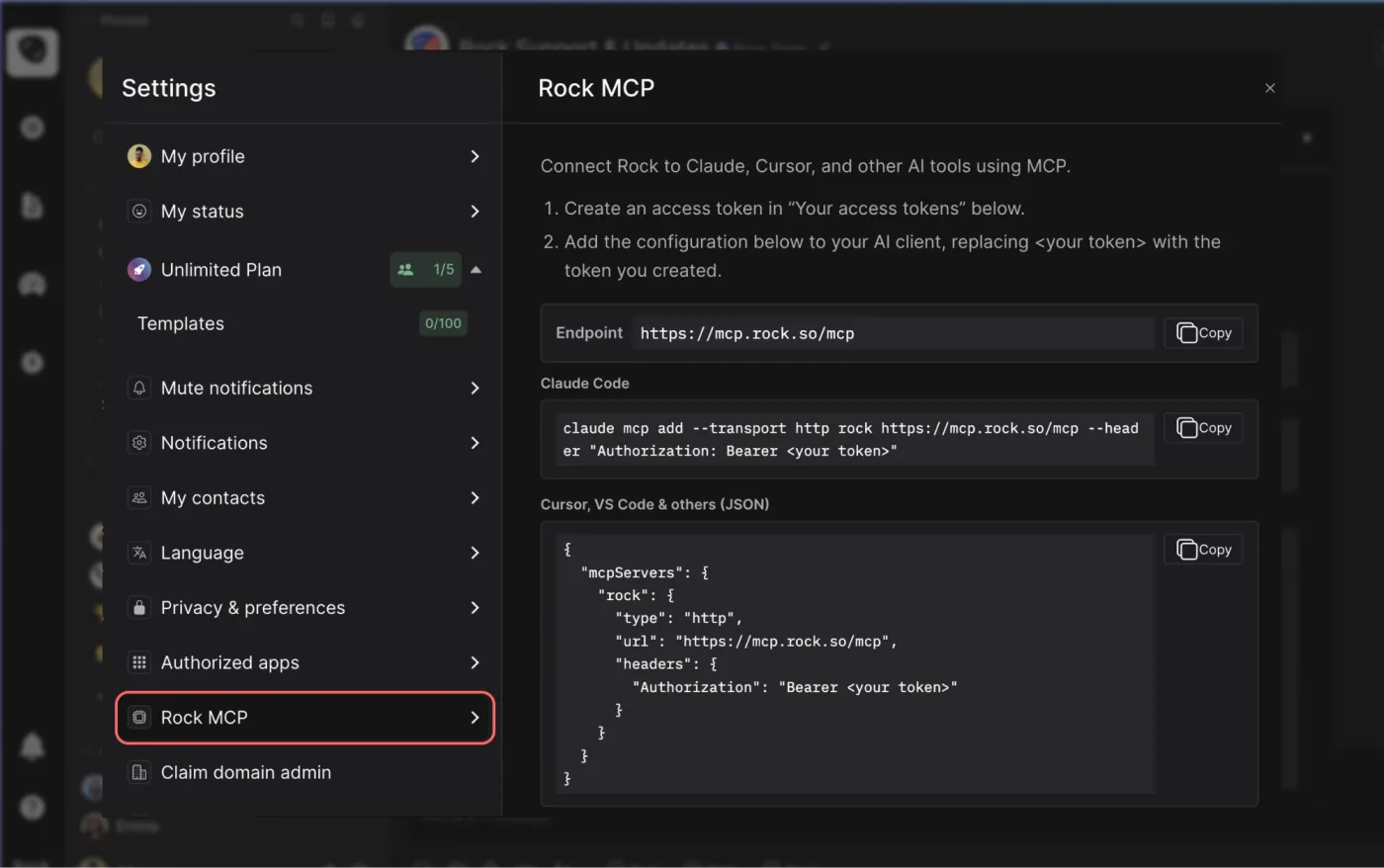
Rock MCP is here. You can now connect Rock to the AI tools you already use. Create a token in Rock, paste it into Claude, Cursor, or another client, and the assistant works inside your spaces as you, across all of them at once.
From earlier calls this month we learned that a lot of our active teams live in tools like Claude and Cursor now, and you would rather they reach into Rock than have you copy things back and forth. We work the same way.
Rock MCP is that connection: your AI assistant reads and updates your spaces directly, making it easier to stay up to date and manage projects across team members.
A few things worth knowing:
It works today with Claude Desktop, Claude Code, Codex, Cursor, VS Code, and Claude Cowork. A one-click connector for Claude on the web and mobile is coming next.
The token acts as you, read and write, across all your spaces. Treat it like a password, and revoke it any time.
It is on every plan, including Free.
Easiest setup: just ask Cowork
Claude Cowork can help you end-to-end with the setup. Share the prompt below and generate a new token, Claude will guide you through all steps.
Keep your token safe, never share in chat.
zsh
Works in coding environments
Add Rock MCP to Claude Code, Codex, Cursor, VS Code, or right from the terminal.
You will find it under your avatar, in a settings panel called Rock MCP. Full setup for every client is in the help guide.
What we use it for
A few of the things we ask it every day:
Search across your whole account. One question searches tasks, notes, and chat messages in every space you belong to. Try "where did we land on the Q3 pricing change?" or "find the onboarding brief and summarize it."
Turn a transcript or doc into tasks. Paste a meeting transcript or point it at a document, and ask it to create the tasks, with owners, due dates, and descriptions already filled in.
Push updates in. Drop your latest growth numbers, funnel metrics, or a status note straight into the right space, so the team sees it where they already work.
Run your to-do list from the chat. Ask "what is my most urgent task?", work on it together, then mark it done or update it without opening the app.
Plus, recent fixes
Since our last update, we also shipped:
Cleaner notifications and unread counts. Unread dots clear correctly for archived spaces and after "Mark all as read," and counts update the moment you open an item.
DMs in custom folders no longer disappear from your sidebar.
Chat threads stay in the right space now, with no more cross-space mix-up when you open one.
Add Spaces picker now targets the correct workspace inside embeds.
One thing has changed since this matrix got popular. AI assistants generate more output, more suggestions, and more things that look urgent. So the real value of the matrix in 2026 is not sorting tasks faster. It is giving you a reason to say no to the pile of urgent-looking work that does not matter.
Why You Keep Choosing the Wrong Task First
You sit down to work. Your inbox has 14 unread messages. A client pinged you about a "quick update." A teammate needs feedback on a deliverable due tomorrow. And somewhere on your to-do list, buried under all of it, sits the strategy work that would actually move your business forward.
You already know which tasks you will tackle first. The loud ones win every time. That is not a willpower problem. It is a wiring problem.
In 2018, researchers at the University of Chicago published a study in the Journal of Consumer Research that named this pattern: the Mere Urgency Effect. Across five experiments, Zhu, Yang, and Hsee found that people consistently choose tasks with shorter deadlines over tasks with bigger rewards. Even when participants knew the urgent task paid less, the deadline alone was enough to grab their attention.
That finding explains a lot about how most teams actually spend their days. Research from HBR (Birkinshaw and Cohen, 2013) found that knowledge workers spend 41% of their time on low-value activities they could easily hand off or skip entirely. That is nearly half of every workweek lost to tasks that feel busy but produce very little.
"What is important is seldom urgent and what is urgent is seldom important." - Dwight D. Eisenhower
The Eisenhower Matrix exists because of this exact gap between what feels pressing and what actually matters. It is not a new idea. But the reason it keeps showing up in productivity writing is simple: the problem it solves has only gotten worse. Microsoft's 2025 Work Trend Index reports that the average employee gets interrupted every two minutes, with communication eating up 60% of the workday.
This article is not another walkthrough of four boxes. You already know how the matrix works. Instead, we are going to look at why most people fill it out correctly and still end up doing the wrong work, and what to do about it.
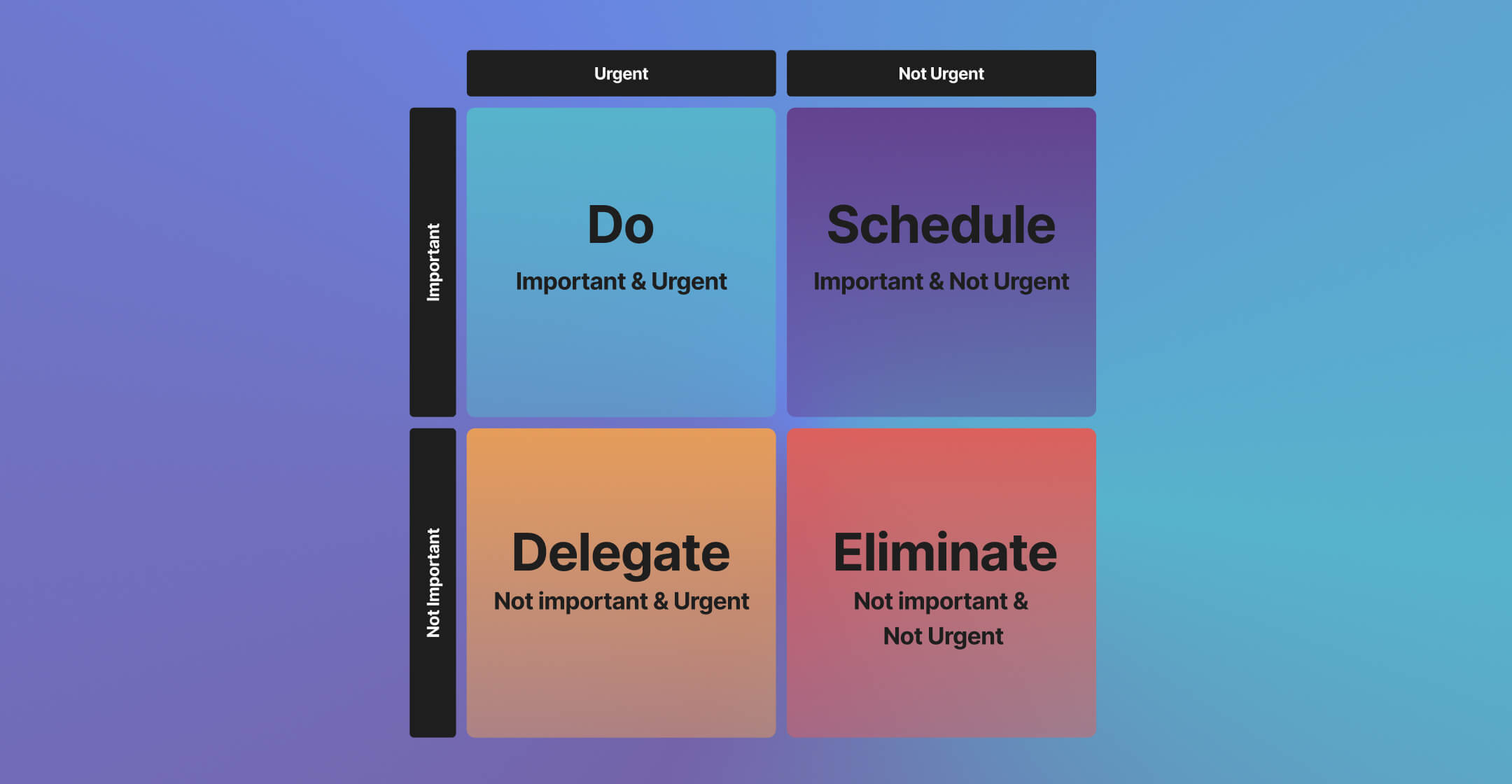
The Eisenhower Matrix decides which task to do next; the Pomodoro Technique handles the focused execution discipline once you have decided. The Eisenhower Matrix maps tasks by urgency (horizontal) and importance (vertical) to clarify what deserves your time.
The Four Quadrants (and the Psychology Behind Each)
Before we get into the traps, here is a quick refresher on how the eisenhower matrix divides your work. The real value is not in the labels. It is in understanding why your brain treats each quadrant the way it does.
Q1Do First
Urgent and Important
What it isGenuine fires. A server goes down. A client deadline is tomorrow. A team member quits mid-project.
The trapLiving here permanently. When everything feels like Q1, Q2 has been neglected. Prevention work that never happened becomes crisis work that demands all your energy.
Q2Schedule
Important but Not Urgent
What it isSOPs, team development, improving your sales process, planning your company goals. None of this screams for attention.
The trapPushed to "next week" over and over. Without a system to protect this time, Q2 evaporates while Q1 fires steal your day.
Q3Delegate
Urgent but Not Important
What it isMeetings that could be messages. The "quick question" that pulls you out of deep work for 20 minutes. Urgency borrowed from someone else's priorities.
The trapQ3 feels like Q1. The multitasking myth makes it worse, because switching costs more attention than people realize.
Q4Eliminate
Not Urgent and Not Important
What it isMindless scrolling. Reorganizing files nobody accesses. Perfecting a slide deck that three people will see.
The trapComfort work feels productive. Creeps in when you are mentally tired or avoiding a harder Q2 task. Being honest about Q4 reclaims serious time.
Eisenhower Matrix
Drag tasks between quadrants to prioritize. Add, edit, or delete tasks as needed.
Most people understand the matrix within five minutes. The framework is simple. The problem is that knowing the categories does not change behavior. Sorting a task into "Do First" is not the same as actually doing it, which is where an execution habit like the eat the frog method picks up. Here are three specific failure modes and how to fix each one.
Failure mode
The fix
Everything feels urgentEvery ping, email, and "just checking in" message triggers the same stress response. Your brain cannot tell the difference between a real deadline and someone else's impatience.
The 10/10/10 testBefore reacting to a task, ask: will this matter in 10 minutes? In 10 months? In 10 years? If only "10 minutes," it belongs in Q3 or Q4, not Q1. Five seconds of friction interrupts the automatic urgency response long enough to prioritize tasks by actual impact.
Q2 keeps getting bumpedYou plan to spend Thursday morning on strategy. By 9:15 a.m., three things have come up and your Q2 block is gone. Q2 work has no external accountability. Nobody is chasing you for it.
Time-blocking with boundariesBlock Q2 time on your calendar like a client meeting. Treat it as non-negotiable. Make blocks visible to your team. Q3 requests that arrive during Q2 time get a response window ("I will look at this after 11 a.m."), not an immediate reaction.
Delegating feels slower than doing it yourselfYou can do the task in 10 minutes. Explaining it to someone else takes 20. So you just do it. Again. Until your entire week is filled with work that should not be on your plate.
Invest now, save laterEvery task you delegate has a learning curve. The first time costs extra. The second breaks even. The third saves time. When a Q3 task shows up more than twice, write a quick SOP and hand it off.
"The word priority came into the English language in the 1400s. It was singular. It meant the very first or prior thing. Only in the 1900s did we pluralize the term and start talking about priorities." - Greg McKeown, Author of Essentialism
Quadrant 2 work needs protected time and a distraction-free setup.
Real Examples by Role
Generic examples do not help you sort your own work. Here is how the matrix looks for three roles that deal with competing priorities daily.
Agency Owner Managing 5 Client Accounts
Q1 (Do): Client deliverable is late and at risk of churn. A payment issue threatens a retainer contract. A key team member is stuck and blocking two projects.
Q2 (Schedule): Building a repeatable onboarding process for new clients. Creating templates that reduce project setup from two days to two hours. Having a quarterly review with your top accounts to understand their evolving needs.
Q3 (Delegate): Responding to "quick question" emails that a project manager could handle. Attending status calls that your team lead could run. Reviewing every social media post before it goes live.
Q4 (Eliminate): Redesigning your internal dashboard for the third time. Sitting in on sales calls for services you have already documented. Checking analytics daily when weekly reviews give you the same insights.
Marketing Lead Planning Q2 Campaigns
Q1 (Do): The landing page for next week's launch has broken tracking. A paid campaign is overspending and needs to be paused. The CEO wants the board deck numbers updated before tomorrow's meeting.
Q2 (Schedule): Mapping the full Q2 campaign calendar with dependencies. Building an SEO content pipeline that will drive organic traffic in six months. Running a work effectiveness audit on your team's recurring processes.
Q3 (Delegate): Formatting the weekly performance report. Scheduling social posts for the month. Coordinating with the design team on banner sizes for an upcoming ad set.
Q4 (Eliminate): A/B testing button colors on a page that gets 50 visits a month. Attending a cross-functional sync that has no action items for marketing. Manually pulling data that could be automated with a simple integration.
Freelancer Juggling Multiple Clients
Q1 (Do): A client's website went down and you are the only one with access. A deliverable scope changed midway and the deadline did not move. An invoice is 45 days overdue and you need to follow up before it becomes a cash flow issue.
Q2 (Schedule): Building a portfolio page to attract higher-paying clients. Setting up a contract template so you stop negotiating terms from scratch. Learning a new skill that lets you offer a higher-value service.
Q3 (Delegate): Bookkeeping and expense tracking (hire a virtual assistant or use software). Minor revision rounds that a junior freelancer could handle. Scheduling and rescheduling client calls.
Q4 (Eliminate): Redesigning your logo for the fourth time. Browsing freelancer forums without a specific question. Spending an hour perfecting a proposal for a project that pays below your minimum rate.
Documenting priorities and meeting outcomes in a shared space keeps the matrix visible for the whole team.
When NOT to Use the Matrix
No framework works for every situation. Being honest about limitations is more useful than pretending the matrix is universal. For team product backlogs that need numeric scoring, RICE scoring is a better fit. Here are three scenarios where you should skip it.
Crisis ModeIf your business is in genuine survival mode, everything that keeps the lights on is Q1. Sorting tasks into four quadrants adds overhead without clarity. In a real crisis, your only question is: "What keeps us alive through next week?" The matrix becomes useful again once you have stabilized.
Very Small Task ListsIf you have five or fewer tasks for the day, you do not need a framework. You need a list. The eisenhower matrix adds the most value when you have 15+ items competing for attention and you cannot rely on gut feeling to sort them. For a light day, just pick the hardest task first and work through the rest.
Purely Reactive RolesSome roles are designed around responding to incoming requests. Think customer support, IT helpdesk, or on-call incident response. In these roles, urgency is the job. Trying to categorize every ticket into four quadrants slows you down without adding value. A simple triage system (severity levels, response time targets) serves these roles better.
How to Set It Up in Practice with Rock
At Rock, we use our own Eisenhower matrix template inside our workspace. Here is how we set it up, and what actually makes it stick.
We create a task board with four columns that map directly to the quadrants: Do First, Schedule, Delegate, and Eliminate. Each task gets dropped into the right column during our Monday planning. The board lives inside the same space where our team chats, so there is no switching between apps to check priorities.
What makes this work is the combination of tasks and chat in one place. When a new request comes in through chat, we can drag it straight to the board and place it in the right quadrant. No copy-pasting between tools. No context lost. The Q3 "Delegate" column gets assigned to the right team member directly from the board, with a due date and any notes attached.
For Q2 work, we use recurring tasks with specific time blocks. Every team member has at least two Q2 blocks on their weekly schedule, and those show up on the shared calendar. When someone tries to book over a Q2 block, the calendar makes it visible, which creates a small but real friction against the "just this once" habit.
The Eliminate column is the most underrated part. We review it every two weeks and ask: are any of these tasks still showing up as requests? If so, we either automate them or create a rule that stops them from being created in the first place. Over three months, this cut our team's recurring low-value tasks by roughly 30%.
If you manage task management across multiple client projects, having each project space with its own priority board means you can see at a glance which clients have too much Q1 work (a sign that Q2 prevention is being skipped).
"In the absence of clear indicators of what it means to be productive and valuable in their jobs, many knowledge workers turn back toward an industrial indicator of productivity: doing lots of stuff in a visible manner." - Cal Newport, Georgetown Professor, Author of Deep Work
That quote captures why the eisenhower matrix matters more now than when Eisenhower first described the concept. In a world where busyness is the default measure of productivity, having a visible system that separates real work from noise is not optional. It is how you protect the work that actually grows your business.
Start Sorting Your Work Today
The matrix does not require a perfect setup. Start with a blank board, four columns, and the tasks already on your plate this week. Sort them honestly. The first time you move something from "Do First" to "Eliminate," you will feel the difference between reacting and deciding.
Remote work is a way of working that lets people work from a location anywhere instead of having to go onsite to do their job.
For example, instead of commuting 45 minutes by train to their office, a remote worker can log on anywhere. You can get your work done from your living room, home office, or sitting poolside. Remote work is sometimes called "telecommuting," "distributed work," or "work from home".
Remote work is intended to give workers more flexibility and give companies a way to attract and retain talent. It lets companies and workers "work smarter" by saving time and money.
Remote work is possible because of major advances in technology (communication, project management, and collaboration tools) that let workers do their jobs anywhere without impacting the quality of their work. Remote work tools help replicate traditional onsite workflows, like a coworker stopping by your desk to talk about a project.
Today, at least 25% of Americans work fully remote. Companies like Meta, Spotify, and Microsoft have made remote work a permanent option for their teams. Instead of offering it as a perk, many companies now rely on remote work for the day-to-day.
Here's why remote work is here to stay
Remote work is now a standard feature of how teams operate. Better technology and tools make it easy to work from anywhere. Instead of commuting to their workplaces five times a week, workers have more flexibility and autonomy.
Companies will save money on real estate by shrinking their office footprints while their productivity increases because of remote workers' contributions. Rather than having an unfocused approach to remote work, companies will have comprehensive policies and support which will help them attract and retain talent.
Both companies and workers have found that incorporating remote work into the day-to-day business is a complex change but a positive one overall. For most knowledge workers, it is now a standard expectation rather than a special arrangement.
The shift to remote work accelerated rapidly in the early 2020s and has become permanent for many industries. With technology and tools that make remote work easy and comparable to in-office work, companies realized that offering remote work was a way to attract new workers and make their current workforce feel valued.
Most companies now operate with hybrid working models or are fully remote. The traditional office has become just one of many places where work happens.
That doesn't mean that everyone will be working remotely though. Many jobs simply can't be done from home or a remote location. However, because technology makes it easy and affordable, remote work is here to stay.
What are the top 3 benefits of remote work for workers?
1. Better work/life balance
A survey by GitLab found that remote workers highly valued their ability to skip commuting and spent that saved time with their families. A follow-up study found that 37% of remote workers had reoriented their lives to spend more time with families and communities.
2. More Flexibility
Global Workplace Analytics reports that 56% of American employees have a job where they could do some work remotely. That means that those employees can do their job when it works best for them, like shifting their work hours to accommodate a dentist appointment.
With remote work as an option, workers can live and work in different cities, states, or countries. Workers can look for new jobs without worrying about relocation. They can also move to a place that's more affordable or a better fit with their lifestyle.
Flexibility is a highly valued aspect of a job, allowing workers to spend more time with family, friends, or outdoors. With flexibility comes a greater degree of independence and self-direction.
3. Cut the commute
Remote workers can save time that they would otherwise "waste" during their workdays. Because they don't have to go onsite every day, many workers can save hours of their time that would normally be spent on buses, trains, or in traffic.
With remote work, that time can be spent with family, on hobbies, or just sleeping in.
What are the top 3 benefits of remote work for companies?
1. Better recruitment & retain talent
Companies use remote work as a key benefit to attract top talent. People value the ability to work remotely because it gives them a degree of flexibility in how (and where) they work.
By its very nature, remote work allows workers a larger degree of independence and self-determination.
2. Boost team productivity
Despite early skepticism about remote productivity, research has proven that remote workers are often more productive than their in-office counterparts.
In a two-year study, Stanford University researchers found that the group assigned to work remotely had a boost in work productivity and took fewer sick days compared to their "traditional" counterparts.
To support their employees' increased productivity, companies should invest in proper remote work setups. Remote work is also associated with a reduction in the number of meetings, something most teams welcome.
3. Save money
As companies support remote work and incorporate it into their business models, one obvious perk is cost-effectiveness. Remote work allows for more efficient use of existing office space because it's only used when there's really a need for it.
Companies can save on high-priced real estate, even if they keep a place for workers who can and want to be onsite.
While saving money on office space, companies should offer allowances or reimbursements to help employees set up their remote work environments. That way, the cost of office supplies, desks, chairs, and technology doesn't become a frustrating burden to workers.
What are the top 3 challenges of remote work for companies?
1. Rethinking some tasks to better fit remote work
A McKinsey study found that some tasks like coaching, feedback, and training may be done more effectively when they're done in person. This presents a difficulty to companies since some of these tasks would need some serious outside-of-the-box thinking to reimagine them to fit remote work better.
Companies should strive for innovation in tasks like these so they can be better integrated into remote work. Many of these tasks are communication-heavy so companies should focus on making sure that they have the best remote work tools for communication and task management that translate smoothly to remote work.
2. Leveling the playing field for remote workers
Companies will face the challenge of making sure that remote work is fair to their employees, wherever those employees are. As companies look to switch entirely to remote work or to keep it as part of a hybrid work model, they'll need to adjust their operations and workflows accordingly.
In companies with hybrid work models, remote workers sometimes felt marginalized in the workplace compared to their in-office coworkers. Remote work can sometimes have an "out of sight, out of mind" effect.
To prevent workers from feeling neglected, companies need to establish clear communication strategies and discuss their expectations with employees so everyone is on the same page.
3. Retraining managers
Another challenge for companies is adjusting management styles and tactics to accommodate the realities of a distributed workforce. Managers who were used to judging productivity and performance by the "butt-in-seats" method will find that approach is no longer effective.
Many managers struggle to figure out the best way to manage their remote teams. Over-management and mistrust of employees are common with remote work. It also contributes to toxic work culture, employee stress, and ultimately turnover.
To ensure efficient remote work, managers should set up expectations for how and when their teams should communicate. For example, setting up weekly check-in questions for meetings for their team in addition to more standard communication methods like emails and virtual meetings.
Companies should invest in management training and develop comprehensive policies to give managers the skills they need. This will make sure that remote workers feel valued and supported.
What are the top 3 challenges of remote work for workers?
1. Setting boundaries
For employees, the added flexibility in their workday comes with some serious downsides. A survey from Gitlab highlighted that 47% of respondents felt that managing distractions at home was a top challenge for them while working remotely.
Remote workers struggle to turn off their laptops and step away since the office is also where they would otherwise spend their free time.
This adds stress and more distractions to manage. For women and other people who are often caregivers, other distractions at home often fall on their shoulders in addition to the work from their job. Companies, managers, and employees should work together to set up boundaries and establish what works for everyone involved.
2. Feeling isolated
Another challenge facing remote workers is sometimes feeling isolated. That doesn't mean that remote workers are lonely, although the two feelings are similar. When remote workers feel isolated, they often don't have access to materials or information that they need.
Think of isolation as separation from opportunities and information that we're used to getting easily in physical workplaces. Like knowing that it's a busy day in the office hearing phones ringing, or having a coworker stop by your desk.
Collaboration, clear expectations, and communication are all key elements that companies, workers, and managers need to combat feelings of isolation.
3. Lacking manager support and direction
For managers who are used to managing their teams in a more traditional, onsite setting, the switch to remote work can be a challenge. It's a difficulty that workers face too since they need direction, support, and trust to get things done.
When people move to remote working, communication can break down, simply because it's harder to keep people in the loop. A checked-out manager makes remote workers unnecessarily stressed.
Sticking to an organized structure can help combat disorganization. It also initiates a conversation about the best way to communicate can help too.
Communication is key to remote work
Remote work relies heavily on communication to make sure things are running smoothly. Since it's such a big part of working remotely, it's important to understand the different types of communication.
What are asynchronous & synchronous styles of communication?
Synchronous communication is real-time, usually involves set schedules, and typically, in-person work. Some benefits of this communication style are instant feedback and workers feeling involved.
A school classroom is a good example of synchronous communication, students and teachers can have conversations in real-time and students depend on the teacher to learn information at the same time. This type of communication is associated with traditional work that ties an employee's time to a place and certain tasks.
Asynchronous communication (as you might have guessed) is the opposite of synchronous communication. With this communication style, you can work at your own pace without real-time collaboration.
An example of asynchronous communication would be remote-learning classrooms. The teacher provides some structure but students also "self-teach" at their own pace with video recordings and assigned classwork. The benefit of asynchronous work is that it can typically be done independently and accommodates different schedules.
What are the types of tools needed for remote work?
Aside from the obvious (computer or laptop, internet connection, table or desk), remote work requires a wide variety of digital tools. In traditional, in-office workplaces, communication and tools were mostly centered around employees who worked in a central location.
To work with a distributed workforce, companies and their workers will need the right tools to succeed.
1. Communication tools
Communication is critical to sustaining remote work in the long term. This is because keeping a distributed workforce on the same page takes a lot of effort. Standard tools like task management platforms and virtual meetings (Zoom and Google Meet) will help teams stay in touch with each other.
2. Collaboration tools
Tools that support collaboration between remote workers are important to have because it's an elementary part of almost every job. With remote workers all logging on from their homes or remote workplaces, cross-departmental collaboration or across teams, in general, can be a daunting task.
Google Drive, Onedrive, and Dropbox are mainstream tools for sharing information and files with each other, whether you're in different neighborhoods or time zones.
3. Project management tools
With people and information in different places, project management is key to success for remote workers.
Project management tools often have a to-do list or task board format to track various items. For example, Rock has task boards to make it easier for users to manage projects and tasks. That way, you can update them as you make progress or complete a task or project.
Because project management tools are accessible to everyone in a team or company, they're an asynchronous way of staying organized at work and updating your coworkers and managers on what you're working on.
Most tools currently don't work well for working remotely
Most of the tools that remote workers use don't work well because they're usually made with a single purpose in mind. This means that many have to juggle a bunch of different tools just to communicate and work together. These tools make remote work more complicated because they're so narrowly focused.
These remote work tools are also expensive for companies to use and maintain. Companies are forced to pay for tools that complicate things, don't work well together, and add stress to day-to-day business for both them and their workers.
Multimodal tools are ideal for remote work
Tools that are multimodal are best suited for remote work because they're more flexible and often multi-purpose.
Multimodal tools are asynchronous by default and synchronous when they need to be. This gives remote workers the best of both worlds. These tools are more multifaceted than most remote work tools.
They include a variety of ways to communicate like chats, video calls, and task boards. Because remote work depends heavily on flexibility and communication, multimodal tools are the best kind of tool.
Rock combines messages plus tasks and your favorite apps with all-in-one functionality
Rock is the ideal multimodal tool for remote work because it's built for more than one purpose and offers everything you need in one tool. Instead of picking one communication style (asynchronous or synchronous), you can use whichever works best for you.
This makes working with people in other time zones as easy as working with people in your neighborhood. You don't have to choose between communication styles like you do with email, virtual meetings, and chat messages.
Rock keeps everything you need to work remotely in one place. Keep your files, manage your projects with task boards, and chat with your coworker with in-app messaging. Everyone you work with will be able to access cloud files with a convenient Google Drive integration.
Rock also has a built-in task board to make managing your project easier. Your coworkers and managers will be able to see the status of your projects and tasks without an update. To make communication smoother Rock has both Zoom and Jitsi integrations for your meetings and in-app messaging.
Why are multimodal tools the future?
Multimodal tools are the future of remote work because they're built for the world of remote work. Multimodal tools offer flexibility that older, single-use tools don't include. Working how you want is a critical part of successful remote work and single-use tools aren't up to that task.
In addition to providing flexibility for both workers and companies, multimodal tools also centralize functions to make cross-functional collaboration while working remotely easier for everyone.
There are enough things to juggle while working remotely. Juggling a variety of tools adds stress when it's not needed. Because multimodal tools keep everything you need in one place, they'll become irreplaceable to companies and remote workers.
Get ready for an exciting new world (of remote work)
Remote work has become the new normal for many knowledge workers. Working remotely offers employees a better work/life balance, more flexibility, and saves time on work-related things like commuting.
For companies, remote work is cost-effective and boosts productivity. It serves as a top recruiting and retaining tool for their workers.
Workers struggle to set boundaries as companies and workers continue to adjust to working remotely. Companies face the challenges of adjusting operations, rethinking tasks, and retraining managers to establish trust while achieving company goals and objectives.
It's important to distinguish between asynchronous (not real-time) and synchronous (real-time) communication. Remote workers are often limited by the lack of flexibility because most tools stick with one communication style. Since remote work will be a mainstay in many workplaces, multimodal tools are the future.
Multimodal tools like Rock offer better flexibility and organization to remote workers than tools designed for people working onsite.
It is Monday morning. You open WhatsApp to find 47 unread messages across six client groups. Somewhere in there is a design approval, a revision request, and a deadline that passed on Friday. But which project? Which client?
If you run a digital agency with 5 to 50 people and serve clients in different time zones, this situation probably feels familiar. Work lives in chat threads. Deadlines live in someone's head. Status updates happen in meetings that could have been a message.
A task board changes that. It gives your team one place to see what needs to happen, who is doing it, and where things stand. No scrolling through chat history. No "did you see my message?" follow-ups.
By the end of this article, you will know how it works, whether your agency actually needs one, and how to set one up in 15 minutes. You can even try building one yourself with the interactive demo below.
What Is a Task Board (and What Is It Not)?
A task board is a visual way to organize client work into columns that represent stages of progress. The most common setup has three columns: To Do, In Progress, and Done. Each task gets its own card that moves from left to right as work progresses.
The concept comes from kanban boards, first used in Toyota's manufacturing plants in the 1940s. The idea is simple: make work visible so nothing falls through the cracks.
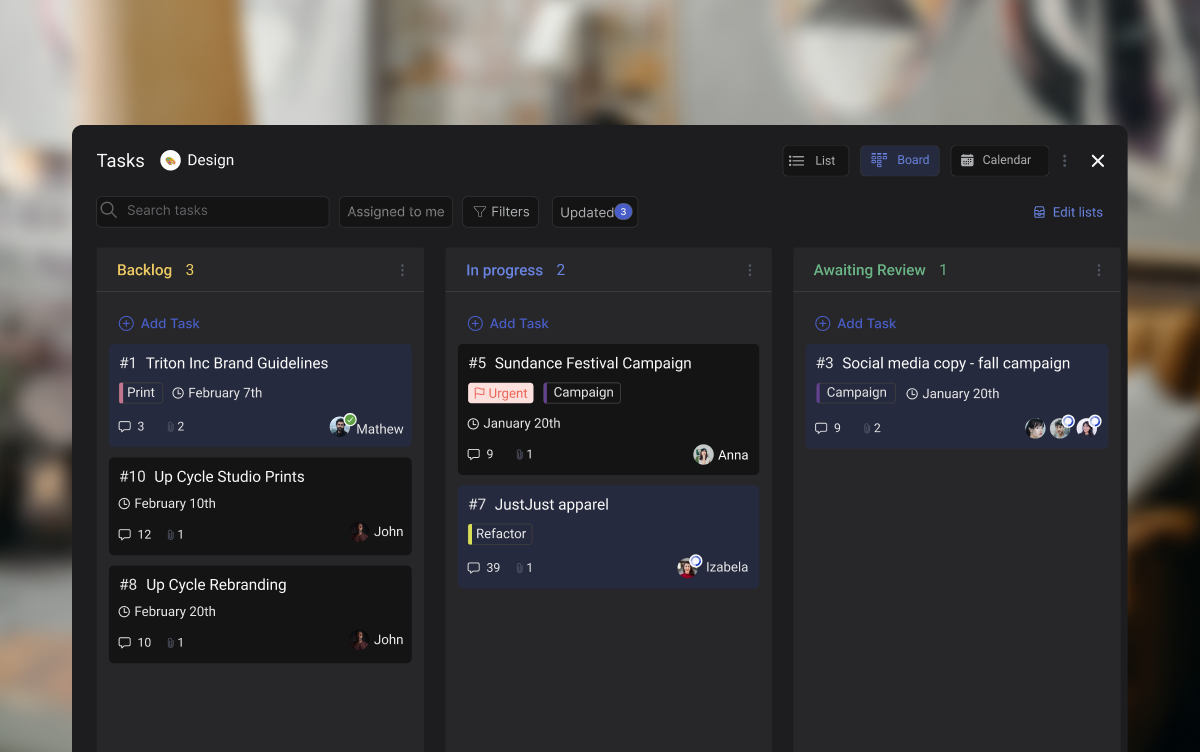
A basic task board layout with three columns. Each card represents one task assigned to a team member.
It is not a full project management suite. It is not a Gantt chart with dependencies and critical paths. It is not a spreadsheet with color-coded cells. It is the simplest useful layer of project tracking, and that simplicity is exactly why it works for agencies where not everyone is a project manager.
Best for: Teams of 5 to 50 managing multiple client projects at once. Especially useful when your team currently tracks work through chat messages or spreadsheets.
Skip this if: You work solo with one or two clients and can hold everything in your head. Adding a board adds a step you might not need yet.
The Real Cost of Not Using One
According to Asana's Anatomy of Work Index, workers spend 58% of their time on "work about work," meaning status updates, searching for information, and chasing approvals. Only 33% goes to the skilled work they were hired to do.
For an agency, that math is brutal. If your 10-person team bills at $25 per hour and each person works 160 hours a month, 58% of that time on coordination means roughly $23,200 per month goes to work that does not produce anything for clients. That is time spent asking "where is the file?", sitting in status meetings, or re-explaining what was already decided in a chat thread.
Microsoft's Work Trend Index found a similar pattern: workers spend 57% of their time communicating and only 43% creating. Harvard Business Review calls this collaboration overload, noting that time spent in collaborative activities has increased by 50% over the past decade. For an agency, creation is the product. Every hour spent on coordination instead of design, code, or copy is an hour you cannot bill.
The WhatsApp Problem
Most agencies in Southeast Asia, Africa, and Latin America start the same way: a WhatsApp group per client. It works when you have two clients and three people. It breaks when you have eight clients and fifteen people.
Here is what happens. A client sends feedback on a design at 11pm their time. Your designer in Manila sees it the next morning, buried under 30 messages about a different project. The revision sits for two days. The client follows up. Your account manager scrambles to find the original message. A meeting gets scheduled to "align." That meeting could have been avoided if the feedback was a task card on a board.
"They know how much money is coming into their business and can see the final profit figure. However, what happens in between remains a mystery." - Marcel Petitpas, CEO of Parakeeto
How It Actually Works
The core of any board is three columns:
To Do: Tasks that are defined and ready to start. Someone is assigned, the brief is clear, and everything needed to begin is available.
In Progress: Tasks that someone is actively working on right now. This column should never be overloaded. If every card is "in progress," nothing is actually moving.
Done: Completed tasks. Moving a card here means the work is finished, reviewed, and delivered. Not "mostly done" or "waiting for one more thing."
Each card on the board represents one task. A good card has a short title (under 10 words), an assignee, a label for the client or project type, and a due date. That is enough. Do not over-engineer your cards with 15 custom fields on day one.
The board becomes a snapshot of your entire project. In a three-second glance, you can see how much work is waiting, what is being worked on, and what just shipped. That is the entire point.
Beyond Three Columns: What Agencies Add
After a few weeks, most agencies add one or two columns specific to their workflow:
Client Review: Tasks that are done on your side but waiting for client feedback. This column makes it visible when the ball is in the client's court, which is valuable when clients ask "why is this taking so long?"
Blocked: Tasks that cannot move forward because of an external dependency. Waiting for stock photos from the client, API credentials, or brand guidelines. A "Blocked" column prevents these tasks from sitting invisibly in "In Progress."
Start with three columns. Add more only when you feel the need, not before.
The Agency Task Board Playbook: Build Yours Now
Every agency runs repeating workflows. Client onboarding follows the same steps. Content production has the same stages. The trick is turning those repeating patterns into board templates you can duplicate for each new project.
Below are five workflows that cover most agency work. Pick the one closest to what your team does and try it out. You can drag cards between columns, add your own tasks, and see how the board feels before setting one up for real.
What we do at Rock: Our content production board has five columns: Briefed, Writing, Review, Approved, Published. Each card is a blog post or social batch. We use labels to tag the content type (blog, social, email) and due dates synced to our content calendar. Draft feedback happens in task comments instead of email threads. When someone finishes a draft, they move the card to Review. No message needed. The team sees it.
"Plans are nothing; planning is everything." - Dwight D. Eisenhower, 34th President of the United States
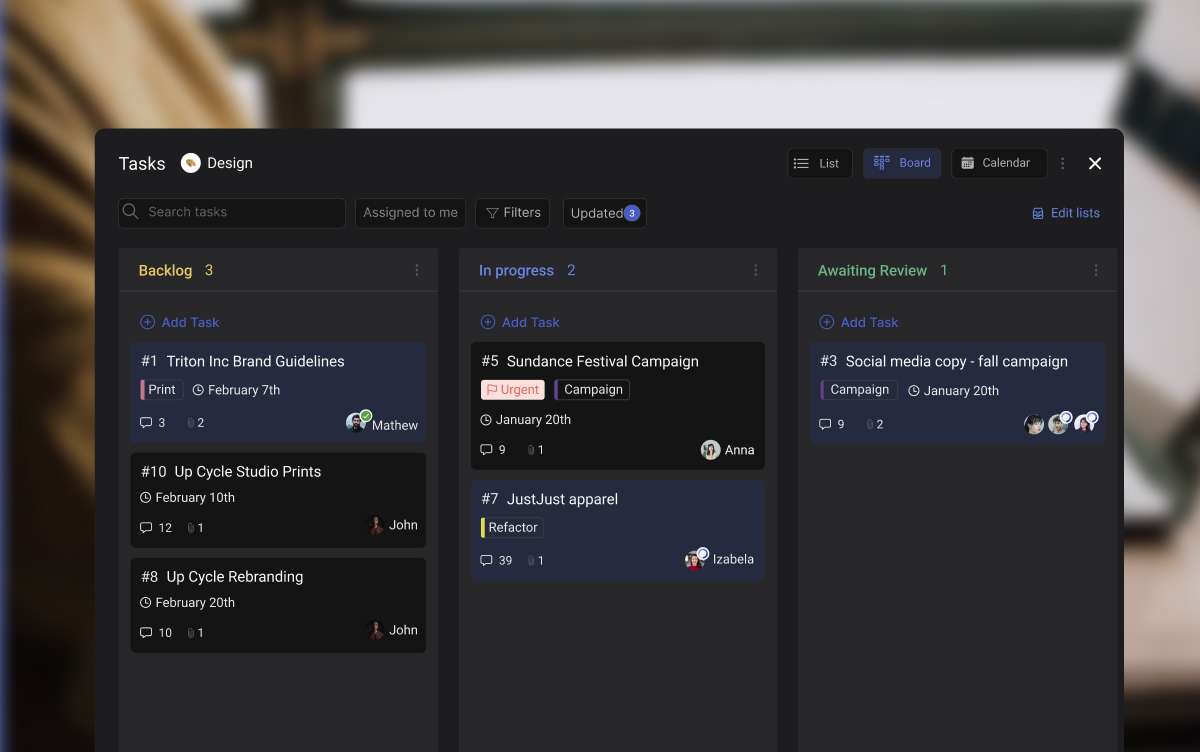
A board in Rock with tasks organized by status. Labels help separate work by client or project type.
Which Tool Fits Your Agency?
There are dozens of task management apps out there, and most of them will show you a board view. The difference is what else comes with it, what it costs, and whether your team will actually use it.
Instead of reading a comparison table, answer four questions and get a recommendation tailored to how your agency works.
Which task board fits your agency?
4 questions. 30 seconds. Get a recommendation.
1. Does your team already use a chat tool for work?
WhatsApp / Telegram
Slack / Teams
Not really
2. Do clients need to see project progress?
Yes, regularly
Sometimes
No, internal only
3. How comfortable is your team with new software?
Rock is a good fit when you want chat and a project board in the same place, you regularly invite clients into project spaces, your team is 5 to 50 people, and you prefer flat pricing over per-seat costs. At 20 people, Rock's $89/month plan works out to $4.45 per user. Most per-seat tools cost $7 to $12 per user at that size.
Rock is not the best fit when you need advanced resource management with capacity planning, built-in time tracking with invoicing, or complex dependency mapping like Gantt charts. For those, tools like Teamwork or Productive.io are stronger. Rock keeps things simple on purpose. If your agency needs enterprise-level project controls, you will outgrow it.
Being honest about this matters. The worst tool choice is one that looks good in a demo but sits unused because it is too complex for your team.
"Most agencies often suffer from indigestion, not starvation. They are fundamentally broken in how they convert revenue into profit, and adding more work only makes the problem worse." - Marcel Petitpas, CEO of Parakeeto
A board set up for client work. Simple enough that clients can check progress without a training session.
Set Up Your First Board in 15 Minutes
You do not need to move your entire agency onto a new tool today. Start with one project and see if the board works for your team.
Step 1: Pick Your First Project
Choose one active client project. Not all of them. Pick the project that causes the most "where is this at?" questions. That is the one where a board will make the biggest immediate difference.
Step 2: Create Three Columns
To Do, In Progress, Done. Nothing more. You can always add columns later, but starting simple means your team has fewer decisions to make on day one.
Step 3: Add Your Tasks
Write one card per deliverable. Keep titles short. "Design homepage banner" is better than "Work on the homepage banner design for the Q2 campaign refresh." Add the person responsible and a due date. If a task does not have a clear owner, it will not get done.
In Rock, you can turn any chat message into a task with one click. The context stays attached.
Step 4: Invite Your Team (and Maybe Your Client)
Get your team on the board first. Let everyone move their own cards for a week or two. Once the habit is established, consider adding the client so they can see progress without scheduling a call to ask for updates.
Step 5: Make It a Daily Habit
Spend five minutes each morning reviewing the board. Move cards that have progressed. Flag anything blocked. This replaces your weekly status meeting. The board is the status update.
If your team uses asynchronous work across time zones, the morning board review becomes even more valuable. You see what your colleagues in a different time zone completed while you were offline, without reading through a thread of messages.
Common Mistakes to Avoid
Too many columns. Start with three. Add more only when cards pile up in one column and you need to see a finer status. Five columns is usually the max before a board becomes hard to scan.
No clear ownership. Every card needs one person responsible. "The team" is not a person. If two people share a task, pick the one who drives it forward.
Ignoring the board after setup. A board only works if people update it. Build it into your daily routine or morning standup. If cards stay in "In Progress" for two weeks, the board is not reflecting reality.
Putting everything on one board. Separate boards per client or per project. One giant board with 200 cards helps nobody. If you cannot see the full picture in a glance, the board is too crowded.
Skipping labels. Labels let you filter by client, project scope, or priority. Without them, the board is just a list with extra steps. Most agencies use one label set for client names and another for work type (design, copy, development).
A board will not fix a broken process. But it will make a working process visible. And for agencies juggling multiple clients across time zones, visibility is the difference between a team that delivers on time and a team that is always chasing.
Go back to that Monday morning scenario. Instead of opening WhatsApp to 47 unread messages, you open your task board. You see three tasks in "Client Review," two in "In Progress," and one marked "Blocked" because the client has not sent their brand assets yet. You know exactly where everything stands. No meetings needed.
If you want to try this with a tool that combines chat and boards in one place, Rock's free plan gives you everything you need to get started.
Why Most Meeting Agendas Fail (And What to Do Instead)
You already know you need a meeting agenda. That is not the problem. The problem is that most agendas look like a vague list of topics nobody prepared for. "Discuss project updates" tells your team nothing about what to bring, what decisions need to happen, or when the meeting should end.
A Harvard Business Review survey found that 71% of senior managers said meetings are unproductive and inefficient, and most report Zoom fatigue on top of it. The agenda is usually where things go wrong. Not because it does not exist, but because it lacks structure.
A good agenda does three things: it tells people what to prepare, sets a time limit for each topic, and names who is responsible for leading each part. If yours does not do all three, it is just a topic list pretending to be a plan.
A structured agenda with time blocks and assigned owners for each topic.
"The single biggest problem with communication is the illusion that it has taken place." - George Bernard Shaw, Playwright
This article gives you concrete agenda examples you can copy and use today. Each one includes a recommended duration, a list of who should attend, and the common mistakes that make that type of meeting waste everyone's time.
Build your meeting agenda
Pick a meeting type to get a ready-made agenda you can edit.
A structured agenda turns vague meetings into focused conversations.
The 5-Minute Agenda Framework
Before we get into specific examples, here is a simple framework you can apply to any meeting. It takes about five minutes to set up and saves you from the "what was that meeting even about?" feeling.
For every meeting, answer these five questions before sending the invite:
What decision or outcome do we need? If you cannot answer this, you might not need a meeting. Consider asynchronous work instead.
Who needs to be there? Only invite people who have context or need to give input. Everyone else can read the notes.
What does each person need to prepare? Write this in the invite. "Review Q2 metrics before the call" is better than "let's discuss Q2."
How much time does each topic get? Assign time blocks. A 30-minute meeting with three topics means roughly 8-10 minutes each.
Who leads each section? The person closest to the topic should present it. The meeting organizer does not have to run every part.
Best for: any meeting type. This framework works whether you are running a quick standup or a full project review.
Skip this if: you are running a casual 1:1 where rigid structure would feel forced. In that case, a simple list of 2-3 topics is enough.
Meeting Agenda Examples by Type
1:1 Meetings (Manager and Report)
The 1:1 is the most personal meeting on anyone's calendar. It should focus on the team member, not on status updates the manager could read in a task board.
Recommended duration: 30 minutes, weekly or biweekly
Who should attend: Manager and direct report only. No exceptions.
Example agenda:
(5 min) Check-in: How are you doing this week? Any wins or frustrations? Use check-in questions to keep this from becoming repetitive.
(10 min) Employee topics: The report brings 1-2 topics they want to discuss. This is their time.
(10 min) Manager topics: Feedback, upcoming projects, or organizational changes to share.
(5 min) Action items: Agree on 1-3 specific next steps with deadlines.
Common mistakes: Turning the 1:1 into a status update. If you spend the whole time reviewing tasks, you are wasting a chance to build trust and address real issues.
Best for: building strong working relationships. Regular 1:1s reduce surprises during performance reviews.
Skip this if: you are already communicating daily through chat and the relationship is strong. Some teams do 1:1s biweekly instead.
1:1 Meetings (Client and Freelancer)
Client 1:1s have a different dynamic. The freelancer needs to show progress and the client needs to feel informed without micromanaging.
Recommended duration: 20-30 minutes, weekly
Who should attend: The freelancer or account lead, plus the client's primary contact.
Example agenda:
(5 min) Quick wins: What shipped since last meeting? Show, do not just tell.
(10 min) In-progress work: Walk through current tasks. Flag anything blocked or needing client input.
(5 min) Upcoming priorities: Preview next week's focus so the client can raise concerns early.
(5 min) Questions and feedback: Open the floor. Clients often hold back unless you explicitly invite feedback.
Common mistakes: Not sharing the agenda before the call. Clients should never walk into a meeting wondering what will be discussed.
A client check-in agenda that focuses on showing progress and collecting feedback.
Team Standups and Weekly Syncs
Standups exist to remove blockers, not to give status updates. If your standup is just people reading their task list out loud, you can replace it with an async message. A Forbes study found that professionals spend an average of 31 hours per month in unproductive meetings.
Recommended duration: 15 minutes for standups, 30-45 minutes for weekly syncs
Who should attend: The working team only. Standups with more than 8 people become slow and unproductive.
Example standup agenda:
(1 min per person) Three questions:
What did I finish since yesterday?
What am I working on today?
What is blocking me?
(5 min) Blocker discussion: Only discuss blockers that need group input. Everything else moves to a separate conversation.
Example weekly sync agenda:
(5 min) Wins from last week: Celebrate progress. This keeps energy up.
(15 min) Key updates by project: Each project lead gives a 2-3 minute update. Focus on decisions needed, not tasks completed.
(10 min) Blockers and dependencies: Where are teams waiting on each other?
(5 min) Priorities for next week: Align on the top 3 team priorities.
Common mistakes: Letting the standup stretch to 30+ minutes. If it takes longer than 15 minutes, you have too many attendees or too little discipline. Consider work efficiency strategies to tighten things up.
Best for: teams that work on shared projects and need daily alignment.
Skip this if: your team works independently on separate projects. An async update in your team chat is often enough.
"If you had to identify, in one word, the reason why the human race has not achieved, and never will achieve, its full potential, that word would be meetings." - Dave Barry, Pulitzer Prize-winning Author
Client Check-Ins and Project Reviews
Client check-ins are about maintaining trust. The agenda should make the client feel they know exactly where their project stands without needing to chase your team.
Recommended duration: 30-45 minutes, biweekly or monthly
Who should attend: Account manager, project lead, and the client's key decision-maker. Avoid bringing your whole team unless the client requests it.
Example agenda:
(5 min) Relationship check: How is the collaboration going? Any communication gaps?
(10 min) Progress against milestones: Share a visual timeline or board. Show what is done, what is in progress, and what is next.
(10 min) Budget and timeline review: Be transparent. If something is off-track, say so early.
(10 min) Scope discussion: Address any new requests. Define what is in scope and what requires a change order. "Scope creep" is when new work gets added to a project without adjusting the budget or timeline.
(5 min) Action items: Assign clear owners and deadlines.
Common mistakes: Avoiding tough conversations about budget or delays. Clients respect honesty far more than surprises at the deadline.
Best for: agencies and freelancers managing ongoing client relationships.
Skip this if: you are in the middle of a sprint with no major changes. A quick async message saying "on track, no changes" saves everyone 30 minutes.
A project review meeting focused on milestone tracking and transparent budget discussions.
Sprint Planning and Retrospectives
Sprint planning decides what the team will work on. The retrospective looks at how the team worked. These are two different meetings with two different agendas. Do not combine them. If you are new to sprints, check out our guide on sprint duration first.
Sprint Planning
Recommended duration: 45-60 minutes
Who should attend: The full working team plus the product owner or whoever sets priorities.
Example agenda:
(5 min) Review last sprint outcomes: What shipped? What carried over?
(10 min) Sprint goal: Define one clear goal for the sprint. "Complete the client dashboard redesign" is a goal. "Work on stuff" is not.
(20 min) Backlog review and task selection: Pull items from the backlog. Discuss scope and effort for each. Use task prioritization methods to decide what makes the cut.
(10 min) Task assignment and estimation: Who is doing what? How long will each task take?
(5 min) Dependencies and risks: What could block us this sprint?
Sprint Retrospective
Recommended duration: 30-45 minutes
Who should attend: The same team that worked the sprint. No managers who were not involved, unless the team invites them.
Example agenda:
(5 min) Set the tone: This is a safe space for honest feedback. No blame.
(10 min) What went well? Celebrate wins before digging into problems.
(10 min) What did not go well? Be specific. "Communication was bad" is not actionable. "We missed the deadline because the design specs were unclear" is.
(10 min) What will we change? Pick 1-2 improvements to try next sprint. More than that and nothing sticks.
Common mistakes: Skipping the retrospective because the team is "too busy." Teams that skip retros repeat the same mistakes every sprint.
Skip this if: your project has no clear phases or iterations. A simple weekly sync might serve you better.
All-Hands and Town Halls
All-hands meetings are about alignment and transparency. They fail when they become a lecture from leadership. The agenda should include time for questions, or people will tune out.
Recommended duration: 45-60 minutes, monthly or quarterly
Who should attend: The entire company or department. Keep it optional for teams in very different time zones.
Example agenda:
(5 min) Welcome and context: What is the purpose of today's all-hands?
(10 min) Company updates: Key metrics, wins, and challenges. Be real about the challenges.
(10 min) Team spotlights: 2-3 teams share what they shipped or learned. Rotate this every meeting.
(10 min) Strategic focus: What is the company focusing on next quarter? Connect it to day-to-day work.
(15 min) Open Q&A: Collect questions anonymously beforehand so people feel safe asking tough ones.
(5 min) Closing and next steps: Summarize key takeaways.
Common mistakes: Reading slides that could have been an email. If your all-hands has no interactive component, people will open another browser tab.
Best for: companies with 20+ people where teams do not naturally cross paths.
Skip this if: your team is under 10 people and talks daily. A casual team lunch works better at that size.
Brainstorming Sessions
Brainstorming needs more structure than most people think. Without it, the loudest voices dominate and everyone else checks out.
Recommended duration: 45-60 minutes
Who should attend: 4-7 people with diverse perspectives. More than 7 and participation drops.
Example agenda:
(5 min) Problem statement: Define the exact problem you are solving. Share this before the meeting so people come with ideas.
(10 min) Silent ideation: Everyone writes ideas individually. No talking. This prevents groupthink.
(15 min) Idea sharing: Each person presents their top 2-3 ideas. No critiquing yet.
(10 min) Discussion and clustering: Group similar ideas. Ask clarifying questions.
(5 min) Voting: Each person gets 3 votes. Top ideas move forward.
(5 min) Next steps: Who will research or prototype the winning ideas? Set a deadline.
Common mistakes: Jumping straight into open discussion without individual thinking time. Research shows that groups generate fewer ideas than the same number of people working alone first.
Best for: creative problem-solving when you need fresh perspectives.
Skip this if: you already know the solution and just need buy-in. That is a decision meeting, not a brainstorm.
"Meetings are indispensable when you don't want to do anything." - John Kenneth Galbraith, Economist and Author
What to Do After the Meeting
An agenda only matters if someone follows up. The best meetings end with three things documented: decisions made, action items assigned, and the next meeting date (if needed).
A meeting minutes template that captures decisions, action items, and owners.
Meeting minutes should include:
Date, attendees, and the meeting's purpose
Key decisions with context on why
Action items with owners and deadlines
Open questions to address next time
Share these within 24 hours. The longer you wait, the less accurate they become. Use your team's existing chat or project management template to track action items, not a separate document nobody checks.
Best for: any meeting where decisions are made or tasks assigned.
Skip this if: it was a casual brainstorm with no firm next steps. Even then, a one-line summary in chat helps.
Good meeting minutes make the next meeting shorter.
When to Cancel Instead of Meeting
Not every meeting deserves to happen. If you cannot fill an agenda with items that need real-time discussion, cancel the meeting and send an async update instead.
Cancel the meeting when:
There is no clear decision to make or problem to solve
The key decision-maker cannot attend
The agenda only has "updates" that could be shared in chat
You are meeting out of habit, not necessity
Fewer than half the required people can make it
Replace with async when:
You need to share a status update. Post it in your project channel.
You need a simple yes/no decision. Send a message with context and a deadline for the answer.
Your team spans multiple time zones and finding a common time is painful. Asynchronous work often produces better results for distributed teams.
Canceling a meeting and replacing it with a well-written message is not lazy. It is respectful of everyone's time.
How We Handle Meeting Agendas at Rock
At Rock, we are a remote team spread across time zones. Most of our meetings happen inside the same workspace where we chat and manage tasks. Here is what works for us.
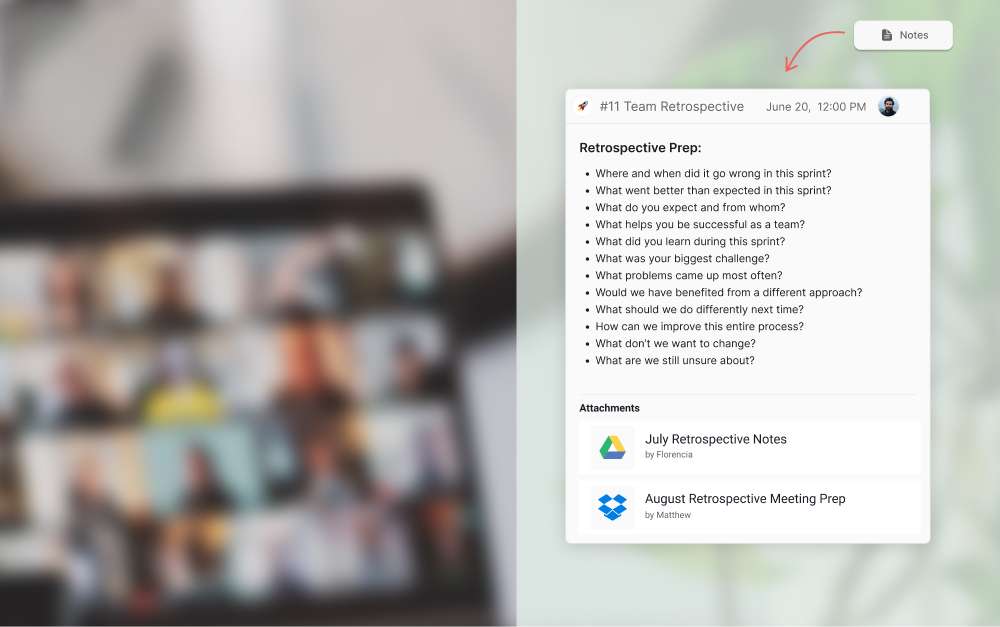
We pin the agenda as a note in the relevant Rock space before every meeting. The note includes the agenda, links to related tasks, and a section for meeting minutes at the bottom. After the meeting, we update the note with decisions and action items, then create tasks directly from those items.
This keeps everything in one place. Nobody needs to dig through emails or a separate doc to find what was decided. The agenda, the discussion, and the follow-up all live in the same space where the work happens.
For recurring meetings like our weekly sync, we reuse the same note and add a new section each week. Over time, this creates a searchable history of decisions. When someone asks "why did we change the onboarding flow?" we can find the exact meeting where that decision was made.
We also skip meetings aggressively. If the agenda for a weekly sync is empty by the morning of, we cancel and post a quick update in chat instead. Nobody misses the 30 minutes.
What works for us might not work for every team. But the core principle holds: keep your agenda where your team already works, and make follow-up as easy as possible.
Start Running Meetings Worth Attending
A solid agenda is not a formality. It is the difference between a meeting that moves work forward and one that wastes an hour of everyone's day. Pick the template that fits your next meeting, fill it in with the 5-minute framework, and share it before the call starts. For the agency client kickoff specifically, see our client kickoff meeting agenda and script.
If you want a workspace where your agenda, tasks, and meeting notes all live in the same place, try Rock for free. Chat and tasks in one space, no switching between apps.
Monday.com is one of the most popular project management tools on the market. Colorful boards, strong automations, and a polished interface make it easy to see why teams sign up. But staying on Monday.com is getting harder to justify.
We are the team behind Rock, a chat and tasks app for agencies and client teams, so we test these tools constantly. Rock is on this list, but if you need Monday-style visual boards and dashboards, some of the options below fit better, and we say so. We set each one up and used it for real work to see who it suits.
In February 2026, Monday.com announced an 18% price increase across all plans. Seats are sold in bundles of five, so a team of 11 pays for 15. Products like monday CRM and monday dev are billed separately. And essential features like time tracking, guest access, and automations beyond basic limits are locked behind Pro and Enterprise tiers.
Then there is the missing piece: Monday.com has no built-in chat. Your team still needs Slack or Teams on the side. According to Harvard Business Review, knowledge workers toggle between apps over 1,200 times per day. Every extra tool adds to that cost.
If you are rethinking your Monday.com subscription, here are 10 monday.com alternatives worth considering in 2026. We tested each one with agencies, remote teams, and small businesses in mind.
Quick Comparison
Tool
Best For
Free Plan
Paid From
Rock
Agencies + client teams
Yes (3 spaces)
$89/mo flat
Basecamp
Async-first teams
1 project
$15/user/mo
Asana
Cross-project reporting
Yes (basic)
$10.99/user/mo
ClickUp
Maximum customization
Yes
$7/user/mo
Trello
Simple Kanban boards
Yes
$5/user/mo
Todoist
Lightweight tasks
Yes
$4/user/mo
Notion
Docs + tasks combined
Yes
$10/user/mo
Hive
Creative proofing
Yes (limited)
$5/user/mo
Wrike
Enterprise workflows
Yes (basic)
$10/user/mo
SmartSuite
Data-driven teams
Yes
$10/user/mo
Not sure what Monday Alternative Suits You Best? Take the Quiz!
Questions regarding your team size, budget and needs that help you find the best match among these 10 Monday.com alternatives.
Which Monday.com alternative fits your team?
Answer 4 questions. Takes 30 seconds.
1. What features matter most?
Select all that apply
Built-in chat / messaging
Visual boards + automations
Docs / knowledge base
Time tracking / proofing
Simplicity over features
Client collaboration
2. How many people will use it?
1-5
6-15
16-30
30+
3. Do external people (clients, freelancers) need access?
Best Monday.com Alternatives for Agencies and Client Teams
Rock combines team messaging with task boards in one workspace.
1. Rock - Best for agencies that need chat and tasks in one place
Monday.com handles tasks well, but your team still needs a separate app for messaging. Rock removes that gap. Every project space includes chat, a task board, notes, and file storage. No Slack subscription on the side.
Rock also connects to AI assistants like Claude and Cursor through a native MCP integration, plus an open API, so you can drive Rock from your AI tools and automate routine work. It is available on the free plan, not gated behind an upgrade.
For agencies, the client collaboration model is the key differentiator. External clients and freelancers join your spaces at no extra cost. They see the same updates your team sees. There are no guest seat fees or limited viewer tiers.
“
AI isn't replacing project managers. It's revealing what great project leaders have always done best: connecting purpose with progress.
Antonio Nieto-RodriguezWorld’s #1 PM thought leader · Thinkers50
The pricing is flat: $89 per month for unlimited users, spaces, and tasks. For a team of 20, that works out to $4.45 per user. Monday.com Standard for 20 users costs $240 per month. The gap widens as your team grows.
Best forAgencies managing multiple client projects who want chat and tasks together without per-seat pricing.
PricingFree plan (3 group spaces, 50 tasks each) Unlimited: $89/mo flat
Skip it ifYou need advanced Gantt charts, custom automations, or deep integrations with tools like Salesforce or HubSpot.
2. Basecamp - Best for async-first teams with client access
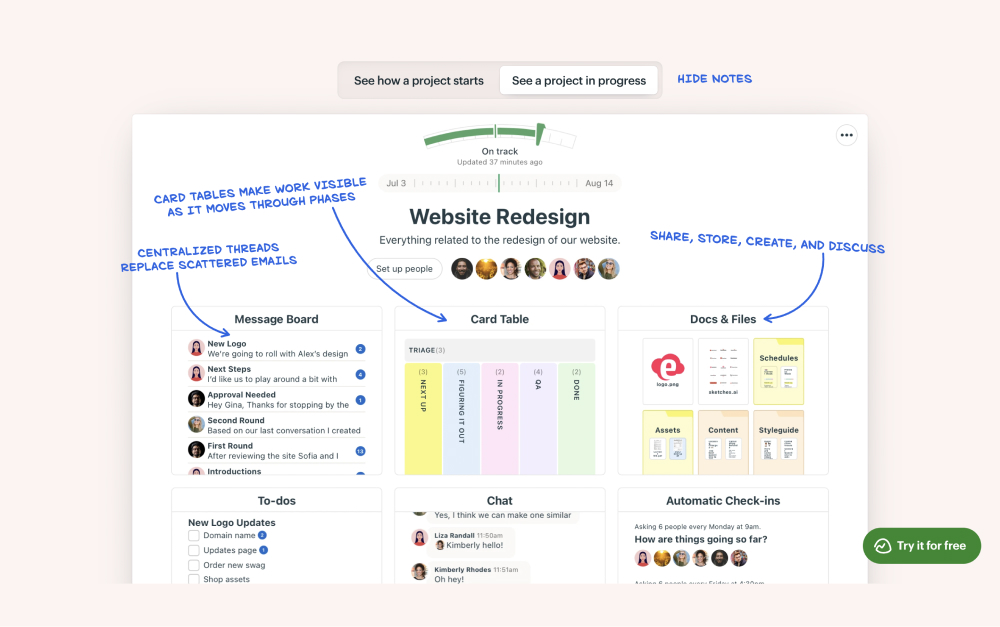
Basecamp keeps projects simple with message boards and to-dos.
Basecamp is built around a specific idea: fewer features, less noise, more focus. Each project gets a message board, to-do lists, a schedule, a chat room (Campfire), and file storage. There is no Kanban board, no Gantt chart, and no automations. That is intentional.
The message board format works well for async teams. Long-form updates replace constant pings. Clients can be added with limited visibility. Hill Charts give a visual sense of project momentum without requiring daily status updates.
Basecamp's flat pricing ($299/mo for unlimited users on the Pro tier) makes it predictable. But the limited feature set means teams that need visual boards or reporting will hit walls fast.
Best forRemote teams that prefer async communication and want opinionated simplicity.
Skip it ifYou need Kanban boards, automations, dependencies, or detailed cross-project reporting.
Best Monday.com Alternatives for Feature-Rich PM
3. Asana - Best for cross-project reporting and portfolios
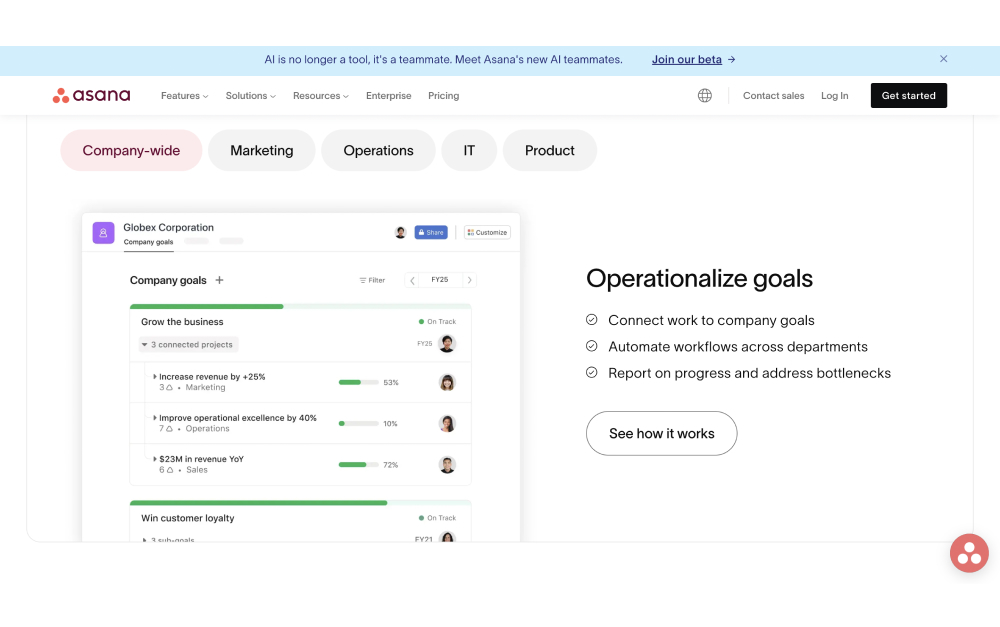
Asana's task and timeline views for cross-project work.
Asana is the closest match to Monday.com in terms of feature depth. Timeline views, board views, custom fields, and automations all come standard. Where Asana pulls ahead is portfolio management: a single dashboard that tracks the status, owner, and progress of every active project.
For agencies running ten or more client projects at once, that portfolio view is genuinely useful. You see which projects are on track and which are slipping without opening each one individually.
The pricing is steep. Asana Starter costs $10.99 per user per month (annual billing). Advanced, which unlocks portfolios and proofing, costs more. A 20-person agency pays roughly $220 to $500 per month depending on the tier.
PricingFree plan (up to 2 users) Starter: $10.99/user/mo Advanced: $24.99/user/mo
Skip it ifYou want built-in chat, flat pricing, or a simpler tool with less setup.
4. ClickUp - Best for teams that want maximum customization
ClickUp packs many views and customization into one workspace.
ClickUp is the Swiss Army knife of project management. Tasks, docs, whiteboards, goals, time tracking, chat, dashboards, and forms are all built in. If Monday.com felt like it was missing something, ClickUp probably has it.
The Unlimited plan at $7 per user per month is one of the best values in the market for feature depth. Custom fields, views, automations, and statuses can be configured at every level.
The trade-off is complexity. ClickUp's interface is dense, and the setup process takes time. New team members often need training to navigate it effectively. If Monday.com's learning curve was already a challenge, ClickUp's will be steeper.
Best forTeams that want one platform for everything and are willing to invest in setup and configuration.
PricingFree plan (100MB storage) Unlimited: $7/user/mo Business: $12/user/mo
Skip it ifYou value simplicity. ClickUp's depth comes at the cost of ease of use.
Best Monday.com Alternatives for Simplicity
5. Trello - Best for simple Kanban boards
Trello is the opposite of Monday.com's complexity. Cards, lists, and boards. That is the core experience. Drag a card from "To Do" to "In Progress" to "Done." New team members understand the system within minutes.
“
Your mind is for having ideas, not holding them.
David AllenAuthor of Getting Things Done
That principle is what makes Trello effective for small teams. The tool stays out of your way. Power-Ups add calendar views, voting, custom fields, and integrations, but the free plan limits you to one Power-Up per board.
Trello falls short when projects get complex. There is no built-in time tracking, no native Gantt view, and no cross-board reporting. For anything beyond basic task management, you will need to add integrations or switch to a fuller platform.
Best forSmall teams and freelancers that want dead-simple Kanban boards.
PricingFree plan (unlimited boards, 1 Power-Up/board) Standard: $5/user/mo Premium: $10/user/mo
Skip it ifYou need automations, reporting, or collaboration features beyond basic task tracking.
6. Todoist - Best lightweight personal task manager
Todoist does one thing well: it keeps track of what you need to do. Tasks, due dates, priorities, labels, and projects. No boards, no Gantt charts, no team dashboards. The interface is fast and clean.
Natural language input lets you type "Call client Tuesday at 3pm #marketing" and Todoist creates a task with the right date, time, and label. Recurring tasks are simple to set up. The daily view keeps your focus on what matters today.
Todoist is a personal productivity tool first. The team features exist, but they are basic compared to Monday.com. If you need client access, visual boards, or cross-project reporting, Todoist will feel too limited.
Best forIndividuals and small teams that want a minimal task manager without project management overhead.
PricingFree plan (5 active projects) Pro: $4/user/mo Business: $6/user/mo
Skip it ifYou need team collaboration, visual boards, client access, or anything beyond personal task lists.
Best Monday.com Alternatives for Docs and Tasks
7. Notion - Best for document-heavy workflows
Notion combines docs and databases in a flexible workspace.
Notion is part wiki, part database, part project tracker. For the direct comparison, see our Monday vs Notion head-to-head, or our broader Notion alternatives guide. The block-based editor lets you build anything: meeting notes, project boards, product roadmaps, company wikis, and client portals. The flexibility is unmatched.
For teams that spend as much time writing and organizing information as managing tasks, Notion is a strong pick. Linked databases let you connect tasks to documents, create relational views, and build dashboards from your data.
The downside: Notion is not a traditional PM tool. There are no native Gantt charts, no resource management, and no proofing features. Building a project management system in Notion requires time and ongoing maintenance. It is flexible, but it is not turnkey.
Best forTeams that need a combined knowledge base and task system, especially content, product, and engineering teams.
PricingFree plan (1 member, unlimited blocks) Plus: $10/user/mo Business: $18/user/mo
Skip it ifYou want structured project management out of the box without building your own system.
8. Hive - Best for creative teams with design proofing
Hive includes built-in proofing that lets designers, clients, and managers mark up images and documents directly in the platform. Combined with six project views (Gantt, Kanban, calendar, table, portfolio, and summary), it covers a wide range of creative workflows.
The native time tracker, resourcing views, and forms for client intake requests make it practical for agencies that handle incoming work from multiple clients. At $5 per user per month, it is one of the more affordable options with proofing included.
The free plan is limited, and some analytics features are locked behind enterprise pricing. The integration ecosystem is smaller than Monday.com's.
Best forCreative agencies and design teams that need proofing, time tracking, and visual project views.
PricingFree plan (limited) Teams: $5/user/mo Enterprise: custom
Skip it ifYou need advanced automations or a large integration library.
Best Monday.com Alternatives for Enterprise
9. Wrike - Best for enterprise workflows and proofing
Wrike is built for structured, repeatable processes at scale. Request forms, multi-level approval workflows, proofing, Gantt charts, resource management, and time tracking are all native. For organizations with compliance requirements or formal review processes, Wrike offers the depth that Monday.com lacks on lower tiers.
“
Rather than obsess over idea generation, we would be better served by developing the capacity to make ideas happen.
Scott BelskyCSO at Adobe, Founder of Behance
Wrike supports both agile and waterfall methodologies with dedicated views. Cross-tagging lets tasks exist in multiple projects simultaneously, which simplifies reporting across teams.
The trade-off is complexity. Wrike's interface is dense, and onboarding takes longer than most tools on this list. Smaller teams often find it overpowered for their needs.
Best forLarger teams and enterprises that need proofing, compliance controls, and detailed resource management.
PricingFree plan (basic, up to 5 users) Team: $10/user/mo Business: $25/user/mo
Skip it ifYour team is under 15 people or you want a tool you can set up in an afternoon.
10. SmartSuite - Best for data-driven teams
SmartSuite sits between Monday.com and Airtable. You get visual project views (grid, Kanban, timeline, calendar, card, map, chart) combined with database-level flexibility: formulas, rollups, linked records, and pivot tables.
The automation builder is capable and easier to configure than Monday.com's for most use cases. The template library covers over 200 solutions, from sales pipelines to product roadmaps to HR onboarding.
The trade-off: SmartSuite has a smaller user base and integration ecosystem compared to Monday.com. Support resources and community forums are less extensive. The free plan limits you to two users.
Best forOperations, finance, and data-heavy teams that want spreadsheet-like flexibility with PM views.
PricingFree plan (2 users) Team: $10/user/mo Professional: $25/user/mo
Skip it ifYou need a large integration ecosystem or extensive community support.
Tools We Didn't Include (and Why)
Jira: Purpose-built for software development. If your team is not running sprints and tracking code issues, Jira is overkill.
Airtable: A powerful database tool with PM add-ons, but not a direct Monday.com replacement. Best used alongside a dedicated PM platform.
Microsoft Project: Enterprise scheduling software tied to the Microsoft 365 ecosystem. Not practical for small or mid-size teams.
Zoho Projects: Works well inside the Zoho suite (CRM, Books, Desk). Standalone, it lacks the polish and integrations of dedicated PM tools.
GoodDay: Budget-friendly ($4/user), but limited market presence, fewer integrations, and a smaller support community than established alternatives.
We also considered tools like Teamwork and Productive, which target agencies specifically. Both are solid but priced at $13 or more per user per month, which puts them in the same cost bracket as Monday.com without enough differentiation to justify the switch.
Skip the per-seat pricing
Rock is flat $89/mo for unlimited users. Chat, tasks, and notes in one workspace.
The right tool depends on three things: how your team communicates, how many external people need access, and how much you want to pay.
If your team relies on chat alongside tasks, look at Rock or Basecamp. Both include messaging so you are not paying for a separate tool like Slack. If external clients need regular access, Rock's flat pricing model removes the per-seat cost that makes guest access expensive on Monday.com.
A UCI study found that it takes over 23 minutes to refocus after switching between tools. Choosing a platform that covers more of your workflow in one place can reduce that switching cost significantly.
For feature-rich PM, Asana and ClickUp are the strongest options. Asana is better for reporting across projects. ClickUp is better for teams that want to customize everything. Both charge per user, so calculate the cost at your actual team size.
For simplicity, Trello and Todoist stand out. Both have generous free plans and minimal learning curves. They work best for small teams or individuals who do not need heavy collaboration features. But be honest about your growth plans: a tool that works at five people may not work at fifteen.
Start with what your team actually needs today, not what you might need in a year. Most tools on this list offer free plans or trials. Pick two or three that match your priorities, run a real project in each for a week, and let your team vote. The best monday.com alternative is the one your team will actually use. For the direct Rock comparison, see Rock vs Monday. For the head-to-head against the calmer alternative, see Basecamp vs Monday.
Rock brings messaging and tasks into one workspace with flat pricing.
Looking for a Monday.com alternative that combines chat and tasks without per-user pricing? Try Rock for free.
Asana is a solid project management tool, but it is not the right fit for every team. Per-seat pricing adds up fast once you grow past ten people. You can only assign one person per task. There is no built-in chat, which means you still need Slack or Teams running on the side. And many useful features, like timeline views and custom fields, are locked behind the Business or Enterprise tiers.
That forced toggling between apps has a real cost. Harvard Business Review found that workers switch apps up to 1,200 times per day, losing roughly four hours a week to context switching. A UCI study confirmed it takes over 23 minutes to refocus after an interruption.
If you are shopping for Asana alternatives, the good news is that the market has matured. There are options built for agencies, for visual thinkers, for teams that live in documents, and for people who just want a simple task list. This guide covers ten tools worth testing in 2026, organized by what they do best.
"The tools that have been around for a long time just don't work the way teams work anymore. Business moves so quickly and the tools can't keep up with that pace of change." - Liz Pearce, former CEO, LiquidPlanner
Quick disclosure: we are the team behind Rock, one of the alternatives below. We build in this space and run these tools next to Rock, so we know where each is strong and where it is not. This is the honest landscape, not a pitch.
Quick Comparison
Tool
Best For
Free Plan
Paid From
Rock
Agencies + client teams
Yes (3 spaces)
$89/mo flat
Monday.com
Visual workflows
2 seats
$12/user/mo
ClickUp
Maximum customization
Yes
$7/user/mo
Trello
Simple Kanban
Yes
$5/user/mo
Basecamp
Async-first teams
1 project
$15/user/mo
Notion
Docs + tasks combined
Yes
$10/user/mo
Wrike
Enterprise workflows
Yes (basic)
$10/user/mo
Hive
Creative proofing
Yes (limited)
$5/user/mo
Todoist
Lightweight tasks
Yes
$4/user/mo
SmartSuite
Data-driven teams
Yes
$15/user/mo
Not sure what Asana Alternative fits you best? Take the Quiz
We'll recommend an Asana alternatie for you team based on Budget, needs and size.
Which Asana alternative fits your team?
Answer 4 questions. Takes 30 seconds.
1. What features matter most?
Select all that apply
Built-in chat / messaging
Visual boards + automations
Docs / knowledge base
Time tracking / proofing
Simplicity over features
Client collaboration
2. How many people will use it?
1-5
6-15
16-30
30+
3. Do external people (clients, freelancers) need access?
Best Asana Alternatives for Agencies and Client Teams
Rock combines team messaging with task boards in one workspace.
1. Rock - Best for agencies that need chat and tasks in one place
Best forAgencies with 10+ people who work with clients daily and want chat and tasks in one workspace.
PricingFree plan (3 group spaces, 50 tasks/space) Unlimited plan: $89/mo flat
Skip it ifYou need advanced Gantt charts, resource leveling, or deep integrations with enterprise tools like Salesforce.
Most Asana alternatives solve tasks but ignore communication. Rock takes a different approach: every project space includes its own chat, task board, notes, and file storage. You do not need a separate messaging app.
For agencies, the client collaboration angle stands out. External clients and freelancers join spaces directly at no extra cost. They see the same chat and task updates your team sees. No guest seat fees, no permission headaches. What we do at Rock: we run our own marketing in Rock spaces where the team and external partners work side by side.
The pricing model is flat. $89 per month for unlimited users, spaces, and tasks. For a team of 15, that is under $6 per user. For 30 people, under $3. Per-seat tools like Asana get more expensive as you grow. Rock gets cheaper.
Rock also ships a native MCP server, so AI assistants like Claude, Cursor, and ChatGPT can operate your workspace directly: read messages, create tasks, move tasks, and search across spaces. It is available on the free plan, not gated behind an enterprise tier.
2. Basecamp - Best for async-first teams with client access
Best forRemote teams that value async communication and want a calm, structured workspace for client projects.
PricingFree plan (1 project, limited storage) Paid: $15/user/mo or $299/mo flat (unlimited users)
Skip it ifYou need visual boards, automations, or detailed reporting across projects.
Basecamp takes the opposite approach to feature-heavy tools. Each project gets a message board, to-do lists, a schedule, a chat room, and file storage. That is it. No custom fields, no dependencies, no automations.
That simplicity is the point for async teams. The message board format encourages longer, thoughtful updates instead of rapid-fire chat. Clients can be added to projects with limited visibility. Hill Charts give a visual sense of progress without requiring everyone to update task statuses daily.
The trade-off is real, though. There are no Kanban boards, no timeline views, and no subtask structures. If your projects involve complex dependencies, Basecamp will feel limiting fast.
Best Asana Alternatives for Visual Project Management
3. Monday.com - Best for visual workflows and automations
Best forMarketing teams and agencies that need visual workflows, automations, and cross-functional dashboards.
PricingFree plan (2 seats) Standard: $12/user/mo Pro: $20/user/mo
Skip it ifYou are a small team watching costs, or you prefer a simpler tool without a learning curve.
Monday.com is the strongest pick for teams that think visually. Color-coded boards, timeline views, and Gantt charts come standard. The automation builder is powerful: set triggers for status changes, due dates, assignments, or custom conditions without writing code.
The template library covers marketing campaigns, sprint planning, CRM pipelines, and more. Dashboards pull data from multiple boards into one view, which helps managers track progress across teams.
The downside is pricing. The $12/user/mo rate requires a minimum of three seats, and useful features like time tracking and automations are limited on lower tiers. A 20-person team pays $240/month before hitting feature caps.
4. Trello - Best for simple Kanban boards
Best forSmall teams that want a simple, visual task board without setup time. A solid Trello-level experience with room to grow.
PricingFree plan (unlimited boards, 1 Power-Up/board) Standard: $5/user/mo Premium: $10/user/mo
Skip it ifYou manage complex projects with dependencies, need time tracking, or want built-in reporting.
Trello invented the digital Kanban board, and it is still the simplest way to manage tasks visually. Drag cards across columns, add checklists, attach files, set due dates. The interface is intuitive enough that new team members figure it out within minutes.
Power-Ups extend Trello's functionality with calendar views, voting, custom fields, and integrations. But the free plan limits you to one Power-Up per board, and advanced features like dashboard views require the Premium tier.
Trello works well for small teams and straightforward workflows. It starts to struggle when projects involve multiple dependencies, cross-board reporting, or client-facing deliverables.
Best Asana Alternatives for Feature-Rich PM
5. ClickUp - Best for teams that want maximum customization
Best forTeams that want one platform for everything and are willing to invest time in setup and configuration.
PricingFree plan (100MB storage) Unlimited: $7/user/mo Business: $12/user/mo
Skip it ifYou value simplicity. If Asana felt overwhelming, ClickUp will feel worse.
ClickUp tries to be everything: tasks, docs, whiteboards, goals, time tracking, chat, and dashboards in one platform. For teams that want to consolidate tools, it delivers. The customization depth is unmatched. Custom fields, views, automations, and statuses can be configured per space, folder, or list.
"Nearly 9 in 10 disappointed software buyers experienced implementation disruptions, most often due to integration issues, data migration errors, or project delays." - Capterra Software Buying Trends Report
That depth has a cost. The learning curve is steep. Setting up ClickUp to match your workflow takes hours, not minutes. And the interface can feel cluttered for teams that do not need every feature. It is a powerful tool, but not a simple one.
6. Wrike - Best for enterprise workflows and proofing
Best forEnterprise teams and agencies with formal approval processes, proofing needs, and compliance requirements.
PricingFree plan (basic features) Team: $10/user/mo Business: $25/user/mo
Skip it ifYou are a small team or startup that needs a lightweight tool. Wrike's setup time is significant.
Wrike is built for structured, repeatable processes. Request forms, approval workflows, proofing tools, and Gantt charts make it a strong pick for teams that manage complex deliverables. The proofing feature lets reviewers mark up images, videos, and PDFs directly inside the platform.
Time tracking is native, and resource management views help managers balance workloads across the team. Cross-tagging lets a single task live in multiple projects, which Asana handles differently with its multi-home feature.
The trade-off: Wrike is not simple. The interface takes getting used to, and smaller teams may find it heavy for their needs.
Best Asana Alternatives for Docs and Tasks
7. Notion - Best for document-heavy workflows
Best forTeams that need a combined wiki and task system, especially for content, product, and engineering workflows.
Skip it ifYou want structured project management out of the box. Notion requires setup to work as a PM tool.
Notion blurs the line between project management and knowledge management. For the broader field, see our Notion alternatives guide or our head-to-head Asana vs Notion, Asana vs Basecamp, and Asana vs Jira comparisons. Its block-based editor lets you build anything: wikis, databases, task boards, meeting notes, and project trackers. The flexibility is the draw.
For teams that create a lot of documentation, Notion is hard to beat. You can link databases, create relational views, and build dashboards from your data. The free plan is generous for personal use.
The downside: Notion is not a traditional PM tool. There are no native Gantt charts, no resource management, and no built-in time tracking. Task management works, but it requires building your own system from templates or scratch.
8. Hive - Best for creative teams with design proofing
Best forCreative agencies and design teams that need proofing, time tracking, and visual project views in one place.
PricingFree plan (10 members) Teams: $5/user/mo Enterprise: custom pricing
Skip it ifYou need advanced automations, custom fields, or client-facing portals.
Hive combines project management with tools that creative teams actually use. Built-in proofing lets designers and clients mark up files directly. Time tracking is native. And the action card system supports multiple views: Kanban, Gantt, calendar, table, and summary.
Hive also includes a simple messaging feature and integrates with over 1,000 tools through Zapier. The interface is clean and less overwhelming than ClickUp or Wrike.
The free plan is limited to 10 workspace members, and some features like analytics dashboards are locked behind higher tiers.
Best Asana Alternatives on a Budget
9. Todoist - Best lightweight personal task manager
Best forFreelancers and small teams that want a fast, minimal task manager without project management complexity.
PricingFree plan (5 projects, 5 collaborators) Pro: $4/user/mo Business: $6/user/mo
Skip it ifYou need team collaboration features, visual boards, or client access. Todoist is built for personal productivity first.
Todoist strips task management down to the essentials: tasks, due dates, priorities, labels, and projects. The interface is clean and fast. Adding tasks feels natural with the quick-add bar and natural language date parsing.
It is not a project management tool in the traditional sense. There are no boards, no Gantt charts, no team dashboards. But for individuals and small teams that just need a reliable task list, Todoist does the job without the overhead.
"There is surely nothing quite so useless as doing with great efficiency what should not be done at all." - Peter Drucker
The Todoist philosophy fits that quote. Not every team needs a complex PM system. Sometimes a clean task list is enough.
10. SmartSuite - Best for data-driven teams
Best forTeams that need structured data alongside project management, especially operations and finance workflows.
PricingFree plan (limited records) Team: $15/user/mo Professional: $25/user/mo
Skip it ifYou want a large integration ecosystem or need an established tool with a big community and support library.
SmartSuite is a newer player that combines work management with database-like flexibility. Think of it as a middle ground between Monday.com and Airtable. You get task views (grid, Kanban, calendar, timeline, card, map) plus the ability to build custom data structures with formulas, automations, and linked records.
The template library is strong, covering use cases from sales pipelines to product roadmaps. Dashboards aggregate data across solutions with charts, metrics, and pivot tables.
The trade-off: SmartSuite is not widely known yet. The integration ecosystem is smaller than Asana's or Monday's. And the pricing can add up for larger teams.
Tools We Didn't Include (and Why)
Jira: Built for software development teams, not general project management. Overkill for most agencies and non-technical teams.
Airtable: A database tool with project management add-ons. Powerful, but the learning curve and pricing make it a poor direct Asana replacement.
Microsoft Project: Enterprise-grade scheduling software. Requires Microsoft 365 and is designed for program managers, not everyday team collaboration.
Zoho Projects: Part of the Zoho ecosystem. Works best if you already use Zoho CRM, Books, and other Zoho apps. Standalone, it is underwhelming.
GoodDay: Interesting AI-powered features, but the small user base means fewer integrations, slower updates, and limited community support.
Simpler than Asana, with chat
Rock pairs tasks with built-in team chat. One flat price, no per-seat fees.
Start with why you are leaving Asana. If it is pricing, calculate your per-user cost at your current team size and compare flat-rate options like Rock. If it is complexity, lean toward simpler tools like Trello or Todoist. If it is missing features, look at ClickUp or Wrike.
Think about who needs access. Agencies that bring clients into projects need tools built for external collaboration: Rock and Basecamp handle this well. Internal-only teams have more flexibility.
The best Asana alternative is the one your team will actually use. Most of these tools offer free plans or trials. Pick two or three from this list, run a real project through each, and let the team vote. The quiz at the top of this page can narrow your starting point.
ClickUp is a powerful project management tool. It can do almost anything you need, from task boards and docs to time tracking and automations. But "can do everything" comes with trade-offs.
We are the team behind Rock, a chat and tasks app for agencies and client teams, so we test these tools constantly. Rock is on this list, but if you need ClickUp-level depth, some of the options below fit better, and we say so. We set each one up and used it for real work to see who it suits.
In 2025, ClickUp raised its Unlimited plan price from $5 to $7 per user per month. Some teams saw their bills jump overnight after guests were reclassified as limited members. On top of that, the learning curve is steep. Teams that just need a clean task board and a way to communicate often find themselves buried in features they never use.
According to Harvard Business Review, knowledge workers toggle between applications over 1,200 times per day. Adding a complex tool to the mix can make this worse instead of better.
If you are looking for something simpler, cheaper, or just a better fit for your team, here are 10 ClickUp alternatives worth considering.
Quick Comparison
Tool
Best For
Free Plan
Paid From
Rock
Agencies + client teams
Yes (3 spaces)
$89/mo flat
Basecamp
Async-first teams
1 project
$15/user/mo
Monday.com
Visual workflows
2 seats
$12/user/mo
Trello
Simple Kanban
Yes
$6/user/mo
Asana
Cross-project reporting
Yes (basic)
$13.49/user/mo
Wrike
Enterprise workflows
Yes (basic)
$10/user/mo
Notion
Docs + tasks combined
Yes
$12/user/mo
Hive
Creative proofing
Yes (limited)
$5/user/mo
Todoist
Lightweight tasks
Yes
$5/user/mo
SmartSuite
Data-driven teams
Yes
$12/user/mo
Answer a few questions to learn which ClickUp alternative fits your team best
We've created a custom quiz to help you decide on the best ClickUp alternative depending on your team and workflows. Try it out, just takes 30 seconds!
Which ClickUp alternative fits your team?
Answer 4 questions. Takes 30 seconds.
1. What features matter most?
Select all that apply
Built-in chat / messaging
Visual boards + automations
Docs / knowledge base
Time tracking / proofing
Simplicity over features
Client collaboration
2. How many people will use it?
1-5
6-15
16-30
30+
3. Do external people (clients, freelancers) need access?
Best ClickUp Alternatives for Agencies and Client Teams
1. Rock - Best for agencies that need chat and tasks in one place
Rock combines team messaging with task boards in one workspace.
Rock is built for teams that work with external clients. Instead of running Slack for messaging and ClickUp for tasks, Rock puts both in the same workspace. Every project gets its own space with chat, a task board, notes, and files.
Rock also connects to AI assistants like Claude and Cursor through a native MCP integration, plus an open API, so you can drive Rock from your AI tools and automate routine work. It is available on the free plan, not gated behind an upgrade.
Clients and freelancers join your spaces directly without paying extra. This is a big deal for agencies that manage five or ten client relationships at once. No separate "guest" pricing tier that inflates your bill.
The pricing model is different from most tools on this list. Rock charges a flat $89 per month for unlimited users, instead of charging per seat. For a team of 20, that works out to $4.45 per person. At 30 people, it drops to $2.97. The math gets better as your team grows.
The trade-off is that Rock is not as feature-deep as ClickUp. You will not find custom fields, complex automations, or Gantt charts. It covers chat, task management, notes, files, and meetings. For many agencies, that is enough.
Best forAgencies managing multiple client projects who want chat and tasks together.
PricingFree plan (3 group spaces, 50 tasks each) Unlimited: $89/mo flat
Skip it ifYou need advanced automations, custom fields, or Gantt charts.
2. Basecamp - Best for async-first teams with client access
Basecamp takes a different approach to project management. Instead of giving you dozens of features to configure, it gives you a fixed set of tools: message boards, to-dos, schedules, file storage, and group chat. You cannot customize the layout much, and that is the point.
"The most common mistake teams make is buying a tool based on its feature list instead of how their team actually works." - Jason Fried, CEO, Basecamp
Basecamp works well for agencies that communicate with clients through the platform. You can invite clients to specific projects and control what they see. The flat pricing option ($349/mo for unlimited users) makes it predictable for larger teams.
The downside is the limited flexibility. You cannot create custom workflows, there are no Kanban boards, and reporting is basic. If your team needs sprints or visual project tracking, Basecamp will feel too rigid.
Best forTeams that want opinionated structure and async communication.
PricingFree plan (1 project, 20 users) $15/user/mo or $349/mo flat
Skip it ifYou need visual boards, custom workflows, or detailed reporting.
Best ClickUp Alternatives for Visual Project Management
3. Monday.com - Best for visual workflows and automations
Monday.com offers colorful visual boards with built-in automations.
Monday.com is one of the most visually polished project management tools available. The boards are colorful, easy to read, and the drag-and-drop interface works well for teams that think visually.
Where Monday.com stands out is automations. You can set rules like "when status changes to Done, notify the project lead and move the item to the Archive group." These automations are easier to build than ClickUp's, though slightly less powerful.
The pricing adds up quickly. At $12 per user per month (Standard plan), a 25-person team pays $300 monthly. You also need at least 3 seats to start, and the free plan is limited to 2 seats.
Best forTeams that want visual boards with solid automations and templates.
PricingFree plan (2 seats) Standard: $12/user/mo
Skip it ifYou are cost-conscious or need deep customization beyond pre-built automations.
4. Trello - Best for simple Kanban boards
Trello is the tool that popularized Kanban boards for business teams. Cards, lists, drag and drop. If you found ClickUp overwhelming and just want a clean board to track tasks, Trello is the simplest option on this list.
The free plan is generous enough for small teams. You get unlimited cards, up to 10 boards per workspace, and basic automations through Butler. The paid plans add calendar views, timeline views, and more dashboard features.
The limitation is that Trello stays simple. There is no built-in communication tool, no docs, and no time tracking. For anything beyond basic task tracking, you will need to add integrations or switch to a more complete platform. Trello is also owned by Atlassian, which means its pricing and features can shift with Atlassian's broader strategy.
Best forSmall teams that want dead-simple Kanban without a learning curve.
PricingFree plan (unlimited cards, 10 boards) Standard: $6/user/mo
Skip it ifYou need reporting, built-in chat, or anything beyond basic boards.
Best ClickUp Alternatives for Complex Projects
5. Asana - Best for cross-project reporting and portfolios
Asana is a strong pick for teams managing multiple projects at once. The portfolio feature gives you a bird's-eye view of all active projects, their status, and who is responsible. This is where Asana is clearly better than ClickUp for some teams.
The interface is cleaner than ClickUp's. You can switch between list, board, timeline, and calendar views without the clutter. Cross-functional collaboration is easier because the navigation is more intuitive.
The pricing is steep though. Asana's Starter plan starts at $13.49 per user per month, and the Advanced plan (needed for portfolios, proofing, and approvals) jumps higher. There is no flat pricing option, so costs scale directly with headcount.
Best forTeams juggling multiple projects that need portfolio-level reporting.
PricingFree plan (up to 10 users) Starter: $13.49/user/mo
Skip it ifYou want built-in chat, or your team is price-sensitive at 15+ seats.
6. Wrike - Best for enterprise workflows and proofing
Wrike is built for larger organizations that need structure, compliance, and detailed reporting. The proofing feature lets teams mark up images, PDFs, and videos directly in the platform, which is useful for agencies handling creative work.
The tool also offers strong time tracking, resource management, and Gantt charts. If your team uses agile or waterfall methodologies, Wrike supports both with dedicated views.
The challenge is that Wrike feels enterprise-first. The interface is dense, the setup takes time, and smaller teams may find it too heavy. Pricing starts at $10 per user per month (Team plan), but the features most teams want are on the Business plan, which costs more.
Best forLarger teams that need proofing, time tracking, and compliance controls.
PricingFree plan (basic) Team: $10/user/mo
Skip it ifYour team is under 15 people or you want something lightweight.
Best ClickUp Alternatives for Docs and Tasks
7. Notion - Best for document-heavy workflows
Notion blends databases, docs, and task management into a flexible workspace. For a deeper Notion-vs-ClickUp breakdown, see our Notion vs ClickUp or ClickUp vs Jira head-to-heads, or our wider Notion alternatives guide. If your team spends as much time writing and organizing information as managing tasks, Notion is a natural fit.
The free plan is strong. You get unlimited pages, and the collaborative editing works well for team wikis, meeting notes, and project documentation. The task management features are functional but secondary to the docs experience.
"The best tool is the one that fits how your team already works, not the one with the longest feature list." - Claire Lew, CEO, Canopy (formerly Know Your Team)
Notion's weakness is that it is not a dedicated project management tool. There are no built-in automations, no proofing, and no time tracking. You can build task boards using databases, but it requires setup and ongoing maintenance. For teams used to ClickUp's out-of-the-box PM features, Notion may feel too unstructured.
Best forTeams that need a knowledge base with lightweight task tracking.
PricingFree plan (unlimited pages) Plus: $12/user/mo
Skip it ifYou need dedicated PM features like Gantt charts, time tracking, or automations.
8. Hive - Best for creative teams with design proofing
Hive is a mid-range project management tool that includes built-in proofing for design files. Teams can mark up images and documents directly, leave comments on specific areas, and track approval status.
The platform offers six project views (Gantt, Kanban, calendar, table, portfolio, and summary), plus a built-in time tracker. The forms feature lets you create intake forms for client requests, which is useful for agencies handling incoming work.
At $5 per user per month, Hive is one of the more affordable options that includes proofing. The free plan exists but is limited to basic features for small teams.
Best forCreative teams that need proofing and approval workflows.
PricingFree plan (limited) Teams: $5/user/mo
Skip it ifYou do not need proofing and want something simpler or cheaper.
Best ClickUp Alternatives on a Budget
9. Todoist - Best lightweight personal task manager
Todoist is not trying to compete with ClickUp on features. It is a focused task manager that handles personal and small-team task management without the overhead of a full PM platform.
The interface is clean. You add tasks, set due dates, assign priorities, and check them off. Natural language input lets you type "Submit proposal Friday p1" and it creates a high-priority task due on Friday. No training needed.
The free plan covers up to 5 active projects and 5 collaborators. The Pro plan at $5 per user per month adds reminders, labels, filters, and comments.
Best forIndividuals or small teams that want a clean task list without project management complexity.
PricingFree plan (5 projects) Pro: $5/user/mo
Skip it ifYou need boards, client access, or team-level collaboration features.
10. SmartSuite - Best for data-driven teams
SmartSuite is a newer platform that combines work management with data tools. Think of it as a middle ground between Airtable and Monday.com. You get visual boards, but also spreadsheet-like views with formulas, rollups, and linked records.
The platform includes over 200 templates and supports multiple views per solution (grid, Kanban, timeline, calendar, map, and chart). The automation builder is capable without being as complex as ClickUp's.
"Nearly 9 in 10 disappointed software buyers experienced implementation disruptions, most often due to integration issues, data migration errors, or project delays." - Capterra Software Buying Trends Report
At $12 per user per month, SmartSuite sits in the mid-range. The free plan is available for basic use with limited records.
Best forTeams that want work management with spreadsheet-level data flexibility.
PricingFree plan (limited) Team: $12/user/mo
Skip it ifYou want something simple, or your team does not need data-driven workflows.
Tools We Didn't Include (and Why)
Jira: Designed for software development teams, not general project management. Overkill for most agencies and non-engineering teams.
Airtable: Excellent as a database, but not a full PM tool. Best used alongside other tools rather than as a replacement.
Microsoft Project: Enterprise-focused, expensive, and requires the Microsoft ecosystem.
Zoho Projects: Capable but tightly coupled to the Zoho suite. If you are not already using Zoho CRM or Zoho Books, the value drops.
GoodDay: Budget-friendly at $4 per user, but limited market presence and fewer integrations than established alternatives.
Or pair tasks with chat
Rock keeps messaging and task boards in the same workspace. Flat $89/mo, unlimited users.
The right tool depends on what drove you away from ClickUp in the first place.
If ClickUp is too complex: Look at Todoist, Trello, or Rock. All three prioritize simplicity over feature depth.
If ClickUp is too expensive at scale: Rock's flat $89 per month beats per-user pricing at 12+ people. Basecamp's flat plan works for larger teams too. For the head-to-head, see ClickUp vs Basecamp.
If you need client collaboration: Rock and Basecamp both let clients join your workspace without extra per-seat costs.
If you need visual boards and automations: Monday.com is the closest match to ClickUp's visual approach, with an easier learning curve.
If you need docs and tasks together: Notion is the strongest option, though it trades PM features for flexibility.
Rock brings messaging and tasks into one workspace with flat pricing.
A University of California, Irvine study found that it takes 23 minutes to regain focus after switching between tools. Whatever you choose, picking one tool that covers your core needs is better than stitching three together.
Looking for a ClickUp alternative that combines chat and tasks without per-user pricing? Try Rock for free.
According to research from My Hours, 48% of workers say their last meeting was unnecessary. Meeting time has tripled since 2020. The average professional now spends more than half their workweek in meetings and messages, leaving less than half for actual work.
Sometimes the right move is to cancel. Sometimes the right move is to replace the meeting with an async update. And sometimes the meeting should happen, just shorter. This article covers all three situations, with templates you can copy for each one.
"A meeting hangover is the idea that when we have a bad meeting, we just don't leave it at the door. It sticks with us and it negatively affects our productivity." - Steven Rogelberg, Professor at UNC Charlotte and Author of The Surprising Science of Meetings, via CBS News
Before You Cancel: Should This Meeting Exist?
Before writing the cancellation message, ask yourself which category this meeting falls into:
Cancel it if there is no agenda, or the agenda can be covered in a single message. If you cannot explain what the meeting will accomplish in one sentence, it probably should not happen.
Make it async if it is a status update, information share, or a decision that does not need real-time discussion. A written update or a short recorded video can replace most of these. For the calls that do stay live, our video conferencing guide covers when the format earns its cost. For more on this, see our guide on virtual communication practices.
Keep it but shorten it if the topic needs discussion but 15 minutes would be enough instead of 60. Most meetings default to 30 or 60 minutes because that is what the calendar app suggests, not because the topic requires it.
Keep it as-is if it is a brainstorm, a conflict resolution conversation, relationship-building with a new client, or onboarding. These benefit from real-time interaction and body language.
According to Reclaim.ai, replacing just 4 unnecessary meetings per week with email or chat updates saves about 2.67 hours. Over a year, that adds up to more than two full work weeks.
How to Cancel an Internal Meeting
Internal meetings are the simplest to cancel. Your team understands competing priorities. The key is to always say what happens instead: an async update, a rescheduled date, or nothing (because the meeting was not needed).
Template: Slack or chat message
"Hey team, canceling today's [meeting name]. [Reason in one sentence]. I will send a written update by [time] instead. If anything needs discussion, drop it in the thread and we will sort it out async."
Template: Email
"Hi everyone, I am canceling our [meeting name] scheduled for [date/time]. [Brief reason]. Instead, I have posted an update in [location: project space / shared doc / email below]. Please review and flag anything that needs a live conversation. We can always add a shorter sync if needed."
Notice both templates include what replaces the meeting. "Canceled with no follow-up" feels like something got dropped. "Canceled, here is the update instead" feels like you are respecting everyone's time.
How to Cancel a Client Meeting
Client meetings are different. Canceling an internal sync is forgiven. Canceling a client meeting, especially more than once, signals unreliability. With new clients or prospects, there are rarely second chances.
A few rules that protect the relationship:
Call or message directly first, then follow up in writing. An email-only cancellation can feel dismissive. A quick phone call or direct message shows you take the relationship seriously.
Always offer something in return. A brief async update, a deliverable sent ahead of schedule, or a shorter alternative meeting. Never cancel and leave a vacuum.
Never cancel the same client's meeting twice in a row. One cancellation is understandable. Two back-to-back is a pattern, and clients notice.
Give as much notice as possible. 48 hours is ideal. Same-day cancellations should only happen for genuine emergencies.
Template: Client cancellation message (phone or chat)
"Hi [name], I need to move our meeting scheduled for [date]. [Brief honest reason: a client deliverable needs my attention / a team issue came up that I need to handle today]. I want to make sure we use our time well, so I would like to suggest [alternative: rescheduling to X date / sending you an async update today / a shorter 15-minute check-in tomorrow]. What works best for you?"
Template: Follow-up email after cancellation
"Hi [name], following up on our conversation. I have rescheduled our meeting to [new date/time]. In the meantime, here is a quick update on where things stand: [2-3 sentences on project status]. Let me know if anything needs attention before we meet."
If your team or clients are in different countries, meeting cancellation norms vary more than you might expect.
Southeast Asia (Philippines, Indonesia): Hierarchy matters. Canceling a meeting with a senior person requires more deference and explanation than canceling with a peer. Indirect communication is preferred. Instead of "I am canceling because it is not needed," try "I want to make sure we are using your time well. Would it be helpful if I sent a written update instead?"
Latin America (Brazil, Colombia, Mexico): Personal relationships come first. A phone call is better than an email. The personal touch matters more than efficiency. Even if the cancellation is straightforward, spending 30 seconds acknowledging the relationship makes a difference.
General rule: When in doubt, over-communicate the reason and offer a concrete alternative. This works across cultures because it shows respect for the other person's time regardless of local norms. For more on building culture across regions, see our article on remote work culture for agencies.
All Templates in One Place
Here are all six templates for easy reference:
1. Internal meeting - chat message: "Hey team, canceling today's [meeting]. [Reason]. I will send a written update by [time] instead."
2. Internal meeting - email: "I am canceling our [meeting] on [date]. [Reason]. Update posted in [location]. Flag anything that needs a live conversation."
3. Client meeting - direct message: "Hi [name], I need to move our meeting on [date]. [Reason]. Can I suggest [alternative]? What works for you?"
4. Client meeting - follow-up email: "Following up. Rescheduled to [date]. Here is a quick update: [status]. Let me know if anything needs attention."
5. Recurring meeting you want to eliminate: "I have been thinking about our weekly [meeting]. Most weeks, the updates could be covered in a written message. What if we switch to a Friday async report and only meet when there is something that needs real-time discussion? We can try it for two weeks and see how it feels."
6. Proposing async instead of a meeting: "Before we schedule a call for this, can I try something? I will record a 5-minute walkthrough of [topic] and share it. You can watch when it works for you and leave comments. If anything needs a live conversation after that, we will schedule a shorter call."
When to Replace Meetings with Async Updates
Canceling a meeting is one thing. Replacing the pattern is another. If you find yourself canceling the same type of meeting repeatedly, the meeting itself might be the problem.
Status updates: Replace with a Friday async report. What shipped, what is blocked, what comes next week. Two to three paragraphs or a 3-minute recorded video.
Design or work reviews: Replace with recorded walkthroughs. Your team member records a 5-minute Loom, the reviewer watches and leaves timestamped comments. More thoughtful feedback, no scheduling needed.
Decision meetings: Replace with a written decision template. Context, options, recommendation, deadline for input, decision owner. See our guide on remote communication for the full framework.
What we practice at Rock: we share a meeting agenda 24-48 hours before every meeting. At the start, we ask if everyone has read it. If not, we give 5 minutes for short agendas or reschedule for longer ones. This alone eliminates most unproductive meetings because the preparation requirement filters out the ones that should not happen.
"The most productive meetings contain only five to eight people." - Robert Sutton, Professor of Organizational Behavior at Stanford University
Final Thoughts
Canceling a meeting is not a failure of management. Keeping an unnecessary meeting is. The best teams cancel more meetings than average teams because they have systems that make real-time discussion optional for most work.
Start with the decision framework: cancel, make async, shorten, or keep. Use the templates above when you need them. And if you notice you are canceling the same meeting every week, replace the pattern with something better.
Cancelling a meeting works when the communication around it does. Make the right information visible at the right time, and you replace the meeting instead of just dropping it.
Want to reduce meetings by keeping your team and clients in one workspace? Rock combines messaging, tasks, notes, and files in every project space. Clients join directly. Get started for free.
According to industry surveys, 59% of Scrum teams use 2-week sprints. That is the default, but it is not always the right answer. Sprint length depends on how fast you can get feedback, how experienced your team is, and how much changes between reviews. Get started with the sprint planning template.
For agencies managing client work, sprint length is often dictated by the client's feedback timeline, not by Scrum theory. If your client reviews work every Friday, a 2-week sprint means they see half-finished work at the review. A 1-week sprint aligns with their rhythm.
This guide helps you pick the right sprint length for your team, with an interactive tool, a decision framework, and specific advice for agencies running client projects.
"A Sprint should be as short as possible and no shorter." - Ken Schwaber, Co-creator of Scrum
Find Your Sprint Length
Answer four questions and get a recommendation based on your team's situation.
1. How often does your client (or stakeholder) review work?
2. How many people are on the team?
3. How much do requirements change between reviews?
4. Is your team new to sprints?
Sprint Length Options at a Glance
1-week sprints: Best for fast-changing requirements, small teams, or when clients review weekly. High planning overhead (you plan every week) but maximum alignment with feedback. Good for agencies where the client expects to see progress every few days.
2-week sprints: The industry standard. 59% of teams use this length. Balances planning overhead with delivery. Works well when clients review bi-weekly or when your team is still learning sprint practices.
3-4 week sprints: For complex work with stable requirements. The Scrum Guide sets one month as the maximum. Gives teams extended focus time but increases the risk of scope drift and late feedback. Consider a mid-sprint check-in to catch issues early.
Sprints for Agency Client Work
Most sprint guidance is written for product teams building software. For more on the full product development process, see our guide. Agencies are different in ways that directly affect sprint length.
The client is the Product Owner. In a product company, the Product Owner is an employee who understands sprint boundaries. In an agency, the client fills that role, and they may not understand that adding scope mid-sprint has consequences. This means shorter sprints often work better for agencies because there is less time for scope to creep.
Multi-client capacity. A developer on three client projects cannot commit fully to any one sprint. If your team splits time across clients, shorter sprints give you more flexibility to rebalance capacity week to week.
Client feedback is the real constraint. Sprint length should align with when the client can actually review work. If they only have time for a review call every other Friday, a 2-week sprint ending on Thursday gives you time to prepare the deliverable. If they check in weekly, match that rhythm.
"Part of why we love the Agile approach is because it bakes in adaptation, and we can learn as we go." - Emily Theis, Head of Producers at Upstatement, via Medium
Your team spends more time in planning and retros than building
Nothing meaningful ships at the end of each sprint
Velocity is unpredictable from sprint to sprint (the burndown chart usually shows the Wave or Flatline shape)
Team feels like they are constantly starting over
Fix: Extend to 2 weeks. Batch smaller tasks together. Reduce ceremony time by sharing meeting agendas in advance so retros and planning stay focused.
Signs Your Sprints Are Too Long
Requirements change before the sprint ends
Client feedback arrives too late to act on
Scope creep fills the extra time (more gets added because "we have the time")
Team procrastinates early and rushes at the end
Fix: Shorten to 2 weeks. If you cannot go shorter, add a mid-sprint check-in to catch drift early. For more on managing scope changes, see our guide on defining project scope.
Sprint Fatigue: The Problem Nobody Talks About
After 6 or more consecutive sprints without a break, teams often report blurred lines between sprints, lower productivity, shorter tempers, and increasing sick days. This is sprint fatigue, and it is real. At the individual level, the equivalent rhythm protection is the Pomodoro Technique: short focused intervals with structured breaks that prevent the same exhaustion at a daily scale.
The fix: build in a rest sprint every 6-8 weeks. Use it for learning, process improvement, documentation, or technical debt. Not client work. This is not lost time. It is an investment in the team's ability to sustain pace over months, not just weeks.
Rock has built-in sprints that work alongside chat, tasks, notes, and files in every project space. Set your sprint cadence (weekly, bi-weekly, or monthly), assign tasks to sprints, and track progress on the sprint board.
Because the sprint board lives in the same space as your project chat, clients can see sprint progress directly without a separate status meeting. Sprint reviews can happen asynchronously: share the board, the client reviews when they have time, and you discuss only what needs discussion.
For a broader look at how sprints fit into your tool stack, see our guide on task management apps.
Final Thoughts
Sprint length is not a one-time decision. Start with 2 weeks if you are unsure. After 3-4 sprints, look at what is working and what is not. If planning overhead is eating your time, go longer. If client feedback is arriving too late, go shorter. The right sprint length is the one that matches your team's feedback cycle, not the one a framework prescribes.
Cadence is not about more check-ins. It is about making the right information visible at the right time, so the team stays aligned without chasing each other for updates.
Want sprints, chat, and client collaboration in one workspace? Rock combines messaging, task boards with built-in sprints, notes, and files. One flat price, unlimited users. Get started for free.
Read that again. Your remote team feels productive and connected. They are also quietly browsing job boards.
This is the engagement paradox, and it explains why "remote culture" initiatives like water cooler channels and Zoom happy hours do not actually reduce turnover. They address engagement (which is already high) instead of the structural reasons people leave: no visible career path, burnout from context switching, isolation from decision-making, and the feeling that nobody notices their work. Left unchecked, these are the early signs of a toxic work culture.
For agencies, these problems are amplified. You have rotating client projects, freelancers who come and go, timezones that never fully overlap, and a designer context-switching between three clients before lunch. Virtual pizza parties do not fix any of that.
"What you do is who you are. Culture is not what your company says about itself, it's how it makes decisions when you're not in the room." - Ben Horowitz, Co-founder of Andreessen Horowitz, from What You Do Is Who You Are
What Doesn't Work (and Why)
Virtual water coolers, mandatory social events, Friday trivia, team Spotify playlists. These are the most common remote culture recommendations. They are also the least effective at reducing turnover when used as the foundation.
The reason: they address loneliness symptoms without touching the structural causes of attrition. A Slack memes channel creates a moment of connection, but it does not help the junior developer who has no idea what "senior" looks like at your agency, or the freelancer who ships work every week but has never been in a strategy conversation.
"Burnout does not happen in isolation. It is shaped by culture, by leadership behaviors, and by the norms we reinforce every day at work. When exhaustion becomes normalized and silence feels safer than speaking up, burnout stops being an individual issue and becomes a reflection of the environment itself." - Jennifer Moss, Author of The Burnout Epidemic
This matters because the activities you skip reveal more about your culture than the activities you add. If your agency has a #celebrations channel but no quarterly growth conversations, the message is: we care about morale but not your career. People notice.
That said, social activities still have a place once the structural foundation is in place. The key is to ask your team what they actually enjoy rather than assuming everyone wants the same thing. A monthly optional game night might work great for one team and feel forced for another. Let the team shape the social layer after the important things (recognition, career paths, workload balance) are working.
For agencies, this is simple and free. When a team member ships a deliverable that the client loves, say so publicly in the project space. Not in a private message. In the shared space where the whole team can see it. Name the person, name what they did, and name why it mattered.
This compounds over time. People who feel seen stay longer. People who feel invisible start looking.
2. Fix Context Switching Before Adding Culture Activities
Research from Asana's Anatomy of Work shows that workers switch contexts an average of 15 times per hour. For agencies where one designer handles three clients, this is worse. One study documented agencies losing 208 hours per employee per year to context switching alone.
Culture starts with not burning people out. Everything else is decoration on top of exhaustion.
The fix: dedicated work blocks. One client per morning, another per afternoon. Agencies that implemented this saw 21% fewer project touchpoints per day. Your team delivers better work, and they have energy left for the things that build connection. For more on protecting focus time, see our guide on virtual communication practices.
3. Make Career Paths Visible
According to HR Source research, 82% of HR leaders cite unclear promotion paths as a top driver of turnover. In remote agencies, this problem is invisible because growth is invisible. Nobody sees who got promoted, what skills were rewarded, or what "the next level" looks like.
Fix: quarterly growth conversations with every team member. Not annual reviews. A 30-minute conversation every three months: "Here is where you are. Here is what senior looks like. Here is what you would need to work on to get there." Define "senior" with specific skills and responsibilities, not just years of tenure.
This is especially important for agencies in Southeast Asia and Latin America, where hierarchical communication norms mean team members are less likely to ask about their growth path unprompted. If you do not bring it up, they will not either. They will just leave.
4. Include Freelancers in Culture, Not Just Projects
If 40% of your agency's capacity comes from freelancers who feel "invisible, not part of something," you do not have agency culture. You have a staffing arrangement.
Freelancers do not need to attend every all-hands meeting. But they should:
Be included in project retros (they have context nobody else has)
See team-wide updates about what the agency is working toward
Get recognized publicly when they ship good work
Know who else is on the team, not just their project lead
Research from Together Mentoring shows that structured mentorship improves retention by 82% and productivity by 70%. For freelancers who are technically outside your org, even light mentorship (a monthly check-in, access to learning resources, feedback on their work) can shift them from "contractor" to "extended team."
5. Break Project Silos with Cross-Team Visibility
Project-based work creates silos by default. The design team only interacts with design clients. Dev only talks to dev. Strategy never meets operations. After six months, you do not have one agency culture. You have four micro-cultures that barely know each other.
Fix: a monthly "show and tell" where each project team shares one thing they learned, one thing that worked, or one thing that failed. Keep it short: 15 minutes, async video or live. Not mandatory, but visible. Over time, people start seeing the agency as a whole, not just their corner of it.
In Rock, cross-project visibility is built into the workspace. Team members can see what other spaces are working on. When someone ships work in one project, the recognition is visible to the whole agency, not just the people in that space.
The Developing Nations Reality
Most remote culture advice is written for US and European tech companies. If your agency is in the Philippines, Nigeria, or Brazil, some of it applies and some of it does not.
Southeast Asia: Many SEA cultures favor indirect communication, especially around conflict. Team members in Indonesia or the Philippines may hint at problems rather than state them directly, prioritizing harmony over confrontation. This means your feedback mechanisms need to account for this. Anonymous pulse surveys and private 1-on-1s will surface issues that an open Slack channel never will.
Africa:43% of the African population cannot access reliable electric power. When a team member's third restart of the day is due to a power outage, the Zoom happy hour is not their problem. Remote culture in Africa means accounting for infrastructure realities: flexible deadlines, async-first workflows, and tools that work on low bandwidth.
Latin America: Work culture in Brazil, Colombia, and Mexico places high value on personal relationships. Trust comes from connection with leadership, not from process docs. Regular 1-on-1s with leadership (not just project managers) are essential, not optional. If the agency owner is invisible, the culture feels hollow.
In all three regions, WhatsApp is where your team bonds informally. Quick messages, voice notes, group chats. That informal layer is valuable and you should not try to replace it. What you do need is a structured workspace alongside it for project management, client collaboration, and decisions that need to be tracked. The informal and the structured serve different purposes. Keep both, and be clear about when each one is the right tool.
Final Thoughts
Remote agency culture is not about adding fun activities on top of a broken structure. It is about fixing the structure so that connection happens naturally.
Recognition costs nothing and compounds. Fixing context switching gives people energy for connection. Visible career paths give people a reason to stay. Including freelancers turns a staffing arrangement into a team. And cross-project visibility turns a collection of project silos into an actual agency.
Once those foundations are working, bring in the social layer. Ask your team what they actually want. Some teams thrive on weekly casual video calls. Others prefer an async photo channel where people share their weekend. The format matters less than the fact that it came from the team, not from a "remote culture best practices" blog post.
The data supports this: fully remote teams retain at 94.2% when the culture works, compared to 81.6% for office-based teams. Remote can be better. But only if you build for it intentionally.
A strong remote culture is not built on sending more messages. It comes from making the right information visible at the right time, so nobody feels out of the loop or has to chase it.
Want a workspace where your team, freelancers, and clients all see the same project space? Rock combines messaging, tasks, notes, and files. One flat price, unlimited users. Get started for free.
If you are reading this, you probably already know what Trello does well: Kanban boards, drag-and-drop cards, a clean interface that anyone can learn in five minutes. For small projects and simple workflows, it is hard to beat.
But you are also here because something is not working anymore. Maybe you need to see across multiple projects at once and Trello does not do portfolios. Maybe your team is copying task updates into Slack because Trello has no built-in messaging. Maybe your board has 200 cards and finding anything takes longer than doing the work. Or maybe the per-user pricing is adding up now that your team has grown.
This guide covers 10 alternatives organized by the specific Trello limitation you are trying to solve.
Quick disclosure: we are the team behind Rock, one of the alternatives below. We build in this space and run these tools next to Rock, so we know where each is strong and where it is not. This is the honest landscape, not a pitch.
“
Your system needs to be as simple as it can, but no simpler.
David Allen, Author of Getting Things Done
Quick Comparison
Tool
Best For
Free Plan
Paid From
Rock
Agencies + client teams
3 group spaces
$89/mo flat (any team size)
Asana
Reporting + portfolios
15 users
$10.99/user/mo
Monday.com
Visual project boards
2 seats
$9/seat/mo (min 3)
ClickUp
Maximum customization
Basic tasks
$7/user/mo
Todoist
Personal task management
5 projects
$5/user/mo
Basecamp
Async-first teams
1 project
$15/user/mo
Notion
Docs + tasks combined
Unlimited pages
$10/user/mo
MeisterTask
Visual Kanban with automation
3 projects
$7/user/mo
Wrike
Enterprise workflows
5 users
$10/user/mo
Hive
Document approvals + reviews
Limited
$5/user/mo
Trello Alternative Picker for your Team
Answer the following questions to see which tools fits the needs of your team best.
Which Trello alternative fits your team?
Answer 4 questions. Takes 30 seconds.
1. Why are you looking beyond Trello?
Select all that apply
Need built-in chat
Need more than Kanban
Need docs / notes
Need automations
Want something simpler
Too expensive at scale
2. How many people will use it?
1-5
6-15
16-30
30+
3. Do external people (clients, freelancers) need access?
Best forAgencies with 10+ people that want chat and task management in one workspace, with client access at no extra cost
PricingFree (3 group spaces, unlimited messages) Unlimited: $89/month flat regardless of team size
Skip it ifYou are a small team of 3-5 where per-user tools may be cheaper, or you need advanced PM features like Gantt charts.
Rock combines messaging, tasks, notes, and files in every project space.
Trello handles tasks. Rock handles the conversation around tasks too. Every project space includes chat, a task board, notes, and files. Clients and freelancers join directly without a guest portal or per-user fee.
Where Trello requires you to pair it with Slack or email for communication, Rock combines both. Kanban boards, list view, calendar view, sprints, and custom fields on the paid plan. The open API lets you connect any AI (Claude, ChatGPT, Gemini) as a bot in your workspace.
Rock also ships a native MCP server, so assistants like Claude, Cursor, and ChatGPT can operate your workspace directly: read messages, create tasks, move cards, and search across spaces. It is available on the free plan, not gated behind an enterprise tier.
Skip it ifYou need built-in messaging. Asana has none, so you still run a separate chat tool.
Asana fills the portfolio and reporting gap that Trello does not cover.
Asana fills the gap Trello leaves once you manage multiple projects. Portfolio views show you where every project stands at a glance. Workload management helps balance team capacity. Timeline views give you Gantt-style planning that Trello cannot do.
The free plan supports 15 users with unlimited tasks. The trade-off: no built-in messaging. You still need a separate chat tool.
3. Monday.com - Best Visual Alternative
Best forTeams that want Trello's visual simplicity with more features underneath
Skip it ifYou are a tiny team. The 3-seat minimum means at least $27/month even at 1-2 people.
Monday.com offers Trello's visual approach with more power underneath.
If you like Trello's visual approach but need more power, Monday.com is the natural step up. Color-coded boards, timeline views, drag-and-drop automations, and a polished interface that works well in client presentations.
Monday.com raised prices 18% in February 2026. The 3-seat minimum on paid plans means you pay at least $27/month even for a small team.
4. ClickUp - Best for Customization
Best forTechnical teams that want maximum control over their workflow
Skip it ifYou value simplicity or onboard clients into your workspace. The learning curve is steep.
ClickUp is the opposite of Trello's simplicity. Every view, field, and workflow is customizable. List, board, Gantt, calendar, table, and more. ClickUp Brain adds AI features for an additional $9/user/month.
Two things worth knowing: ClickUp raised prices 40% in 2025, and some users have reported billing issues where guests were reclassified as paid members. See our ClickUp vs Monday.com vs Rock comparison for details.
Best for Simplicity
5. Todoist - Best for Personal Task Management
Best forFreelancers and individual contributors who need a personal task system, not a team PM tool
Skip it ifYou need team project management, shared boards, or client collaboration.
Todoist is even simpler than Trello. Natural language input ("email client brief tomorrow at 3pm") makes adding tasks fast. The new Ramble feature (January 2026) converts voice to organized tasks in 38 languages.
6. Basecamp - Best for Async-First Teams
Best forTeams that find Trello too lightweight but find ClickUp or Asana overwhelming
Skip it ifYou need Gantt charts, complex automations, or a visual Kanban-first workflow.
Basecamp replaces Trello's boards with to-do lists, message boards, and automatic check-ins. It is opinionated: no Gantt charts, no complex automations. Designed for teams that prefer asynchronous work over constant real-time collaboration.
Best for Docs + Tasks Combined
7. Notion - Best for Teams That Think in Documents
Best forSmall agencies that want docs, tasks, and wikis in one place
Skip it ifYou want a tool that works out of the box. In Notion you build the system yourself.
Notion replicates Trello boards and adds databases, wikis, and client portals. For the direct comparison, see our Notion vs Trello head-to-head, or the wider Notion alternatives guide.
Notion can replicate Trello's Kanban boards and add databases, wikis, client portals, and SOPs on top. The flexibility is both its strength and its challenge. You can build anything, but you have to build it yourself.
Notion removed standalone AI as an add-on in May 2025. AI features now require the Business tier at $20/user/month.
8. MeisterTask - Best Visual Kanban with Automation
Best forTeams that love Kanban boards and want column-based automations without ClickUp's complexity
Skip it ifYou need more than Kanban, like portfolios, docs, or built-in chat.
MeisterTask is the closest to Trello's Kanban feel, with built-in column automations.
MeisterTask is the closest alternative to Trello's visual Kanban approach, but with built-in automation. Automations trigger when tasks move between columns: assign a team member, change the due date, send a notification. If you like Trello's simplicity but wish it automated more, MeisterTask fills that gap.
Best for Enterprise
9. Wrike - Best for Workflow Automation at Scale
Best forLarge agencies (50+ people) with complex approval workflows
Skip it ifYou are under 30 people. Wrike's complexity is more than most smaller teams need.
Wrike is the enterprise option. 400+ integrations, advanced workflow automation, proofing tools, and custom request forms. It handles the kind of complexity that Trello was never designed for.
10. Hive - Best for Document Reviews and Approvals
Best forCreative agencies with heavy design review and approval processes
Skip it ifYou do not run formal proofing or approval cycles. The proofing focus is wasted otherwise.
Hive combines project management with built-in proofing and approval workflows. Upload a design, leave comments directly on it, route it through an approval chain. For creative agencies that spend hours on review cycles, this is where Hive differentiates.
Want chat with your boards?
Rock combines Kanban, messaging, and notes in one workspace. Flat price, no per-seat fees.
Better team communication is not about sending more messages. It is about making the right information visible at the right time, so nobody has to chase it.
Looking for a Trello alternative with built-in messaging? Rock combines chat, task boards, notes, and files in every project space. Clients join directly. One flat price, unlimited users. Get started for free.
Task management apps all do the same basic things: tasks, assignments, deadlines, boards. The difference is in what else they do, how much they cost, and whether your clients can use them too. If client access is the priority, our best client portal software guide covers that angle directly.
This guide covers 10 options with updated 2026 pricing. Several tools raised prices this year, and one has a billing controversy worth knowing about.
Here is my honest take before the list. Task management is not what it was in 2016 or 2019. If your team works with AI assistants like ChatGPT or Claude, you are moving faster than a few years ago. Building out every task by hand starts to make less sense. The job shifts toward pulling information from the systems you already run, your calls, your product, your delivery work, and keeping one clear overview. AI is also happy to pile on more steps than you need, so part of the work now is keeping that scope in check. For most teams that points to leaner tools that connect to what you already use, not heavier ones you have to maintain.
"Your system needs to be as simple as it can, but no simpler." - David Allen, Author of Getting Things Done
Custom Task Management App Picker
Explain your situation and we'll recommend a task management app for you.
Rock combines messaging, tasks, notes, and files in every project space.
Most task management apps handle tasks. Rock handles the conversation around tasks too. Every project space includes chat, a task board, notes, and files. Clients join directly without a guest portal or per-user fee.
Rock's task management is simpler than ClickUp or Asana, and for many agencies that simplicity is actually what works best. Kanban boards, list view, calendar view, sprints, and custom fields on the paid plan. Clients can pick it up on day one without training. If you need Gantt charts or resource allocation, the tools below will be a better fit. If you need chat and tasks together with client access, Rock is built for that.
The open API lets you connect any AI (Claude, ChatGPT, Gemini) as a bot in your workspace. No AI surcharge.
These three tools are built for teams that need advanced project management. They are powerful, though they come with per-user pricing that scales with your team.
2. ClickUp - Best for Customization
ClickUp offers the most customization, but the learning curve is steep.
ClickUp is the most customizable task management app on this list. Multiple views (list, board, Gantt, calendar, table), custom fields, automations, docs, and now ClickUp Brain for AI features. If you want granular control over every aspect of your workflow, ClickUp can handle it.
Two things worth knowing in 2026. First, ClickUp raised prices 40% in 2025 (Unlimited went from $5 to $7/user/month). Second, some users have reported billing issues where guests were reclassified as paid members, with bills jumping from $144 to over $1,250 in some cases. Worth checking how ClickUp classifies your external collaborators before committing.
Best for: Technical teams that want maximum customization and can invest time in setup.
Skip this if: You regularly onboard clients into your workspace. Rock vs ClickUp. The complexity can be overwhelming for people who are not power users.
3. Asana - Best for Reporting and Portfolios
Asana is strongest for portfolio-level reporting across multiple projects.
Asana is a strong option for agencies that need visibility across multiple projects at once. Portfolio views, workload management, and reporting dashboards let you see where every project stands without opening each one individually.
The free plan supports 15 users with unlimited tasks, which is generous. The main trade-off: Asana does not include built-in messaging. You will still need a separate chat tool, which means your team switches between apps for communication and tasks.
Best for: Agencies managing 10+ concurrent projects that need portfolio-level reporting.
Skip this if: You want chat and tasks in one place. Asana focuses on tasks and project management only. Rock vs Asana.
4. Monday.com - Best Visual Project Management
Monday.com is the most visual option in this category. Color-coded boards, timeline views, and drag-and-drop automations make it approachable for non-technical team members. The interface is polished and works well in client presentations.
Something to keep in mind: Monday.com raised prices 18% in February 2026. The minimum purchase is 3 seats, so you are paying at least $27/month even for a small team. Automation limits are also strict on lower tiers (250 runs/month on Standard), which can be limiting for agencies running multiple client workflows.
Best for: Teams that value visual design and need to present project status to clients who are not comfortable with traditional PM tools.
Skip this if: You are a small team (the 3-seat minimum inflates cost) or you need heavy automation on a budget. Rock vs Monday.com.
Best for Simplicity
Not every agency needs a full project management suite. These tools do less, on purpose. They are faster to set up, easier to learn, and cheaper to run.
5. Trello - Best Simple Kanban
Trello is the original Kanban board app. Cards, columns, drag and drop. If your workflow is "To Do, In Progress, Done," Trello handles it with zero learning curve. Power-ups add extra features like calendar views, time tracking, and integrations.
Best for: Small teams that think visually and need a lightweight task board.
Skip this if: You manage complex multi-phase projects. Trello's simplicity becomes a limitation once you need dependencies, portfolios, or cross-project views.
6. Todoist - Best Personal Task Management
Todoist is a personal task manager first and a team tool second. Natural language input ("email client brief tomorrow at 3pm") makes adding tasks fast. The new Ramble feature (January 2026, built on Gemini) converts voice to organized tasks in 38 languages, which is handy for agencies with multilingual teams.
Todoist raised prices in December 2025 (Pro went from $4 to $5/month). Still affordable, but the team features are limited compared to dedicated PM tools.
Best for: Individual contributors and freelancers who need a personal task system. The voice-to-task feature is a genuine differentiator for people on the go.
Skip this if: You need team-level project management. Todoist is built for personal productivity, not multi-person project workflows.
7. Basecamp - Best for Async-First Teams
Basecamp is opinionated about how work should happen. No Gantt charts, no complex automations, no endless customization. Instead: to-do lists, message boards, automatic check-ins, and a hill chart for tracking progress. It is designed for teams that believe most work should happen asynchronously.
Basecamp simplified its pricing in 2025. The Pro Unlimited plan at $349/month (or $299/month annual) covers unlimited users, which makes it competitive for larger teams.
Best for: Teams that want simplicity and structure over customization. Agencies that find traditional PM software frustrating often end up here.
Best for Docs + Tasks Combined
8. Notion - Best for Teams That Think in Documents
Notion is a workspace where you can build just about anything: databases, wikis, project boards, client portals, SOPs. The flexibility is its strength and its challenge. You can create a system that fits perfectly, but you do need to build it yourself.
Notion removed standalone AI as an add-on in May 2025. For deeper picks, see our Notion alternatives roundup, plus the Notion vs ClickUp, Notion vs Trello, Monday vs Notion, and Basecamp vs Notion head-to-heads. AI features are now bundled in the Business tier at $20/user/month, which is a noticeable jump from the $10/user Plus plan. If you do not need AI, the Plus plan is solid. If you do, budget accordingly.
Best for: Small agencies (under 20 people) that want docs, tasks, and wikis in one place and have someone willing to set it up.
Skip this if: You need built-in messaging or want something that works out of the box. Notion takes some setup time to get right.
Best for Enterprise
9. Wrike - Best for Workflow Automation
Wrike is the enterprise option. 400+ integrations, advanced workflow automation, custom request forms, and proofing tools for creative review. If your agency manages large accounts with complex approval chains, Wrike can handle that level of complexity.
The trade-off is the interface. Wrike is powerful but not the most intuitive. New team members will need time to get comfortable, and it is generally better suited for teams that already have PM experience rather than clients who need something simple.
Best for: Large agencies (50+ people) with complex approval workflows and enterprise clients.
Skip this if: You are a small or mid-size team. The complexity and minimum seat requirements make Wrike more than most agencies under 30 people need.
Build Your Own (Vibe-Coded Task Management)
Building your own task management tool is easier than ever. Maintaining it is not.
In 2026, you can build a custom task management app in a weekend using Claude Code, Cursor, or Codex. Fully custom to your workflow, no per-user fees, and you own the code. It is an appealing idea, especially for technical agencies.
The reality is more nuanced. According to a comprehensive analysis of AI code quality research, AI-generated code has 2.74x more security vulnerabilities than human-written code. A METR study found that experienced developers were actually 19% slower when using AI coding tools, despite believing they were 20% faster.
The first 80% of a custom tool comes together fast. The last 20% (edge cases, integrations, production hardening) is where projects tend to stall. And six months later, when the developer who built it has moved on, maintaining what was created becomes a real challenge.
"In vibe coding you don't care about the code, just the behaviour of the system. In augmented coding you care about the code, its complexity, the tests, and their coverage." - Kent Beck, creator of Extreme Programming
Best for: Technical agencies with in-house developers who have specific workflow needs that no off-the-shelf tool covers.
Skip this if: Your dev time is better spent on client work. The hours maintaining a custom tool almost always cost more than a subscription.
The middle ground: If what you really want is AI in your task management, you do not need to build a whole tool. Rock's open API lets you connect Claude, ChatGPT, or Gemini as a bot in your workspace. It can read spaces, create tasks, send messages, and analyze patterns. You get the AI layer without building or maintaining the infrastructure underneath it.
Do You Actually Need a Separate Task Management App?
Before adding another subscription to your stack, it is worth asking: does your current tool already include task management?
Rock, Basecamp, and Notion all include task management alongside other features. If you use one of these, you might not need a standalone PM tool at all. See our full guide on remote work tools for how these stack together.
You likely need a dedicated PM tool when: You require Gantt charts, resource allocation, workload balancing, complex dependencies, time tracking tied to client billing, or portfolio-level reporting across 10+ projects. For a deeper comparison of dedicated PM tools, see our guide on PM software for agencies.
You probably do not need one when: Kanban boards, task lists, assignments, deadlines, and client visibility cover your workflow. In that case, the built-in tasks in Rock or Basecamp save you a subscription and reduce the context switching between chat and your PM tool.
Final Thoughts
The task management market is crowded, and honestly, every tool on this list works. The real question is which one fits your team without adding complexity or cost you do not need.
For agencies specifically: the biggest cost is usually not the subscription itself. It is the time your team spends managing the tool instead of doing the actual work. The tools with the steepest learning curves (ClickUp, Wrike) are also the most powerful. The simpler tools (Rock, Trello, Basecamp) get you productive faster. Pick based on what you need today, not what you might need someday.
Better team communication is not about sending more messages. It is about making the right information visible at the right time, so the work does not stall while people chase updates.
Want task management and messaging in one workspace? Rock combines chat, task boards, notes, and files in every project space. Clients join directly. One flat price, unlimited users. Get started for free.