By clicking Accept, you agree to the storing of cookies on your device to enhance site navigation, analyze site usage, and assist in our marketing efforts. View our Privacy Policy or manage preferences.
Oops! Something went wrong while submitting the form.
or continue with
This month we shipped four updates: an AI-friendlier public API, a full Spanish interface, sharper space search, and a sweep of UX and stability fixes across web, desktop, and mobile.
Here is what is new.
AI-Friendly Public API
Rock has had a public API for a while. This month we expanded it with the building blocks AI assistants need to act inside your spaces.
The result: you can connect ChatGPT, Claude, Gemini, or any AI assistant, and have it create tasks, send messages, post updates, or pull context from a space. All from a simple conversation.
Claude spinning up a new client project from a brief, straight inside a Rock space.
What that looks like in practice:
Use case
What your AI does in the space
Project kickoff from a brief
Drop a client brief in the space and ask your AI to read it. It breaks the work into tasks, assigns them, and sets the sprint.
Status TL;DR of a space
Coming back from PTO or jumping into a busy space? Ask your AI to read the recent messages, tasks, and notes, and post a summary of where each project stands.
Daily standup recap
Your AI scans yesterday's activity each morning and posts a recap: what shipped, who is blocked, what is next.
Dev updates from Claude Code
Hook Claude Code into your engineering space so it posts when it opens a PR, finishes a build, or pushes a deploy. No more copy-pasting from GitHub.
Client emails to tasks
Paste a long client email and your AI creates the right tasks, with deadlines and owners. No more manual breakdown.
Weekly client recaps
End of the week, your AI scans the space and drafts a status message you can send to the client. Copy, edit, send.
How to set it up
Setup takes minutes. From inside the space you want to plug your AI into:
1. Open Space settings from the space header.
2. Go to Integrations, then Custom Webhook.
3. Click Add new to generate a bot token. (Custom webhooks are part of the Unlimited plan.)
4. Hand the token to your AI assistant. It can now read and act inside that one space, not your whole workspace.
It works the same way MCP connections work in Claude: your AI gets direct access to a single space at a time.
Bring your own key. No per-seat AI fees, no vendor lock-in. Unlike platforms that charge extra for proprietary AI, Rock lets your team use whatever AI they already pay for.
We are actively expanding what the API can do. If there is a workflow you want to automate but cannot yet, let us know.
Rock en Español
Rock is now available in Spanish. The full interface, notifications, and onboarding flow have been translated for Spanish-speaking teams.
Latam is one of our fastest-growing regions, with agencies and small businesses across Mexico, Argentina, Colombia, and Spain running their work on Rock. Until now, those teams worked in English. Now they can work together and with clients in both English or Spanish.
To switch your language: open your user settings, select Language, and toggle to Spanish.
This is our first step toward making Rock accessible to more teams around the world. More languages are on the way. Want to request a language? Poke us in the support space.
Rock now speaks Spanish across the entire workspace.
Sharper Space Search
Space search is now faster and more accurate. Whether you are looking for a message, a task, or a file from a few weeks back, results surface where you expect them.
UX, UI, and Stability
We rolled out a batch of small improvements across the platform: visual refinements, performance updates, and stability fixes on web, desktop, and mobile.
Nothing flashy. Just smoother day-to-day use.
What's Next
This is the start of a busier release cadence for Rock. Over the next few months we will keep expanding the API and shipping the improvements our users ask for most.
Have a feature request or a bug to flag? Ping us in the Rock Support and Updates space. We read every message, and the things you raise shape what we build next.
Are you tired of juggling multiple tasks and deadlines for your projects? Look no further – the ultimate management project template is here to streamline your workflow and boost your productivity. Whether you're a seasoned project manager or just starting out, this template is designed to make your life easier.
With its user-friendly interface and comprehensive features, this template is the perfect tool to organize and manage all aspects of your projects. From setting goals and milestones to assigning tasks and tracking progress, you'll have everything in one place.
The ultimate management project template is fully customizable, allowing you to tailor it to your specific needs. Its intuitive design ensures that you can easily navigate through the various sections and quickly access the information you need.
Say goodbye to confusion and missed deadlines – with the ultimate management project template, you'll have full control over your projects. Take your project management skills to the next level and start achieving remarkable results today.
Streamline your projects with this game-changing template and experience the difference it makes in your productivity and success.
Benefits of Using Project Management Templates
Using project management templates can significantly enhance the efficiency and effectiveness of your projects. One of the most prominent benefits is the time saved in planning and organizing tasks. By employing a structured template, you eliminate the need to start from scratch for every project. Instead, you can leverage previously established frameworks to quickly outline key objectives, timelines, and responsibilities, allowing you to focus more on executing the project rather than planning it. This can be a game-changer, especially when deadlines are tight, and every moment counts.
Another major advantage is the consistency that templates bring to project management. With a standardized approach, team members can easily understand their roles and expectations, leading to fewer misunderstandings and miscommunications. This consistency is particularly beneficial for organizations that handle multiple projects simultaneously, as it ensures that all team members are on the same page, regardless of the project they are working on. Such clarity can improve overall team collaboration and significantly enhance project outcomes.
Lastly, project management templates facilitate better tracking and reporting. With built-in sections for monitoring progress, deadlines, and deliverables, you can quickly assess where the project stands at any given moment. This structured approach allows for more informed decision-making, as you have access to all relevant data in one place. Additionally, it makes it easier to identify potential bottlenecks or issues before they escalate, enabling proactive measures to keep the project on track.
Different Types of Project Management Templates
Project management templates come in various forms, each tailored to meet specific needs and scenarios. One of the most common types is the long term planning template. This document outlines the project's objectives, scope, stakeholders, and high-level requirements. A well-crafted planning template serves as a foundational document that provides direction and clarity, ensuring that everyone involved understands the project's purpose from the outset.
Another essential type is the simple project planner template, which helps in detailing the specific tasks that need to be accomplished throughout the project lifecycle. This template often includes sections for task descriptions, responsible team members, deadlines, and status updates. By breaking down the project into manageable tasks, it becomes easier to assign responsibilities and track progress, ultimately contributing to a smoother workflow.
The Eisenhower Matrix template is a simple way of prioritizing tasks. It divides tasks into four quadrants based on urgency and importance. Quadrant 1 is for urgent and important tasks, which need immediate attention. Quadrant 2 contains important but not urgent tasks, making space for longer-term planning. Quadrant 3 is for urgent but not important tasks, which can often be delegated. Lastly, Quadrant 4 holds tasks that are neither urgent nor important, typically suggesting they can be set aside. This method helps streamline focus, ensuring time is spent efficiently on essential tasks.
There are also more specialized templates that could work well for your project. A marketing campaign planning template is a structured guide for organizing and executing campaigns. It covers key areas like goals, target audience, messaging, budget, and timelines. The template helps ensure consistent branding, effective resource allocation, and tracking of campaign performance. It's a helpful tool for teams to collaborate efficiently and achieve marketing objectives.
Features of the Ultimate Management Project Template
The ultimate management project template is designed with a multitude of features that cater to the diverse needs of project managers. One key feature is the customizable dashboard, which provides a visual overview of the project’s progress at a glance. This dashboard typically includes charts and graphs that update in real-time, allowing project managers to quickly assess performance metrics and make data-driven decisions. The ability to visualize data helps in understanding trends and patterns, which can be crucial for successful project management.
Another standout feature is the task assignment and tracking system. This section allows project managers to assign tasks to team members, set deadlines, and monitor progress through various stages. By integrating this functionality into the template, project managers can ensure accountability and transparency within the team. Team members can easily view their assigned tasks, reducing the chances of confusion and missed deadlines, thus streamlining the overall process.
Moreover, the ultimate management project template often includes collaborative features that facilitate communication among team members. Messaging, comment sections, and document sharing capabilities enhance collaboration by allowing team members to discuss tasks, share files, and provide feedback in real time. This fosters a more cohesive working environment, where everyone can contribute to the project's success while staying informed about each other's contributions.
How to Customize the Template for Your Specific Project
Customizing the ultimate management project template is essential to ensure it meets the unique requirements of your project. The first step is to assess the specific goals and objectives of your project. Understanding what you want to achieve allows you to modify the template’s sections accordingly. For instance, if your project emphasizes certain milestones or deliverables, you can add dedicated sections to track these elements in detail, ensuring they align with your project's vision.
Next, consider the team dynamics and structure when customizing the template. Different projects may involve varying team sizes and roles, so it’s important to tailor the task assignment and tracking features to reflect your team’s composition. You can create role-specific categories, allowing team members to focus on their designated responsibilities while providing you with a clear overview of the entire project’s progress. This targeted approach enhances accountability and ensures that everyone knows their contributions to the project’s success.
Finally, don’t forget to customize the aesthetic elements of the template. Visual appeal can play a significant role in user engagement and ease of use. Incorporate your organization’s branding, such as colors, logos, and fonts, to create a cohesive look that resonates with your team. Additionally, using visual cues like color coding for status updates can enhance clarity and make it easier for team members to navigate the template effectively. These customizations transform a generic template into a powerful tool tailored specifically for your project’s needs.
Step-by-Step Guide to Using the Management Project Template
To maximize the effectiveness of your management project template, it’s important to follow a systematic approach. Begin by laying the groundwork with a comprehensive project kickoff meeting. During this session, gather all stakeholders to discuss project objectives, timelines, and roles. This collaborative effort ensures that everyone is aligned and aware of the template's structure and how it will be utilized throughout the project lifecycle.
Once the kickoff is complete, move on to populating the template with relevant data. Start by filling out the project charter section, outlining key objectives, deliverables, and stakeholders. From there, break down the project into manageable tasks, assigning them to the appropriate team members while establishing clear deadlines. This step is crucial in creating a roadmap for project execution, as it sets expectations and provides a framework for tracking progress.
As the project progresses, regularly update the template to reflect the current status of tasks and milestones. Schedule routine check-ins with your team to discuss updates, address any challenges, and make adjustments as necessary. Keeping the template current not only aids in tracking progress but also fosters accountability and open communication among team members. By following this step-by-step guide, you can ensure that your management project template remains a valuable asset throughout the project's duration.
Best Practices for Project Management Using Templates
Implementing project management templates effectively requires adherence to several best practices. One of the foremost practices is to maintain flexibility. While templates provide structure, it's important to adapt them to fit the evolving needs of your project. As circumstances change, be open to modifying sections, adding new features, or streamlining processes to ensure that the template continues to serve its purpose effectively. Embracing flexibility allows your team to respond to challenges proactively, ultimately contributing to project success.
Another critical best practice is to encourage team collaboration and engagement with the template. Ensure that all team members are trained on how to use the template effectively, emphasizing its importance as a communication tool. Foster a culture where team members feel comfortable updating their progress, sharing feedback, and discussing challenges within the template. This collaborative approach can lead to improved accountability and a stronger sense of ownership among team members, enhancing overall project performance.
Lastly, regularly review and assess the effectiveness of the template. Gather feedback from team members on what aspects are working well and identify areas for improvement. Conducting periodic evaluations allows you to refine the template continuously, ensuring it meets the needs of your projects over time. By prioritizing feedback and fostering a culture of continuous improvement, you'll enhance the overall effectiveness of your project management practices.
Tools and Software for Managing Projects with Templates
Several tools and software solutions can enhance your project management experience when using templates. Rock is an all-in-one platform that simplifies project management by integrating messaging, tasks, and all your favorite apps in one space. With Rock, you can efficiently manage projects with unlimited members and tasks, keeping everything organized and accessible in one place. It comes with different views to see all your project tasks – from a list view to a board view. The great thing about Rock is that you don't need to deal with the hassle of per-user pricing.
Another popular option is Microsoft Project, a robust tool that offers a wide range of project management features, including customizable templates, Gantt charts, and resource management capabilities. With its intuitive interface and powerful functionalities, Microsoft Project is an excellent choice for teams looking to streamline their project workflows.
A noteworthy tool is Trello, which uses a card-based system to manage tasks and projects visually. Trello's flexibility allows users to create boards and cards that represent different projects and tasks, making it easy to customize the workflow according to the team's needs. Additionally, Trello offers various templates for different types of projects, enabling users to start quickly while still having the ability to tailor their boards as needed.
For teams that prioritize collaboration, Asana is an ideal choice. This platform provides a user-friendly interface with features designed to foster teamwork, including task assignments, progress tracking, and integrated communication tools. Asana also offers pre-built templates for various project types, making it easy for teams to get started while allowing for extensive customization to fit specific project requirements. By leveraging these tools, you can enhance your project management capabilities and make the most of your templates.
Success Stories of Organizations Using Project Management Templates
Numerous organizations have successfully implemented project management templates to streamline their workflows and achieve remarkable results. For instance, a leading marketing agency adopted a project management template to manage its campaigns more efficiently. By utilizing the template, the team was able to clearly outline project objectives, assign tasks, and track progress in real time. As a result, they experienced a 30% reduction in project turnaround time and significantly improved client satisfaction due to timely deliveries.
Another success story comes from a software development firm that employed project management templates to manage its product development lifecycle. The team customized their template to include sections for sprint planning, backlog management, and quality assurance. This structured approach not only improved communication within the team but also led to a smoother development process. Ultimately, they were able to launch their product ahead of schedule, gaining a competitive edge in the market.
Lastly, a nonprofit organization utilized project management templates to streamline its fundraising initiatives. By implementing a comprehensive template that covered everything from task assignments to budget tracking, the team was able to coordinate their efforts more effectively. This resulted in a 50% increase in fundraising success compared to previous years, allowing the organization to expand its outreach and impact in the community. These success stories illustrate the transformative power of project management templates across various industries.
Conclusion: Streamlining Your Projects with the Ultimate Management Project Template
The ultimate management project template is a powerful tool that can revolutionize the way you manage projects. By leveraging the benefits of templates, you can enhance efficiency, foster collaboration, and improve tracking and reporting. With various types of templates available, you can select the one that best suits your specific needs, whether it be for task management, risk assessment, or project charters.
The extensive features of the ultimate management project template allow for customization, enabling you to tailor it to your project's unique requirements. By following a step-by-step approach to implementation and adhering to best practices, you can ensure that the template serves as a valuable asset throughout the project lifecycle.
Moreover, with the availability of various tools and software designed for project management, you can further enhance your experience with templates, making your projects not only more manageable but also more successful. With success stories from organizations across different sectors, it's clear that adopting project management templates can lead to significant improvements in productivity and outcomes. Embrace the ultimate management project template and take your project management skills to new heights.
Product management is a complex and evolving field that requires the right tools to stay ahead of the curve. As we move into 2024, having effective software can make or break a product team's success.
We dive into the 10 best product management tools you should consider in 2024. From AI-powered platforms to visual collaboration tools, we share options to suit different needs.
Whether you’re looking to streamline communication, enhance project timelines, or gain actionable insights, these tools will provide you the edge you need. Ready to elevate your product management game?
Let’s explore the top contenders for 2024!
1. Rock
Rock is a platform designed to streamline product management by combining project management, communication, and integration with other tools. Here's how it can help product teams:
Unified workspace: Rock integrates messaging, tasks, notes, files, and meetings, reducing the need to switch between multiple apps.
Task Management: Track all tasks and priorities with built-in time tracking and project dashboards.
App Integration: Seamless integration with popular apps like Google Drive, Miro, Notion, Zapier, and more, ensuring smooth workflows.
Cost Efficiency: Rock offers unlimited members, projects, and tasks in one simple plan, saving money and improving productivity.
With these features, Rock helps product teams manage projects, communicate, and collaborate efficiently.
2. Linear
Linear is a project management tool designed to streamline the software development process with a focus on speed and a keyboard-first user interface. Work with customizable workflows, issue tracking, and integrate with other tools.
Linear stands out as an exceptional product lifecycle management tool for several reasons:
Efficiency and speed: Linear is designed with performance in mind, offering interactions as quick as 50 milliseconds and real-time synchronization.
Keyboard-first approach: Users can manage tasks quickly without relying on a mouse through a keyboard-first interface with extensive shortcuts for virtually all actions.
Structured workflow customization: Set up automated features like backlog management, where issues are auto-closed and archived to keep a clean and efficient workspace.
3. Amplitude
Amplitude is a product analytics platform that helps companies track and analyze user behavior across digital products. It aims to drive engagement and growth by providing deep data analysis, user journey mapping, real-time analytics, and A/B testing. This enables organizations to understand customer interactions and optimize product features effectively.
Here’s why Amplitude is highly regarded for product management:
Experimentation & optimization: Test, analyze, and scale optimizations effectively to improve product performance with robust A/B testing and experimentation capabilities.
Integrated customer data platform: Work with a single source of truth for user behavior by unifying data across different teams and systems.
User journey analysis: Teams can understand the full user journey through detailed analytics, helping to identify critical touchpoints and optimize user flows.
4. Figma/Figjam
Figma is a design tool that enables users to create, prototype, and collaborate on digital projects in real-time. Product teams can streamline the design process with vector networks, auto layout, and dynamic overlays. Design everything from simple icons to complex interactive applications.
Product teams can work together seamlessly from different locations, making it a popular choice among designers, developers, and product managers.
Figma/FigJam are excellent tools for product management for several key reasons:
Unified design & prototyping: Figma integrates design and prototyping in a single tool, allowing product managers and designers to swiftly move from ideation to interactive prototypes without switching software.
Real-time collaboration: Teams can co-create and iterate on designs and strategies simultaneously since both Figma and Figjam offer real-time collaboration features. .
Versatile use cases: From UX/UI design to wireframing, product marketing and strategic planning, Figma and FigJam cover a broad spectrum of product management workflows.
5. Cron
Cron is a modern calendar application designed for professionals and teams. After its integration with Notion, it is now known as Notion Calendar.
Cron combines advanced scheduling features with Notion's collaborative workspace, making it an effective tool for organizing meetings, deadlines, and projects.
Users also get real-time synchronization, a user-friendly interface, and customization options to suit specific project needs. Here are some standout features that further highlight why Cron is one of the best product manager tools:
Advanced scheduling features: Cron provides sophisticated scheduling capabilities that help product management teams organize meetings, deadlines, and product launches efficiently.
User-friendly interface: Cron is designed to be intuitive and easy to use, making it simple for product teams to plan their workflows, visualize project timelines, and track important milestones.
Customization and flexibility: Teams can customize calendar views and notifications to suit their specific project needs.
6. Arc
Arc is a modern web browser focused on customization, organization, and privacy. It offers unique features such as Spaces and Profiles, which allow users to organize activities efficiently within one window.
Privacy and security are core principles since Arc does not track users' site visits or searches, ensuring a clean and personalized browsing experience.
7. Notion
Notion is a well-known productivity tool that helps product teams with note-taking, task management, databases, and a calendar in one place.
Notion supports real-time editing, sharing, and integration with other popular tools such as Slack. Monday or ClickUp, making it a go-to solution for teams and individuals who need an all-in-one productivity boost.
Notion has versatile features that make it a standout when it comes to product information management tools:
Versatile documentation: Product managers can create, store, and manage all documents—from product requirements documents and roadmaps to meeting notes and project timelines—in one accessible, organized place.
Collaborative features: Everyone from developers to stakeholders can stay in sync with real-time editing, comments, and notifications. Updates, feedback, and changes are communicated instantly through a collaborative environment, improving team efficiency.
8. Miro
Miro helps product teams with functionality such as diagramming, process mapping, whiteboarding, and real-time data visualization. Product managers use Miro for strategic planning, product development workflows, and synchronous or asynchronous teamwork.
Miro is highly effective if you’re looking for product management tools for several reasons:
Visualization tools: Use a suite of visualization options like whiteboarding, mind mapping, and customer journey mapping that help in planning and strategizing complex product roadmaps.
Real-time data visualization: Visualize data and content in real-time to always make informed decisions and ensure all team members have access to the latest information.
9. Coda
Coda is an all-in-one collaborative workspace that combines documents, spreadsheets, and custom applications into one platform, helping teams streamline work.
Coda supports real-time collaboration, integrates with many tools, and offers customizable templates, making it a highly recommended tool for product management and team productivity.
While Rock enables you to organize, discuss, and get things done, these other platforms can complement your work and make you more productive as a remote worker.
Several remote work tools will help you be fruitful and increase your chances of success. Working remotely might seem like an attractive possibility for some, but it comes with some difficulties.
The following article focuses on helping you manage your work more efficiently and get more done while working remotely. Here are some tools and platforms to use alongside Rock on your day-to-day.
Rimuut revolutionizes your administrative work and enables you to go borderless by providing invoicing, payment, and compliance solutions. You can go borderless, send tax-deductible invoices to your clients located anywhere and collect payment securely.
The best part is that Rimuut enables you to invoice clients in almost 150 countries without starting a company and get paid. If you want to be paid on time as a freelancer or a contractor, you can create service contracts and NDAs using readymade samples on Rimuut. It is the easiest way to get paid and comply with regulations.
Figma comes with web and mobile application design elements. The interface is clean and straightforward. A flat design makes it easier to work on various objects. Users can build their page design from scratch and save a template.
This multi-user web design tool is nothing short of revolutionary.Its solutions and low learning curve, user-friendly interface, and various features make web designing accessible to even those new to it in the industry. Figma keeps getting better with time. You can also integrate Figma to the Files mini-app of every Rock space.
If you have ever tried to find a working meeting time with more than one person, you know how frustrating it can be. You get the usual email chain that goes on forever. Calendly is a simple service that fixes this issue. It’s easy to see why using Calendly might save you hundreds of hours over a year.
You can schedule meetings at your convenience and suggest potential meeting dates and times that work with Calendly’s built-in scheduling assistant.
The last thing you want is to let your guard down one night and go on a site for your business only to get locked out because you forgot your password. This can be a nightmare, especially if no one else remembered it!
Thankfully, 1Password is an excellent solution to these problems since it’s secure and allows you to access all of your information from one place.
Essentially, Google Drive can help you become more productive by providing you with a cloud-based repository for your documents, spreadsheets, and presentations. Google Drive also conveniently integrates with Rock.This means that Google Drive removes the need for a local copy of these files and allows you to access them anywhere via the web.
Google Docs is one of the most popular applications in the suite. You can create almost anything with Docs. For example, an excellent Google Slides will assist you with presentations and spreadsheets for your budgeting needs.
Working across spaces and upgrading to Unlimited has never been easier! Create spaces in seconds with template spaces, Gift a month of Rock Unlimited and receive $20 in balance to upgrade, and move discussions across spaces by forwarding messages.
Space templates
Create new projects faster than ever with space templates. Duplicate any existing space configurations for future collaborations; from client onboarding to marketing campaigns and event management.
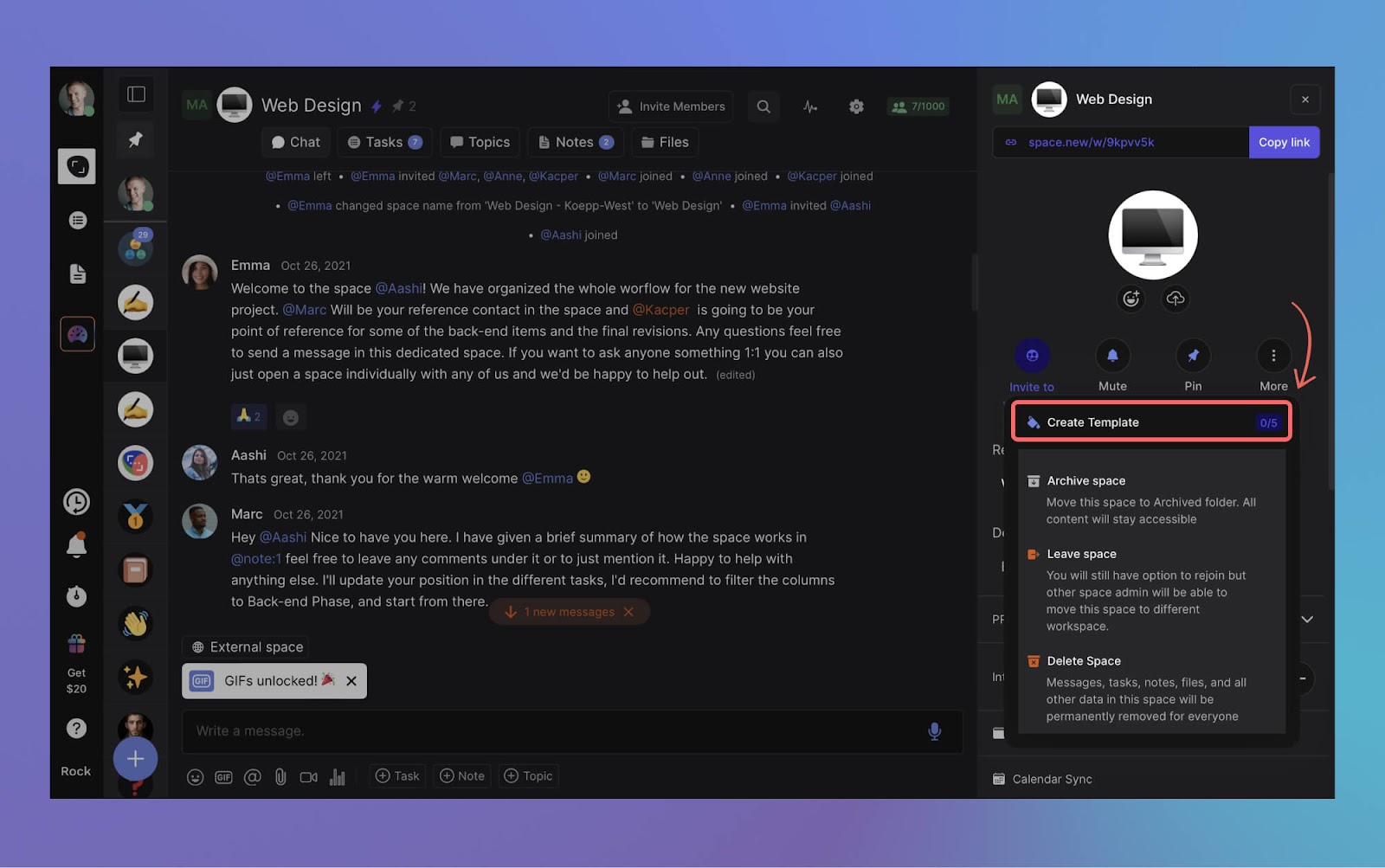
To access templates, go to space settings (admin permissions required) and create a new template.
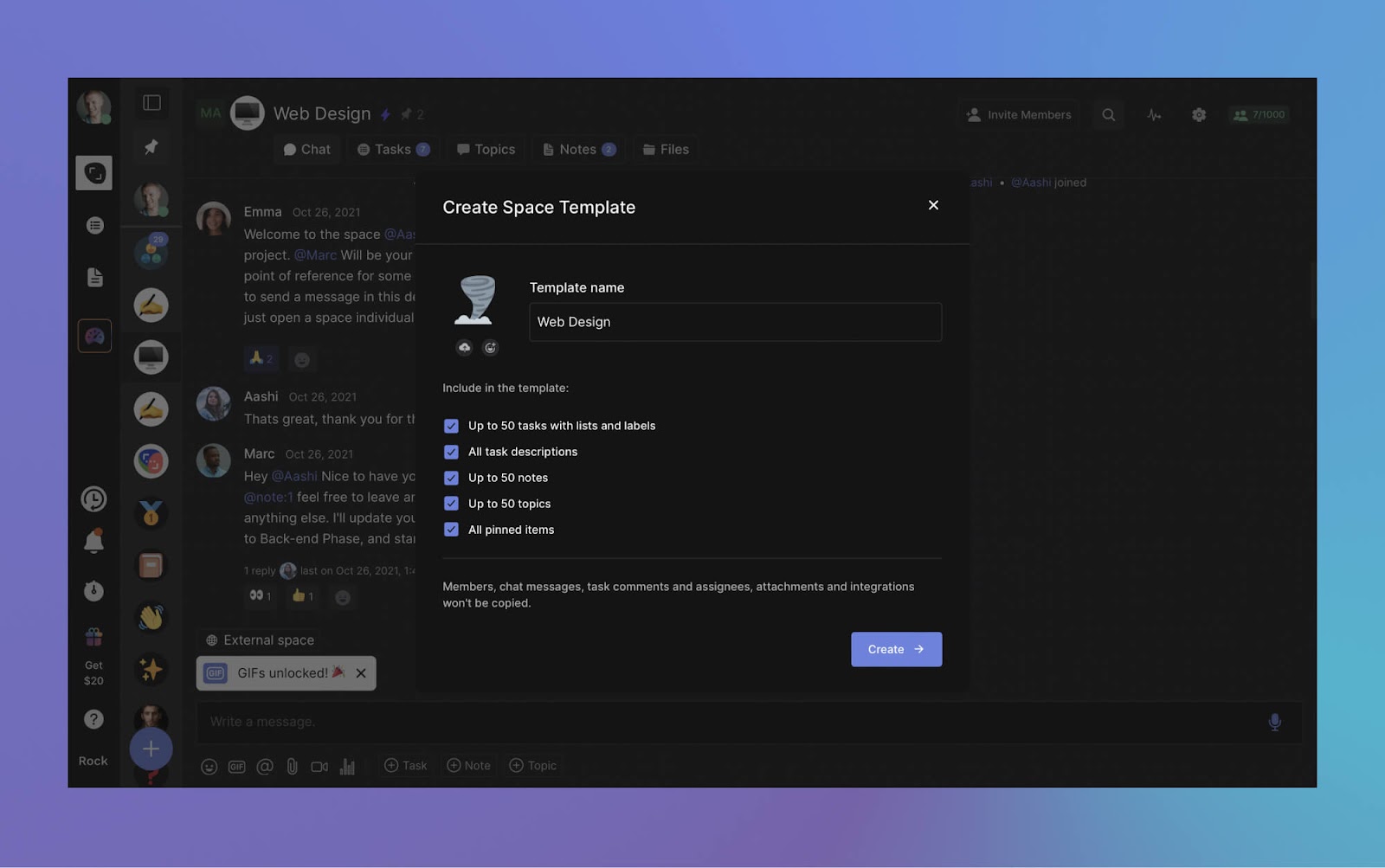
Select the icon and space name of your template. You can choose what information you want to carry over to future copies (tasks, notes, topics, pinned items).
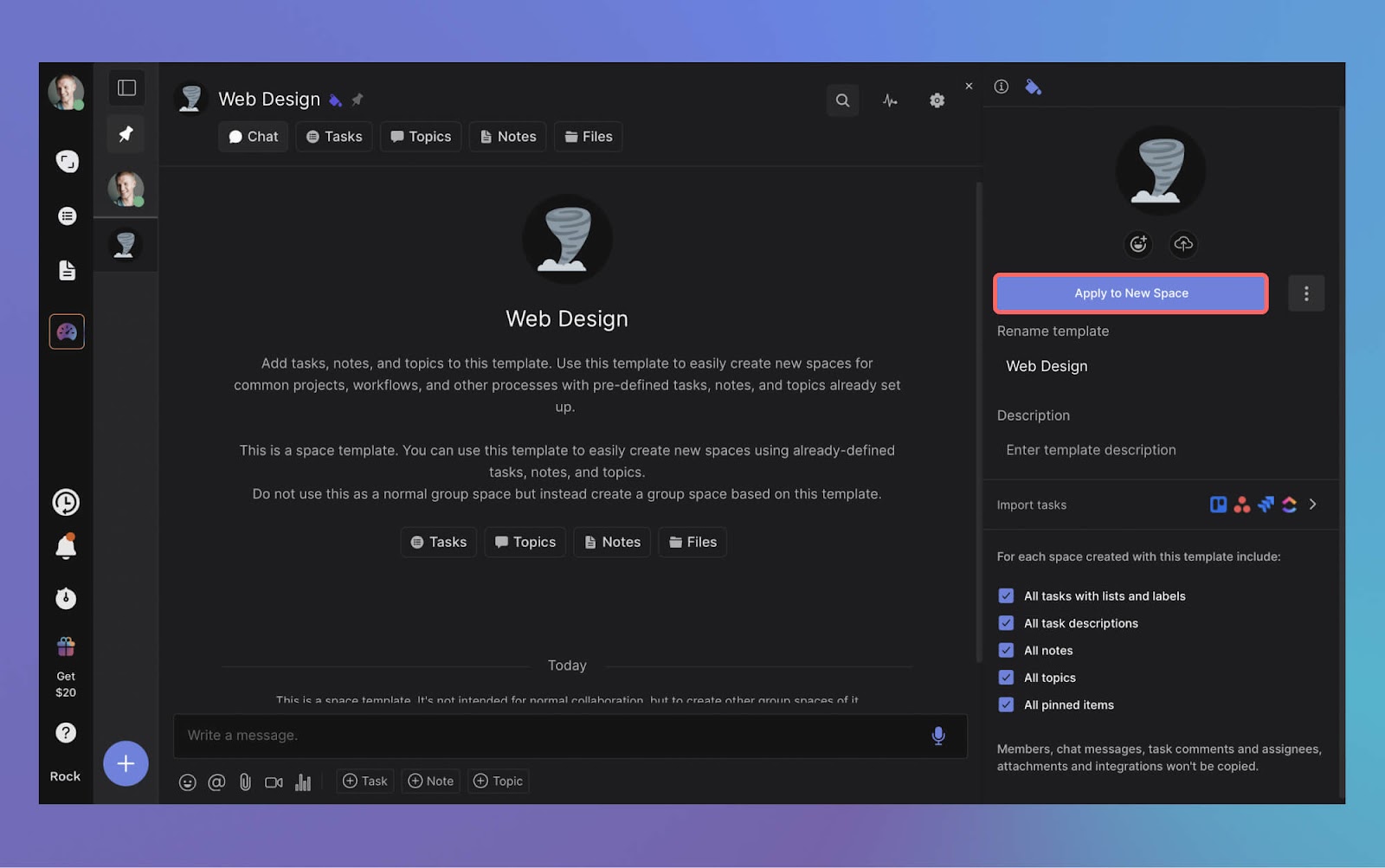
Once you've created a template, access it anytime from your user settings under "templates". Simply select apply to new space and a new space will be created.
Create unlimited new spaces with the template configuration and invite anyone to join you for messaging, tasks, and all your favorite apps in one place.
Looking to help out your clients, freelancers, or contacts while also saving money on your own unlimited plan? You can nowGive a month of Unlimited and get $20 to your own plan.
Once your invitee successfully redeems the reward and signs up they will get a month of unlimited for free. If they stay on the plan, you'll receive $20 off on your own Unlimited plan.
To get started, simply head to your user settings to find your personalized gift link. Share this link with anyone you want to gift a free month of Rock Unlimited to.
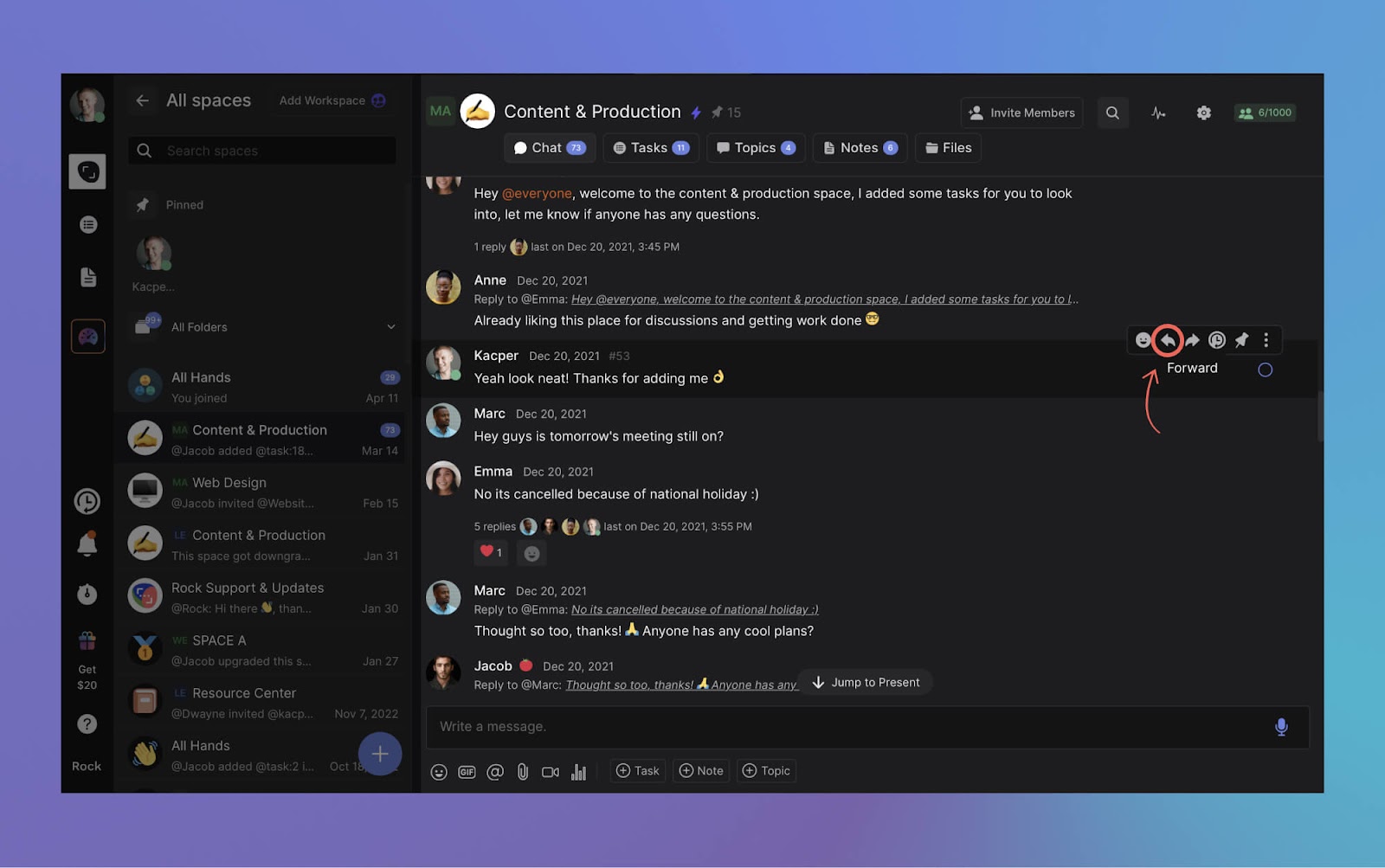
With forwarding messages you can move discussions across spaces without copy-pasting or manually moving messages. To forward a message simply hover over it and select the forward icon.
Improvements on mobile
We have also made a bunch of improvements to the mobile app.
Templates: Create your own space templates. Use templates to skip setting up new spaces from scratch every single time or share your Rock template with others.
Referral program: Gift a month of Unlimited for free and get $20
Chat: More organized and less cluttered message threads
Workspaces: More fine-tuned privacy options for workspaces and spaces
If you have any questions about this release, connect with us at web.rock.so/support.
If you run an agency in Southeast Asia, Latin America, or Africa, your team probably lives on WhatsApp. That is not a guess. Over 200 million businesses use WhatsApp monthly, and in countries like Brazil, 96% of businesses rely on it as their primary communication tool.
WhatsApp works. Until it does not.
At some point, your team starts losing track of client feedback buried in group chats. A designer shares a file, but nobody can find it two weeks later. Project updates mix with lunch plans. There is no way to separate "urgent client revision" from "happy birthday" messages.
That is usually when someone suggests Slack. But is Slack actually better for your team, or just different? This Slack vs WhatsApp comparison breaks down exactly where each tool wins, where it falls short, and which type of team benefits from each.
Short on time? Take the 30-second quiz to get a personalized recommendation.
This is where Slack and WhatsApp are fundamentally different tools.
Slack organizes conversations into channels. You can have #client-acme, #design-reviews, and #random, each with its own history, pinned files, and member list. Threads keep follow-up discussions attached to a specific message without cluttering the main channel. For a 20-person agency managing five clients, that structure is the difference between finding information in seconds and scrolling through a thousand messages.
"The experience of being able to search back over all your team's communications for, in our case, millions of messages, is super-valuable. But you don't know what that's like until you actually have it." - Stewart Butterfield, Co-founder of Slack
WhatsApp has groups and the newer Communities feature, which lets you bundle related groups together. But groups are flat. There are no threads for side conversations, no bookmarks, and no way to organize messages by topic within a group. Once a conversation scrolls past, it is gone unless you remember to search for the exact words.
For a small team (under 10 people) working on one or two projects, WhatsApp groups are fine. For agencies juggling multiple clients, the lack of structure becomes a real cost in time spent looking for information.
Feature
Slack
WhatsApp
Message history (free)
90 days
On device only
Message history (paid)
Unlimited, searchable
No centralized archive
Channels / groups
Unlimited channels
Groups up to 1,024
File sharing
5 GB free, 10 GB/user paid
2 GB per document
Search
Advanced filters (from:, in:, before:)
Basic keyword search
Integrations
2,400+ apps
None built in
Video calls (free)
1:1 only, 30 min
Up to 8 people
Voice calls (free)
1:1 only
Up to 32 people
Threads
Full threaded replies
Reply-to-message (flat)
Scheduled messages
Yes
No
Desktop experience
Desktop-first design
Mobile-first, desktop companion
Admin controls
Full dashboard, SSO, DLP (paid)
Basic (Business app)
End-to-end encryption
No (enterprise TLS)
Yes, by default
Free plan cost
$0 (limited)
$0 (full features)
Paid plan from
$7.25/user/month
API only (per-message fees)
File Sharing and Search
Slack was literally named as an acronym: Searchable Log of All Communications and Knowledge. Search is its core feature. You can filter by person, channel, date range, file type, or even messages that contain links. On paid plans, every message ever sent is indexed and searchable.
On the free plan, that changed in August 2024. Slack now limits free workspaces to 90 days of history, and messages older than one year are permanently deleted. For cost-conscious teams, this is a significant downgrade.
WhatsApp stores files and messages on your device. There is no centralized file repository. If a team member shares a PDF in a group chat, other members need to scroll back to find it, or it lives in their phone's download folder. The search function is basic: keyword matching within individual chats, no filters, no date ranges.
For client communication, this matters. When a client asks "what did we agree on last month?" and the answer is buried in a WhatsApp thread between holiday photos and voice messages, you have a problem.
WhatsApp Business adds business profiles and catalogs but keeps the same mobile-first messaging interface.
Video Calls and Meetings
Here, WhatsApp wins on the free tier. You get group voice calls with up to 32 people and video calls with up to 8 people, no time limits, no account required beyond a phone number. For a quick team sync or a client check-in, it just works.
Slack's free plan restricts you to 1:1 huddles with a 30-minute time limit. Group huddles (up to 50 participants with screen sharing) require the Pro plan at $7.25/user/month. If video calls are a daily part of your workflow and budget is tight, this is a clear gap.
That said, most agencies already use a separate video tool (Zoom, Google Meet, or Jitsi) for scheduled meetings. The question is whether you need quick, informal calls built into your messaging tool, and for that WhatsApp is simpler.
Integrations and Automation
Slack connects to over 2,400 apps: project management tools (Jira, Asana, Trello), cloud storage (Google Drive, Dropbox), developer tools (GitHub, Sentry), and CRMs (Salesforce, HubSpot). You can also build custom workflows with Slack's Workflow Builder without writing code.
WhatsApp has no built-in integrations. The WhatsApp Business API lets you connect to external systems, but that requires a Business Solution Provider (like Twilio), developer resources, and per-message fees. It is designed for customer communication at scale, not for internal team workflows.
For an agency that uses Google Workspace or wants notifications from their project management tools in chat, Slack is the obvious choice. For a team that just needs to talk to each other and their clients, WhatsApp's simplicity is actually a feature, not a limitation.
Pricing Breakdown (2026)
WhatsApp is free for team messaging. The WhatsApp Business app costs nothing. The only paid element is the Business API, which charges per message and is designed for customer-facing automation, not internal team chat.
Pro: $7.25/user/month (annual). Unlimited history, 10 GB/user storage, unlimited integrations, group huddles up to 50 people
Business+: $12.50/user/month (annual). Adds SSO, audit logs, data loss prevention
For a 15-person agency, Slack Pro costs roughly $109/month. That is not trivial for teams in developing markets where the average is significantly lower. And the free plan's 90-day history limit means you lose access to conversations that might contain important client decisions or project context.
"We didn't choose WhatsApp. The Latin American population chose WhatsApp." - Guilherme Eler, Social Commerce Director for Latin America, L'Oreal
One cost that does not appear on any pricing page is the impact on work-life balance. WhatsApp is a personal messaging app that people also use for work. That means work messages arrive on the same screen as family chats, at any hour. There is no "do not disturb" schedule, no status indicators beyond online/offline, and no way for managers to limit after-hours messages.
Research from the Slack Workforce Index found that employees who log off at the end of the day register 20% higher productivity scores than those working after hours. Slack supports this with scheduled "do not disturb" windows, custom status messages, and notification preferences per channel.
For agencies where asynchronous work across time zones is the norm, these boundaries matter more than any feature comparison.
The Slack vs WhatsApp difference here is structural. Slack was designed as a work tool with work-life separation built in. WhatsApp was designed as a personal messaging app that people also use for work. That fundamental design choice affects every notification, every after-hours ping, and every blurred boundary between client work and family conversations.
For teams that need more than just messaging, tools like Rock combine chat with task management.
Best For: When to Pick Which
Pick WhatsApp if:
Your team is under 10 people working on 1-2 projects. Your clients already communicate via WhatsApp. Free video calls for group meetings are important. You need zero setup and instant adoption. Budget is the top priority.
Pick Slack if:
You manage multiple clients or projects simultaneously. Searchable message history is critical for your workflow. You need integrations with project management or developer tools. Your team works across time zones and needs async features like threads and scheduled messages. You want clear separation between work and personal communication.
Skip Slack if: You need enterprise compliance features but cannot justify Business+ pricing. In that case, look at Slack alternatives that offer more at lower price points.
Skip WhatsApp if: You regularly need to reference past conversations or shared files. The lack of searchable history will cost you more time than you save on software fees.
"We're living in a messaging-first world, and people want to interact with businesses the same way they connect with family and friends." - Nikila Srinivasan, VP of Business Messaging, Meta
Yes — that is exactly Rock.
Chat, tasks, and notes in one workspace. One flat price, unlimited users.
One gap both Slack and WhatsApp share is that neither is built for project management. Slack has integrations with PM tools, but you still need a separate subscription. WhatsApp has nothing beyond the chat itself.
If your team's real problem is not just "where do we talk" but "where do we track who is doing what," a tool that combines messaging with task management might be a better fit. Rock puts chat, tasks, and notes in one workspace. See how it compares to WhatsApp and Slack directly at a flat $89/month for unlimited users. No per-seat pricing, no separate PM subscription. Clients and freelancers can join your spaces directly at no extra cost.
It is not the right choice for everyone, but for agencies that want to stop switching between chat in one app and tasks in another, it is worth trying.
The right messaging tool keeps your team aligned without adding complexity. Rock combines chat, tasks, and notes in one workspace. One flat price, unlimited users. Get started for free.
Effective project management software is more crucial than ever. Whether you're leading a small team or managing complex projects in a multi-national corporation, the right tool can be a game-changer.
Tools in project management are about more than just task management. Nowadays, managing projects is about involving different stakeholders, juggling communication channels, and ultimately driving success.
Finding the perfect fit for your unique needs can feel like searching for a needle in a haystack with all the tools available on the market,.
But fear not.
This comprehensive guide will introduce you to the 10 best project management software tools available in 2026.
Our list includes something for everyone – switch up your current tool or start using free project management software for the first time. From feature-rich platforms to streamlined, user-friendly interfaces, let's explore the solutions currently available on the market.
Read our related article on the best remote work tools for teams who are looking to stay productive in 2026.
10 Project Management Software Tools Worth Checking Out In 2026
Let’s delve into the details of 10 tools in project management that are worth checking out this year.
We've done the heavy lifting for you, examining each tool's features, pricing, as well as listing their pros and cons. Read along to learn more about the best project manager software!
Rock is the ultimate project management software tool on the market. All-in-one functionality allows users to switch between tasks, chat, notes, files, topics and meetings without leaving their project space.
Users can start projects with anyone both in and outside of their organization. This makes Rock a great solution for teams what work with clients, freelancers, and other external stakeholders.
Every project space includes native file management and integrations popular providers such as Google Drive, Dropbox, Figma and OneDrive. Users can attach cloud files to task cards and notes to more easily access work on the cloud.
A flat pricing model makes Rock a very attractive tool for project management. Teams can collaborate with unlimited users both in- and outside of their organization without their bill skyrocketing at the end of the month.
Working with more than 5 or 6 people? Then Rock is most probably your cheapest option if you want to access premium project management software functionality.
What Features Are Available Within Rock’s Project Management Software?
Rock offers all-in-one functionality in one place. Reclaim valuable time and focus on your work. Here are some of the key features within the project management tool:
Spaces: You can organize everything into different spaces. Create a space for 1:1s, group conversations, or projects. Add anyone, inside or outside your organization, to a space so they can participate in a conversation, work on tasks, read notes, and access any file they need.
Task Management: You can use Rock to organize all your work. This feature allows you to create, assign, and manage tasks, making it easier to track project progress and deadlines.
Full-fledged Messaging: Rock features a built-in messaging system that allows you to discuss and connect with anyone, reducing the need for multiple communication platforms.
Meetings: You can conduct video meetings directly within the platform. This feature further enhances the platform's role as a one-stop solution for collaboration and communication.
Dashboard: Rock provides a unified dashboard for all your projects, with a built-in time tracker to help you stay on top of priorities.
Custom Workflows: With Rock's API documentation, you can build custom workflows and tools tailored to your team's needs.
Set Aside: This feature allows users to go through their messages, tasks, and mentions and decide what to work on now versus later.
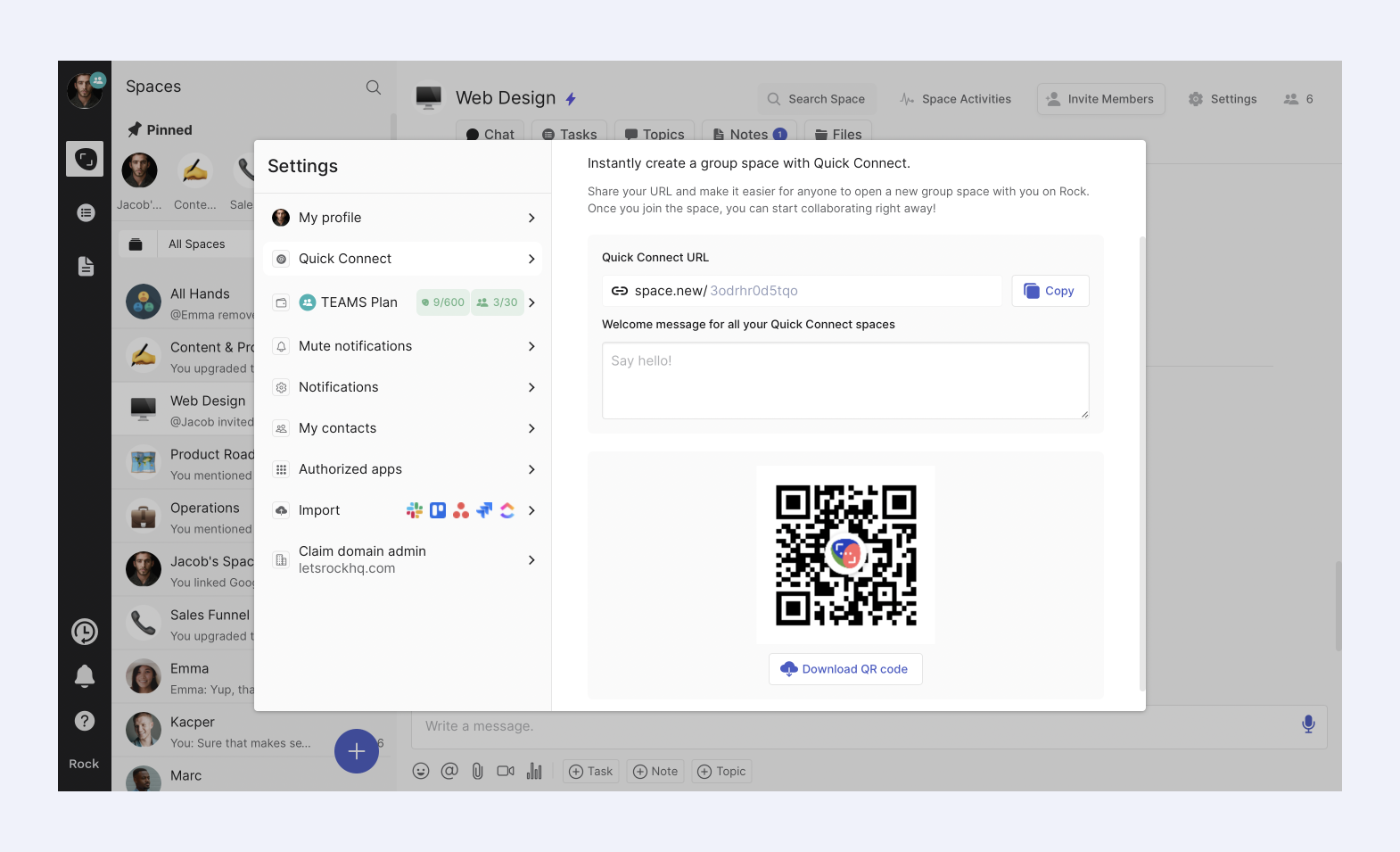
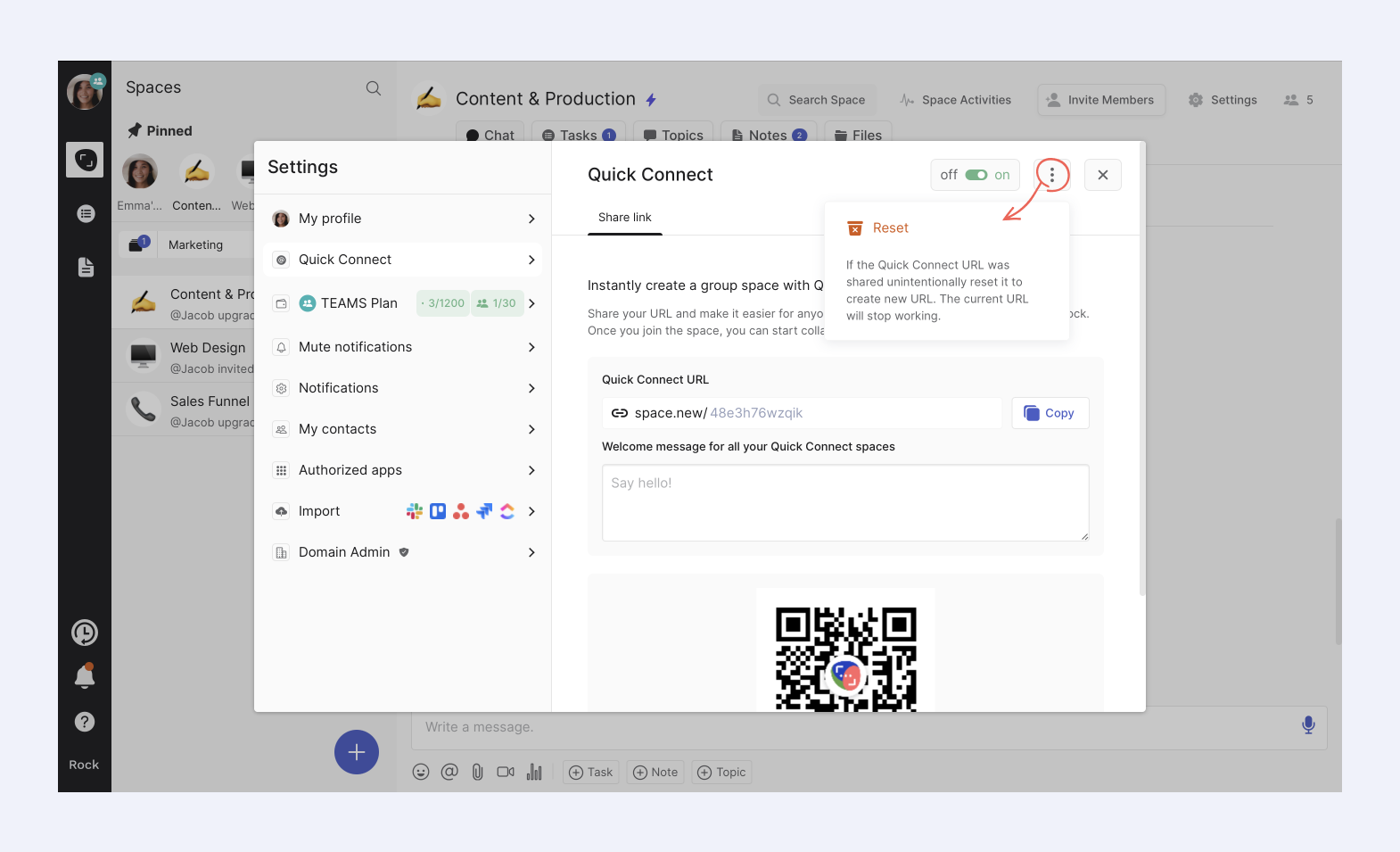
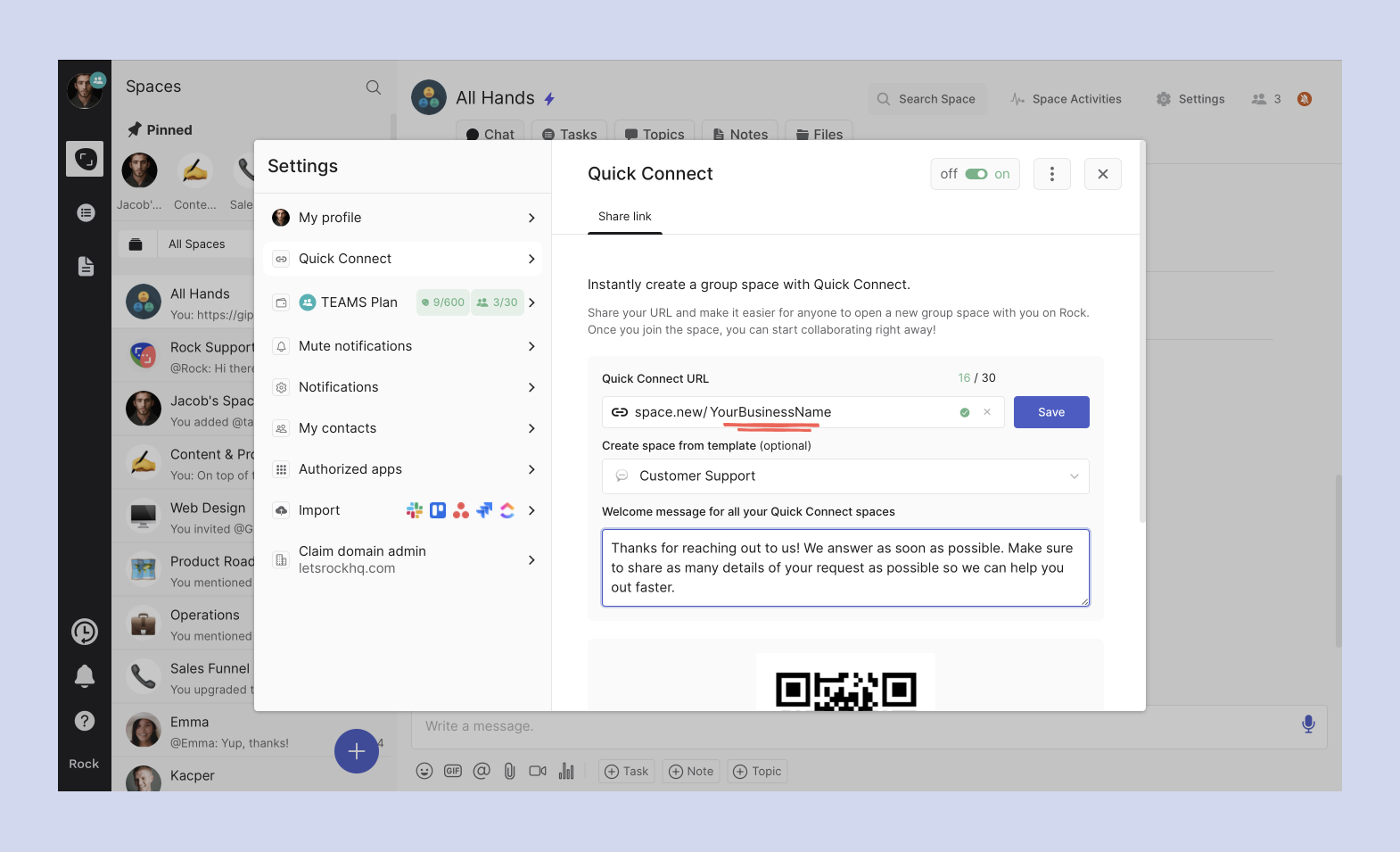
Quick Connect: With Quick Connect, you can start collaborating with anyone quickly using your own personal link. Anyone on the internet that clicks on your link will directly be redirected to a project space with you.
Rock offers two pricing tiers: Free and Unlimited. Pricing is unique to other tools on the market because it's flat. Teams pay a single price regardless of the number of users collaborating in their project spaces.
Free Plan: This plan is best for small projects, and it’s a free software for project management. It includes the following features:
Messaging, tasks, and notes are available in every space.
Up to 50 tasks and 50 notes can be created per space.
Free cloud file storage and meeting integrations.
Import tasks from popular project management and messaging apps.
Unlimited 1:1 peer spaces and 3 group spaces.
Each free group space hosts up to 10 members.
Unlimited Plan: This plan costs $89 per month on a monthly basis and $75 per month if billed yearly, saving 29%. It's best for both small and large teams, especially those who often work with external collaborations such as clients or freelancers.
The Unlimited Plan includes, among other things, the following features:
Unlimited tasks and notes in every space.
Each space hosts up to 1000 members.
Unlimited storage per space is provided.
Online/offline and static user status is available.
Advanced features like time tracker for PRO spaces, 5 managers who can change unlimited spaces to PRO, team dashboard, time tracker dashboard, and custom Quick Connect URL.
Workspaces (50), spaces per workspace (50), group spaces (unlimited), and peer spaces (unlimited) are also included.
The Unlimited plan also provides access to premium features like advanced task functionality, automations, custom integrations, and the ability to build your own bots with the Rock API.
For more information or questions, Rock offers 24/7 customer support and priority support to Unlimited plan users.
Pros And Cons Of Using Rock As Your Project Management Software Tool
The pros and cons of user Rock can vary depending on the specific needs and circumstances of your team or project. Take advantage of the freemium plan to see if Rock is the right fit for you.
Pros Of Using Rock
✅ All-in-one platform: Consolidate messaging, tasks, notes, files, and other favorite apps into one space
✅ Integration with other apps: Work with a large number of other popular tools, such as Google Drive, Dropbox, Zoom, and Github.
✅ Collaboration features: Quickly add other companies, agencies, or freelancers to a space and give everyone access to everything they need to get work done.
✅ Flexible use cases: Rock is designed for a wide variety of use cases, including marketing, startups, freelance, educators, engineering, and more.
✅ Affordable pricing: Upgrade to the Unlimited Plan for a flat price. The paid plan makes Rock a cost-effective solution, particularly for larger teams.
Cons Of Using Rock
❌ Limited offline capabilities: As an online project management software tool, Rock does not offer offline functionality.
What Other People Think About Using Rock
“As a freelancer I work on several projects at the same time with many different people and organization. I use Rock to organize every project in different space, inviting the people I work with. We share plan, tasks, files, and they can follow my workflow, which task is completed or not etc. The massive change compare to Trello and Slack I've been using is that we can discuss at the task level. This means if I'm working on a project with several tasks, we don't have to have endless emails discussing them one by one, the client can just add inputs or comment within the task.” - Capterra Verified Review
"It's easy to use. Quick to setup and basically got all the functions we need to run a collaboration between team members." - Capterra Verified Review
MeisterTask is a comprehensive project management software designed to facilitate effective and efficient team collaborations.
Stemming from the principles of Kanban, MeisterTask presents tasks on a board where they move across columns as they progress through stages. A visual interface allows for an easy overview of project status and workflow at a glance.
The platform is customizable and adaptable, catering to various use cases such as task management, agile project management, workflow management, and teamwork.
MeisterTask Key Features
Kanban-style Project Boards
Task Creation and Management
Personal Agenda Board
Task Assignees and Watchers
Built-in Time Tracker
Attachments
MeisterTask Pricing
MeisterTasks’ management software offers the following pricing plans:
Basic Plan: free, providing core task management features for single users.
Pro Plan: $12 per user per month.
Business Plan: $24 per user per month and is designed for larger teams.
Enterprise Plan: This plan offers custom pricing for large companies with specific requirements. The Enterprise plan is best for large organizations (1000+ employees) looking into software to manage projects
Pros and Cons Of Using MeisterTask For Project Management
Pros of using MeisterTask
✅ Kanban-Style Boards: MeisterTask uses Kanban-style boards to visualize workflows. Board view can help teams better understand their progress and what needs to be done next.
Cons of using MeisterTask
❌ Pricing: Teams can quickly rack up a large bill at the end of the month when paying 12$ or 24$ per user per month.
❌ Potential for Feature Overload: MeisterTask’s project management software offers a lot of features, potentially overwhelming users. Especially those who prefer a more straightforward, simple task management solution.
Hive is a management software designed to optimize workflows, increase productivity, and enable seamless team collaboration.Functionality includes task tracking, time tracking, setting and visualizing milestones, collaboration and messaging, and AI-powered content creation.
Designed for the hybrid working model, Hive is a free project management software that is versatile enough to cater to diverse teams and projects.
Hive offers extensive functionality, but this complexity can sometimes also be an issue for users. Some users have reported finding the interface overwhelming due to the multitude of features and options available.
Additionally, there have been mentions of occasional glitches, and some users have expressed the need for better customer support.
Hive Key Features
Project Management
Time Tracking
Goals
Collaboration & Messaging
Notes AI
Analytics
Hive Pricing Plans
Hive offers three different pricing plans catering to different needs, which are:
1. Solo: This is a free plan aimed at individuals who need to organize their projects in one place. This plan includes:
Up to 2 workspace members
Gantt, Kanban, Calendar & Table views
Email in Hive
Native chat messaging
2. Teams: This is the most popular plan and costs $12/month per user. It's designed for those who need to work without limits and customize their project management experience. This plan includes everything in the Solo plan plus:
Unlimited workspace members
Seven flexible add-ons (extra)
External guest access
Shareable forms
Time tracking
In-app calendar
3. Enterprise: This plan is for users who need more flexibility, extra support, and security. The price isn't listed on the website and you're encouraged to get in touch with Hive for a quote. The Enterprise plan is best for large organizations (1000+ employees) looking into apps for project management.
Pros and Cons Of Using Hive As Your App For Project Management
Pros of using Hive
✅ Integrations: Hive can be integrated with a wide array of external apps, helping to streamline work and centralize information.
Cons of using Hive
❌ Cost Implications: With a rate of $12 per user each month, teams might find themselves with a substantial cumulative expense for management software by month's end.
❌ Learning Curve: Given the wide array of features and customization options, new users might face a steep learning curve.
Trello is a project management tool designed to foster team collaboration and work organization. The platform uses a card-based system where each card represents a task, which can be organized into different lists representing the stages of a project.
Trello strives to make project management simple and efficient for teams of all sizes with features such as automations, power-ups and project plan templates for easy setup.
Although Trello's free project management software is great for visualizing stages, it can lack depth for detailed project management needs. Users have also expressed a need for more robust reporting and analytic features to better track and evaluate the overall progress of their projects.
Standard Plan - $5 per user/month if billed annually ($6 billed monthly).
Premium Plan - $10 per user/month if billed annually ($12.50 billed monthly).
Enterprise Plan - $17.50 per user/month if billed annually ($210.00 annual price per user). The Enterprise plan is best for large organizations (1000+ employees) looking into apps for project management.
Pros And Cons Of Using Trello For Project Management
Pros Of Using Trello
✅ Kanban-Style Boards: Trello uses Kanban-style boards to visualize workflows. Board view can help teams better understand their progress and what needs to be done next.
Cons Of Using Trello
❌ Pricing: Teams can quickly rack up a large bill at the end of the month when paying 5$ or 10$ per user per month.
❌ Potential for Feature Overload: Trello offers a lot of features, potentially overwhelming users. Especially those who prefer a more straightforward, simple task management solution.
Monday.com is a Work Operating System (Work OS) that enables organizations to manage tasks, projects, and team work in one collaborative space. Functionality is designed to suit various team sizes and industries, offering solutions for marketing, sales, engineering, recruiting, and more.
Monday’s management software allows users to create their own workflows, centralize all work and communication in one place, and integrate with other popular tools like Slack, Dropbox, and Adobe Creative Cloud.
While Monday.com’s project management software provides a host of benefits, it isn't without its drawbacks. One common user complaint is about its pricing. Some users feel that the platform can be quite expensive, especially for small businesses or startups.
Furthermore, users have noted a steep learning curve, making initial setup and adoption a challenge.
Monday project management functionality
Boards
Views
Dashboards
Integrations
Automations
Apps
Docs
Monday pricing options
Free Plan - $0 forever
Basic Plan - $8 per seat/month ($24/month total - minimum 3 users) billed annually
Standard Plan - $10 per seat/month ($30/month total - minimum 3 users) billed annually
Pro Plan - $16 per seat/month ($48/month total - minimum 3 users) billed annually
Enterprise Plan - Pricing is provided upon contacting sales. The Enterprise plan is best for large organizations (1000+ employees) looking into software to manage projects
Pros And Cons Of Using Monday Com As Your Project Management Software
Pros Of Using Monday
✅ Customizable views: Monday.com offers 10+ customizable views including Gantt and Kanban, which allows users to visualize tasks and projects based on their specific workflows.
Cons Of Using Monday
❌ Pricing: Teams can quickly rack up a large bill at the end of the month when paying 8$, 10$ or $16 per user per month.
❌ Notification Overload: Some users have reported receiving too many notifications, which can become overwhelming and potentially disrupt productivity.
Microsoft Teams is a unified project management tool that integrates workplace chat, video meetings, file storage, and application integration. The service is part of the Microsoft 365 family of products, providing a hub for teamwork.
Users can create shared workspaces, use AI-powered experiences to make collaboration smarter and easier, and even empower their frontline workers with intelligent operations and seamless communication.
A common complaint from users is that the interface can be somewhat non-intuitive and confusing, especially for first-time users. UI issues within the project management software can lead to difficulties in navigation and locating specific features or tools.
Working with Microsoft Office already? Add the OneDrive integration to your Rock spaces for seamless file access.
Project Management Features In Microsoft Teams
Meetings and Conferencing
Teams Phone
Chat and Collaboration
Teams Devices
Apps
Frontline Workforce Solutions
Real-time Coauthoring
Microsoft Teams Connect
Teams Channels
Microsoft Teams pricing
Teams does not have a free software for project management. Instead, pricing is divided among the following plans:
Microsoft Teams Essentials: Starting from $4 per user/month (Annual subscription—auto renews).
Microsoft 365 Business Basic: Starting from $6 per user/month (Annual subscription—auto renews).
Microsoft 365 Business Standard: Price: Starting from $12.5 per user/month (Annual subscription—auto renews).
Pros And Cons Of Using Microsoft Teams As For Project Management
Pros Of Using Microsoft Teams
✅ Collaborative Workspace: Microsoft Teams integrates with other Microsoft 365 apps like SharePoint, OneNote, Planner, and Power BI, making it a comprehensive platform for team collaboration.
Cons Of Using Microsoft Teams
❌ Integration with Non-Microsoft Apps: While Teams integrates well with Microsoft's own apps, it may not integrate as smoothly with third-party apps.
❌ Notification Management: Users have reported that managing notifications can be overwhelming and confusing.
Asana is a popular project management software that helps teams organize, track, and manage their work. Their primary goal is to facilitate team collaboration and improve productivity.
With a user-friendly interface, Asana allows you to create and assign tasks to team members, set deadlines, and add task descriptions. You can visualize your work in various ways including lists, task boards, calendars, or Gantt charts with the Timeline feature.
Teams can share notes, upload files, and communicate directly in the context of each task or project, keeping all relevant information in one place.
Features that can be found within Asana
Task Management
Project Visualization
File Sharing
Collaboration Tools
Workflow Automation
Integrations
Custom Fields
Goals
Forms
Asana pricing
Basic: This is for individuals or teams just getting started with project management. It's free forever.
Premium: $10.99 per user/month if billed annually ($13.49 billed monthly)
Business: This plan is for teams and companies that need software to manage projects across initiatives. $14.99 per user/month if billed annually ($30.49 billed monthly)
Enterprise: This is Asana's most comprehensive offering, providing powerful, intuitive work management with advanced admin features and security at scale. The price for the Enterprise plan is not provided and you are prompted to contact their sales team for more information.
Asana Pros And Cons For Project Management
Pros Of Using Asana
✅ Features: Asana provides robust features such as task assignments, due dates, project timelines, comments, file attachments, and more.
Cons Of Using Asana
❌ Pricing: Some users find Asana to be expensive, especially for small businesses or startups, as some of the advanced features are only available in the premium tiers.
❌ Overwhelming for Simple Projects: If you're managing a straightforward or small-scale project, Asana might be more complex than you need.
Jira, developed by Atlassian, is a popular issue and project tracking software that provides a comprehensive suite of tools for managing work in agile teams.
The project management software covers aspects from work management and IT service management to agile and DevOps, catering to various team sizes and industries.
One of the most common criticisms of Jira is its complexity. The platform is robust and highly customizable, which can make it overwhelming and difficult to navigate for newcomers.
Jira’s Tools For Project Management
Issue and Project Tracking
Prioritization and Discussion
Fast Release
Reporting
Automation
Templates
Customization
Integration
Open DevOps
Different Pricing Options Within Jira
Free Plan - $0 forever
Standard Plan - $21 per seat/month ($63/month total - minimum 3 users) billed monthly
Premium Plan - $47 per seat/month ($141/month total - minimum 3 users) billed monthly
Enterprise Plan - Pricing is provided upon contacting sales. The Enterprise plan is best for large organizations (1000+ employees) looking into apps for project management.
Jira Pros And Cons For Project Management
Pros Of Using Jira
✅ Strong Support for Agile Methodologies: Jira offers strong support for Agile methodologies, including Scrum and Kanban. Features like customizable boards, backlogs and sprints, make it a good fit for Agile teams.
Cons Of Using Jira
❌ Complexity: The high degree of flexibility and customization can lead to complexity, making it difficult to configure and manage without dedicated administrators.
❌ Cost: While Jira does offer a free tier, the costs can increase quickly as you add more users and need more advanced features.
9. ClickUp
Via ClickUp
ClickUp is a cloud-based project management platform designed to bring all of your work into one centralized location. The platform is designed to be flexible and customizable, enabling teams from all sectors and sizes to plan, organize, and stay organized at work.
ClickUp's goal is to make the world more productive by removing the friction caused by using so many different apps, and to provide a single unified platform for work.
While ClickUp’s project management software is highly praised for its versatility and wealth of features, it also receives some criticism. A common user complaint is about the platform's complexity due to its extensive features and customization options.
Additionally, some users have reported that the software can occasionally be slow and laggy, especially when managing a large number of tasks, which can impact productivity and the user experience.
ClickUp’s Tools For Project Management
Task Management
Customizable Views
Collaboration Tools
Time Tracking
Custom Fields
Integration
Reporting
Automation
Pricing Plans Within ClickUp
Free Forever
Unlimited: $7 per member per month on an annual plan
Business: $12 per member per month on an annual plan
Enterprise: Contact Sales for pricing. The enterprise plan is best for large organizations (1000+ employees) looking into apps for project management.
ClickUp Pros And Cons For Managing Your Project Management
Pros Of Using ClickUp
✅ Collaborative Tools: Users have noted that ClickUp's collaborative tools, like comment sections and document sharing, are very useful for team projects.
Cons Of Using ClickUp
❌ Mobile App: Some reviews indicate that the mobile app could be improved in terms of functionality and performance.
❌ User Interface: A few users have noted that the user interface could be more intuitive and user-friendly.
10. Basecamp
Via Basecamp
Basecamp aims to eliminate the need for multiple apps for chat, file sharing, tasks, or basic scheduling. Thereby, reducing time spent bouncing between different platforms and increasing overall productivity.
Users are offered a unique set of tools for project management like Hill Charts, Campfire and Card Table.
While Basecamp is lauded for its simplicity and ease of use, some users have expressed dissatisfaction with its lack of advanced features, such as Gantt charts and time tracking, which are commonly found in other project management tools.
Lack of functionality may limit its applicability for teams or projects that require more complex or specialized project management functionalities.
Basecamp Project Management Features
Home Dashboard
Messages
File Sharing and Discussion
Schedule
Automatic Check-ins
Reports
Pings
Pricing Options within Basecamp
Basecamp does not offer a free software for project management, instead users can make use of a 30-day trial. Instead, it offers the following two plans:
Basecamp: The pricing model is on a month-to-month basis and is charged at $15/user per month. Only employees are billed, and guests can be invited for free.
Basecamp Pro Unlimited: The cost is $299/month, billed annually with no per-user charges. If you prefer to pay month-to-month, it’s $349/month.
Basecamp Pros And Cons For Managing Your Project Management
Pros Of Using Basecamp
✅ Project Organization: Users appreciate the centralized location for project management, including task assignments, discussions, file sharing, and scheduling.
Cons Of Using Basecamp
❌ Integrations: While Basecamp does integrate with some other tools, users have expressed the desire for more extensive integration capabilities with external apps and services.
❌ Pricing: Some users find the pricing model, especially for small teams, to be more expensive compared to other project management tools.
Get The Most Out Of Your Work With The Best Project Management Software
Wave goodbye to clutter, chaos, and confusion. Embrace the power of seamless collaboration, streamlined communication, and effective tools in project management.
Rock is the best project manager software. You're not just managing projects, you're mastering them. Elevate your teams, optimize your workflow, and start making every project a success story today.
Your journey to effortless project management starts here! Time to get the most out of your work, one project at a time.
In this release we're introducing Rock webforms, adding the ability to display thumbnails on the task board, and making a ton of other improvements to the core Rock experience. Interested in learning more? Check out the key changes below:
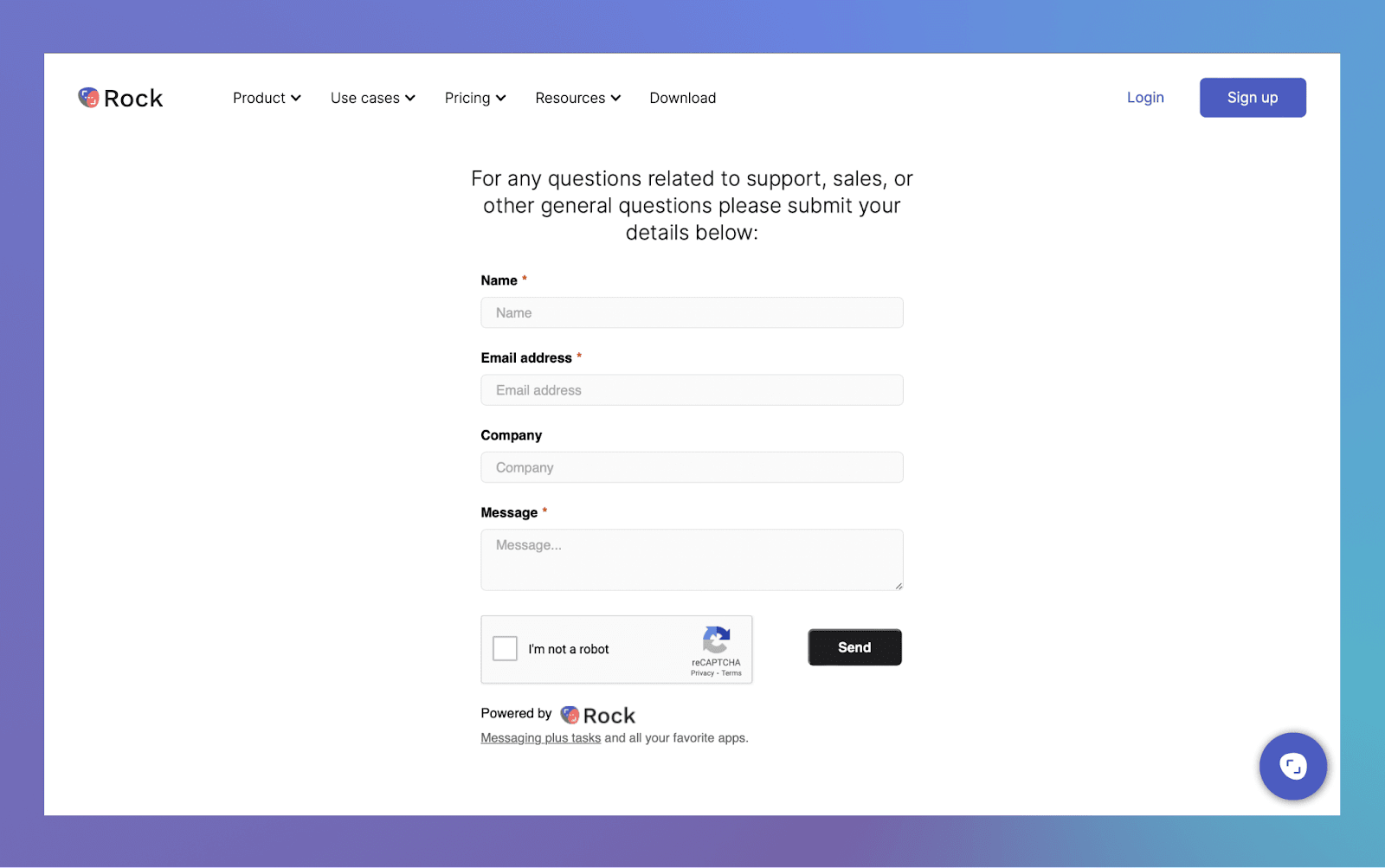
Webform - add a Rock webform to any website and when an entry is submitted a task is created in Rock. Use this for incoming requests, sales inquiries, or support tickets, and do the follow-up in Rock.
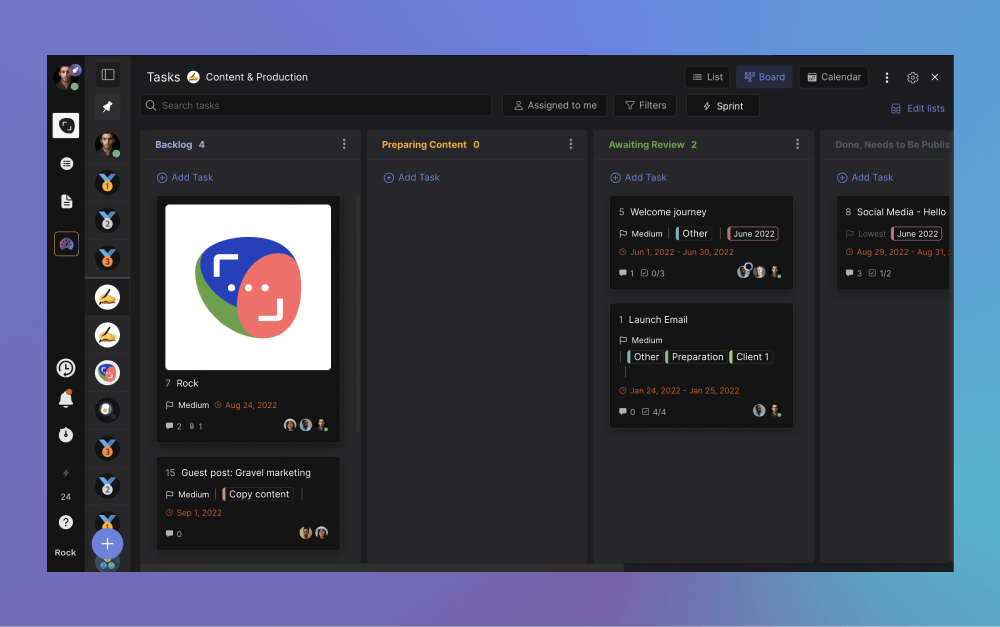
Thumbnails on the task board - see images on the task board so you can quickly see creative, visuals, and other attachments without having to go into a task.
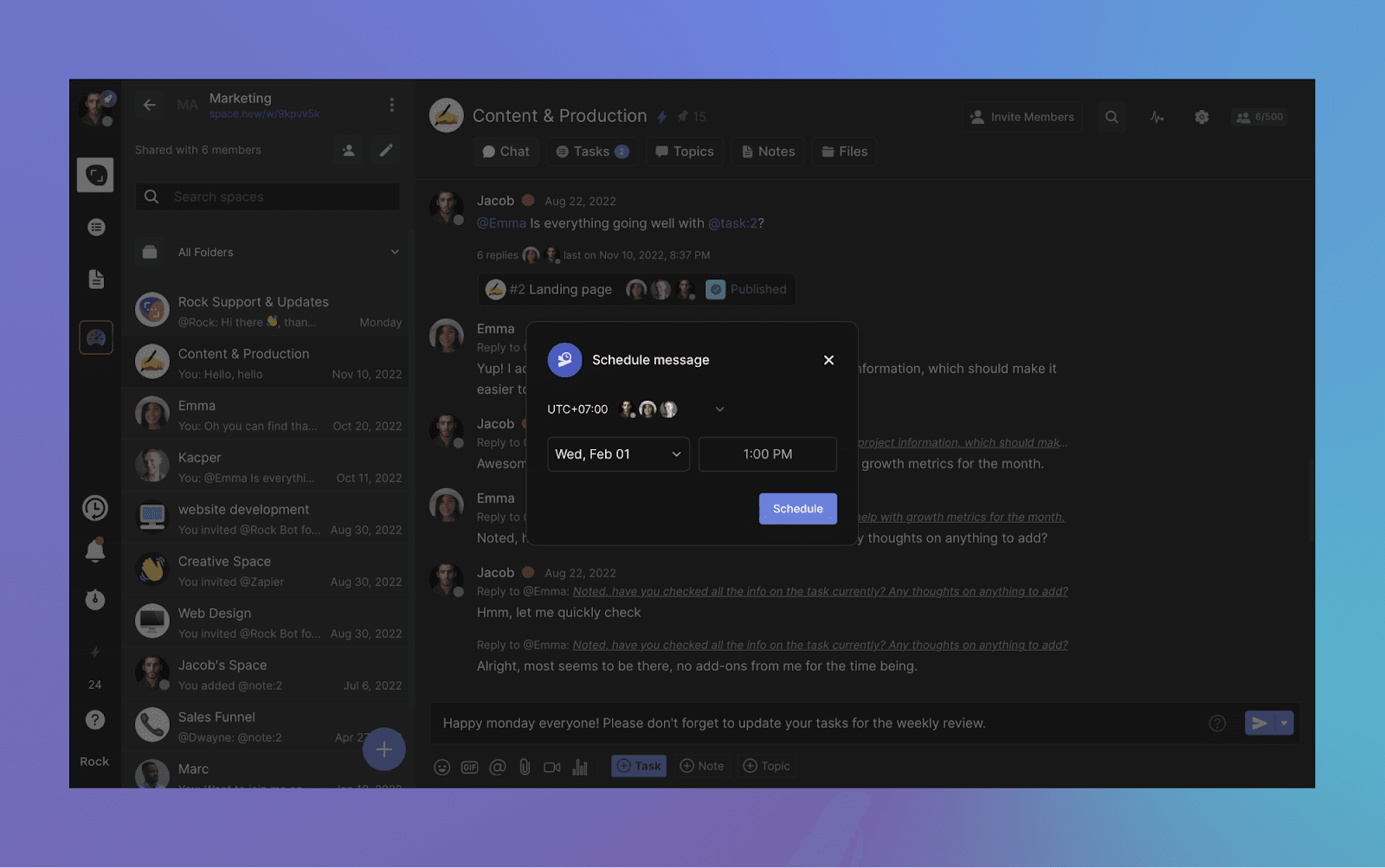
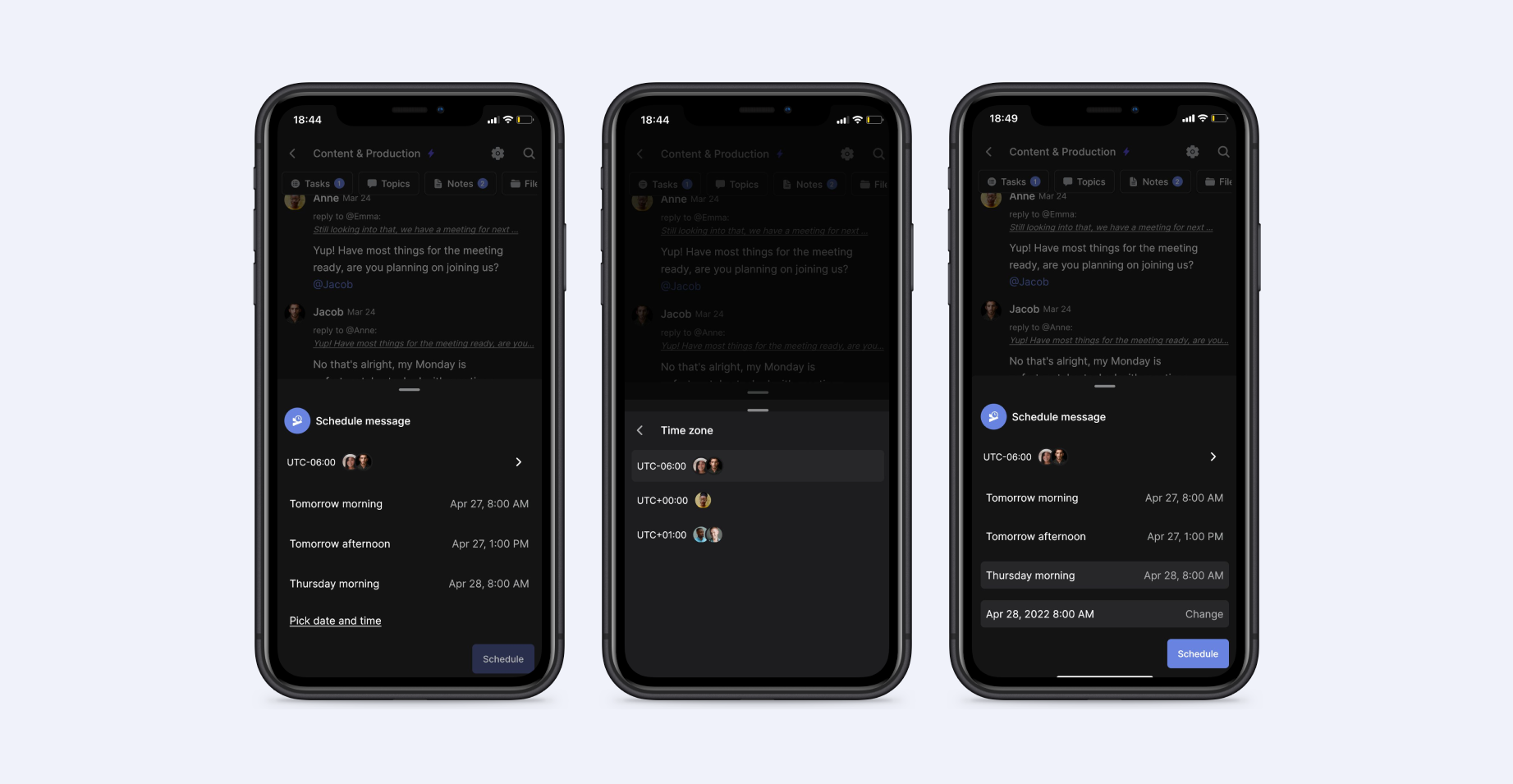
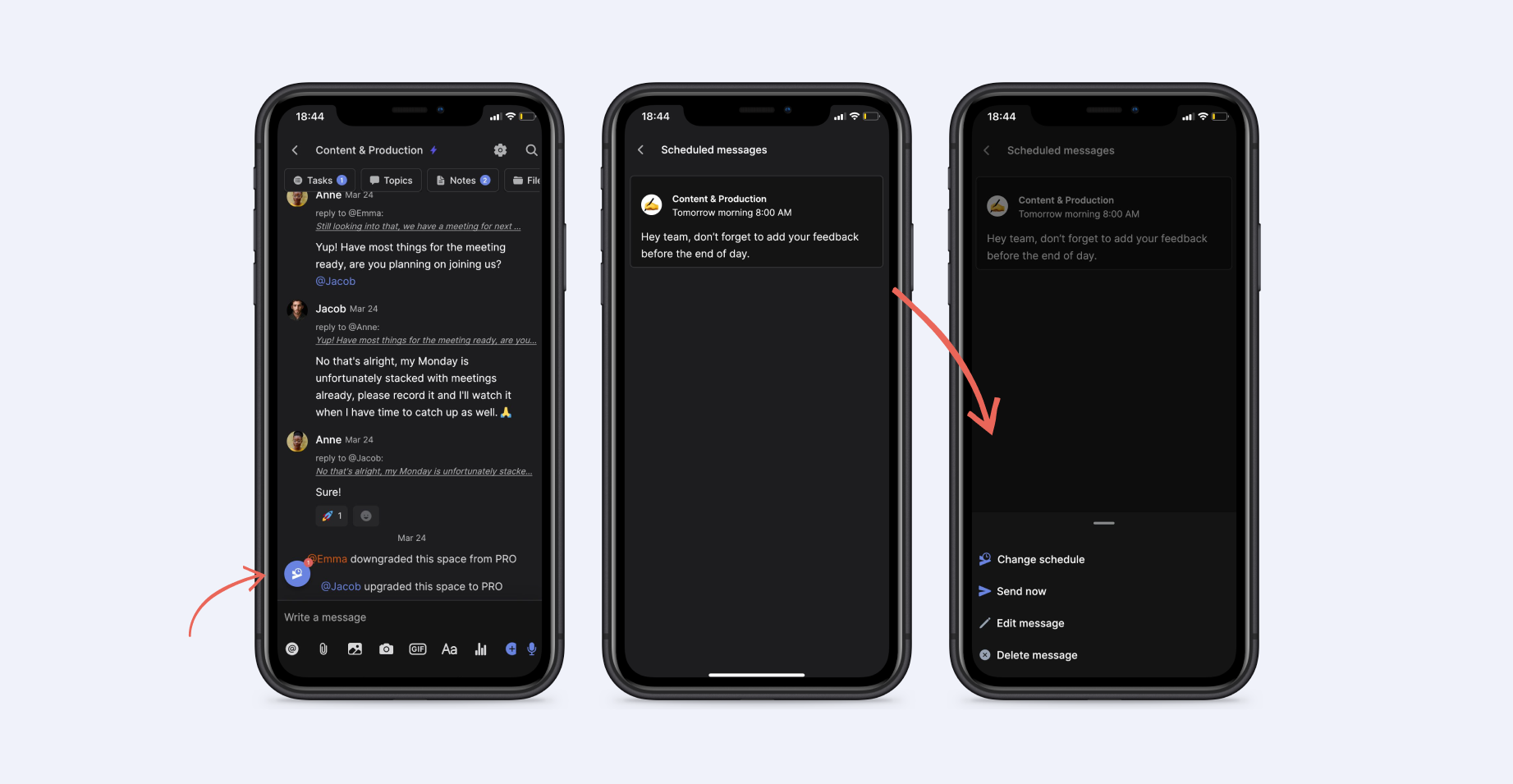
Scheduled messages- send messages when people are going to be online by scheduling these based on their timezone.
Workspace improvements - instead of automatically adding everyone to all spaces in a workspace, you can now selectively invite people to a specific space.
Minimize space panel - need a bit more space for your space? You can now minimize the space panel so you can see more. No larger monitor needed.
Tons of other improvements - from improved task objects in chat to improvements on the way you navigate around Rock, we've added tens of small improvements that will keep you rocking.
Embeddable Rock webform
Set up new webforms between your website and Rock, available in both free and PRO spaces. Rock webforms automatically convert new website responses into tasks, creating a more centralized and intuitive flow of information.
This makes it easier for website visitors to contact you and allows your team to access and handle new form submissions without leaving Rock.
Here are some instances where the new webform could benefit to your team operations:
Product demos and consultations: Create a form that allows visitors to request a demo or consultation. This helps you gather pre-sales information while also directly assigning a new lead to a space member.
Contact forms: Add a "Contact Us" form to allow visitors to ask questions about your business or products and collect their information for future marketing. Visit our contact page to see this example in action!
Newsletter sign-up: Add a form for visitors to seamlessly sign up for your mailing list to stay engaged with updates, promotions and other important business announcements.
Feedback: Collect reviews or feedback from visitors on a specific product or service. You can use labels to categorize all information within your dedicated Rock space.
Event registration: Make it easy for attendees to register for your next digital or in-person event.
Check out our support page to see the webform in action, feel free to leave any feedback, queries or share anything else with us.
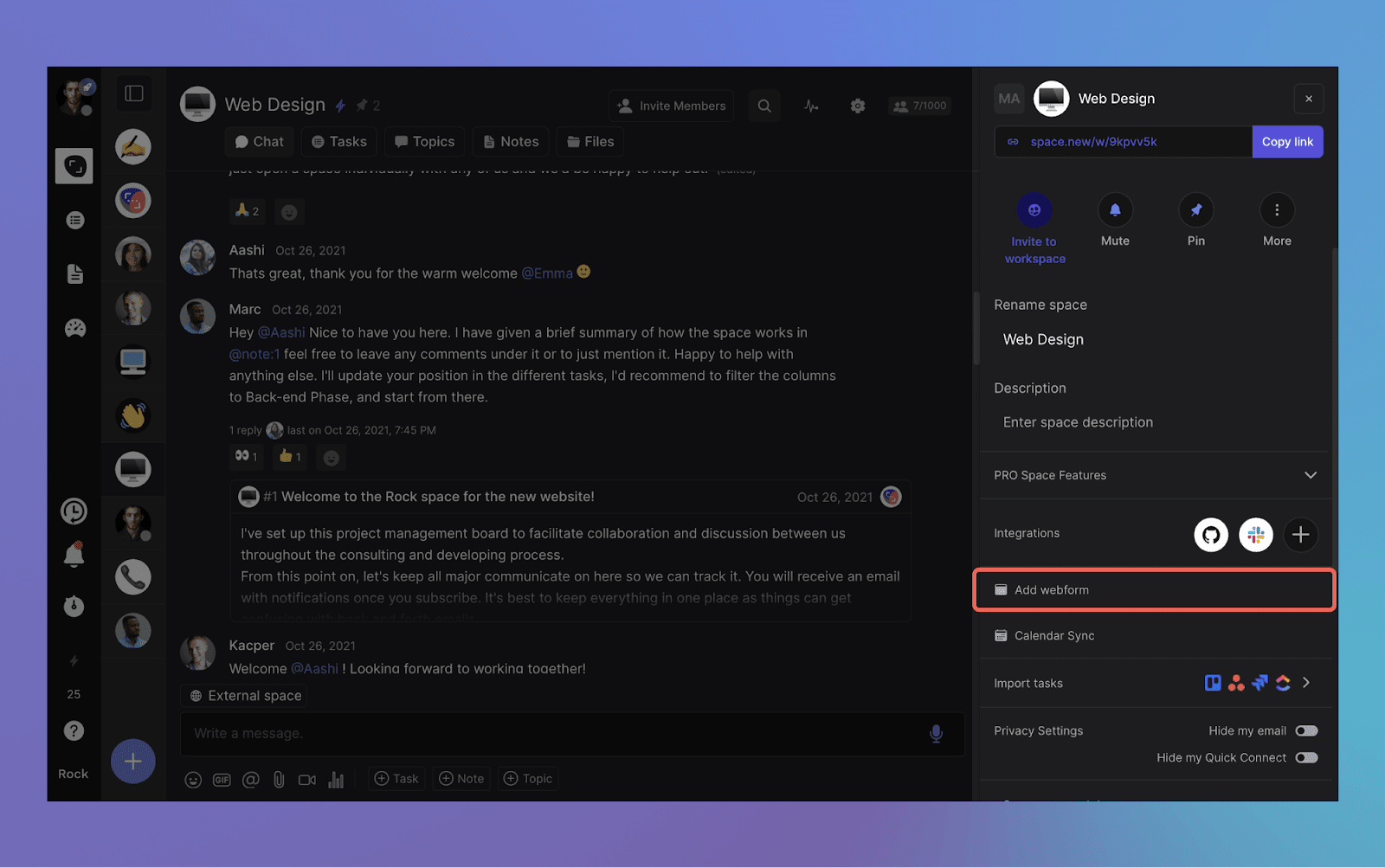
The new webform feature has been made available in both free and PRO spaces. Any user with admin permissions in a space can access the feature by visiting the space settings.
It is now possible to display images on tasks when viewing the Tasks mini-app in board view. This can increase clarity on how to operate tasks, improve engagement or bring more personalized branding to your projects on Rock.
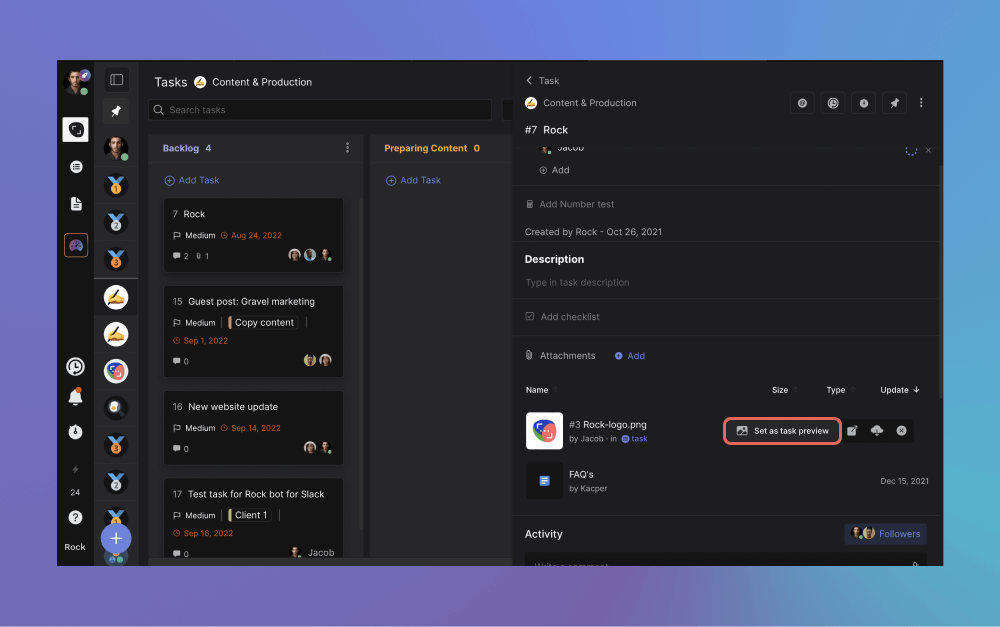
To set an image as a thumbnail, follow these simple steps:
Upload an attachment in .PNG .JPG or .JPEG to a task.
Hover over the element and select “Set as task preview”.
Done! Your preview now shows on the board view. To remove the preview, repeat the steps and click on “Remove thumbnail”.
Workspace improvements
We have implemented an update to workspaces that enables you to selectively invite users to specific spaces within a workspace.
This means that once a user is invited, they will only be part of the spaces chosen by you, and will not automatically become a member of any current or future spaces added to that workspace.
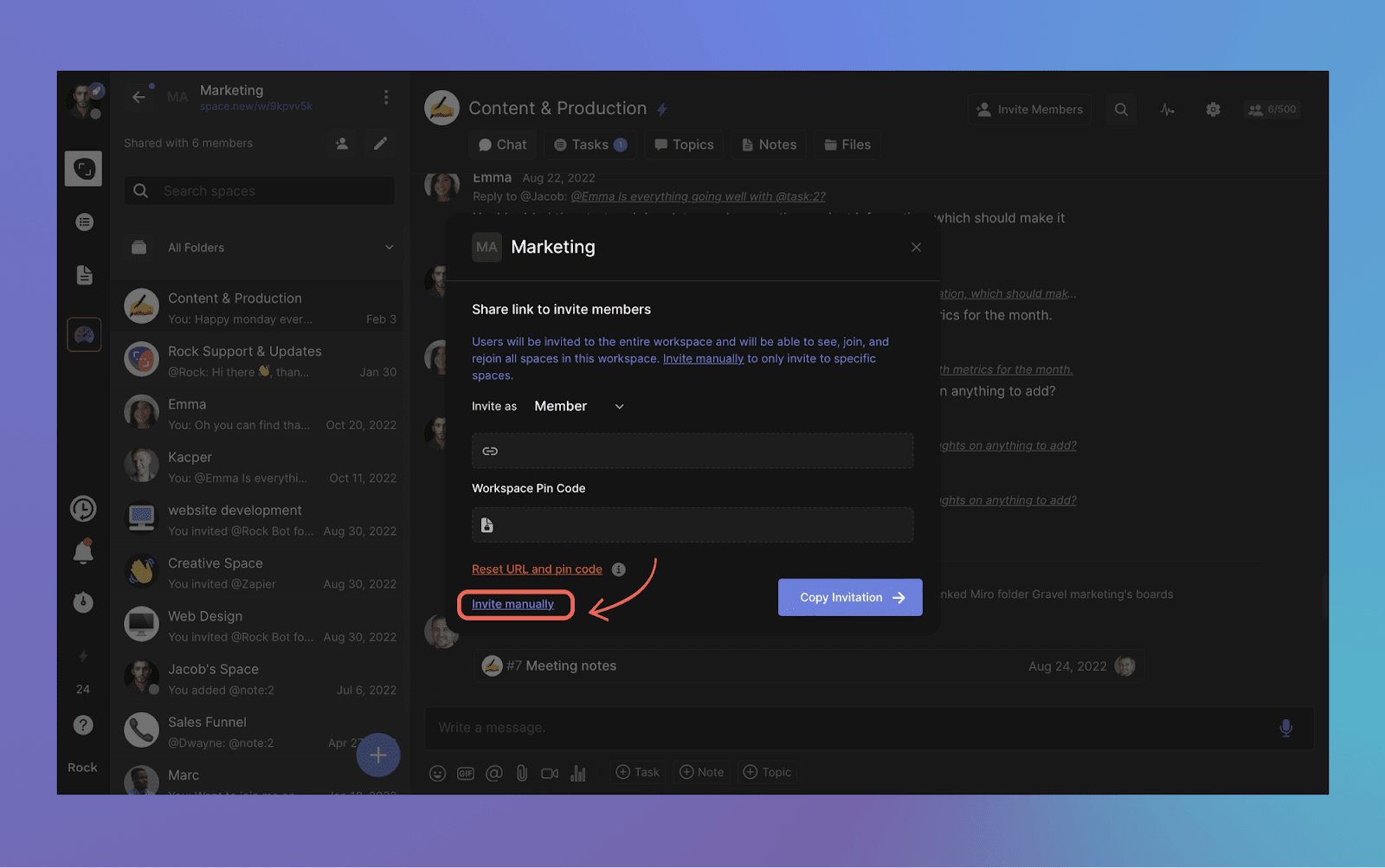
To invite a new user to specific spaces, select the "invite manually" option in the workspaces panel.
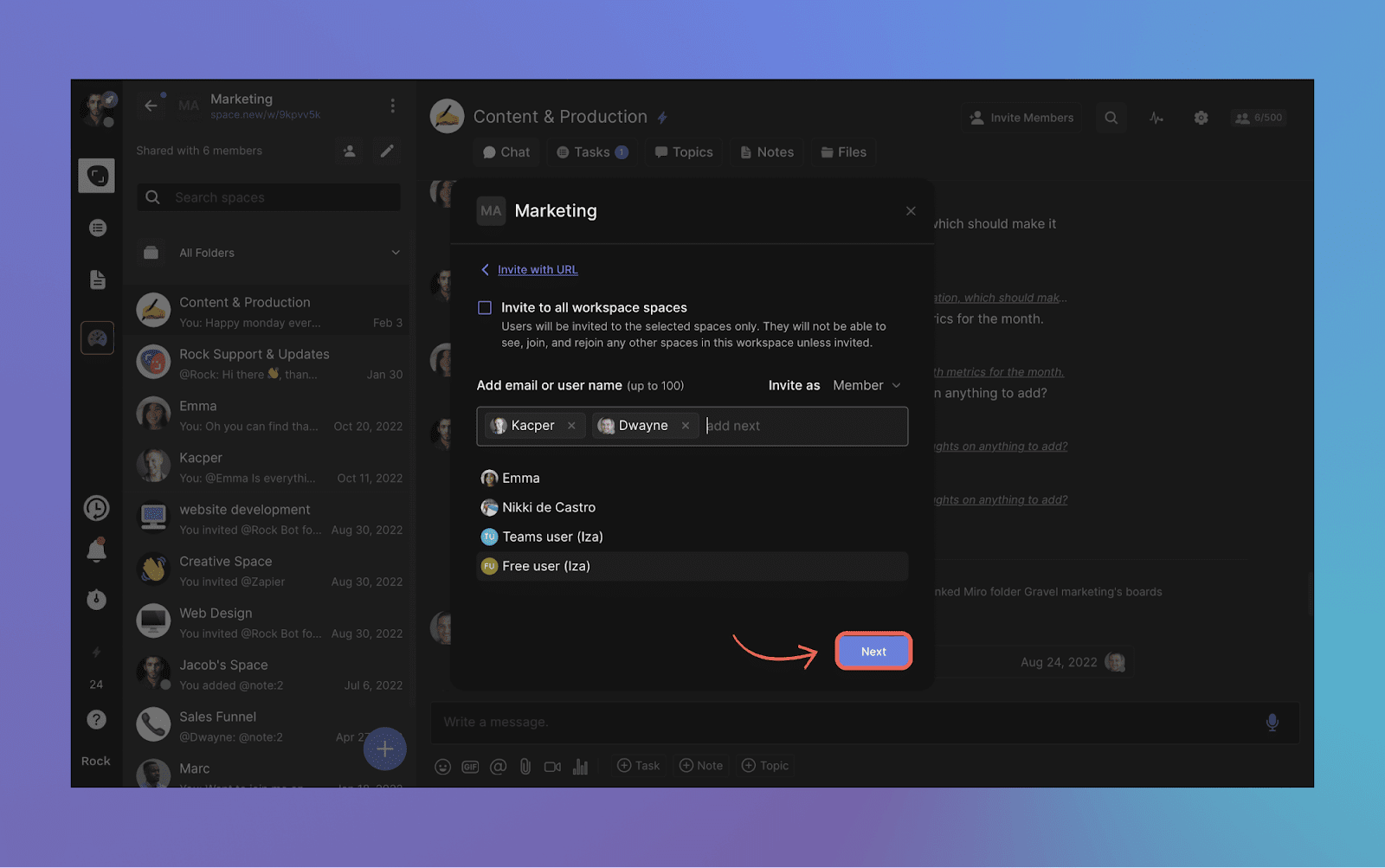
Next, ensure to deselect the default option of "invite to all workspace spaces". Then, manually choose the users you want to invite to the subset of spaces in the workspace.
Once you have selected all desired users, press the "next" button.
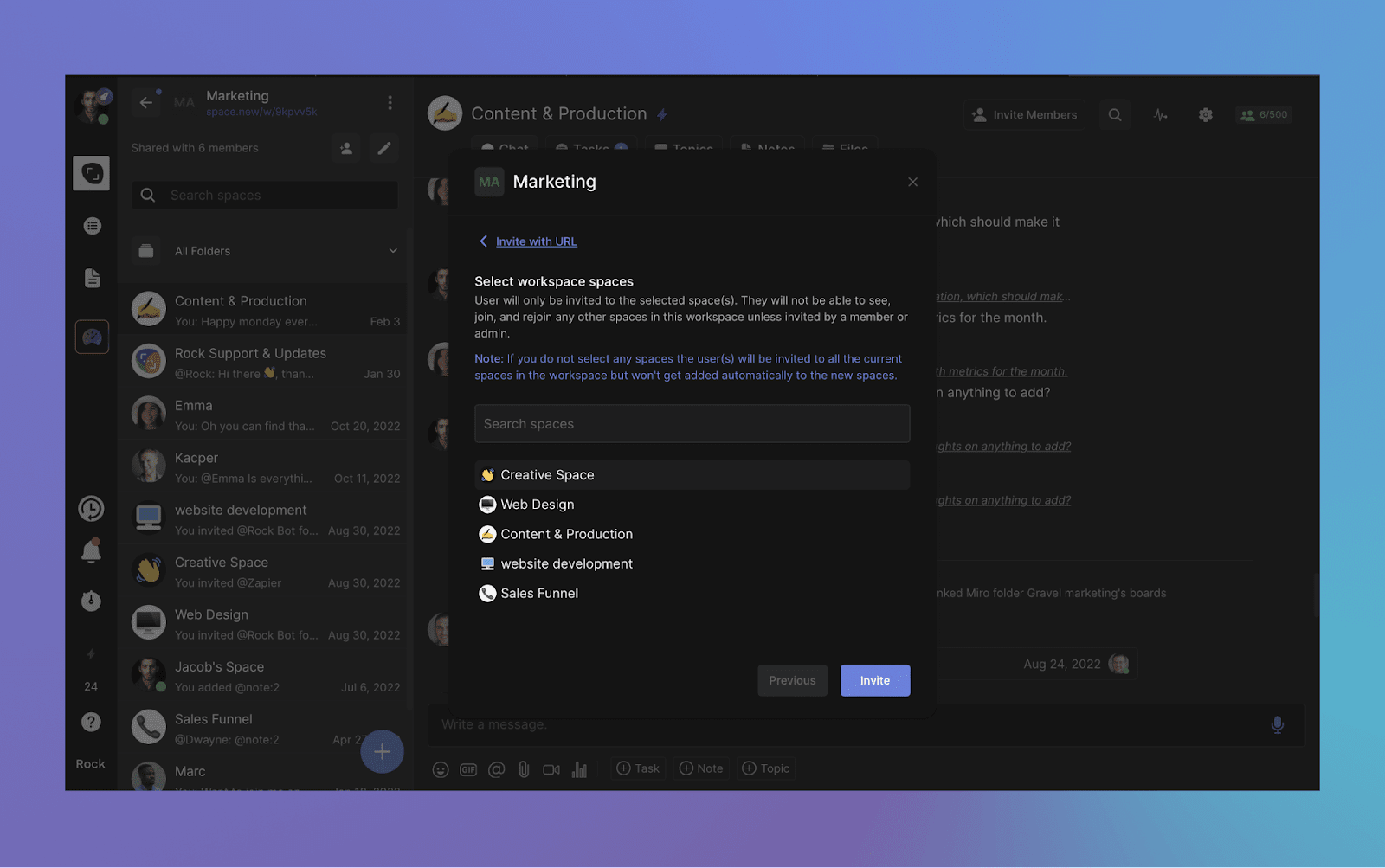
You now have the option to choose which spaces to add the user to. They will no longer be automatically included in new spaces added to the workspace or already existing spaces within your workspace.
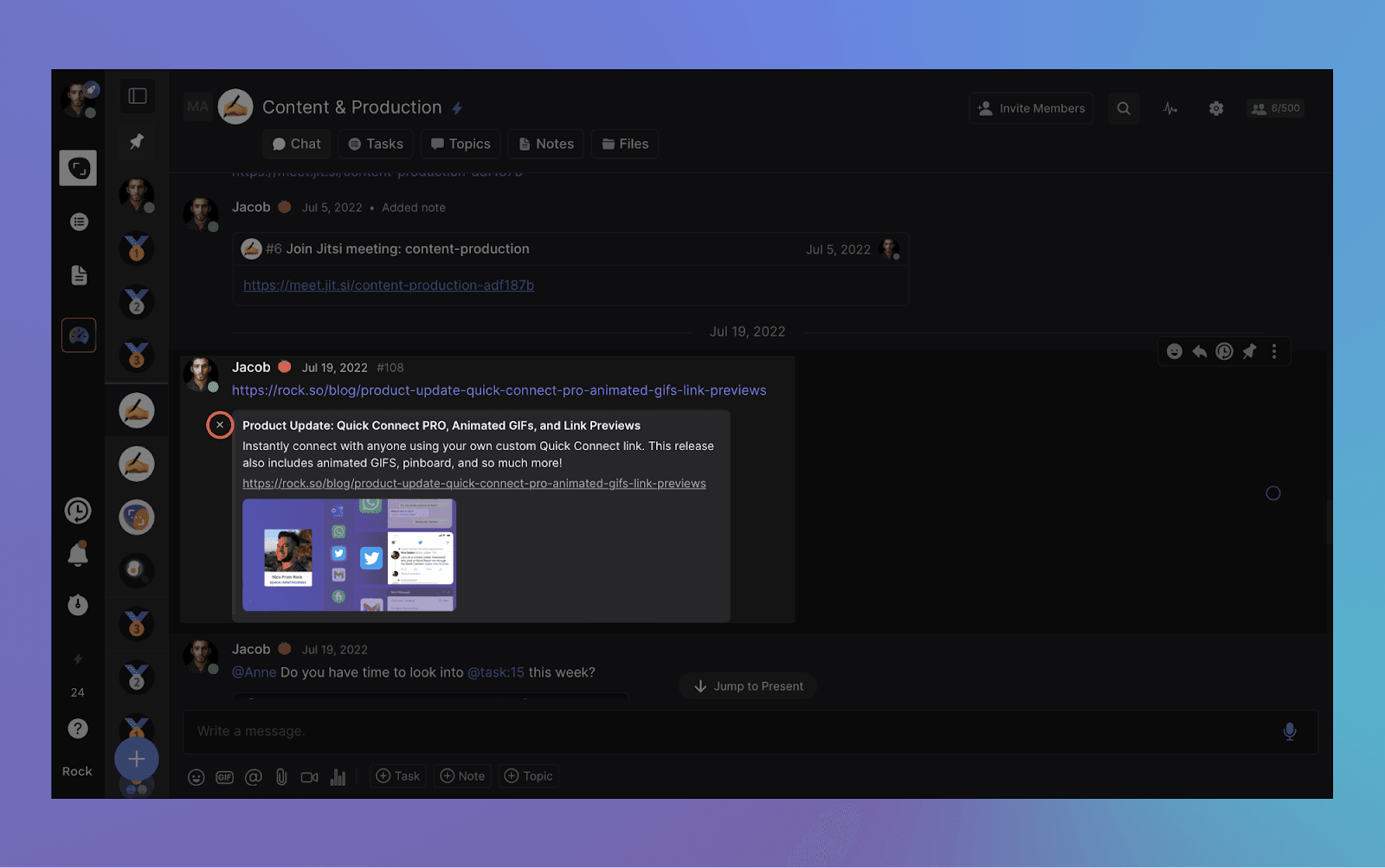
Remove link previews
You now have the ability to eliminate the thumbnail previews for links shared in chat. This change will be reflected for all users sharing the chat space with you.
To remove a thumbnail, simply hover over it once it appears and click the "x" button. Keep in mind, once removed, the thumbnail cannot be restored for that specific message.
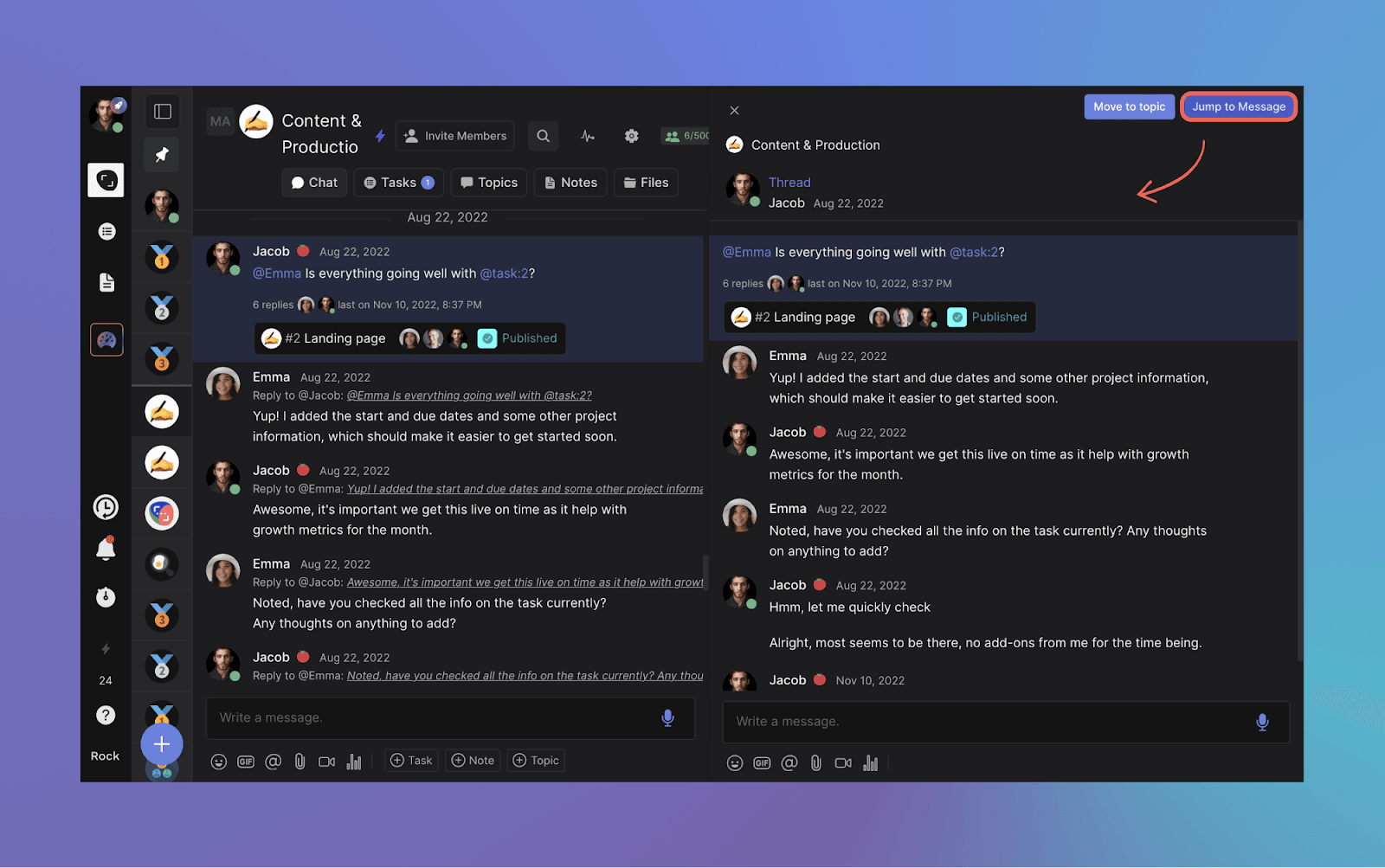
Jump to message
Want to quickly access the original message in a notification or thread? The chat panel now offers the option to jump to the message in the chat.
This makes it easier to view past conversations and navigate through messages in your different spaces and discussions. To activate the feature, simply select “Jump to Message” at the top of the panel.
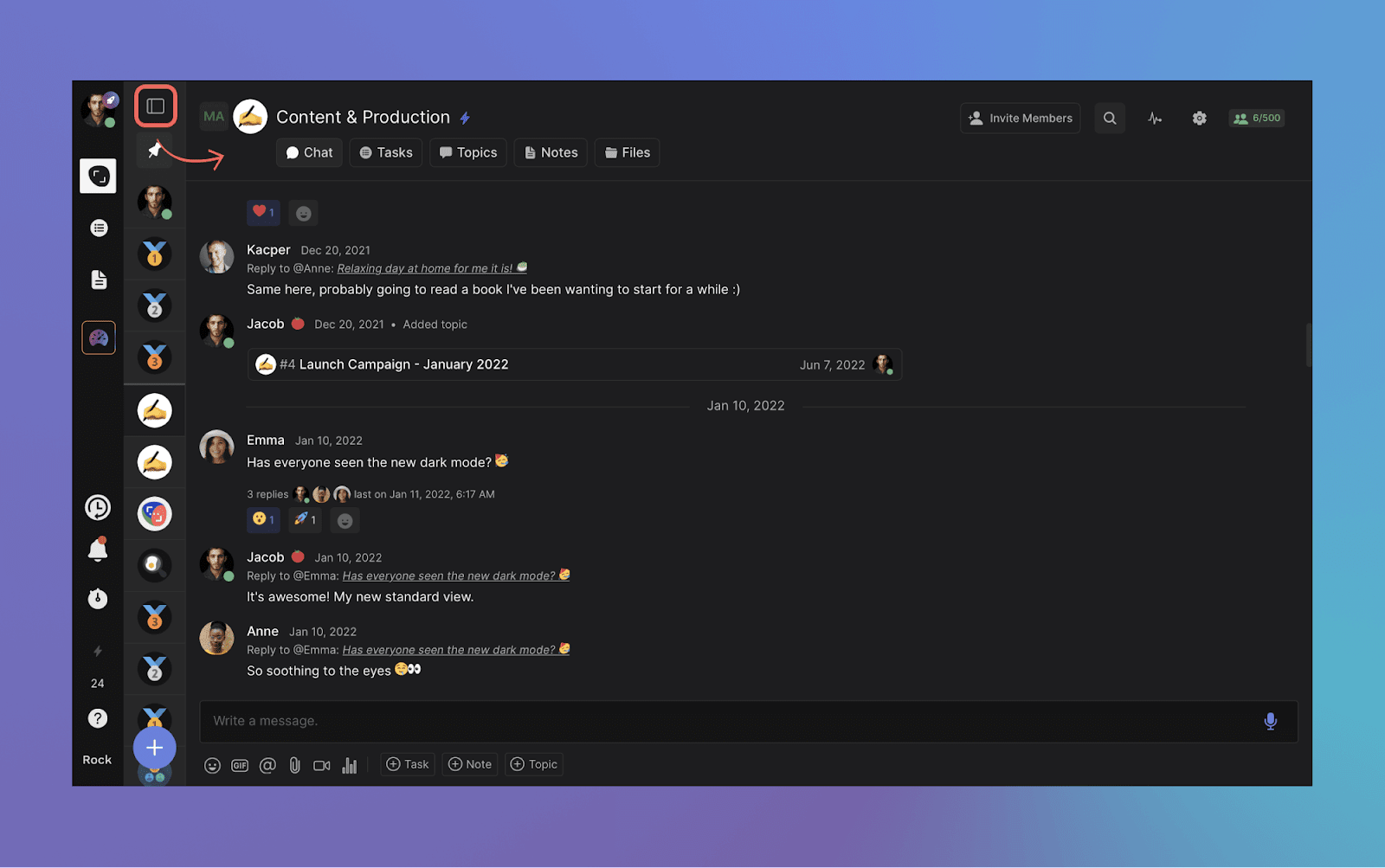
Minimize spaces panel
Maximize your Rock spaces view by hiding the spaces to the left. This feature can be easily enabled by pressing “hide” at the top of the spaces view.
This reduces clutter and increases the size of an open mini-app in a space, making it easier to get work done within your different workstreams.
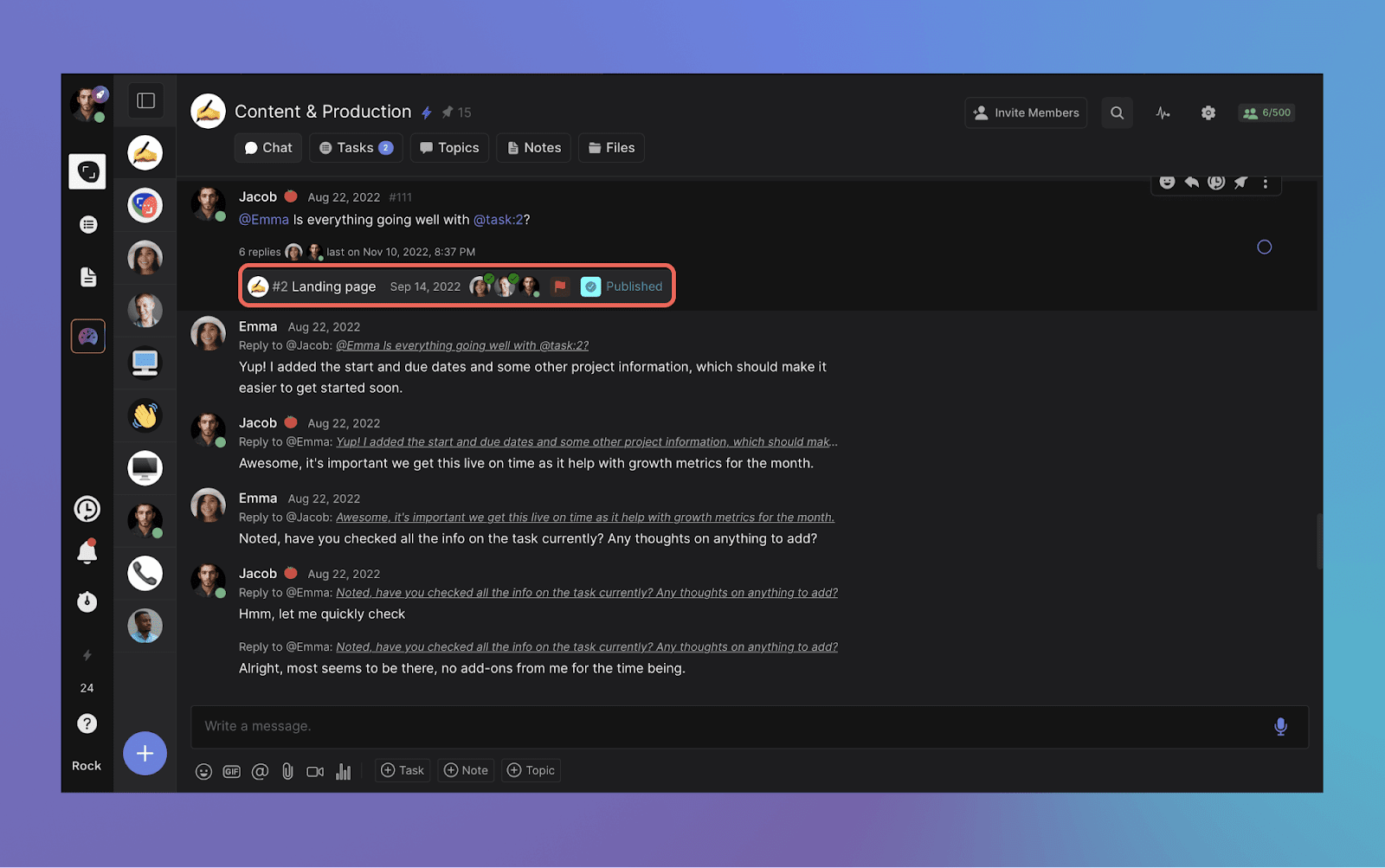
Tasks objects in chat, now with due date and assignee status
Task objects now provide a more comprehensive view when shared in a space. Along with the standard information, we have added due date and assignee status.
This additional information will automatically appear when creating a new task or mentioning a task in your next conversation.
Time tracker improvements
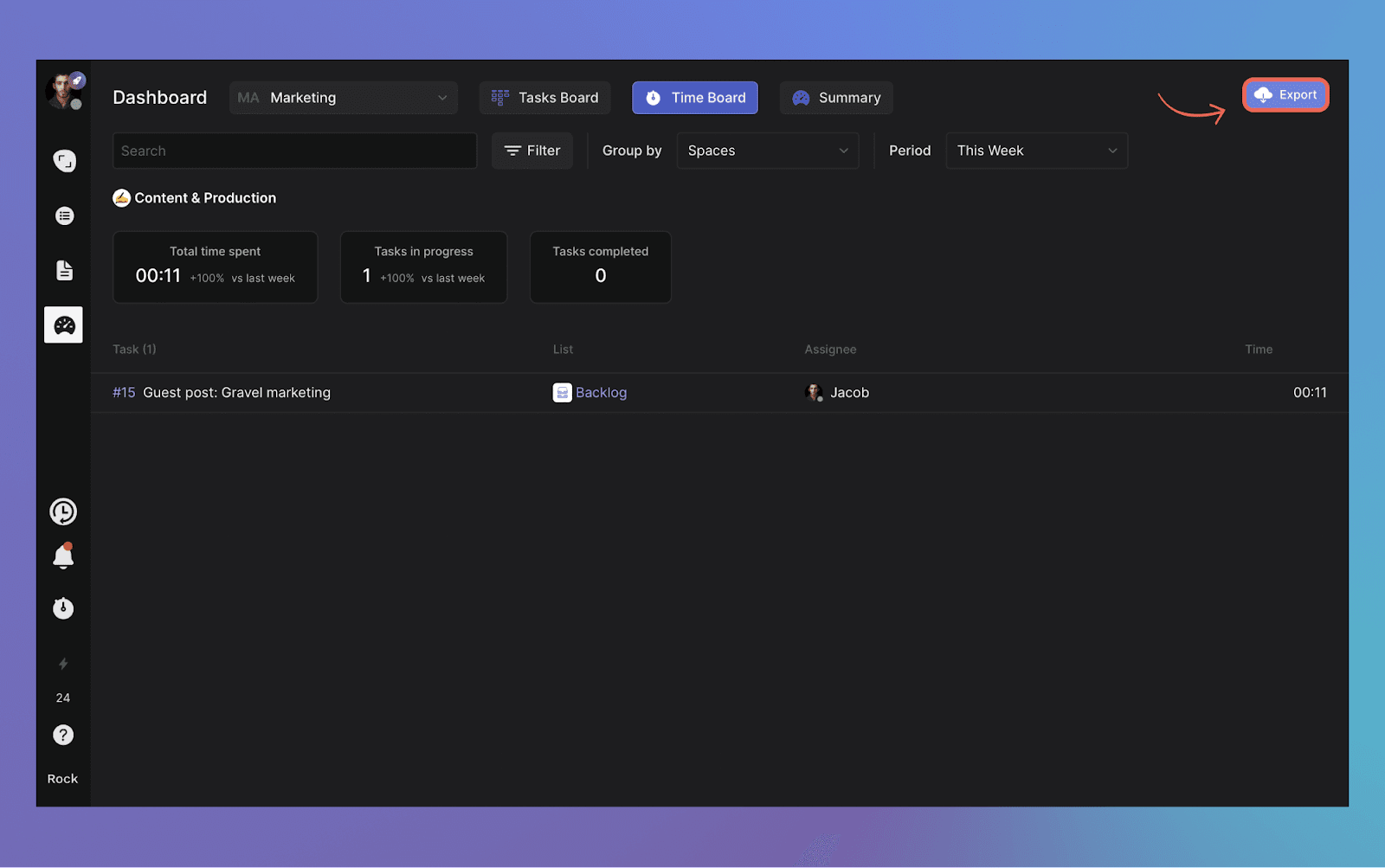
We have made numerous improvements to the time tracker. This should result in a smoother experience overall with bug fixes and speed improvements across the board. Additionally, the format of the CSV exported from the time tracker has been updated.
To export tracked time in a CSV follow these steps. Go to your personal time tracker or the time view in the management dashboard -> set the desired time frame -> select "export" in the top right corner of the view.
Scheduled messages (unlimited)
Send messages or polls at a convenient time by scheduling them. This enables you to send messages at a time that aligns with your team members' time zones, plan ahead or set reminders.
The unlimited plan is available for everyone, and limits for the free plan are now in effect. All users have access to free spaces, but with limitations.
FREE spaces are limited to creating 50 tasks and notes, adding 10 members, and uploading 250MB of files per FREE space.
Free users can also create only 3 group spaces and one workspace. However, you can create unlimited 1:1 spaces and use the Chat and Topics mini-apps without any restrictions.
Upgrade today and unlock access to PRO spaces for your team, partners, clients, freelancers and anyone else that wants to collaborate together with you on Rock.
Download the mobile app
We’re building Rock in public, share your thoughts, ideas, and feedback with us!
Join the Rock team as we build the future of collaboration and productivity. Learn more about upcoming features, share product suggestions and access the latest resources and events from the Rock team. Everyone is welcome to join through this link.
What if you could speak your success into existence? Career affirmations exist for that exact purpose. Uncover the power of positive affirmations and get started with 100+ powerful statements.
Everyone goes through a set of worries. Concerns can range from the rising cost of living to an increasing workload, news of layoffs, or other events in personal or global surroundings.
Those who work remotely are hit even harder by concerns. One reason for this is that it may be harder to form connections in the digital space. There is less in-person communication with other team members, which decreases reassurance while increasing doubts.
Thankfully, there are many ways to turn difficult days around. One of them is by incorporating positive affirmations for work into your work routine. This article walks you through:
Thedefinition of career affirmations
100+ different positive affirmation examples
How our team implemented positive work affirmations into daily routines
Unleash the full potential of your career journey with our guide and start transforming your productivity today!
Free Project Management Template
How to Work Effectively & Efficiently
Work with tasks, chat, notes, files and meetings in one place.
Career affirmations are a psychological technique involving the repetition of positive phrases related to one's career. These phrases influence the subconscious mind, creating a positive self-perception and a favorable outlook on one's professional life.
Introducing daily affirmations for work can help increase productivity, job satisfaction, and career success. Some people like practicing their positive affirmations at certain times. Alternatively, others repeat the statements when they have an anxious or negative thought.
There’s no one-size-fits-all when it comes to positive affirmations. What is important is finding the ones that work for you and defining when you want to use them.
You can also refresh your affirmations every now and then – it’s totally up to you!
"I am not a product of my circumstances. I am a product of my decisions." - Stephen Covey, author of "The 7 Habits of Highly Effective People".
What are the benefits of career affirmations?
It is widely believed that your thoughts help to shape your reality. This isn’t something that’s meant to be taken in a literal sense (thinking about a scenario won’t magically make it happen). However, having a positive outlook in life certainly helps reduce negative thoughts.
Positive affirmations also help you be more mindful of your train of thought, which subsequently helps with staying organized at work.
Here are a few specific benefits:
Reduced stress: Regularly repeating positive affirmations reduces work-related stress and anxiety. Your mindset is shifted away from worrying or negative thoughts by focusing on positive statements.
Improved focus and productivity: Affirmations can help maintain focus on tasks and goals, which in turn can enhance productivity.
Better communication skills: Focusing your affirmations on empathy, understanding, and effective communication fosters a more cooperative work environment.
Growth mindset: Repeating powerful statements can foster a growth mindset, which is the belief that abilities and intelligence can be developed over time. You become more motivated to take on challenges and see effort as a path to mastery.
"You are never too old to set another goal or to dream a new dream."- C.S. Lewis, British writer
Importance of positive affirmations for employee motivation
Using positive affirmations for work can help you find the motivation you need for the day. It’s a quick, simple, and easy way to get into the right headspace for work. Positive statements also help to decompress from work and reduce stress. Especially when the going gets tough.
In the long run, this will create a more harmonious workspace and prevent a toxic work culture or employee burnout. If you’re in a leadership role, using positive affirmations in your communication strategies can help with your team dynamic.
It’s one way of showing empathy and letting your team know that you’re there for your team. You can opt to have positive affirmation sessions or check-ins – focused on employee well-being and headspace at work.
Depending on what your team prefers, you can also discuss work well-being through check-in questions for meetings, share teamwork quotes that reinforce a shared goal, or just have a space where colleagues share thoughts and feelings. These different activities allow you to better understand what type of help your team needs at work.
Types of positive affirmations for work
Now that you know just how beneficial positive affirmations are at work, it’s time to go over some examples. Because there are different types, it’s good to narrow them down. This will help you choose the ones that you need depending on your situation.
Do you need a positive affirmation regarding a difficult task? Lack of motivation? Work stress? Whatever it is, we have you covered with 100+ workplace positive affirmations for work
Monday affirmations for work
Positive affirmations to start the work week can help set the tone for a productive, successful, and positive week ahead. Shift your mindset from dread or stress about the incoming week to one of anticipation and enthusiasm.
Here are some powerful affirmations you can start using at the start of your week:
This day will be filled with productivity and learning.
A new week means a fresh start.
I will complete all of the tasks I need to complete.
I am capable and knowledgeable in my line of work.
I have insights and ideas that are valuable to my team.
I am taking one step at a time toward my goals.
I’ll get past the Monday blues.
I am excited for the new opportunities this week will bring.
Today is a great day to make a positive impact at work.
There’s something new to learn every day.
This week will be an enjoyable work week.
I am well-prepared and capable of facing any challenges this week.
I am a positive influence on my co-workers and bring value to my team.
I am focused, determined, and ready to accomplish my goals this week.
I am grateful for the chance to make a difference in my work.
Positive affirmations for the workplace
Different personalities and types of communication styles in a team represent a variety of ideas, opinions, and interactions. Positive affirmations can foster a good team dynamic by encouraging collaboration, mutual respect, and shared success.
Try out these affirmations to build better relationships and promote better cross-functional collaboration with your team members!
Every member of my team has something to offer, including me.
Teamwork is essential in succeeding.
My team has my back, and I have theirs.
I collaborate effectively to reach our shared goals.
My team will have a productive day ahead.
My team creates a safe space for ideas and suggestions.
My team consists of different personalities, but we all have one common goal.
I will do my best to help my team whenever I can.
I will create an inviting and inclusive work environment for my team.
Each and every member of the team has a crucial role.
You can also use team affirmations to warm up a meeting. Here are some group statements you can use:
We are open and respectful of each other's ideas and opinions.
Every challenge we face strengthens our team and brings us closer.
We trust and support each other.
Our team communicates openly, honestly, and respectfully.
We celebrate each other's achievements and learn from each other's mistakes.
Our team embraces diversity and values the unique perspectives it brings.
We are all essential pieces of a larger puzzle, working together seamlessly.
We are a unified force, ready to tackle any task together.
Our team is flexible, adaptable, and ready for change.
We collaborate effectively to maximize our collective potential.
Free Project Management Template
Become a More Assertive Communicator
Work with tasks, chat, notes, files and meetings in one place.
Although it’s quite normal to sometimes feel stressed, it’s not something you should constantly feel. Stress can be a difficult thing to manage, but the correct statements can help shift your mindset and reduce feelings of anxiety.
Help combat work stress through these powerful affirmations:
I acknowledge that feeling stressed sometimes is completely normal.
I will let go of the things I can’t control.
My feelings are valid, but they will not consume me.
This moment may be difficult, but I’ll get past it.
My stress doesn’t control me, and it will eventually melt away.
I am in control.
Everything is going to be okay.
I exhale stress and inhale peace.
I will not entertain or feed negativity at work.
I choose to react calmly to any situation I face.
I am capable and calm in the face of challenges.
Every situation is an opportunity for growth and learning.
I am stronger than any stress that comes my way.
I am doing my best and that is enough.
I have successfully navigated through challenges before and I can do it again.
Positive affirmations for practicing work-life balance
Life is not all about work. Learn to find the right balance between focusing on your work and focusing on enriching the other aspects of your life. Reinforce the importance of both professional and personal time, reducing stress, and promoting overall well-being.
Here are some examples of positive affirmations for work-life balance:
Today and every day, I will make time to work towards career and personal success.
Resting is also an essential part of work.
My work does not define my worth.
I rest whenever I need to.
Time for my family, friends, loved ones, and myself is important.
Time for my hobbies and interests outside of work is important.
I should not feel guilty for not answering work emails after work hours.
I take care of both my work life and my personal life.
I am blessed both with my work life and my personal life.
Setting work boundaries is necessary and important.
I respect my personal time as much as my work time.
I am creating a healthy balance between work and my personal life.
I have the power to set boundaries and prioritize my well-being.
My personal life is as important as my professional success.
Time off is a necessity, not a luxury, and I allow myself to enjoy it.
I am more than my job, and I give myself permission to relax and enjoy life.
Work is a part of my life, it is not my entire life.
I am productive at work and fully present in my personal life.
Free Project Management Template
How to Work Effectively & Efficiently
Work with tasks, chat, notes, files and meetings in one place.
Positive work affirmations for dealing with challenges
Making a mistake or two at work is normal, but that doesn’t make the experience less frustrating. Manage negative emotions, build resilience, and maintain a positive outlook even in the face of adversity.
Consider these career affirmations for when you encounter challenges:
I am not defined by my mistakes.
Challenges and struggles help me grow.
It’s okay to ask for help with my tasks.
I am taking things one step at a time.
It’s okay to take a break, but giving up is not an option.
It’s okay to step back when I’m feeling overwhelmed.
I am resilient throughout challenges.
Each challenge I face eventually becomes a useful lesson.
I can overcome difficult tasks and challenging situations.
I don’t dwell on things that have gone wrong – only on how I can move forward.
I am resilient and capable of overcoming any obstacles in my path.
Every step, no matter how small, is progress.
I am brave, I am strong, and I am resilient.
I am not defined by this challenge, but how I respond to it.
I am stronger than this challenge, and this challenge is making me even stronger.
I trust in my ability to navigate through this situation.
Positive affirmations for combatting Imposter Syndrome
Imposter Syndrome is a psychological pattern where individuals doubt accomplishments or talents. As a result, people might have a persistent internalized fear of being exposed as a "fraud". Doubts and anxious feelings through impostor syndrome can occur in various areas of life, including work, school, and personal relationships.
If these feelings sound familiar to you, then the following affirmations might work:
I know what I’m doing.
I am an asset to my team.
I will stop entertaining feelings of self-doubt.
I can do anything that I set my mind to.
I have the skills needed to do my job well.
I am worthy of my achievements.
I deserve the career position I am in now.
I am an expert.
I can successfully complete my tasks.
I contribute to the success of this company.
I am competent, smart, and capable.
My contributions are valuable and necessary.
I am deserving of all my achievements and recognition.
I embrace the opportunity to learn and grow from my mistakes.
My worth is not defined by my performance.
I am more than capable of achieving my goals.
I am confident in my skills and knowledge.
I believe in my unique talents and abilities.
Every day, I am becoming more comfortable with success.
I am deserving of success and happiness.
Subscribe to Rock’s blog
The latest news and insights from our team right in your inbox
Sharing work affirmations with your team
These are just some examples of positive work affirmations you can use. Practicing these statements greatly helps your outlook, especially as you work from home.
Keep in mind that for this technique to be effective, you have to be intentional and consistent in using them. Here is some final advice:
Consistency is key: To reap the benefits of work affirmations, it's important to repeat them regularly. This could be when you start your day, during breaks, or any other time.
Believe in the affirmations: For statements to work, you need to believe in them. Visualize the balance you are striving for as you say the statements out loud.
Personalize your affirmations: We shared 100+ general examples. Feel free to modify them or create your own sentences that resonate with you.
Combine affirmations with actions: While affirmations help shift your mindset, they need to be combined with concrete actions. Start setting boundaries, prioritizing tasks, and scheduling personal time.
If you are looking for an effective way to share positive affirmations with your team, you can check out Rock. It’s a holistic task management and messaging tool that can help you keep tabs on your affirmations.
How our team practices positive affirmations on a regular basis
There are several ways we use Rock to incorporate positive affirmations into our routine. For one, we use the Notes mini-app to write down the ones that suit us best.
The benefit of adding work affirmations on a note is that we can access it without browsing different folders or physical notes.
Lastly, some of our team members use the Tasks mini-app to create to-do’s for positive affirmations. This is a great way to stay consistent. Our team members even receive dedicated notifications by adding due dates and reminders.
Start using positive affirmations for work today
Remember, the key to an extraordinary career lies within you. Embrace these affirmations, let them shape your mindset, and watch as they open the doors to new heights of professional accomplishment.
Your journey to success begins with the words you choose to speak. Affirm positively, believe confidently, and step into a career that's not just successful, but uniquely yours!
Many teams often get lost in the day-to-day of tasks, deadlines, and projects. However, there is so much more to effective team collaboration. Incorporating check-in questions can be a great strategy to keep up with team members and uncover important details.
At the heart of every successful venture is an engaged and motivated team. Smart check-in questions help managers and employees alike to measure moods, discuss doubts and start open conversations.
We've curated a list of over 100 check-in questions designed to break the ice, ignite engaging conversations, and foster a deeper understanding among team members.
Buckle up and get ready to transform your meetings and build better, more connected teams with definitions, 100+ check-in questions and implementation strategies.
What are check-in questions?
Check-in questions are a communication method used at the beginning of meetings, workshops, or team sessions. The questions serve to gauge participants on how they’re feeling, what they're thinking, or where their focus is.
The purpose of good check-in questions is to encourage active participation, build team rapport, and set the tone for the rest of the meeting. Identify issues or distractions that can affect the meeting's productivity, and ensure team members feel heard and understood.
Incorporating check-in questions into your routine can be especially helpful for remote and hybrid teams, who might not have as many daily or in-person interactions.
Why you should use check-in questions
Check-in questions can be a valuable tool for staying in tune with your coworkers. Spot potential roadblocks or bottlenecks and find a helping hand if needed.
Good check-in questions provide an opportunity for everyone to speak, no matter where they’re located or how long they have been part of the team. Great questions also give context for conversations and assignments other attendees might not be aware of.
With more background on someone’s workload, another coworker might be able to help or offer answers. You can have these questions explicitly stated in your meeting agendas or not.
Good check-in questions are part of virtual meeting best practices and should help build a positive team and company culture. Elicit a brief answer from your team members.
You want more than a “yes” or “no” response while also staying away from turning your meeting into a free-for-all storytelling session.
Good check-in questions share several characteristics that boost effectiveness and efficiency in promoting open dialogue and fostering team rapport. Here are 7 key characteristics to implement in your questions:
Open-ended: Effective check-in questions are usually open-ended, inviting more than a simple 'yes' or 'no' answer.
Clear and concise: The question should be easy to understand and not overly complicated. Ensure that everyone can engage in the conversation, regardless role or experience.
Non-judgmental: Create a safe space for honest responses. No one should feel judged or criticized for their answers.
Relevant: The question should be relevant to the team members and the context of the meeting.
Encourages reflection: Good check-in questions prompt team members to reflect on their current state of mind, their feelings, or their position on a particular topic.
Promotes engagement: Stimulate the conversation and foster engagement among team members.
Positive Tone: While not all check-in questions need to be positive, it’s often beneficial to frame questions in a positive way to foster a supportive environment.
🎁 Free resource: Don't let your voice be drowned out in the noise of the world—take control of your life through the Assertiveness Training Template.
5 Signs of bad check-in questions
Make sure that questions aren’t negatively impacting the meeting to prevent a toxic work culture.
Check-in questions can be a powerful tool to foster connection, but should not become the main act. Avoid these 5 pitfalls to effectively implement this communication strategy:
Avoid leading questions: Leading questions subtly guide a person towards a particular response, resulting in a sense of pressure.
Don't make check in questions mandatory: Forcing someone to answer a question when they're uncomfortable can create resentment or discomfort. Allow team members to pass on answering if they wish.
Avoid personal or sensitive topics: Foster connection and understanding without invading personal privacy unless it's appropriate and consent is given.
Don't rush: Give team members time to think and respond. When people feel rushed, they might not share fully or honestly.
Don't dismiss or ignore responses: Make sure that thoughts and responses of team members are acknowledged.
100+ Check-in questions that set you up for success
Check-in questions can adapt to fit your needs. They can be as fun or business-like as you want them to be. You can ask the same question at each meeting or switch up your questions to get different perspectives. We’ll discuss the following categories:
Daily check-in questions
Mental health check-in questions
Team check-in questions
Fun check-in questions
Future-oriented check-in questions
Review these 100+ check-in questions and decide what works for your team and meeting.
Daily check-in questions
Daily check-in questions are prompts used at the beginning of meetings or workdays. Think of daily standups.
These questions are best for agile workplaces, remote teams, or among teams that strongly value interpersonal communication and team cohesion. Use them as morning meeting questions to set the tone for the day.
What do you want to accomplish today?
Can you mention a work challenge you’re facing?
Can you list your biggest priorities?
How can your team support your work?
What's one word that best describes your mood today and why?
What's the most interesting thing you've learned or read about recently?
What's one thing you're looking forward to today?
On a scale of 1-10, how would you rate your energy level today, and why?
What is your main focus for today's tasks?
What was the highlight of your day yesterday?
Is there anything that you're worried might get in your way today?
What's one thing you could use help with today?
What's something you're proud of from your work yesterday?
What's something you're grateful for today?
Are there any obstacles that you anticipate facing today?
How can we as a team make today a great day?
What's one thing that could be done to improve our work process today?
What's a positive change you've noticed in our team recently?
Is there anything you feel stuck on and need some input or help with?
🎁 Free resource: It's time to take control of your hectic schedule and unleash your true potential with our FREE productivity training!
Mental health check-in questions
Mental health is a key priority and dedicated check-in questions can give you a glimpse of your team’s mindset. Keep the professional context of work in mind and avoid any overly personal questions.
These don’t have to be regular morning meeting questions or asked on a daily or regular basis but are important to bring up to spot team members who feel overwhelmed or burnt out.
You can also incorporate mental health check-in questions into one-on-one meetings or more formal situations, like yearly reviews.
How would you describe your current mindset?
What tasks are in outside of your comfort zone?
What has made you feel proud recently?
How is your workload affecting your mindset?
What is your main concern right now?
How are you feeling today, really?
What's one thing you've done for yourself today?
Are you finding it easy to relax and switch off from work?
What's something that's been bringing you joy lately?
What's something that's been causing you stress or worry?
Are you feeling more tired or fatigued than usual?
How are you managing to stay connected with friends and family?
Do you feel like you have someone you can talk to about things that are bothering you?
Are you managing to find time for activities or hobbies you enjoy?
How would you describe your current work-life balance?
What's one thing you could do to take care of your mental health this week?
Are there any tasks or responsibilities that are feeling particularly overwhelming right now?
How are you feeling about your current workload?
Do you feel like you're able to express your feelings and concerns openly?
Is there anything we could do as a team to better support your mental well-being?
What's something positive you've experienced or learned recently?
Check-in questions for groups
Check-in questions for groups serve as conversation starters that allow teams to discuss their collective strengths, challenges, and areas for improvement.
Questions can cover various aspects such as communication, collaboration, team culture, shared goals, and more.
What's one thing you appreciate about our team?
What's one way we could improve our communication?
What's a strength of our team that we could utilize more?
What's one thing we accomplished recently that you're proud of?
What's a challenge we've faced as a team, and how did we overcome it?
How would you describe our team culture?
What's one thing you think our team could do better?
What's a team tradition or practice you love?
What's a recent example of great teamwork you've observed?
What's one way we could better support each other?
What's an aspect of our team dynamic you think we could improve on?
What's something you've learned from a team member recently?
What's a project we worked on that you felt we collaborated well on?
How do you feel our team handles feedback and criticism?
What's a team goal you'd like us to aim for?
What's a skill or strength you think our team is missing?
What's one thing we did as a team this week that you think we should do more often?
What's something you wish people outside our team understood about us?
What's a way we could improve our team meetings?
What's something our team did recently that made you feel valued or appreciated?
What's a quality you admire in one of our team members?
What's an area where you think our team could use more training or knowledge?
What's a recent situation where you felt our team was particularly supportive?
What's something you think our team does really well?
What's a way we could make our team feel more inclusive or welcoming?
Fun check-in questions
Fun check-in questions are light-hearted, entertaining questions used at the beginning of meetings to foster a positive mood. Break the ice, or help new team members get to know the rest of the team better.
The goal is not only to make meetings more enjoyable but also to encourage team members to learn more about each other in a non-work-related context.
Share fact that most people don’t know about you?
If you could have a superpower, which one would it be?
Are there any surprising facts about yourself?
What is your favorite movie?
If you could have any superpower, what would it be and why?
What's the most interesting fact you know?
If you could have dinner with any historical figure, who would it be?
What's your favorite guilty pleasure TV show or movie?
If you were an animal, what would you be and why?
What's something you're absolutely terrible at doing?
What's the strangest food you've ever eaten?
If you were to write a book, what would it be about?
What's your favorite joke?
What's the last thing that made you laugh out loud?
What's your go-to karaoke song?
If you could only eat one food for the rest of your life, what would it be?
What's a movie or book that you think is overrated?
If you could teleport to any place in the world right now, where would you go?
What would your dream vacation look like?
If you could learn to do anything, what would it be?
What's the weirdest gift you've ever received?
If you could choose a new name for yourself, what would it be and why?
If you were a kitchen appliance, which one would you be and why?
If you could learn a new language right now, which one would it be and why?
Future-oriented check-in questions
These group check-in questions are designed to foster forward-thinking and proactive behavior. Encourage team members to think ahead, set goals and anticipate challenges.
Future-oriented questions can be particularly useful in work settings. Help team members stay focused on achieving company goals and objectives, plan for upcoming tasks or projects, and think about their professional development.
What are your top priorities for the coming week?
What's one thing you're looking forward to in the next month?
What's a personal goal you have for the upcoming quarter?
What's one challenge you anticipate facing in the next week? How are you planning to tackle it?
What skill do you want to improve or learn in the next six months?
What's one thing you would like to change about your work routine in the upcoming week?
What project are you most excited to work on in the near future?
What's one way you hope our team will grow in the coming year?
What's a professional goal you're working towards this year?
What's a change you would like to see in our work process in the next month?
What's an upcoming event or meeting you're preparing for?
What's one thing you're hoping to achieve by the end of this month?
What's a habit you're planning to develop in the next few weeks?
What's one way you're planning to challenge yourself in the near future?
What's something you're hoping to learn from your colleagues in the upcoming weeks?
What resource do you think would most help you in your work in the next quarter?
What's one thing you'd like to do to help improve our team dynamic in the future?
What's a book or course you're planning to dive into soon for your professional development?
What's a future project or task that you could use help with?
What is one thing you are aiming to improve in your work-life balance in the next month?
What is one positive change you hope to see in our workplace in the near future?
What's one upcoming challenge you would like the team's input on?
What's a milestone you're hoping to reach in your career in the next year?
What's a leadership quality you're looking to develop in the future?
If you could achieve one big thing in the next six months, what would it be?
Other ways to engage the team besides group check-in questions
It’s important to do what works best for your team. Sometimes, meetings aren’t the best place for individual or group check-in questions — whether you don’t have the time or your meetings include a large number of people.
Create a water-cooler space
Virtual water-cooler spaces enable team members to share non-work-related things and connect. We use group spaces in Rock for this exact purpose.
This is valuable for us as we work asynchronously, subsequently team members can’t always respond in real-time. Water-cooler spaces allow the team to still bond with others across timezones and create interpersonal relationships.
Conduct recurring polls with your team
While it’s not the same level of interaction as an actual or virtual face-to-face, it’s valuable to have a communal space. Rock’s messaging feature enables you to conduct polls to get a quick read on your team’s opinions and mindset.
Polls can help you get an idea of workload, who is busy, and how people are feeling about their work. Team members can tag tasks or projects that they are having trouble with so you can see exactly what they’re talking about. Teams can respond with messages or emojis to continue the conversation or show their support or lack thereof.
Leverage direct messaging or 1:1 channels to check-in with team members
Keep up with your team individually in your one-on-one spaces and follow up on check in questions for staff meetings. If a team member mentions that they feel overwhelmed or bored, creating and following through on action items can demonstrate that you’ve heard them and you’re addressing their concerns.
To be more effective, convert check in-responses into tasks in your personal space so you can follow up on something. Rock’s task management feature enables you to assign tasks to yourself or others, creating an actionable step.
Taking notes is also a good idea, this can help you track progress of a team member who is struggling or burnt out. You can also make sure that your team’s answers to check-in questions are remembered for future reference.
Nurture team relationships through (virtual) coffee chats
You should always be thoughtful about using time for meetings, and cancel meetings where you add no value to the conversation. Nevertheless, coffee chats can be a great strategy to effectively incorporate check-in questions.
(Virtual) Coffee chats offer a relaxed and informal platform that can be extremely beneficial for checking in with team members, particularly in remote or distributed work settings. Here are some reasons why they can be effective:
Informal Check-in: Virtual coffee chats can serve as a less structured, informal way to check in on team members' wellbeing, mood, and general job satisfaction. This can help managers or team leads identify any issues or concerns that may not come up in a more formal setting.
Reducing isolation: For remote and hybrid teams, virtual coffee chats can help reduce feelings of isolation and disconnection by providing regular social interaction.
Boosting Morale: Boost team morale by providing a break from the routine and a chance to relax and enjoy social interaction.
Promoting Inclusivity: Virtual coffee chats, especially when scheduled at times that work for all team members, can help promote a sense of inclusivity and belonging.
It’s not “just” a check-in question
Good check-in questions can be a valuable part of meetings. They offer insight into your team’s current mindset, offer team members a chance to be heard, and help your team connect..
If check-in questions don’t fit in your meetings or don’t work for your team, find another way to touch base. Create a water-cooler space, set up coffee chats or engage your team members more through 1:1 spaces.
What’s your favorite check-in question? Let us know on Twitter!
Rock now provides the fastest way to set up a space with anyone using Quick Connect and your own personal web.rock.so link. Anyone can now quickly open a group space with you using your link which can easily be shared on social media, your website, email, or any other external page.
Read along to learn more about Quick Connect and other new features! This release also includes iCal sync (PRO), animated GIFs (powered by Giphy) and scheduled messages (PRO) on mobile.
Quick Connect ? - The fastest way to set up a space to work together
No more back-and-forth to figure out which tool to use to start working together on a project. With Quick Connecton Rock, anyone can quickly create a brand new group space with you so you can start chatting, working on tasks, or sharing files within seconds.
Share your link in emails or social media or add your QR code to your website, social media posts or anywhere else, and allow anyone to connect and collaborate with you on Rock.
You can find your Quick Connect link by going to Settings. In Settings, you can find your web.rock.so URL as well as a handy QR code anyone can scan to instantly set up a group space with you.
Personalize the experience by adding a welcome message to your Quick Connect spaces. This can be anything from a 'Welcome to my space' to 'Here's some information I need to get started: [...]'.
Keep control over your Quick Connect links by toggling the ON/OFF switch or press the three dots in the top right corner of the panel to reset the link if ever needed.
Note that once you reset your link there is no way of restoring it to a previously used Quick Connect link. This means that you have to update your Quick Connect link on all live pages or visuals.
Stay tuned for lots more on Quick Connect and the web.rock.so domain!
Calendar sync with iCal [PRO]
Sync Rock with Google Calendar, Outlook, and any calendar that supports the iCalendar format. This is not just limited to the Apple/iOS calendar app, but also works with most popular calendar services.
Visualize task deadlines right next to all your other meetings using your favorite calendar app. (Note that this integration is only available in PRO spaces).
Calendar sync can be enabled on web/desktop/mobile by a space admin for the entire space by following these steps:
Go to ⚙️ Space Settings, select integrations and pick ? Calendar Sync from the different options.
Confirm ? Calendar Sync. Note that you can always disable the feature in the future through ⚙️ Space Settings.
Calendar Sync is now enabled for the space.
When copying the link members of the space can choose whether they want to see tasks they are assigned to, they are following or to see all tasks within a space on the calendar.
Anyone can now copy the iCal link and add it to any calendar (e.g. Apple/iOS calendar, Google Calendar, Outlook) that supports the iCal format. Check here to see whether your calendar supports the iCal format.
GIFs on mobile
Purrfect 5-second distractions for any occasion with GIFs in the Chat mini-app! Browse thousands of different options from the Giphy library and share them in the Chat mini-app of any group space you're in.
GIFs can be accessed in the messaging panel by pressing the GIF button. You need at least 3 people in a group space for the feature to be enabled so add people to share your favorite memes!
Schedule messages and polls on mobile [PRO] ⏰
In a PRO space, you can now schedule messages or polls to be sent out when most convenient to you on mobile. This way you can send messages at a time that suits a team members' timezone better.
How to schedule a message or poll
Write down the message or poll you want to schedule in the Chat mini-app.
Keep the send button pressed for a few seconds. The schedule a message panel will automatically open.
Check the time zones of everyone in the space if needed by pressing the arrow right under 'Schedule message'.
Pick one of the suggested times or press 'Pick date and time' to manually adjust a time for the scheduled message.
Press 'Schedule' in the bottom right corner of your screen and your message should be scheduled!
Editing your scheduled messages
You can edit your scheduled message in a few different ways by following these steps:
Press the scheduled messages button on the bottom left corner of your screen. Note that this button only appears when you have one or more messages scheduled.
Press the scheduled message or poll you want to edit.
Pick from the option menu: change schedule, send now, edit message or delete message.
Mobile updates
This release brings a lot of improvements to the experience on the mobile app. Check out the following list for all the new features.
Chat mini-app
Schedule messages: pick times for messages or polls to be sent in the Chat mini-app.
Gifs: Access thousands of gifs and share them in the Chat mini-app of any space.
Tasks mini-app
iCal integration: add task deadlines to your calendar and keep an eye on everything that is going on.
Other
Quick Connect: Allow anyone to open a group space with you within seconds.
Due date notifications for tasks on mobile: receive pop-up banners for due dates on mobile.
Invite new members from @mentions: trying to mention someone that is not in the space yet? Quickly invite them to the space from the @mention list!
Bug fixes and performance improvements
Download the mobile app
If you have any questions or suggestions you are always welcome to ping us in the Rock Support and Updates space.
No more back-and-forth on which tools to use to work together, as with Quick Connect, you can instantly start working with anyone. If you want a more memorable Quick Connect link, you can now claim your own custom web.rock.so URL when you’re on PRO or TEAMS.
This release also includes link previews and GIFs on the web and desktop versions, a new help center and blog, and many improvements to the mobile app.
Check out the first-ever product release webinar, where Nico & Greta walk you through the latest features and their different use cases.
Quick Connect PRO ?
Personalize your Quick Connect to highlight your business name or the service you’re offering with a custom link.
You can add your Quick Connect link to social media channels & communications, your freelance profile, or client-facing websites or business cards. This makes it easier for people to start a conversation with you and collaborate on anything.
Use Quick Connect to seamlessly get in touch with new clients, offer customer support, or collaborate with anyone for an up and coming business partnership. Make sure to claim your link in time, once it’s taken it’s gone!
We have also added template spaces to Quick Connectto create a more customized experience. Available templates include: operations, recruiting, product design, marketing campaign, engineering, project management and customer support. Customized template options are coming soon to PRO and TEAMS!
Link Previews on web and desktop
In addition to previewing links on mobile, Rock now shares a thumbnail of links that are shared within your spaces. Get a quick sense of videos, articles and other links that people share in a space with a thumbnail and a snippet describing what you shared.
GIFs on web and desktop
You can now share your favorite GIFs on the web and desktop versions of Rock!
GIFs become available in a group space with more than three people. You will receive a notification saying ‘GIFs unlocked ?’ and the GIF button will appear next to the emoji functionality.
Browse thousands of different options from the Giphy library and share them in the chat with your team to say something only the right GIF can express.
Pinboard [Mobile only]
Pin important information in a dedicated panel in each space. This makes it easier to find important tasks, topics, notes, files or messages without having to go looking. You can pin multiple objects in a space, allowing everyone to quickly check out and access information by clicking on the pin button in the top right corner of the space. This may include a welcome message, a weekly announcement, or an important task or note. How to pin:
Messages: keep the message you want to pin pressed for a few seconds and click on the pin icon afterwards.
Tasks, notes, files and topics: press the pin button in the top right corner of the object. You can unpin items by selecting the same pin button again.
Pinned information can be accessed by clicking on the pin next to the space name. You can also filter pinned information to quickly browse through relevant objects by mini-app.
Import tasks from CSV [PRO & TEAMS]
Are you looking to quickly create a large amount of tasks or move documented information over to tasks? The import from CSV functionality makes it easy to quickly create a whole set of tasks. Add your information into the provided template and migrate it to Rock within a few clicks. You can access the import from CSV feature in the Import section of your Settings panel.
Log out from all devices
Not sure on what devices your current account is logged in? This feature allows you to log out of all devices your profile is still connected to in one go. That way you can make sure that you’re the only one with access to your account. You can access the feature from your Settings, press the three dots, and select ‘Log out from all devices’
Rock Help Center ?
Resources, documentation and so much more! Browse the help center for support material on tasks, messages, notes and any other Rock feature. We will be adding new help center articles on a continuous basis so if you’re looking for something specific let us know by opening a space with us!
The new Rock blog ?️
We have also upgraded the navigation experience on web and mobile for the Rock blog. This makes it easier to find relevant articles and improves the reading experience across devices. We are also enabling guest posting. Are you a writer, company or user that has a story to tell that you think is relevant to our audience? Feel free to reach out to open a space with us to further discuss possibilities.
Mobile updates
We have added a bunch of improvements to the mobile experience. This product release includes the following changes and fixes to the mobile apps:
Quick Connect (PRO) - pick your own custom Quick Connect link and use a template for your Quick Connect space.
Pinboard: pin anything in a space for easy access to all your important tasks, notes, files, and more.
Force log out from all devices
A whole lot of bug fixes and smaller improvements.
The strength of a team can often be the deciding factor between success and failure. A cohesive team that's aligned in purpose isn't just desirable, it's essential to achieve goals and objectives.
That's why we've curated a collection of 100 teamwork quotes that capture the wisdom of centuries.
From historical leaders to the practical proverbs that have stood the test of time, each quote has been selected to inspire, motivate, and remind us that the whole is greater than the sum of its parts.
Reinforce the bonds within your team, or simply find a daily dose of inspiration to share with coworkers. These 100+ teamwork quotes reflect the legacy of great leaders and businesses throughout time. Let’s get into it!
United we thrive: timeless quotes on teamwork and unity
Let’s delve into quotes about unity and teamwork that visualize the wisdom of leaders, visionaries, and trailblazers.
A quote for teamwork and unity is more than mere words; they are the echoes of success stories, and a gentle reminder that the journey towards greatness is best traveled together.
Let these quotes on teamwork and unity inspire you to forge stronger bonds within your teams. Build bridges across skill sets, and create a culture where unity is the bedrock of success.
When we unite in purpose and action, we don't just grow—we thrive.
"Talent wins games, but teamwork and intelligence win championships." – Michael Jordan
"Alone we can do so little; together we can do so much." – Helen Keller
"Unity is strength... when there is teamwork and collaboration, wonderful things can be achieved." – Mattie Stepanek
"Teamwork is the ability to work together toward a common vision. The ability to direct individual accomplishments toward organizational objectives. It is the fuel that allows common people to attain uncommon results." – Andrew Carnegie
"Coming together is a beginning. Keeping together is progress. Working together is success." – Henry Ford
"None of us is as smart as all of us." – Ken Blanchard
"The strength of the team is each individual member. The strength of each member is the team." – Phil Jackson
"If you want to go fast, go alone. If you want to go far, go together." – African Proverb
"It is literally true that you can succeed best and quickest by helping others to succeed." – Napoleon Hill
"The whole is other than the sum of the parts." – Kurt Koffka
"Cooperation is the thorough conviction that nobody can get there unless everybody gets there." – Virginia Burden
"The best teamwork comes from men who are working independently toward one goal in unison." – James Cash Penney
"No one can whistle a symphony. It takes a whole orchestra to play it." – H.E. Luccock
"Individual commitment to a group effort—that is what makes a team work, a company work, a society work, a civilization work." – Vince Lombardi
"Many hands make light work." – John Heywood
"Interdependent people combine their own efforts with the efforts of others to achieve their greatest success." – Stephen Covey
"Teamwork begins by building trust. And the only way to do that is to overcome our need for invulnerability." – Patrick Lencioni
"A single leaf working alone provides no shade." – Chuck Page
"Find a group of people who challenge and inspire you, spend a lot of time with them, and it will change your life." – Amy Poehler
"A successful team is a group of many hands but of one mind." – Bill Bethel
Cooperative spirit: Uplifting quotes about collaboration
If there's one thing that can make or break a project, it's how well we work together.
These quotes about collaboration and teamwork aren't just fluff—they're battle-tested truths from folks who've been in the trenches of teamwork and come out the other side with something to show for it.
When we pool our skills and knuckle down as a unit, we're stronger, smarter, and way more effective.
"Great things in business are never done by one person; they're done by a team of people." – Steve Jobs
"It is the long history of humankind (and animal kind, too) that those who learned to collaborate and improvise most effectively have prevailed." – Charles Darwin
"Effectively, change is almost impossible without industry-wide collaboration, cooperation, and consensus." – Simon Mainwaring
"The best teamwork comes from men who are working independently toward one goal in unison." – J.C. Penney
"Politeness is the poison of collaboration." – Edwin Land
"If everyone is moving forward together, then success takes care of itself." – Henry Ford
"The ratio of We’s to I’s is the best indicator of the development of a team." – Lewis B. Ergen
"Collaboration allows teachers to capture each other's fund of collective intelligence." – Mike Schmoker
"The secret is to gang up on the problem, rather than each other." – Thomas Stallkamp
"Alone, we can do so little; together, we can do so much." – Helen Keller
"Collaboration has no hierarchy. The Sun collaborates with soil to bring flowers on the earth." – Amit Ray
"To me, teamwork is the beauty of our sport, where you have five acting as one. You become selfless." – Mike Krzyzewski
"The nice thing about teamwork is that you always have others on your side." – Margaret Carty
"Many ideas grow better when transplanted into another mind than the one where they sprang up." – Oliver Wendell Holmes
"The whole is greater than the sum of the parts." – Kurt Koffka
"Contrary to popular belief, there most certainly is an 'I' in 'team.' It is the same 'I' that appears three times in 'responsibility.'" – Amber Harding
"A group becomes a team when each member is sure enough of himself and his contribution to praise the skills of others." – Norman Shidle
"No matter how brilliant your mind or strategy, if you're playing a solo game, you'll always lose out to a team." – Reid Hoffman
"Collaboration begins with mutual understanding and respect." – Mori Taheripour
"Collaboration is much like a birth. The painful process of delivery pales against the joy of seeing your baby take the first breath." – Jim Tamm
Quote generator for teamwork quotes
Add your company website to generate well-known and unique quotes for you:
Free Project Management Template
How to Work Effectively & Efficiently
Work with tasks, chat, notes, files and meetings in one place.
Quotes about teamwork from famous business leaders
From the visionary minds of CEOs to the tactical know-how of industry pioneers, these teamwork quotes distill decades of leadership experience into bite-sized pieces of advice.
Whether you're leading a team of two or two hundred, these quotes about teamwork will remind you that the engine of any successful business isn't just a groundbreaking idea or a standout product—it's the people who come together to make it happen.
Let's dive into the collective wisdom of those who've mastered the art of teamwork at the highest levels of business.
"Teams should be able to act with the same unity of purpose and focus as a well-motivated individual." – Bill Gates, Co-founder of Microsoft Corporation.
"My model for business is The Beatles. They were four guys who kept each other's kind of negative tendencies in check. They balanced each other, and the total was greater than the sum of the parts." – Steve Jobs, Co-founder, and former CEO of Apple Inc.
"I am a big believer in the power of a team. A good team can win a championship if they have the fundamentals and work together as one." – Howard Schultz, former CEO of Starbucks.
"To win in the marketplace you must first win in the workplace." – Doug Conant, former President and CEO of Campbell Soup Company.
"The team, not the individual, is the ultimate champion." – A.G. Lafley, former CEO of Procter & Gamble.
"We’ve got to find ways of confronting the issues that divide – and at the heart of cultural issues, you often find religions." – Indra Nooyi, former CEO of PepsiCo.
"A group of people get together and exist as an institution we call a company so they are able to accomplish something collectively that they could not accomplish separately – they make a contribution to society." – David Packard, Co-founder of Hewlett-Packard.
"The five separate fingers are five independent units. Close them and the fist multiplies strength. This is organization." – James Cash Penney, founder of J.C. Penney.
"The best team is not the team with the best players, but the team that plays best together." – Jamie Dimon, CEO of JPMorgan Chase.
"I’ve always found that the speed of the boss is the speed of the team." – Lee Iacocca, former CEO of Chrysler.
"Surround yourself with a trusted and loyal team. It makes all the difference." – Alison Pincus, Co-founder of One Kings Lane.
"In the end, a great leader is only known by the impact he or she has on others." – Jim Stengel, former Global Marketing Officer of Procter & Gamble.
"No matter how brilliant your mind or strategy, if you're playing a solo game, you'll always lose out to a team." – Reid Hoffman, Co-founder of LinkedIn.
"The best teamwork comes from men who are working independently toward one goal in unison." – James Cash Penney, founder of J.C. Penney.
"You need a high degree of synchronization and the ability to orchestrate a big team. That’s an important part of leadership." – Satya Nadella, CEO of Microsoft.
"I invite everyone to choose forgiveness rather than division, teamwork over personal ambition." – Jean-Francois Cope, CEO of Atos.
"Teamwork is the ability to work together toward a common vision. The ability to direct individual accomplishments toward organizational objectives. It is the fuel that allows common people to attain uncommon results." – Andrew Carnegie, founder of Carnegie Steel Company.
"Coming together is a beginning. Keeping together is progress. Working together is success." – Henry Ford, founder of Ford Motor Company.
"None of us is as good as all of us." – Ray Kroc, founder of McDonald's
"I’ve learned that mistakes can often be as good a teacher as success." – Jack Welch, former CEO of General Electric
Together we speak: Teamwork and communication quotes
Ever wonder how some teams just 'get it'? They finish each other's sentences, they back one another up, they move as one. Well, a lot of that magic comes down to crystal-clear communication.
Let's dive into teamwork and communication quotes and get your team talking the talk and walking the walk, together.
"The single biggest problem in communication is the illusion that it has taken place." – George Bernard Shaw
"The art of communication is the language of leadership." – James Humes
"Good communication is just as stimulating as black coffee, and just as hard to sleep after." – Anne Morrow Lindbergh
"To effectively communicate, we must realize that we are all different in the way we perceive the world and use this understanding as a guide to our communication with others." – Tony Robbins
"Effective communication is 20% what you know and 80% how you feel about what you know." – Jim Rohn
"The most important thing in communication is to hear what isn't being said." – Peter Drucker
"We have two ears and one mouth so that we can listen twice as much as we speak." – Epictetus
"Speak clearly, if you speak at all; carve every word before you let it fall." – Oliver Wendell Holmes, Sr.
"Communication works for those who work at it." – John Powell
"Communication is the solvent of all problems and is the foundation for personal development." – Peter Shepherd
"Communication leads to community, that is, to understanding, intimacy and mutual valuing." – Rollo May
"You can have brilliant ideas, but if you can't get them across, your ideas won't get you anywhere." – Lee Iacocca
"Communication is your ticket to success, if you pay attention and learn to do it effectively." – Theo Gold
"The way we communicate with others and with ourselves ultimately determines the quality of our lives." – Tony Robbins
"Communication is the bridge between confusion and clarity." – Nat Turner
"Let us make our future now, and let us make our dreams tomorrow's reality." – Malala Yousafzai, emphasizing the power of communicating one's vision for the future.
"Words are often seen hunting for an idea, but ideas are never seen hunting for words." – Josh Billings
"The most important things are the hardest to say because words diminish them." – Stephen King
"Great communication begins with connection." – Oprah Winfrey
"Words are, of course, the most powerful drug used by mankind." – Rudyard Kipling
Gratitude in action: Thank you teamwork quotes
In the world of teamwork, saying 'thank you' goes beyond mere politeness. To avoid a toxic work culture, you want to recognize the collective effort, celebrate milestones and reinforce the bonds that make a team not just functional, but exceptional.
Whether you're a team leader looking to inspire or a team member wanting to show gratitude, these quotes serve as a testament to the incredible achievements that come from working together.
Let's dive into these thank you teamwork quotes and give thanks where it's due. Every act of appreciation can become the driver of continued teamwork and greater achievements.
"Gratitude is the glue that binds together the strength of teamwork."
"Every successful team has a foundation of gratitude for its shared efforts and victories."
"In the harmony of a team, gratitude is the melody that resonates with progress."
"Thankfulness within a team is a multiplier of motivation and morale."
"Let us be grateful to the people who make us happy; they are the charming gardeners who make our teamwork blossom." – Inspired by Marcel Proust
"Being part of a team means being part of something bigger than oneself, and for that, we are perpetually grateful."
"A grateful team is an empowered team, each 'thank you' lifting us to new heights."
"The magic of teamwork begins with a simple 'thank you' and grows into endless possibilities."
"Gratitude turns what we have into enough, and more – it turns denial into acceptance, chaos into order, and a group of individuals into a team."
"Acknowledgement and gratitude are the twin souls of a thriving team."
"A team's spirit is nurtured by the gratitude of its members, for it is thankfulness that makes success bloom."
"In the spirit of teamwork, every act of gratitude is a catalyst for more success and unity."
"Gratitude is the invisible thread that weaves together the strength of a team."
"When gratitude becomes an essential part of our teamwork, our collaboration is natural and our successes are amplified."
"Thankfulness in a team is like a sunrise; it brightens up the day and points us to a new beginning."
"Being grateful for our team means recognizing every individual's effort as a vital piece of the puzzle."
"Gratitude within a team is infectious; it spreads and cultivates an environment where everyone thrives."
"A team that cherishes gratitude as a core value is a team that stands strong in the face of adversity."
"Gratitude is not only the greatest of virtues but the parent of all others, and in teamwork, it breeds success." – Adapted from Cicero
"In the ecosystem of teamwork, gratitude is the nourishment that fuels growth and harmony."
Free Project Management Template
How to Work Effectively & Efficiently
Work with tasks, chat, notes, files and meetings in one place.
Trust is the silent affirmation that each member will hold their weight, honor their commitments, and stand by one another through challenges and victories alike.
These trust and teamwork quotes will help you share this sentiment effectively.
"When a team trusts each other, success is a natural byproduct." – Anonymous
"Trust is the adhesive that binds a team together; without it, even the simplest tasks become difficult." – Anonymous
"The best teamwork comes from those who are working independently toward one goal in unison." – James Cash Penney
"Teamwork begins by building trust. And the only way to do that is to overcome our need for invulnerability." – Patrick Lencioni
"Trust is knowing that when a team member does push you, they're doing it because they care about the team." – Patrick Lencioni
"It's about trust. Trusting your team, knowing that they will do everything in their power to not let you down, and vice versa." – Mike Krzyzewski
"None of us is as smart as all of us. Trust in collective intelligence leads to triumph." – Ken Blanchard
"Talent wins games, but teamwork and intelligence win championships." – Michael Jordan
"To be trusted is a greater compliment than to be loved." – George MacDonald
"Trust is the lubrication that makes it possible for organizations to work." – Warren Bennis
"If you want to lift yourself up, lift up someone else – and trust they will do the same." – Booker T. Washington
"Good teams incorporate teamwork into their culture, creating the building blocks for success." – Ted Sundquist
"Creating a better world requires teamwork, partnerships, and collaboration, as we need an entire army of companies to work together to build a better world within the next few decades." – Simon Mainwaring
"The speed of the team is the speed of the boss. The team's trust in their leader can accelerate the pace of work." – Barbara Corcoran
"A single leaf working alone provides no shade. Trust your fellow teammates to create the canopy." – Chuck Page
Ending on a light note: Funny teamwork quotes for work
They say that teamwork makes the dream work, but let's face it, sometimes it also makes for some hilarious situations.
Whether it's the never-ending coffee runs, the printer that jams only when you're on a tight deadline, or that one team meeting that could have definitely been an email, there's plenty to chuckle about when we come together to get the job done.
Take a moment to share a laugh with your colleagues. These funny teamwork quotes for work are here to remind us that while the work we do is important, it's also perfectly okay to approach it with a smile, a light heart, and a sense of humor.
After all, laughter can be the best kind of team-building exercise. Let's dive into one-liners that celebrate the quirks of working as a team.
"Teamwork is essential—it allows you to blame someone else."
"Remember, teamwork is about sharing glory and blame alike. So if we fail, it's definitely everyone's fault but mine."
"The nice thing about teamwork is that you always have others on your side to share the workload, the blame, and the office snacks."
"I love teamwork. It means I always have someone else to do the stuff I don't want to."
"A team is like a pack of wolves—always hungry for success and occasionally for pizza."
"On this team, we're all united in a common goal: taking credit for each other's work."
"Teamwork: because sometimes your best just isn't good enough."
"Our team works like a well-oiled machine; it needs constant maintenance, and it occasionally leaks."
"Our teamwork strategy is the '404 Error: Teamwork Not Found' approach."
"I've found that teamwork is much more effective if you have the right team. If not, solo work suddenly seems remarkably appealing."
"On our team, we stick together. Mainly because we're always out of office supplies like paper clips and glue."
"My team really knows how to work together... to avoid doing work together."
"Teamwork is important; it helps to put the blame on someone else when your project goes sideways."
Don’t forget that humor in the workplace should always be inclusive and never at the expense of others. Have fun, but keep it kind!
Frequently asked questions on teamwork quotes
1. Why are teamwork quotes valuable for team building?
Teamwork quotes instill inspiration and unity, serving as reminders of the importance of working together toward common goals.
2. How can we integrate teamwork quotes into our work culture?
Introduce quotes during meetings, through office displays, and in internal communications to reinforce your team's collaborative spirit.
3. Can famous quotes from leaders really impact our team's performance?
Absolutely, they encapsulate wisdom that can boost morale and guide teams towards achieving their objectives efficiently.
4. How often should teamwork quotes be shared within the team?
Share them regularly, especially during moments that require extra motivation or to celebrate team achievements.
5. Are there any quotes that help in managing team conflicts?
Yes, quotes on trust and collaboration can provide perspective and assist in resolving misunderstandings.
6. What's the best way to present these quotes to a diverse team?
Choose universally relatable quotes and present them in a way that respects and celebrates the diversity within your team.
7. How can teamwork quotes help in welcoming new team members?
They can foster a sense of belonging and highlight your team's commitment to collaboration right from the start.
8. Can we use these quotes for team retrospectives?
Yes, they're great for highlighting lessons learned and reinforcing the positive aspects of teamwork.
9. What if a team member finds these quotes cheesy or unhelpful?
Respect their viewpoint and encourage them to contribute quotes or thoughts that resonate with them more.
10. Should we only use quotes from famous individuals?
No, consider sourcing quotes from within your own team to personalize the message and increase relevance.
11. How do we ensure that these quotes lead to actual teamwork improvements?
Follow up quotes with actionable goals, discussions on their application, and acknowledge when they're embodied in work.
12. What kind of quotes should be used to overcome a failure?
Use quotes that focus on perseverance, learning from mistakes, and the collective power of the team to rise again.
13. How can we measure the impact of these quotes on team dynamics?
Look for improvements in team communication, feedback during meetings, and overall team morale.
14. Is it effective to create visual reminders of these quotes?
Yes, visual representations can be very effective as they serve as constant, subtle reminders of your team values.
Implementing teamwork quotes in the workplace: Things to consider
1. What should I do if teamwork quotes have no effect on my team?
Assess team dynamics to uncover deeper issues. Offer various motivational strategies and customize your approach.
2. One team member is offended by a quote, how should I handle it?
Apologize for any unintended offense, discuss the context of the quote, and ensure future quotes are sensitive to all team members.
3. Quotes are liked but not impacting teamwork, why?
Quotes must be paired with concrete team-building activities and clear expectations to translate inspiration into action.
4. How should I react to sarcasm towards these quotes?
Engage with the individual to understand their skepticism, and consider creating a space where critical views can be shared constructively.
5. Teams enjoy quotes but don't retain the message, what to do?
Implement periodic discussions about the quotes' meanings and encourage team members to share how they can apply these learnings.
6. What if a quote contradicts our team's values?
Clarify your team's values, explain the misalignment, and use it as a learning opportunity to reinforce your actual values.
7. How can we prevent teamwork quotes from becoming repetitive?
Vary the source of the quotes, introduce interactive activities related to them, and rotate the responsibility for choosing them among team members.


.jpeg)